
Last Updated: October 28, 2026
Overview
Utility commands are the building blocks playbooks are made of. When no built-in command does what you need, the Add Command dialog can write one for you: you describe a reusable automation step in plain language, give it one example of the data it will receive, and review the command before anything exists.
A command is judged by what it takes and what it hands back, because that is all a later task can see of it. That pair is the command's command schema: its parameter list and its output fields. The dialog puts the command schema in front of you first, so what you review is the contract, not the code.
Nothing is created until you choose to create it, and what is created is a draft — the same state a command you type by hand starts in. Generating a command does not change any playbook and does not put anything into service.
Availability
AI-assisted command authoring is turned on per instance. If the Add Command dialog shows only the COMMAND column and no COMMAND SCHEMA column, the feature is not enabled on your instance; ask your D3 representative. Without it, commands are created exactly as before.
Choosing Python or Codeless Playbook
Implementation decides what kind of command is built. You choose it, not the model, and it changes what can be built. Each run makes exactly one command.
|
Python |
Codeless Playbook |
|
|---|---|---|
|
What it is |
A function that computes |
A small playbook that acts through the product |
|
Use it when |
You are reshaping, extracting, scoring, or converting values already in hand |
You have to ask an integration something, act on something, or tell somebody |
|
What is generated |
The parameter list, the output fields, and the Python body |
The parameter list, the output fields, and the body playbook: tasks and the links between them |
|
Checked against your sample |
Yes. The function is run against your sample while the command is written |
No. Its tasks reach real products, so running one to check it would do what it was written to do |
A command that only computes is Python. A command that has to call the product — an integration, another command, or a person — is Codeless Playbook. A Codeless command is written against the integrations you have but is not tied to one connection: it runs under whatever connection the site calling it has, so one command serves every site.
Opening the Add Command Dialog
-
Go to Configuration, and under AUTOMATION select Utility Commands.
-
Select + beside the Search Utility Commands box.
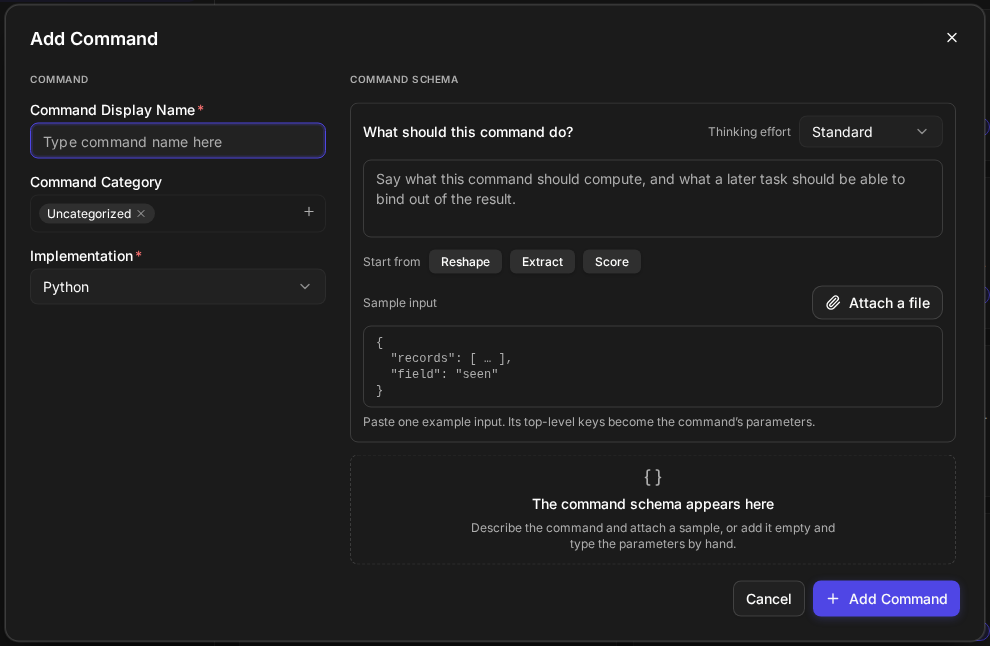
RESULT The Add Command dialog opens, with COMMAND on the left and COMMAND SCHEMA on the right. Until you describe the command, the right column reads *The command schema appears here* / *Describe the command and attach a sample, or add it empty and type the parameters by hand.*
The Add Command dialog
Naming the Command
The COMMAND column names the command and sets its kind.
|
Field |
What it holds |
|---|---|
|
Command Display Name (required) |
The name people see in the catalogue. The box prompts *Type command name here* |
|
Command Category |
Chips. Uncategorized is there until you pick another; + opens the categories that exist |
|
Implementation (required) |
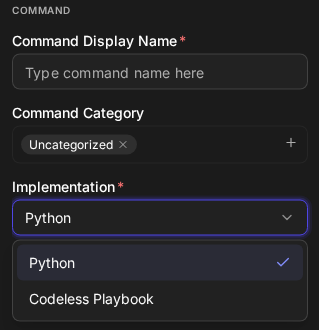
Python or Codeless Playbook |
Implementation
Describing the Command
What should this command do? is where you say, in plain language, what the command should do. The box prompts *Say what this command should compute, and what a later task should be able to bind out of the result.*
Take that second half seriously: a command that computes perfectly and returns one lump gives the next task nothing to pick a field out of.
Under Start from, the buttons Reshape, Extract and Score each write a sample sentence into the box, where you edit it. They are a starting point, not a choice you are locked into.
Thinking effort, on the same row, sets how much reasoning the run spends. It opens on Standard. The tiers are set per instance, so your choices may differ, and when your instance offers none the selector is not shown.
Adding a Sample Input
Sample input is one example of what the command will be handed. When it is a JSON object, it is also a draft of the command schema: its top-level keys become the parameter names, in order. The hint under the box says so — *Paste one example input. Its top-level keys become the command's parameters.*
-
Paste the example into the JSON box, or use Attach a file to read a file's contents into the same box, where it is text you can edit.
-
A single input that is itself a JSON object has to be wrapped, because the outer level is what names the parameters.
-
A sample is one record, not a data set. Trim a long array to a line or two.
READER NOTE The sample buys something different for each kind. For a Python command it decides whether the output fields are measured off a real result or are only the model's expectation of one. For a Codeless command nothing is run either way, but the parameters are shaped by a real value instead of by a sentence.
Reviewing the Command Schema
The command schema appears in the COMMAND SCHEMA column. It is read-only there: you are approving it, not editing it. Read it as a caller would.
-
The inputs, in order. A Python command receives its values by position, so you are approving the order as well as the names and types.
-
The first parameter's type. The product offers a command by that type, so the first parameter decides where in the product the command turns up.
-
The output fields. Key Fields is the only output slot a later task can pick an individual field out of; the other slots hold whole values.
-
The assumptions. What the run proceeded on without being able to check. Carry them over as questions when you check the command.
If the outputs are not what you need, say so in the description and generate again, or add the missing fields on the command itself afterwards.
Creating the Command
The dialog's buttons are Cancel and + Add Command. Nothing exists until you select + Add Command; Cancel closes the dialog and leaves nothing behind.
RESULT The command is created as a draft and opens on its own page.
READER NOTE A draft is not in service, and no playbook runs it. A generated command that has never run is as unproven as one you typed and never ran: confirm its key fields, its first parameter's type and — for a Python command — its parameter order, resolve anything the assumptions raised, then run it and put it into service.
WARNING A Codeless command's tasks call the real product when they run. Try one only where a real call is acceptable.
A live command is never changed in place, because it is the version playbooks are running. You change it through a new draft, which replaces the live version when it goes into service.
RELATED ARTICLES
-
Generating a Playbook with Morpheus AI
-
Modifying a Playbook with AI