
last updated: Aug 5, 2025
Overview
VirusTotal is a threat intelligence platform that can aggregate multiple antivirus products and online scan engines to check for viruses that a user's antivirus may have otherwise missed, or verify against any false positives. VirusTotal API version 3 is now the default and the recommended method to integrate and interact with VirusTotal. It greatly improves API version 2, which, for the time being, will not be deprecated. The new version has improved greatly compared to the version 2 of the VirusTotal, which is still available for use at the time this document was written. While some of the endpoints and features are provided to users of the public API, many are restricted to premium users only.
VirusTotal V3 is available for use in:
Known Limitations
VirusTotal’s public API is a free service. Public API constraints and restrictions:
-
The Public API is limited to 500 requests per day and a rate of 4 requests per minute.
-
The Public API must not be used in commercial products or services.
-
The Public API must not be used in business workflows that do not contribute new files.
-
You are not allowed to register multiple accounts to overcome the aforementioned limitations.
Refer to Public vs Premium API from VirusTotal’s documentation for more details about the limitations of the public API compared to the premium API.
Connection
To connect to VirusTotal V3 from D3, please follow this part to collect the required information below:
|
Parameter |
Description |
Example |
|
Server URL |
The VirusTotal server URL. |
https://www.virustotal.com |
|
API Key |
The VirusTotal API key to authenticate the API connection. |
0b5*****8e5 |
|
API Version |
The API version to use for the API connection. |
v3 |
Permission Requirements
VirusTotal provides both a Public API and a Premium API. The public API is a free service, available for any website or application that is free to consumers. The premium API will be paid, but has no constraints and limitations. D3’s commands can have full access to VirusTotal by using Public or Premium APIs, please choose either based on your needs.
The prerequisite for using the API is that you must sign up to the VirusTotal Community. Once you have a valid VirusTotal Community account you will find your personal API key in your personal settings section.
Please refer to Public vs Premium API from VirusTotal’s documentation for more details about the limitations of the public API compared to the premium API.
Configuring VirusTotal V3 to Work with D3
Creating a New User Account
-
Navigate to the VirusTotal signup page at https://www.virustotal.com/gui/join-us.
-
There are two options to create a new account.
-
Email Address: Fill in the required fields, agree to the Terms of Service and Privacy Policy, then click Join us.
-
Continue with Third-Party Account: Select the third-party account you want to use. You will be prompted to sign in to the selected account.
-
Adding an API Key
-
Log in to VirusTotal (https://www.virustotal.com/gui/sign-in).
-
Click on the user profile icon found on the top right corner, then API Key.
-
Copy the API Key to build a connection with D3. VirusTotal allows you to view your API key as many times as you wish. The API key will not change for your account unless you are upgrading to use the premium API key. Click here for more information about VirusTotal’s premium services.
READER NOTE
The API key grants user privileges, Store it securely and never share it.
Configuring D3 to Work with VirusTotal V3
-
Log in to D3.
-
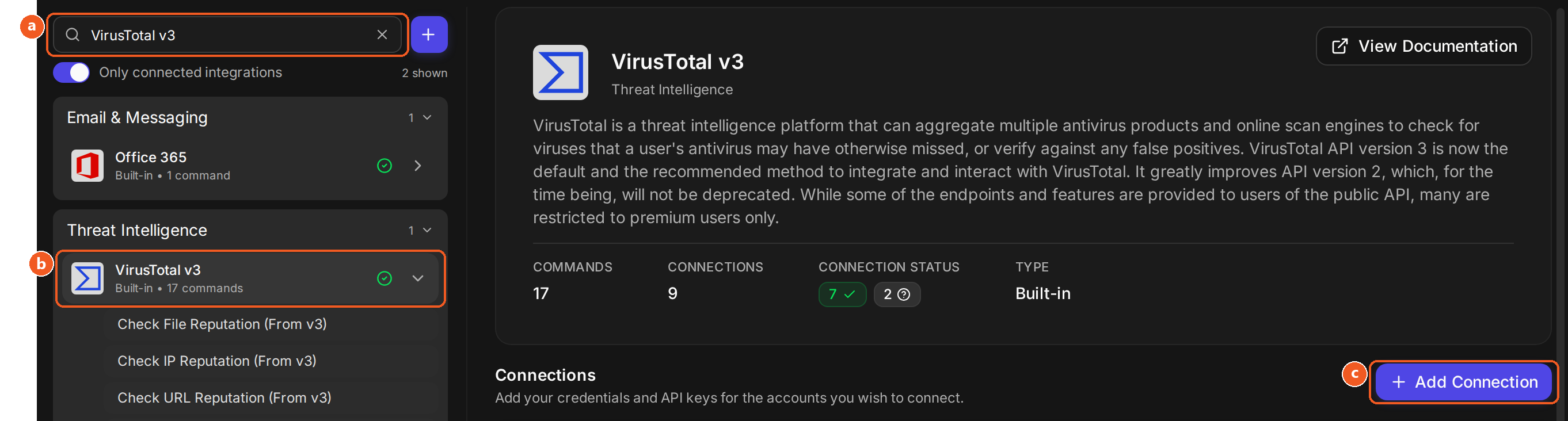
Find the VirusTotal v3 integration. In the sidebar, under Connectivity, click Integrations.
-
Type VirusTotal v3 in the search box.
-
Click VirusTotal v3 in the list to open it.
-
Click + Add Connection on the right side of the Connections section. The Setup VirusTotal v3 window opens.
-
-
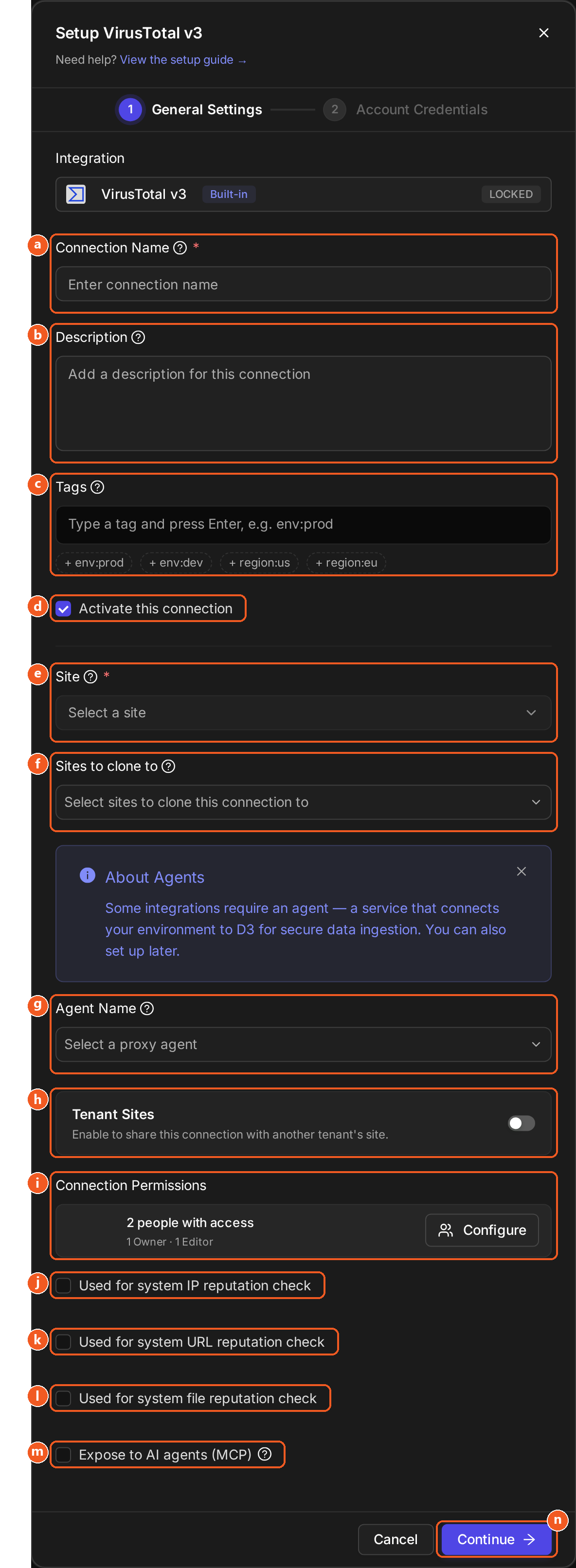
On the General Settings step, configure the following fields.
-
Connection Name: A name for the connection. Playbooks can find a connection by its site and tags, or by its name if every site uses the same name.
-
Description (Optional): The connection's API access scope, for example read access to alerts, enrichment or ticket data.
-
Tags (Optional): Tags that tell connections on the same site apart, such as
env:prodorregion:eu. Type a tag and press Enter, or click a suggested tag. -
Activate this connection: Selected by default. Clear it to create the connection without making it available.
-
Site: The site that owns the connection. Playbooks running on that site can use it. Select Shared to Internal Sites or Shared to Client Sites to let every site of that kind use it. If you select Shared to Internal Sites, a Recipient Site field appears: select the internal site that receives this connection's events.
-
Sites to clone to (Optional): Other sites to copy this connection to after it is created.
-
Agent Name (Optional): The proxy agent that connects D3 to VirusTotal v3 through your network. Some integrations need an agent; you can also add one later.
-
Tenant Sites (Optional, master site only): Turn on to share the connection with another tenant's site, then narrow the tenant sites by region, tenant name and site.
-
Connection Permissions: The users who can use and edit the connection. Click Configure to change them.
-
Used for system IP reputation check (Optional): Runs this integration's IP reputation command on IP artifacts from the connection's site, and uses the result to update their risk level.
-
Used for system URL reputation check (Optional): Runs this integration's URL reputation command on URL artifacts from the connection's site, and uses the result to update their risk level.
-
Used for system file reputation check (Optional): Runs this integration's file reputation command on file artifacts from the connection's site, and uses the result to update their risk level.
-
Expose to AI agents (MCP) (Optional): Publishes the connection to the MCP hub, so AI agents can run this integration's commands on the sites the connection covers. Clear it to remove them again.
-
Click Continue. The Account Credentials step opens.
-
-
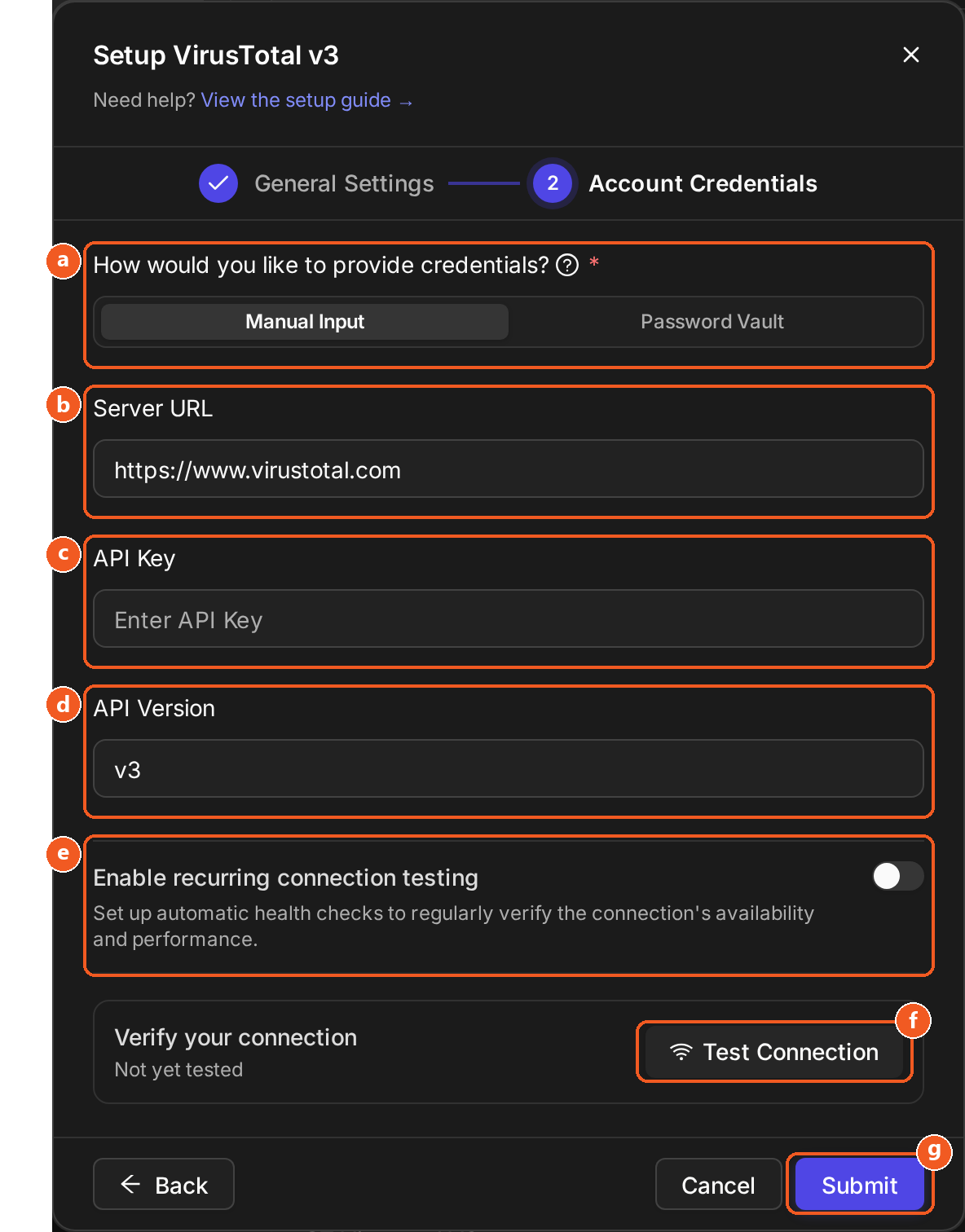
On the Account Credentials step, enter the credentials for VirusTotal v3.
-
How would you like to provide credentials?: Select Manual Input to enter the credentials below, or Password Vault to fetch them from a third-party password vault. Refer to the password vault connection guide if needed.
-
Server URL: The domain-level VirusTotal server URL. The default value is https://www.virustotal.com.
-
API Key: Copy the API key from the VirusTotal platform. Refer to step 3 of Configuring VirusTotal V3 to Work with D3.
-
API Version: The default value is v3. D3 supports only API v3 for all commands; keep the default.
-
Enable recurring connection testing (Optional): Turn on to test the connection on a schedule and, optionally, email recipients after repeated failures. Available only for active connections.
-
Click Test Connection to check the credentials and connectivity. If the test fails, review the parameters and try again.
-
Click Submit to create the connection.
-
Commands
VirusTotal V3 includes the following executable commands for users to set up schedules or create playbook workflows. With the Test Command, you can execute these commands independently for playbook troubleshooting.
READER NOTE
Please note that the sample data provided for some of the following integration commands may have certain key-value pairs removed. However, the shortened sample data are still proper JSON objects. Some sample data have been shortened and simplified due to their length.
Integration API Note
For more information about the VirusTotal V3 API, please refer to the VirusTotal V3 API reference.
READER NOTE
Certain permissions are required for each command. Please refer to the Permission Requirements and Configuring VirusTotal V3 to Work with D3 for details.
Check File Reputation
Retrieves reputation information of the File(s).
Input
|
Input Parameter |
Required/Optional |
Description |
Example |
|
File Hashes |
Required |
The list of file hashes to perform the reputation check on. MD5, SHA-1 and SHA256 file hashes are supported. |
JSON
|
Output
To view the sample output data for all commands, refer to this article.
D3-defined Risk Levels
The table below lists the possible output risk levels with the corresponding return “RiskLevels” under Key Fields:
|
Return Data |
Key Fields “RiskLevels” |
|
1 |
High |
|
2 |
Medium |
|
3 |
Low |
|
4 |
N/A (Default) |
|
5 |
ZeroRisk |
Error Handling
The error tab contains the details responded from D3 or third-party API calls, including Failure Indicator, Status Code, and Message. This can help you locate the root cause of a command failure.
|
Parts in Error |
Description |
Example |
|
Failure Indicator |
Indicates the command failure that happened at a specific input and/or API call. |
Check File Reputation failed. |
|
Status Code |
The response code issued by the third-party API server or the D3 system that can be used to locate the corresponding error category. For example, if the returned status code is 401, the selected connection is unauthorized to run the command. The user or system support would need to check the permission setting in the VirusTotal V3 portal. Refer to the VirusTotal API Errors for details. |
Status Code: 404. |
|
Message |
The raw data or captured key error message from the integration API server about the API request failure. |
Message: File Not Found. |
|
Error Sample Data Check File Reputation failed. Status Code: 404. Message: File Not Found. |
Check IP Reputation
Retrieves reputation information of the IP(s).
Input
|
Input Parameter |
Required/Optional |
Description |
Example |
|
IPs |
Required |
The list of IPs to perform the reputation check on. Note: Only IPv4 addresses are supported. |
JSON
|
Output
To view the sample output data for all commands, refer to this article.
D3-defined Risk Levels
The table below lists the possible output risk levels with the corresponding return “RiskLevels” under Key Fields:
|
Return Data |
Key Fields “RiskLevels” |
|
1 |
High |
|
2 |
Medium |
|
3 |
Low |
|
4 |
N/A (Default) |
|
5 |
ZeroRisk |
Error Handling
The error tab contains the details responded from D3 or third-party API calls, including Failure Indicator, Status Code, and Message. This can help you locate the root cause of a command failure.
|
Parts in Error |
Description |
Example |
|
Failure Indicator |
Indicates the command failure that happened at a specific input and/or API call. |
Check IP Reputation failed. |
|
Status Code |
The response code issued by the third-party API server or the D3 system that can be used to locate the corresponding error category. For example, if the returned status code is 401, the selected connection is unauthorized to run the command. The user or system support would need to check the permission setting in the VirusTotal V3 portal. Refer to the VirusTotal API Errors for details. |
Status Code: 404. |
|
Message |
The raw data or captured key error message from the integration API server about the API request failure. |
Message: IP Not Found. |
|
Error Sample Data Check IP Reputation failed. Status Code: 404. Message: IP Not Found. |
Check URL Reputation
Retrieves reputation information of the URL(s).
Input
|
Input Parameter |
Required/Optional |
Description |
Example |
|
URLs |
Required |
The list of URLs to perform the reputation check on. |
JSON
|
Output
To view the sample output data for all commands, refer to this article.
D3-defined Risk Levels
The table below lists the possible output risk levels with the corresponding return “RiskLevels” under Key Fields:
|
Return Data |
Key Fields “RiskLevels” |
|
1 |
High |
|
2 |
Medium |
|
3 |
Low |
|
4 |
N/A (Default) |
|
5 |
ZeroRisk |
Error Handling
The error tab contains the details responded from D3 or third-party API calls, including Failure Indicator, Status Code, and Message. This can help you locate the root cause of a command failure.
|
Parts in Error |
Description |
Example |
|
Failure Indicator |
Indicates the command failure that happened at a specific input and/or API call. |
Check URL Reputation failed. |
|
Status Code |
The response code issued by the third-party API server or the D3 system that can be used to locate the corresponding error category. For example, if the returned status code is 401, the selected connection is unauthorized to run the command. The user or system support would need to check the permission setting in the VirusTotal V3 portal. Refer to the VirusTotal API Errors for details. |
Status Code: 404. |
|
Message |
The raw data or captured key error message from the integration API server about the API request failure. |
Message: URL Not Found. |
|
Error Sample Data Check URL Reputation failed. Status Code: 404. Message: URL Not Found. |
Detonate Files
Uploads and analysis files.
It is not recommended to use the Test Command feature with the Detonate Files command as it is designed for dynamic input files in Playbooks, Incident Attachments, and Artifact Attachments. There is a simple workaround to test the command:
-
Navigate to Configuration on the top bar menu.
-
Click on Utility Commands on the left sidebar menu.
-
Use the search box to find and select the Create a File from input Text Array command.
-
Click on the Test tab.
-
Input the required information for the parameters.
-
Click on the Test Command button. A D3 File ID will appear in the output data after the file has been successfully created. The D3 File Source of the created file will be Playbook File.
Input
|
Input Parameter |
Required/Optional |
Description |
Example |
|
File IDs |
Required |
The file paths of the file source. The options for file paths are:
|
JSON
|
|
File Source |
Required |
The file source of the file to detonate. The options for file sources are:
|
Incident Attachment File |
Output
To view the sample output data for all commands, refer to this article.
Error Handling
If the Return Data is Partially Successful or Failed, an Error tab will appear in the Test Result window.
The error tab contains the details responded from D3 or third-party API calls, including Failure Indicator, Status Code, and Message. This can help you locate the root cause of a command failure.
|
Parts in Error |
Description |
Example |
|
Failure Indicator |
Indicates the command failure that happened at a specific input and/or API call. |
Detonate Files failed. |
|
Status Code |
The response code issued by the third-party API server or the D3 system that can be used to locate the corresponding error category. For example, if the returned status code is 401, the selected connection is unauthorized to run the command. The user or system support would need to check the permission setting in the VirusTotal V3 portal. Refer to the VirusTotal API Errors for details. |
Status Code: 404. |
|
Message |
The raw data or captured key error message from the integration API server about the API request failure. |
Message: File ID Not Found. |
|
Error Sample Data Detonate Files failed. Status Code: 404. Message: File ID Not Found. |
Get Domain Relationships
Retrieves objects related to the specified internet domains.
Input
|
Input Parameter |
Required/Optional |
Description |
Example |
|
Domains |
Required |
The domains to retrieve related objects. |
JSON
|
|
Relationship |
Required |
The relationship between the specified domains and the related objects to return. Note: Relationship options labeled with “(Enterprise)” (e.g. Caa_records (Enterprise)) can only be used with a premium VirusTotal API connection. |
Communicating_files |
Output
To view the sample output data for all commands, refer to this article.
Error Handling
If the Return Data is Partially Successful or Failed, an Error tab will appear in the Test Result window.
The error tab contains the details responded from D3 or third-party API calls, including Failure Indicator, Status Code, and Message. This can help you locate the root cause of a command failure.
|
Parts in Error |
Description |
Example |
|
Failure Indicator |
Indicates the command failure that happened at a specific input and/or API call. |
Get Domain Relationships failed. |
|
Status Code |
The response code issued by the third-party API server or the D3 system that can be used to locate the corresponding error category. For example, if the returned status code is 401, the selected connection is unauthorized to run the command. The user or system support would need to check the permission setting in the VirusTotal V3 portal. Refer to the VirusTotal API Errors for details. |
Status Code: 404. |
|
Message |
The raw data or captured key error message from the integration API server about the API request failure. |
Message: Domain Not Found. |
|
Error Sample Data Get Domain Relationships failed. Status Code: 404. Message: Domain Not Found. |
Get Domain Reports
Retrieves information of specified Internet domains.
Input
|
Input Parameter |
Required/Optional |
Description |
Example |
|
Domains |
Required |
The list of domains to return corresponding report information. |
JSON
|
Output
To view the sample output data for all commands, refer to this article.
Error Handling
If the Return Data is Partially Successful or Failed, an Error tab will appear in the Test Result window.
The error tab contains the details responded from D3 or third-party API calls, including Failure Indicator, Status Code, and Message. This can help you locate the root cause of a command failure.
|
Parts in Error |
Description |
Example |
|
Failure Indicator |
Indicates the command failure that happened at a specific input and/or API call. |
Get Domain Reports failed. |
|
Status Code |
The response code issued by the third-party API server or the D3 system that can be used to locate the corresponding error category. For example, if the returned status code is 401, the selected connection is unauthorized to run the command. The user or system support would need to check the permission setting in the VirusTotal V3 portal. Refer to the VirusTotal API Errors for details. |
Status Code: 404. |
|
Message |
The raw data or captured key error message from the integration API server about the API request failure. |
Message: Domain Not Found. |
|
Error Sample Data Get Domain Reports failed. Status Code: 404. Message: Domain Not Found. |
Get File Behavior Summaries
Retrieves summaries with behavioral information about the specified files.
Input
|
Input Parameter |
Required/Optional |
Description |
Example |
|
File Hashes |
Required |
The file hash function values (SHA-256, SHA-1 or MD5) of the files to retrieve corresponding summaries. |
JSON
|
Output
To view the sample output data for all commands, refer to this article.
Error Handling
If the Return Data is Partially Successful or Failed, an Error tab will appear in the Test Result window.
The error tab contains the details responded from D3 or third-party API calls, including Failure Indicator, Status Code, and Message. This can help you locate the root cause of a command failure.
|
Parts in Error |
Description |
Example |
|
Failure Indicator |
Indicates the command failure that happened at a specific input and/or API call. |
Get File Behavior Summaries failed. |
|
Status Code |
The response code issued by the third-party API server or the D3 system that can be used to locate the corresponding error category. For example, if the returned status code is 401, the selected connection is unauthorized to run the command. The user or system support would need to check the permission setting in the VirusTotal V3 portal. Refer to the VirusTotal API Errors for details. |
Status Code: 404. |
|
Message |
The raw data or captured key error message from the integration API server about the API request failure. |
Message: File Hash Not Found. |
|
Error Sample Data Get File Behavior Summaries failed. Status Code: 404. Message: File Hash Not Found. |
Get File Relationships
Retrieves objects related to the specified files.
Input
|
Input Parameter |
Required/Optional |
Description |
Example |
|
File Hashes |
Required |
The file hash function values (SHA-256, SHA-1 or MD5) of the files to retrieve related objects. |
JSON
|
|
Relationship |
Required |
The relationship between the specified file hashes and the related objects to return. Note: Relationship options labeled with “(Enterprise)” (e.g. Download_files (Enterprise)) can only be used with a premium VirusTotal API connection. |
Contacted_ips |
Output
To view the sample output data for all commands, refer to this article.
Error Handling
If the Return Data is Partially Successful or Failed, an Error tab will appear in the Test Result window.
The error tab contains the details responded from D3 or third-party API calls, including Failure Indicator, Status Code, and Message. This can help you locate the root cause of a command failure.
|
Parts in Error |
Description |
Example |
|
Failure Indicator |
Indicates the command failure that happened at a specific input and/or API call. |
Get File Relationships failed. |
|
Status Code |
The response code issued by the third-party API server or the D3 system that can be used to locate the corresponding error category. For example, if the returned status code is 401, the selected connection is unauthorized to run the command. The user or system support would need to check the permission setting in the VirusTotal V3 portal. Refer to the VirusTotal API Errors for details. |
Status Code: 404. |
|
Message |
The raw data or captured key error message from the integration API server about the API request failure. |
Message: File Hash Not Found. |
|
Error Sample Data Get File Relationships failed. Status Code: 404. Message: File Hash Not Found. |
Get File Reports
Retrieves information about the specified files.
Input
|
Input Parameter |
Required/Optional |
Description |
Example |
|
File Hashes |
Required |
The file hash function values (SHA-256, SHA-1 or MD5) of the files to return corresponding report information. |
JSON
|
Output
To view the sample output data for all commands, refer to this article.
Error Handling
If the Return Data is Partially Successful or Failed, an Error tab will appear in the Test Result window.
The error tab contains the details responded from D3 or third-party API calls, including Failure Indicator, Status Code, and Message. This can help you locate the root cause of a command failure.
|
Parts in Error |
Description |
Example |
|
Failure Indicator |
Indicates the command failure that happened at a specific input and/or API call. |
Get File Reports failed. |
|
Status Code |
The response code issued by the third-party API server or the D3 system that can be used to locate the corresponding error category. For example, if the returned status code is 401, the selected connection is unauthorized to run the command. The user or system support would need to check the permission setting in the VirusTotal V3 portal. Refer to the VirusTotal API Errors for details. |
Status Code: 404. |
|
Message |
The raw data or captured key error message from the integration API server about the API request failure. |
Message: File Hash Not Found. |
|
Error Sample Data Get File Reports failed. Status Code: 404. Message: File Hash Not Found. |
Get IP Relationships
Retrieves objects related to the specified IP addresses.
Input
|
Input Parameter |
Required/Optional |
Description |
Example |
|
IPs |
Required |
The IPs to retrieve related objects. |
JSON
|
|
Relationship |
Required |
The relationship between the specified IPs and the related objects to return. Note: Relationship options labeled with “(Enterprise)” (e.g. Download_files (Enterprise)) can only be used with a premium VirusTotal API connection. |
Communicating_files |
Output
To view the sample output data for all commands, refer to this article.
Error Handling
If the Return Data is Partially Successful or Failed, an Error tab will appear in the Test Result window.
The error tab contains the details responded from D3 or third-party API calls, including Failure Indicator, Status Code, and Message. This can help you locate the root cause of a command failure.
|
Parts in Error |
Description |
Example |
|
Failure Indicator |
Indicates the command failure that happened at a specific input and/or API call. |
Get IP Relationships failed. |
|
Status Code |
The response code issued by the third-party API server or the D3 system that can be used to locate the corresponding error category. For example, if the returned status code is 401, the selected connection is unauthorized to run the command. The user or system support would need to check the permission setting in the VirusTotal V3 portal. Refer to the VirusTotal API Errors for details. |
Status Code: 400. |
|
Message |
The raw data or captured key error message from the integration API server about the API request failure. |
Message: Invalid IP. |
|
Error Sample Data Get IP Relationships failed. Status Code: 400. Message: Invalid IP. |
Get IP Reports
Retrieves information on the specified IP addresses.
Input
|
Input Parameter |
Required/Optional |
Description |
Example |
|
IPs |
Required |
The list of IPs to return corresponding report information. |
["***.***.***.***"] |
Output
To view the sample output data for all commands, refer to this article.
Error Handling
If the Return Data is Partially Successful or Failed, an Error tab will appear in the Test Result window.
The error tab contains the details responded from D3 or third-party API calls, including Failure Indicator, Status Code, and Message. This can help you locate the root cause of a command failure.
|
Parts in Error |
Description |
Example |
|
Failure Indicator |
Indicates the command failure that happened at a specific input and/or API call. |
Get IP Reports failed. |
|
Status Code |
The response code issued by the third-party API server or the D3 system that can be used to locate the corresponding error category. For example, if the returned status code is 401, the selected connection is unauthorized to run the command. The user or system support would need to check the permission setting in the VirusTotal V3 portal. Refer to the VirusTotal API Errors for details. |
Status Code: 400. |
|
Message |
The raw data or captured key error message from the integration API server about the API request failure. |
Message: Invalid IP. |
|
Error Sample Data Get IP Reports failed. Status Code: 400. Message: Invalid IP. |
Get URL Relationships
Retrieves objects related to the specified URLs.
Input
|
Input Parameter |
Required/Optional |
Description |
Example |
|
URLs |
Required |
The URLs to retrieve related objects. |
["http://*****.*****.***"] |
|
Relationship |
Required |
The relationship between the specified URLs and the related objects to return. Note: Relationship options labeled with “(Enterprise)” (e.g. Analyses (Enterprise)) can only be used with a premium VirusTotal API connection. |
Network_location |
Output
To view the sample output data for all commands, refer to this article.
Error Handling
If the Return Data is Partially Successful or Failed, an Error tab will appear in the Test Result window.
The error tab contains the details responded from D3 or third-party API calls, including Failure Indicator, Status Code, and Message. This can help you locate the root cause of a command failure.
|
Parts in Error |
Description |
Example |
|
Failure Indicator |
Indicates the command failure that happened at a specific input and/or API call. |
Get Url Relationships failed. |
|
Status Code |
The response code issued by the third-party API server or the D3 system that can be used to locate the corresponding error category. For example, if the returned status code is 401, the selected connection is unauthorized to run the command. The user or system support would need to check the permission setting in the VirusTotal V3 portal. Refer to the VirusTotal API Errors for details. |
Status Code: 400. |
|
Message |
The raw data or captured key error message from the integration API server about the API request failure. |
Message: Invalid URL. |
|
Error Sample Data Get Url Relationships failed. Status Code: 400. Message: Invalid URL. |
Get URL Reports
Analyzes and retrieves scan reports on URLs.
Input
|
Input Parameter |
Required/Optional |
Description |
Example |
|
URLs |
Required |
The list of URLs to return corresponding report information. |
JSON
|
Output
To view the sample output data for all commands, refer to this article.
Error Handling
If the Return Data is Partially Successful or Failed, an Error tab will appear in the Test Result window.
The error tab contains the details responded from D3 or third-party API calls, including Failure Indicator, Status Code, and Message. This can help you locate the root cause of a command failure.
|
Parts in Error |
Description |
Example |
|
Failure Indicator |
Indicates the command failure that happened at a specific input and/or API call. |
Get Url Reports failed. |
|
Status Code |
The response code issued by the third-party API server or the D3 system that can be used to locate the corresponding error category. For example, if the returned status code is 401, the selected connection is unauthorized to run the command. The user or system support would need to check the permission setting in the VirusTotal V3 portal. Refer to the VirusTotal API Errors for details. |
Status Code: 400. |
|
Message |
The raw data or captured key error message from the integration API server about the API request failure. |
Message: Invalid URLs. |
|
Error Sample Data Get Url Reports failed. Status Code: 400. Message: Invalid URLs. |
Retrieve Widget HTML Content
Returns the actual HTML content file(s) of the widget report(s) for the given observable(s).
Input
|
Input Parameter |
Required/Optional |
Description |
Example |
|
Query Observables |
Required |
The file hash (md5, sha1 or sha256), URL, IP address or Domain observable(s) to get HTML content of the VirusTotal widget report(s). |
JSON
|
Output
To view the sample output data for all commands, refer to this article.
Error Handling
If the Return Data is Partially Successful or Failed, an Error tab will appear in the Test Result window.
The error tab contains the details responded from D3 or third-party API calls, including Failure Indicator, Status Code, and Message. This can help you locate the root cause of a command failure.
|
Parts in Error |
Description |
Example |
|
Failure Indicator |
Indicates the command failure that happened at a specific input and/or API call. |
Retrieve Widget HTML Content failed. |
|
Status Code |
The response code issued by the third-party API server or the D3 system that can be used to locate the corresponding error category. For example, if the returned status code is 401, the selected connection is unauthorized to run the command. The user or system support would need to check the permission setting in the VirusTotal V3 portal. Refer to the VirusTotal API Errors for details. |
Status Code: 403. |
|
Message |
The raw data or captured key error message from the integration API server about the API request failure. |
Message: Expecting value: line 1 column 1. |
|
Error Sample Data Retrieve Widget HTML Content failed. Status Code: 403. Message: Expecting value: line 1 column 1. |
Scan URL
Analyze and retrieve scan reports on URLs.
Input
|
Input Parameter |
Required/Optional |
Description |
Example |
|
URLs |
Required |
The list of URLs to scan and analyze. |
JSON
|
Output
To view the sample output data for all commands, refer to this article.
Error Handling
If the Return Data is Partially Successful or Failed, an Error tab will appear in the Test Result window.
The error tab contains the details responded from D3 or third-party API calls, including Failure Indicator, Status Code, and Message. This can help you locate the root cause of a command failure.
|
Parts in Error |
Description |
Example |
|
Failure Indicator |
Indicates the command failure that happened at a specific input and/or API call. |
Scan URL failed. |
|
Status Code |
The response code issued by the third-party API server or the D3 system that can be used to locate the corresponding error category. For example, if the returned status code is 401, the selected connection is unauthorized to run the command. The user or system support would need to check the permission setting in the VirusTotal V3 portal. Refer to the VirusTotal API Errors for details. |
Status Code: 404. |
|
Message |
The raw data or captured key error message from the integration API server about the API request failure. |
Message: URL Not Found. |
|
Error Sample Data Scan URL failed. Status Code: 404. Message: URL Not Found. |
Search
Searches domains, IP addresses, file hashes, URLs and tag comments.
Input
|
Input Parameter |
Required/Optional |
Description |
Example |
|
Query |
Required |
The query string to perform an indicator search in VirusTotal. |
*****.*****.*** |
Output
To view the sample output data for all commands, refer to this article.
Error Handling
If the Return Data is Failed, an Error tab will appear in the Test Result window.
The error tab contains the details responded from D3 or third-party API calls, including Failure Indicator, Status Code, and Message. This can help you locate the root cause of a command failure.
|
Parts in Error |
Description |
Example |
|
Failure Indicator |
Indicates the command failure that happened at a specific input and/or API call. |
Search failed. |
|
Status Code |
The response code issued by the third-party API server or the D3 system that can be used to locate the corresponding error category. For example, if the returned status code is 401, the selected connection is unauthorized to run the command. The user or system support would need to check the permission setting in the VirusTotal V3 portal. Refer to the VirusTotal API Errors for details. |
Status Code: 404. |
|
Message |
The raw data or captured key error message from the integration API server about the API request failure. |
Message: Not Found. |
|
Error Sample Data Search failed. Status Code: 404. Message: Not Found. |
Test Connection
Allows you to perform a health check on an integration connection. You can schedule a periodic health check by selecting Connection Health Check when editing an integration connection.
Input
N/A
Output
|
Output Type |
Description |
Return Data Type |
|
Return Data |
Indicates one of the possible command execution states: Successful or Failed. The Failed state can be triggered by any of the following errors:
More details about an error can be viewed in the Error tab. |
String |
Error Handling
If the Return Data is failed, an Error tab will appear in the Test Result window.
The error tab contains the responses from the third-party API calls including Failure Indicator, Status Code, and Message. This can help you locate the root cause of a command failure.
|
Parts in Error |
Description |
Example |
|
Failure Indicator |
Indicates the command failure that happened at a specific input and/or API call. |
Test Connection failed. Failed to check the connector. |
|
Status Code |
The response code issued by the third-party API server or the D3 system that can be used to locate the corresponding error category. For example, if the returned status code is 401, the selected connection is unauthorized to run the command. The user or system support would need to check the permission setting in the VirusTotal V3 portal. Refer to the VirusTotal API Errors for details. |
Status Code: 403. |
|
Message |
The raw data or captured key error message from the integration API server about the API request failure. |
Message: Expecting value: line 1 column 1.
|
|
Error Sample Data Test Connection failed. Failed to check the connector. Status Code: 403. Message: Expecting value: line 1 column 1. |