
last updated: November 18, 2025
Overview
Anomali ThreatStream automates the threat intelligence collection and management lifecycle to speed detection, streamline investigations and increase analyst productivity. Anomali ThreatStream integration enables organizations to expedite threat intelligence lifecycle management.
Anomali ThreatStream is available for use in:
Connection
Gather the following information to connect D3 to Anomali ThreatStream.
|
Parameter |
Description |
Example |
|
Server URL |
The server URL of the Anomali instance. |
https://api.threatstream.com |
|
User Name |
The user email address associated with the ThreatStream account. |
username@example.com |
|
API Key |
The API key used to authenticate the connection. Obtain the username and API key from the My Profile tab in ThreatStream settings. |
ed35*****417b
|
|
API Version |
The version of the API to use for the connection. |
v1 |
Configuring D3 to Work with Anomali ThreatStream
-
Log in to D3.
-
Find the Anomali ThreatStream integration.
.png?cb=5a526a209622a86b0c22fbadae709721)
-
Navigate to Configuration on the top header menu.
-
Click on the Integration icon on the left sidebar.
-
Type Anomali ThreatStream in the search box to find the integration, then click it to select it.
-
Click + Connection, on the right side of the Connections section. A new connection window will appear.
-
-
Configure the following fields to create a connection to Anomali ThreatStream.
.png?cb=061e1cb53fa321715333d265eeabd445)
-
Connection Name: The desired name for the connection.
-
Site: The site on which to use the integration connection. Use the drop-down menu to select the site. The Share to Internal Sites option enables all internal sites to use the connection. Selecting a specific site will only enable that site to use the connection.
-
Recipient site for events from connections Shared to Internal Sites: This field is displayed when Share to Internal Sites is selected for the Site field, allowing selection of the internal site for deploying the integration connection.
-
Agent Name (Optional): The proxy agent required to build the connection. Use the dropdown menu to select the proxy agent from a list of previously configured proxy agents.
-
Description (Optional): The description for the connection.
-
Tenant (Optional): When configuring the connection from a master tenant site, users can choose the specific tenant sites with which to share the connection. Once this setting is enabled, users can filter and select the desired tenant sites from the dropdowns to share the connection.
.png?cb=4f73578246ccdafdb98d92a991aba621)
-
Configure User Permissions: Defines which users have access to the connection.
-
Active: The checkbox that enables the connection to be used when selected.
-
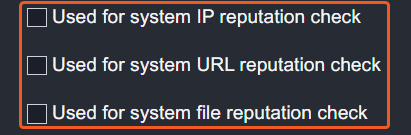
System Reputation Check: Selecting one or more reputation checkboxes will run the corresponding check reputation commands under this integration connection to enrich the corresponding artifacts with reputation details.
For example, an integration connection named "ConnectionA" is configured with the "Sandbox" site. All URL artifacts from the "Sandbox" site will undergo a reputation check using the Check URL Reputation command from that integration. The return data output from this command will then be used to update the risk level of artifacts, which may affect the risk level of incoming events.
-
System: This section contains the parameters defined specifically for the integration. These parameters must be configured to create the integration connection.
.png?cb=ce309a841082c690e092f04c027631e7)
1. Input the domain level Server URL. The default value is https://api.threatstream.com.
2. Input the User Name.
3. Input the API Key.
4. Input the API Version. The default value is v2. -
Enable Password Vault: An optional feature that allows users to take the stored credentials from their own password vault. Refer to the password vault connection guide if needed.
-
Connection Health Check: Periodically checks the connection status by scheduling the Test Connection command at the specified interval (in minutes). Available only for active connections, this feature also allows configuring email notifications for failed attempts.
-
-
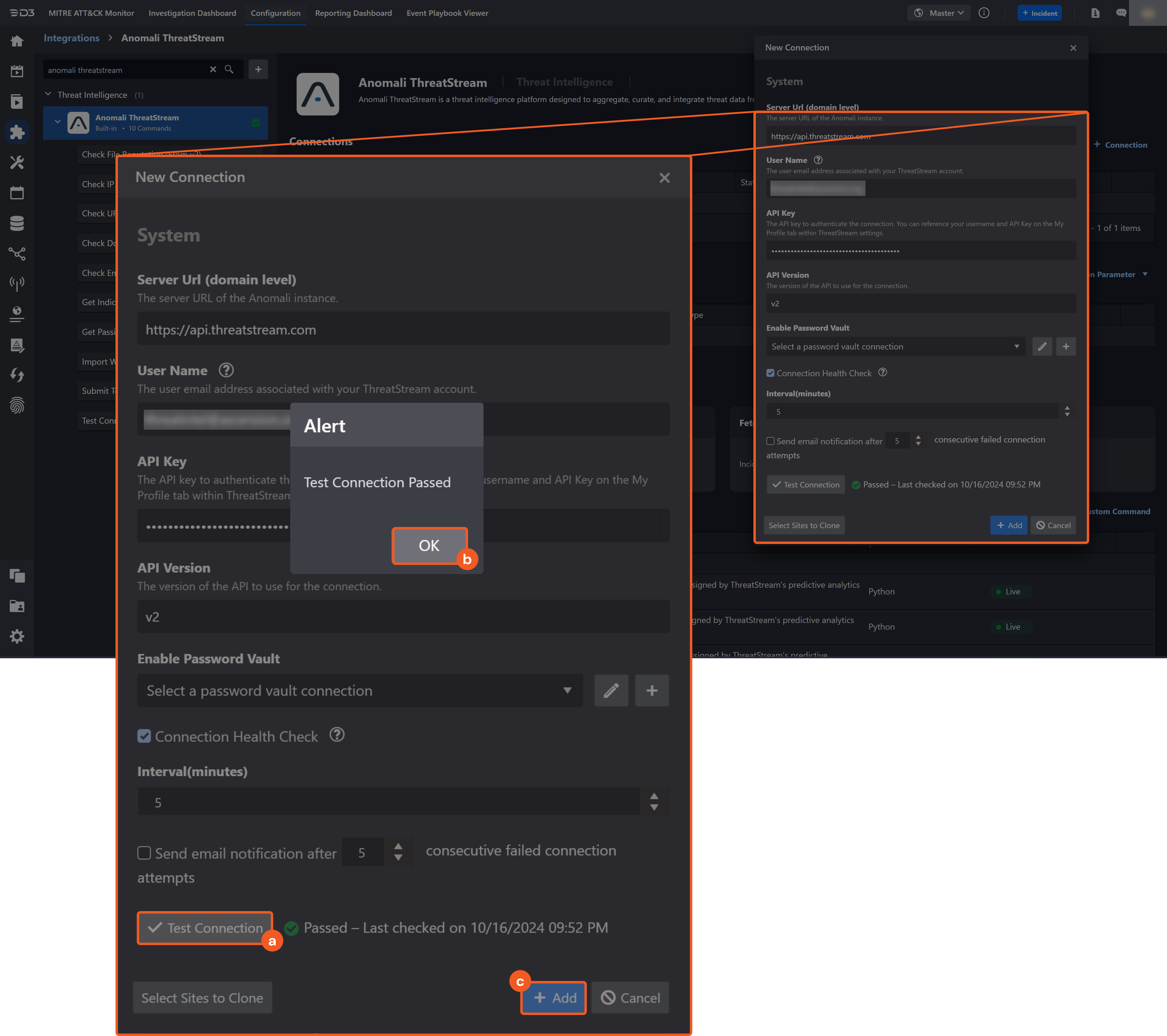
Test the connection.
-
Click on the Test Connection button to verify credentials and connectivity. A success alert displays Passed with a green checkmark. If the connection fails, review the parameters and retry.
-
Click OK to close the alert window.
-
Click Add to create and add the configured connection.
-
Commands
Anomali ThreatStream includes the following executable commands for users to set up schedules or create playbook workflows. With the Test Command, users can execute these commands independently for playbook troubleshooting.
Integration API Note
For more information about the Anomali ThreatStream API, refer to the Anomali ThreatStream API reference.
Approve Observables By Import Job
Approves all or specified observables in an import job.
READER NOTE
Import Job ID is a required parameter to run this command.
-
Run the List Import Jobs command to obtain the Import Job ID. Import Job IDs can be found in the raw data at $.objects[*].id.
Observable IDs is an optional parameter to run this command.
-
Run the Get Observables From Import Job command to obtain the Observable IDs. Observable IDs can be found in the raw data at $.objects[*].id.
Input
|
Input Parameter |
Required/Optional |
Description |
Example |
|
Import Job ID |
Required |
The ID of the import job used to approve observables. Import Job IDs can be obtained using the List Import Jobs command. |
1*****3 |
|
Approve All Observables |
Optional |
The option to approve all observables in the job. By default, the value is set to False. |
True |
|
Observable IDs |
Optional |
The IDs of the observables to approve when Approve All Observables is set to False. Observable IDs can be obtained using the Get Observables From Import Job command. |
JSON
|
Output
To view the sample output data for all commands, refer to this article.
Error Handling
If the Return Data displays Failed, an Error tab will appear in the Test Result window.
The error tab contains the details responded from D3 or third-party API calls, including Failure Indicator, Status Code, and Message. This can help locate the root cause of a command failure.
|
Parts in Error |
Description |
Example |
|
Failure Indicator |
Indicates the command failure that happened at a specific input and/or API call. |
Approve Observables By Import Job failed. |
|
Status Code |
The response code issued by the third-party API server or the D3 system that can be used to locate the corresponding error category. For example, if the returned status code is 401, the selected connection is unauthorized to run the command. The user or system support would need to check the permission setting in the Anomali ThreatStream portal. Refer to the HTTP Status Code Registry for details. |
Status Code: 401. |
|
Message |
The raw data or captured key error message from the integration API server about the API request failure. |
Message: Unauthorized. |
|
Error Sample Data Approve Observables By Import Job failed. Status Code: 401. Message: Unauthorized. |
Check Domain Reputation
Retrieves the reputation of the specified domains that have been assigned to observables by ThreatStream's predictive analytics technology.
READER NOTE
If the input domains are invalid, the command will run successfully with no returned results.
Input
|
Input Parameter |
Required/Optional |
Description |
Example |
|
Domains |
Required |
The domains to perform the reputation check. |
JSON
|
|
Limit |
Optional |
The maximum number of items to return. The valid range is 1 to 1000. By default, 1000 items are returned. To return all items, enter -1. |
2 |
Output
To view the sample output data for all commands, refer to this article.
D3-defined Risk Levels
The table below lists the possible output risk levels with the corresponding return key fields:
|
Return Data |
Key Fields |
|
1 |
High |
|
2 |
Medium |
|
3 |
Low |
|
4 |
Default |
|
5 |
ZeroRisk |
Error Handling
If the Return Data is Failed, an Error tab will appear in the Test Result window.
The error tab contains the details responded from D3 or third-party API calls, including Failure Indicator, Status Code, and Message. This can help locate the root cause of a command failure.
|
Parts in Error |
Description |
Example |
|
Failure Indicator |
Indicates the command failure that happened at a specific input and/or API call. |
Check Domain Reputation failed. |
|
Status Code |
The response code issued by the third-party API server or the D3 system that can be used to locate the corresponding error category. For example, if the returned status code is 401, the selected connection is unauthorized to run the command. The user or system support would need to check the permission setting in the Anomali ThreatStream portal. Refer to the HTTP Status Code Registry for details. |
Status Code: 400. |
|
Message |
The raw data or captured key error message from the integration API server about the API request failure. |
Message: One or more errors occurred. |
|
Error Sample Data Check Domain Reputation failed. Status Code: 400. Message: One or more errors occurred. |
Check Email Reputation
Retrieves the reputation of the specified email addresses that have been assigned to observables by ThreatStream's predictive analytics technology.
READER NOTE
If the input email addresses are invalid, the command will run successfully with no returned results.
Input
|
Input Parameter |
Required/Optional |
Description |
Example |
|
Emails |
Required |
The email addresses to perform the reputation check. |
JSON
|
|
Limit |
Optional |
The maximum number of items to return. The valid range is 1 to 1000. By default, 1000 items are returned. To return all items, enter -1. |
2 |
Output
To view the sample output data for all commands, refer to this article.
Error Handling
If the Return Data is Partially Successful or Failed, an Error tab will appear in the Test Result window.
The error tab contains the details responded from D3 or third-party API calls, including Failure Indicator, Status Code, and Message. This can help locate the root cause of a command failure.
|
Parts in Error |
Description |
Example |
|
Failure Indicator |
Indicates the command failure that happened at a specific input and/or API call. |
Check Email Reputation failed. |
|
Status Code |
The response code issued by the third-party API server or the D3 system that can be used to locate the corresponding error category. For example, if the returned status code is 401, the selected connection is unauthorized to run the command. The user or system support would need to check the permission setting in the Anomali ThreatStream portal. Refer to the HTTP Status Code Registry for details. |
Status Code: 400. |
|
Message |
The raw data or captured key error message from the integration API server about the API request failure. |
Message: One or more errors occurred. |
|
Error Sample Data Check Email Reputation failed. Status Code: 400. Message: One or more errors occurred. |
Check File Reputation
Retrieves reputation of the specified files that have been assigned to observables by ThreatStream's predictive analytics technology.
READER NOTE
-
If the input file hashes are invalid, the command will run successfully with no returned results.
-
Only SHA1 and MD5 hashes are supported.
Input
|
Input Parameter |
Required/Optional |
Description |
Example |
|
File Hashes |
Required |
The file hashes to perform the reputation check. Note: SHA1 and MD5 hashes are supported. |
JSON
|
|
Limit |
Optional |
The maximum number of items to return. The valid range is 1 to 1000. By default, 1000 items are returned. To return all items, enter -1. |
2 |
Output
To view the sample output data for all commands, refer to this article.
D3-defined Risk Levels
The table below lists the possible output risk levels with the corresponding return Key Fields:
|
Return Data |
Key Fields |
|
1 |
High |
|
2 |
Medium |
|
3 |
Low |
|
4 |
Default |
|
5 |
ZeroRisk |
Error Handling
If the Return Data is Failed, an Error tab will appear in the Test Result window.
The error tab contains the details responded from D3 or third-party API calls, including Failure Indicator, Status Code, and Message. This can help locate the root cause of a command failure.
|
Parts in Error |
Description |
Example |
|
Failure Indicator |
Indicates the command failure that happened at a specific input and/or API call. |
Check File Reputation failed. |
|
Status Code |
The response code issued by the third-party API server or the D3 system that can be used to locate the corresponding error category. For example, if the returned status code is 401, the selected connection is unauthorized to run the command. The user or system support would need to check the permission setting in the Anomali ThreatStream portal. Refer to the HTTP Status Code Registry for details. |
Status Code: 400. |
|
Message |
The raw data or captured key error message from the integration API server about the API request failure. |
Message: One or more errors occurred. |
|
Error Sample Data Check File Reputation failed. Status Code: 400. Message: One or more errors occurred. |
Check IP Reputation
Retrieves reputation of the specified IP addresses that have been assigned to observables by ThreatStream's predictive analytics technology.
READER NOTE
If the input IP addresses are invalid, the command will run successfully with no returned results.
Input
|
Input Parameter |
Required/Optional |
Description |
Example |
|
IP Addresses |
Required |
The IP addresses to perform the reputation check. |
JSON
|
|
Limit |
Optional |
The maximum number of items to return. The valid range is 1 to 1000. By default, 1000 items are returned. To return all items, enter -1. |
2 |
Output
To view the sample output data for all commands, refer to this article.
D3-defined Risk Levels
The table below lists the possible output risk levels with the corresponding return Key Fields:
|
Return Data |
Key Fields |
|
1 |
High |
|
2 |
Medium |
|
3 |
Low |
|
4 |
Default |
|
5 |
ZeroRisk |
Error Handling
If the Return Data is Failed, an Error tab will appear in the Test Result window.
The error tab contains the details responded from D3 or third-party API calls, including Failure Indicator, Status Code, and Message. This can help locate the root cause of a command failure.
|
Parts in Error |
Description |
Example |
|
Failure Indicator |
Indicates the command failure that happened at a specific input and/or API call. |
Check IP Reputation failed. |
|
Status Code |
The response code issued by the third-party API server or the D3 system that can be used to locate the corresponding error category. For example, if the returned status code is 401, the selected connection is unauthorized to run the command. The user or system support would need to check the permission setting in the Anomali ThreatStream portal. Refer to the HTTP Status Code Registry for details. |
Status Code: 400. |
|
Message |
The raw data or captured key error message from the integration API server about the API request failure. |
Message: One or more errors occurred. |
|
Error Sample Data Check IP Reputation failed. Status Code: 400. Message: One or more errors occurred. |
Check URL Reputation
Retrieves the reputation of the specified URLs that have been assigned to observables by ThreatStream's predictive analytics technology.
Input
|
Input Parameter |
Required/Optional |
Description |
Example |
|
URLs |
Required |
The URLs to perform the reputation check. |
JSON
|
|
Limit |
Optional |
The maximum number of items to return. The valid range is 1 to 1000. By default, 1000 items are returned. To return all items, enter -1. |
2 |
Output
To view the sample output data for all commands, refer to this article.
D3-defined Risk Levels
The table below lists the possible output risk levels with the corresponding return Key Fields:
|
Return Data |
Key Fields |
|
1 |
High |
|
2 |
Medium |
|
3 |
Low |
|
4 |
Default |
|
5 |
ZeroRisk |
Error Handling
If the Return Data is Failed, an Error tab will appear in the Test Result window.
The error tab contains the details responded from D3 or third-party API calls, including Failure Indicator, Status Code, and Message. This can help locate the root cause of a command failure.
|
Parts in Error |
Description |
Example |
|
Failure Indicator |
Indicates the command failure that happened at a specific input and/or API call. |
Check URL Reputation failed. |
|
Status Code |
The response code issued by the third-party API server or the D3 system that can be used to locate the corresponding error category. For example, if the returned status code is 401, the selected connection is unauthorized to run the command. The user or system support would need to check the permission setting in the Anomali ThreatStream portal. Refer to the HTTP Status Code Registry for details. |
Status Code: 400. |
|
Message |
The raw data or captured key error message from the integration API server about the API request failure. |
Message: One or more errors occurred. |
|
Error Sample Data Check URL Reputation failed. Status Code: 400. Message: One or more errors occurred. |
Create Threat Model Entity
Creates a new entity in the specified threat-model category.
Input
|
Input Parameter |
Required/Optional |
Description |
Example |
|
Threat Model Type |
Required |
The threat-model category for the new entity. Valid options are:
|
Incident |
|
Entity Name |
Required |
The name assigned to the new entity. |
test incident 1201a |
|
Is Public |
Optional |
The visibility setting for the entity.
By default, the value is set to False. |
True |
|
Traffic Light Protocol |
Optional |
The Traffic Light Protocol designation for the entity. Valid options are:
|
Amber |
|
Tags |
Optional |
The tags applied to the entity. A tag is a meaningful name or any string value used to identify the information. |
JSON
|
|
Intelligence |
Optional |
The indicators (observables) associated with the entity on the ThreatStream platform. |
JSON
|
|
Description |
Optional |
The free-form text associated with the entity. This field corresponds to the Description field in the UI. This parameter does not apply to TipReport entities. |
Test description 1201e. |
|
Signature Type(Only applicable to Signature entity) |
Optional |
The signature category for the entity. This parameter applies only to Signature entities. Valid options are:
|
YARA |
Output
To view the sample output data for all commands, refer to this article.
Error Handling
If the Return Data displays Failed, an Error tab will appear in the Test Result window.
The error tab contains the details responded from D3 or third-party API calls, including Failure Indicator, Status Code, and Message. This can help locate the root cause of a command failure.
|
Parts in Error |
Description |
Example |
|
Failure Indicator |
Indicates the command failure that happened at a specific input and/or API call. |
Create Threat Model Entity failed. |
|
Status Code |
The response code issued by the third-party API server or the D3 system that can be used to locate the corresponding error category. For example, if the returned status code is 401, the selected connection is unauthorized to run the command. The user or system support would need to check the permission setting in the Anomali ThreatStream portal. Refer to the HTTP Status Code Registry for details. |
Status Code: 401. |
|
Message |
The raw data or captured key error message from the integration API server about the API request failure. |
Message: Unauthorized. |
|
Error Sample Data Create Threat Model Entity failed. Status Code: 401. Message: Unauthorized. |
Get Import Job Status
Retrieves status details for import jobs.
READER NOTE
Import Session IDs is a required parameter to run this command.
-
Run the List Import Jobs command to obtain the Import Session IDs. Import Session IDs can be found in the raw data at $.objects[*].id.
Input
|
Input Parameter |
Required/Optional |
Description |
Example |
|
Import Session IDs |
Required |
The session IDs used to retrieve status details of import jobs. Import Session IDs can be obtained using the List Import Jobs command. |
JSON
|
Output
To view the sample output data for all commands, refer to this article.
Error Handling
If the Return Data displays Partially Successful or Failed, an Error tab will appear in the Test Result window.
The error tab contains the details responded from D3 or third-party API calls, including Failure Indicator, Status Code, and Message. This can help locate the root cause of a command failure.
|
Parts in Error |
Description |
Example |
|
Failure Indicator |
Indicates the command failure that happened at a specific input and/or API call. |
Get Import Job Status failed. |
|
Status Code |
The response code issued by the third-party API server or the D3 system that can be used to locate the corresponding error category. For example, if the returned status code is 401, the selected connection is unauthorized to run the command. The user or system support would need to check the permission setting in the Anomali ThreatStream portal. Refer to the HTTP Status Code Registry for details. |
Status Code: 401. |
|
Message |
The raw data or captured key error message from the integration API server about the API request failure. |
Message: Unauthorized. |
|
Error Sample Data Get Import Job Status failed. Status Code: 401. Message: Unauthorized. |
Get Indicators
Retrieves indicators and their corresponding information based on the given query conditions.
Input
|
Input Parameter |
Required/Optional |
Description |
Example |
|
Query |
Optional |
The query statement to filter results. |
status=active=suspicious_ip=created_ts |
|
Limit |
Optional |
The maximum number of fields to return. The valid range is 1 to 1000. By default, 1000 fields are returned. |
20 |
Output
To view the sample output data for all commands, refer to this article.
Error Handling
If the Return Data is Failed, an Error tab will appear in the Test Result window.
The error tab contains the details responded from D3 or third-party API calls, including Failure Indicator, Status Code, and Message. This can help locate the root cause of a command failure.
|
Parts in Error |
Description |
Example |
|
Failure Indicator |
Indicates the command failure that happened at a specific input and/or API call. |
Get Indicators failed. |
|
Status Code |
The response code issued by the third-party API server or the D3 system that can be used to locate the corresponding error category. For example, if the returned status code is 401, the selected connection is unauthorized to run the command. The user or system support would need to check the permission setting in the Anomali ThreatStream portal. Refer to the HTTP Status Code Registry for details. |
Status Code: 400. |
|
Message |
The raw data or captured key error message from the integration API server about the API request failure. |
Message: One or more errors occurred. |
|
Error Sample Data Get Indicators failed. Status Code: 400. Message: One or more errors occurred. |
Get Intelligence Enrichments
Retrieves intelligence enrichment data from the following services: AbuseIPDB, Passive DNS, Recorded Future, and Shodan Database.
Input
|
Input Parameter |
Required/Optional |
Description |
Example |
|
Services |
Required |
The enrichment services to query for intelligence data. Valid options are:
|
Passive DNS |
|
Observable Type |
Required |
The type of observable to enrich. Valid options are:
|
IP |
|
Observable Values |
Required |
The observable values to enrich that correspond to the Observable Type. For example, the parameter accepts an array of IP addresses when the Observable Type is set to IP. |
JSON
|
Output
To view the sample output data for all commands, refer to this article.
Error Handling
If the Return Data displays Partially Successful or Failed, an Error tab will appear in the Test Result window.
The error tab contains the details responded from D3 or third-party API calls, including Failure Indicator, Status Code, and Message. This can help locate the root cause of a command failure.
|
Parts in Error |
Description |
Example |
|
Failure Indicator |
Indicates the command failure that happened at a specific input and/or API call. |
Get Intelligence Enrichments failed. |
|
Status Code |
The response code issued by the third-party API server or the D3 system that can be used to locate the corresponding error category. For example, if the returned status code is 401, the selected connection is unauthorized to run the command. The user or system support would need to check the permission setting in the Anomali ThreatStream portal. Refer to the HTTP Status Code Registry for details. |
Status Code: 401. |
|
Message |
The raw data or captured key error message from the integration API server about the API request failure. |
Message: Unauthorized. |
|
Error Sample Data Get Intelligence Enrichments failed. Status Code: 401. Message: Unauthorized. |
Get Observables From Import Job
Retrieves observables from a specified import job.
READER NOTE
Import Job ID is a required parameter to run this command.
-
Run the List Import Jobs command to obtain the Import Job ID. Import Job IDs can be found in the raw data at $.objects[*].id.
Input
|
Input Parameter |
Required/Optional |
Description |
Example |
|
Import Job ID |
Required |
The ID of the import job used to retrieve observables. Import Job IDs can be obtained using the List Import Jobs command. |
1*****3 |
|
Limit |
Optional |
The maximum number of results to return. By default, the value is 20. |
2 |
|
Offset |
Optional |
The number of records to skip before returning results. This parameter is used for pagination with the Limit parameter. By default, the value is 0. |
10 |
Output
To view the sample output data for all commands, refer to this article.
Error Handling
If the Return Data displays Failed, an Error tab will appear in the Test Result window.
The error tab contains the details responded from D3 or third-party API calls, including Failure Indicator, Status Code, and Message. This can help locate the root cause of a command failure.
|
Parts in Error |
Description |
Example |
|
Failure Indicator |
Indicates the command failure that happened at a specific input and/or API call. |
Get Observables From Import Job failed. |
|
Status Code |
The response code issued by the third-party API server or the D3 system that can be used to locate the corresponding error category. For example, if the returned status code is 401, the selected connection is unauthorized to run the command. The user or system support would need to check the permission setting in the Anomali ThreatStream portal. Refer to the HTTP Status Code Registry for details. |
Status Code: 401. |
|
Message |
The raw data or captured key error message from the integration API server about the API request failure. |
Message: Unauthorized. |
|
Error Sample Data Get Observables From Import Job failed. Status Code: 401. Message: Unauthorized. |
Get Passive DNS
Returns enrichment data for the specified domain, IP, and URL observables available on ThreatStream.
Input
|
Input Parameter |
Required/Optional |
Description |
Example |
|
IOCs |
Required |
The values of the indicators to search. Indicators can be IP addresses or domains. |
JSON
|
|
Type |
Required |
The type of indicator to search. Available options are:
|
Domain |
|
Limit |
Optional |
This parameter is deprecated. The maximum number of items to return. |
50 |
Output
To view the sample output data for all commands, refer to this article.
Error Handling
If the Return Data is Partially Successful or Failed, an Error tab will appear in the Test Result window.
The error tab contains the details responded from D3 or third-party API calls, including Failure Indicator, Status Code, and Message. This can help locate the root cause of a command failure.
|
Parts in Error |
Description |
Example |
|
Failure Indicator |
Indicates the command failure that happened at a specific input and/or API call. |
Get Passive DNS failed. |
|
Status Code |
The response code issued by the third-party API server or the D3 system that can be used to locate the corresponding error category. For example, if the returned status code is 401, the selected connection is unauthorized to run the command. The user or system support would need to check the permission setting in the Anomali ThreatStream portal. Refer to the HTTP Status Code Registry for details. |
Status Code: 400. |
|
Message |
The raw data or captured key error message from the integration API server about the API request failure. |
Message: One or more errors occurred. |
|
Error Sample Data Get Passive DNS failed. Status Code: 400. Message: One or more errors occurred. |
Get Threat Bulletin Observables
Retrieves the observables associated with the specified threat bulletin.
READER NOTE
Threat Bulletin ID is a required parameter to run this command.
-
Run the List Threat Bulletins command to obtain the Threat Bulletin ID. Threat Bulletin IDs can be found in the raw data at $.objects[*].id.
Input
|
Input Parameter |
Required/Optional |
Description |
Example |
|
Threat Bulletin ID |
Required |
The ID of the threat bulletin used to return the associated threat-model entities. Threat Bulletin ID can be obtained using the List Threat Bulletins command. |
2*****5 |
Output
To view the sample output data for all commands, refer to this article.
Error Handling
If the Return Data displays Failed, an Error tab will appear in the Test Result window.
The error tab contains the details responded from D3 or third-party API calls, including Failure Indicator, Status Code, and Message. This can help locate the root cause of a command failure.
|
Parts in Error |
Description |
Example |
|
Failure Indicator |
Indicates the command failure that happened at a specific input and/or API call. |
Get Threat Bulletin Observables failed. |
|
Status Code |
The response code issued by the third-party API server or the D3 system that can be used to locate the corresponding error category. For example, if the returned status code is 401, the selected connection is unauthorized to run the command. The user or system support would need to check the permission setting in the Anomali ThreatStream portal. Refer to the HTTP Status Code Registry for details. |
Status Code: 401. |
|
Message |
The raw data or captured key error message from the integration API server about the API request failure. |
Message: Unauthorized. |
|
Error Sample Data Get Threat Bulletin Observables failed. Status Code: 401. Message: Unauthorized. |
Import Without Approval
Imports structured threat data (observables) into ThreatStream without requiring approval of the imported data through the ThreatStream UI.
READER NOTE
-
Users must have the Approve Intel user permission to import without approval. Organization admins can grant this permission from the ThreatStream UI.
-
All input parameters are meta settings.
File ID and File Source
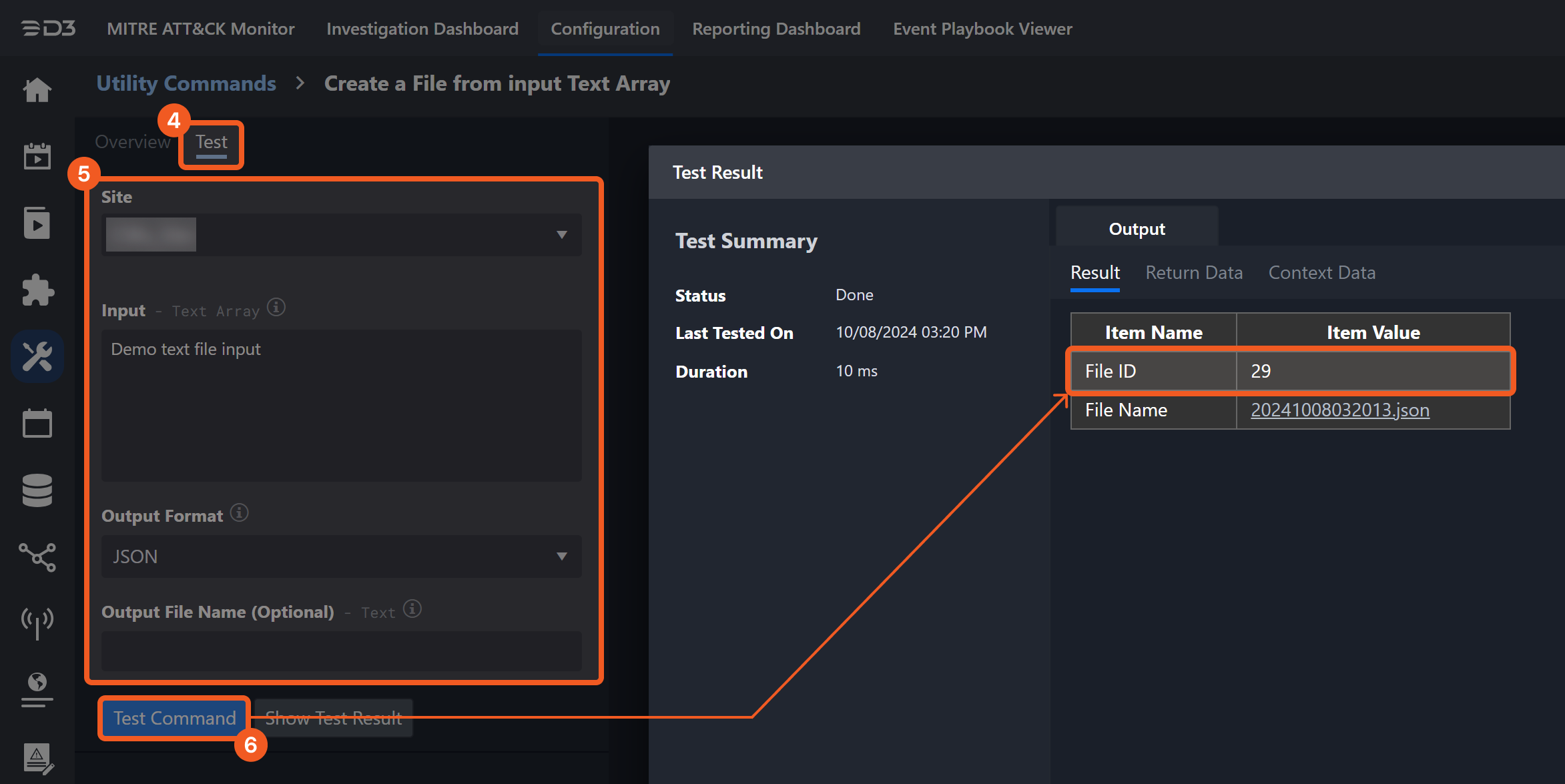
It is not recommended to use the Test Command feature with the Import Without Approval command as it is designed for dynamic input files in Playbooks, Incident Attachments, and Artifact Attachments. There is a simple workaround to test the command:
-
Navigate to Configuration on the top bar menu.
-
Click on Utility Commands on the left sidebar menu.
-
Use the search box to find and select the Create a File from input Text Array command.
-
Click on the Test tab.
-
Input the required information for the parameters.
-
Click on the Test Command button. A D3 File ID will appear in the output data after the file has been successfully created. The D3 File Source of the created file will be Playbook File.
Input
|
Input Parameter |
Required/Optional |
Description |
Example |
|
Allow Unresolved Domain |
Optional |
Whether to accept unresolved domain observables in the imported file as valid when set to True. |
True |
|
Confidence |
Optional |
The level of certainty that an observable matches its reported indicator type. Confidence scores range from 0 to 100. ThreatStream assigns scores only to domain, IP, and URL observables. For all other observable types, a confidence value must be specified either globally or for each observable. |
50 |
|
Source Confidence Weight |
Optional |
The weight assigned to source confidence. A value of 100 uses only the specified value from the Confidence parameter. When set to 100, the Confidence parameter must be specified. Observables with a weight of 100 are made private to the organization, regardless of classification settings. |
100 |
|
Classification |
Optional |
Whether the observables are public or private to the organization. By default, the value is set to Public. |
Public |
|
Expiration Time |
Optional |
The expiration timestamp for the observable in ISO format (UTC). By default, the value is 90 days. |
2022-01-01T00:00:00 |
|
Severity |
Optional |
The potential impact of the indicator type associated with the observable. Available options are:
A default severity value is assigned to each imported observable based on its indicator type. Refer to the Severity field in the ThreatStream UI Help for a list of default values by indicator type. |
Medium |
|
Tags |
Optional |
The tags applied to imported observables. Tags can be made private to the organization by setting the tag’s tlp attribute to red. For example: JSON
|
JSON
|
|
Trusted Circles |
Optional |
The IDs of trusted circles with which to share the threat data. Use comma-separated IDs for multiple circles. |
JSON
|
|
Submission Type |
Required |
The method of providing data to import. File requires file IDs and file source. JSON Object requires the Objects parameter. |
File |
|
File IDs |
Optional |
The IDs of indicator JSON files to be imported. This parameter is used when the Submission Type is File, and the file path format depends on the File Source. |
JSON
|
|
File Source |
Optional |
The file source for the files to be imported. This parameter is used when the Submission Type is File. Available options are:
By default, the value is set to IR Attachment. |
IR Attachment |
|
Objects |
Optional |
The observables to be imported. This parameter is used when the Submission Type is JSON.
|
JSON
|
Output
To view the sample output data for all commands, refer to this article.
Error Handling
If the Return Data displays Partially Successful or Failed, an Error tab will appear in the Test Result window.
The error tab contains the details responded from D3 or third-party API calls, including Failure Indicator, Status Code, and Message. This can help locate the root cause of a command failure.
|
Parts in Error |
Description |
Example |
|
Failure Indicator |
Indicates the command failure that happened at a specific input and/or API call. |
Import Without Approval failed. |
|
Status Code |
The response code issued by the third-party API server or the D3 system that can be used to locate the corresponding error category. For example, if the returned status code is 401, the selected connection is unauthorized to run the command. The user or system support would need to check the permission setting in the Anomali ThreatStream portal. Refer to the HTTP Status Code Registry for details. |
Status Code: 401. |
|
Message |
The raw data or captured key error message from the integration API server about the API request failure. |
Message: Unauthorized. |
|
Error Sample Data Import Without Approval failed. Status Code: 401. Message: Unauthorized. |
List Import Jobs
Retrieves import jobs with optional filters.
Input
|
Input Parameter |
Required/Optional |
Description |
Example |
|
Limit |
Optional |
The number of import jobs to return. By default, the value is 20 and the maximum is 1000. |
2 |
|
Offset |
Optional |
The number of import jobs to skip before returning results. This parameter is used for pagination with the Limit parameter. By default, the value is 0. |
1 |
|
Status |
Optional |
The status values used to filter import jobs. Valid options are:
|
Done |
Output
To view the sample output data for all commands, refer to this article.
Error Handling
If the Return Data displays Failed, an Error tab will appear in the Test Result window.
The error tab contains the details responded from D3 or third-party API calls, including Failure Indicator, Status Code, and Message. This can help locate the root cause of a command failure.
|
Parts in Error |
Description |
Example |
|
Failure Indicator |
Indicates the command failure that happened at a specific input and/or API call. |
List Import Jobs failed. |
|
Status Code |
The response code issued by the third-party API server or the D3 system that can be used to locate the corresponding error category. For example, if the returned status code is 401, the selected connection is unauthorized to run the command. The user or system support would need to check the permission setting in the Anomali ThreatStream portal. Refer to the HTTP Status Code Registry for details. |
Status Code: 401. |
|
Message |
The raw data or captured key error message from the integration API server about the API request failure. |
Message: Unauthorized. |
|
Error Sample Data List Import Jobs failed. Status Code: 401. Message: Unauthorized. |
List Threat Bulletins
Retrieves threat bulletins.
Input
|
Input Parameter |
Required/Optional |
Description |
Example |
|
Start Time |
Optional |
The earliest last-modified timestamp for fetching threat bulletins. |
09/01/2025 12:00 AM |
|
End Time |
Optional |
The latest last-modified timestamp for fetching threat bulletins. |
10/02/2025 12:00 AM |
|
Limit |
Optional |
The number of threat bulletins to return. By default, the value is 20. |
2 |
|
Offset |
Optional |
The number of threat bulletins to skip before returning results. This parameter is used for pagination with the Limit parameter. By default, the value is 0. |
0 |
|
Skip Intelligence |
Optional |
The option to return associations with observables as part of actor lists. Anomali recommends setting this attribute to True for best results. By default, the value is set to True. |
True |
|
Skip Associations |
Optional |
The option to return associations with other threat-model entities as part of threat bulletin lists. Anomali recommends setting this attribute to True for best results. By default, the value is set to True. |
True |
Output
To view the sample output data for all commands, refer to this article.
Error Handling
If the Return Data displays Failed, an Error tab will appear in the Test Result window.
The error tab contains the details responded from D3 or third-party API calls, including Failure Indicator, Status Code, and Message. This can help locate the root cause of a command failure.
|
Parts in Error |
Description |
Example |
|
Failure Indicator |
Indicates the command failure that happened at a specific input and/or API call. |
List Threat Bulletins failed. |
|
Status Code |
The response code issued by the third-party API server or the D3 system that can be used to locate the corresponding error category. For example, if the returned status code is 401, the selected connection is unauthorized to run the command. The user or system support would need to check the permission setting in the Anomali ThreatStream portal. Refer to the HTTP Status Code Registry for details. |
Status Code: 401. |
|
Message |
The raw data or captured key error message from the integration API server about the API request failure. |
Message: Unauthorized. |
|
Error Sample Data List Threat Bulletins failed. Status Code: 401. Message: Unauthorized. |
Search Query
Retrieves saved search filters and query information from the ThreatStream UI.
Input
|
Input Parameter |
Required/Optional |
Description |
Example |
|
Limit |
Optional |
The maximum number of results to return. By default, the value is 20. |
2 |
|
Offset |
Optional |
The number of records to skip before returning results. This parameter is used for pagination with the Limit parameter. By default, the value is 0. |
1 |
Output
To view the sample output data for all commands, refer to this article.
Error Handling
If the Return Data displays Failed, an Error tab will appear in the Test Result window.
The error tab contains the details responded from D3 or third-party API calls, including Failure Indicator, Status Code, and Message. This can help locate the root cause of a command failure.
|
Parts in Error |
Description |
Example |
|
Failure Indicator |
Indicates the command failure that happened at a specific input and/or API call. |
Search Query failed. |
|
Status Code |
The response code issued by the third-party API server or the D3 system that can be used to locate the corresponding error category. For example, if the returned status code is 401, the selected connection is unauthorized to run the command. The user or system support would need to check the permission setting in the Anomali ThreatStream portal. Refer to the HTTP Status Code Registry for details. |
Status Code: 401. |
|
Message |
The raw data or captured key error message from the integration API server about the API request failure. |
Message: Unauthorized. |
|
Error Sample Data Search Query failed. Status Code: 401. Message: Unauthorized. |
Search Threat Model
Retrieves threat model entities from ThreatStream.
Input
|
Input Parameter |
Required/Optional |
Description |
Example |
|
Start Time |
Optional |
The earliest last-modified timestamp for fetching threat models. |
09/01/2025 12:00 AM |
|
End Time |
Optional |
The latest last-modified timestamp for fetching threat models. |
10/02/2025 12:00 AM |
|
Limit |
Optional |
The number of threat models to return. By default, the value is 20. |
2 |
|
Offset |
Optional |
The number of threat models to skip before returning results. This parameter is used for pagination with the Limit parameter. By default, the value is 0. |
0 |
|
Model Type |
Optional |
The type of threat model to return. Valid options are:
|
Actor |
|
Search Value |
Optional |
The threat-model keyword to search. Specifying a value yields results equivalent to a keyword search in the ThreatStream user interface. Each threat-model category (see Model Type) is queried by applying the keyword to a set of fields.
|
Actor |
Output
To view the sample output data for all commands, refer to this article.
Error Handling
If the Return Data displays Failed, an Error tab will appear in the Test Result window.
The error tab contains the details responded from D3 or third-party API calls, including Failure Indicator, Status Code, and Message. This can help locate the root cause of a command failure.
|
Parts in Error |
Description |
Example |
|
Failure Indicator |
Indicates the command failure that happened at a specific input and/or API call. |
Search Threat Model failed. |
|
Status Code |
The response code issued by the third-party API server or the D3 system that can be used to locate the corresponding error category. For example, if the returned status code is 401, the selected connection is unauthorized to run the command. The user or system support would need to check the permission setting in the Anomali ThreatStream portal. Refer to the HTTP Status Code Registry for details. |
Status Code: 401. |
|
Message |
The raw data or captured key error message from the integration API server about the API request failure. |
Message: Unauthorized. |
|
Error Sample Data Search Threat Model failed. Status Code: 401. Message: Unauthorized. |
Submit to Sandbox
Submits files or URLs to the ThreatStream-hosted Sandbox.
Input
|
Input Parameter |
Required/Optional |
Description |
Example |
|
Submission Type |
Required |
The type of content to submit to the Sandbox. Available options are:
|
File |
|
Submission Content |
Required |
The File IDs or URLs to submit to the Sandbox. When Submission Type is File, the value must be File IDs. When Submission Type is URL, the value must be URLs. Separate multiple entries with commas. |
JSON
|
|
Report Classification |
Optional |
Whether the submissions are public or private to the organization. By default, the value is set to Private. |
Public |
|
Submission Platform |
Required |
The platform on which the submissions will run. Available options depend on the Sandbox configuration:
|
WINDOWS7 |
|
Use Premium Sandbox |
Optional |
Whether to use the premium Sandbox for detonation. Set to True if the organization has access to the premium Sandbox. If no value is set, the default Cuckoo Sandbox is used. |
True |
|
Notes |
Optional |
A comma-separated list providing additional details for imported observables. The information is displayed in the Tag column of the ThreatStream UI. |
JSON
|
|
Trusted Circles |
Optional |
The IDs of trusted circles with which to share the Sandbox data. Use comma-separated IDs for multiple circles. |
JSON
|
|
File Source |
Optional |
The file source for the files to be submitted. This parameter is used when the Submission Type is File. Available options are:
By default, the value is set to IR Attachment. |
IR Attachment |
Output
To view the sample output data for all commands, refer to this article.
Error Handling
If the Return Data displays Partially Successful or Failed, an Error tab will appear in the Test Result window.
The error tab contains the details responded from D3 or third-party API calls, including Failure Indicator, Status Code, and Message. This can help locate the root cause of a command failure.
|
Parts in Error |
Description |
Example |
|
Failure Indicator |
Indicates the command failure that happened at a specific input and/or API call. |
Submit to Sandbox failed. |
|
Status Code |
The response code issued by the third-party API server or the D3 system that can be used to locate the corresponding error category. For example, if the returned status code is 401, the selected connection is unauthorized to run the command. The user or system support would need to check the permission setting in the Anomali ThreatStream portal. Refer to the HTTP Status Code Registry for details. |
Status Code: 401. |
|
Message |
The raw data or captured key error message from the integration API server about the API request failure. |
Message: Unauthorized. |
|
Error Sample Data Submit to Sandbox failed. Status Code: 401. Message: Unauthorized. |
Update Threat Model Entity
Updates an existing entity in the specified threat-model category.
READER NOTE
Threat Model Type is a required parameter to run this command.
-
Run the Search Threat Model command to obtain the Threat Model Type. Threat Model Types can be found in the raw data at $.objects[*].id.
Input
|
Input Parameter |
Required/Optional |
Description |
Example |
|
Threat Model Type |
Required |
The threat-model category of the entity to update. Valid options are:
|
Incident |
|
Entity ID |
Required |
The ID of the existing entity to update. Entity ID can be obtained using the Search Threat Model command. |
824429 |
|
Entity Name |
Optional |
The new name assigned to the entity. |
test incident UPDATE 1201n |
|
Is Public |
Optional |
The visibility setting for the entity.
|
True |
|
Traffic Light Protocol |
Optional |
The Traffic Light Protocol designation for the entity. Valid options are:
|
Amber |
|
Tags |
Optional |
The tags applied to the entity. A tag is a meaningful name or any string value used to identify the information. New tags overwrite the existing tags. |
JSON
|
|
Intelligence |
Optional |
The indicators (Observables) associated with the entity on the ThreatStream platform. |
JSON
|
|
Description |
Optional |
The free-form text associated with the entity. This field corresponds to the Description field in the UI. This parameter does not apply to TipReport entities. |
Test description 1201n. |
Output
To view the sample output data for all commands, refer to this article.
Error Handling
If the Return Data displays Failed, an Error tab will appear in the Test Result window.
The error tab contains the details responded from D3 or third-party API calls, including Failure Indicator, Status Code, and Message. This can help locate the root cause of a command failure.
|
Parts in Error |
Description |
Example |
|
Failure Indicator |
Indicates the command failure that happened at a specific input and/or API call. |
Update Threat Model Entity failed. |
|
Status Code |
The response code issued by the third-party API server or the D3 system that can be used to locate the corresponding error category. For example, if the returned status code is 401, the selected connection is unauthorized to run the command. The user or system support would need to check the permission setting in the Anomali ThreatStream portal. Refer to the HTTP Status Code Registry for details. |
Status Code: 401. |
|
Message |
The raw data or captured key error message from the integration API server about the API request failure. |
Message: Unauthorized. |
|
Error Sample Data Update Threat Model Entity failed. Status Code: 401. Message: Unauthorized. |
Test Connection
Allows you to perform a health check on an integration connection. You can schedule a periodic health check by selecting Connection Health Check when editing an integration connection.
Input
N/A
Output
To view the sample output data for all commands, refer to this article.
Error Handling
If the Return Data displays Failed, an Error tab will appear in the Test Result window.
The error tab contains the details responded from D3 or third-party API calls, including Failure Indicator, Status Code, and Message. This can help locate the root cause of a command failure.
|
Parts in Error |
Description |
Example |
|
Failure Indicator |
Indicates the command failure that happened at a specific input and/or API call. |
Test Connection failed. |
|
Status Code |
The response code issued by the third-party API server or the D3 system that can be used to locate the corresponding error category. For example, if the returned status code is 401, the selected connection is unauthorized to run the command. The user or system support would need to check the permission setting in the Anomali ThreatStream portal. Refer to the HTTP Status Code Registry for details. |
Status Code: 401. |
|
Message |
The raw data or captured key error message from the integration API server about the API request failure. |
Message: API access error. |
|
Error Sample Data Test Connection failed. Status Code: 401. Message: API access error. |