
LAST UPDATED: May 01, 2026
Overview
Cisco Secure Endpoint (formerly AMP for Endpoints) offers cloud-delivered endpoint protection plus advanced endpoint detection and response across multi-domain control points.
Cisco Secure Endpoint is available for use in:
Known Limitations
See Secure Endpoint API Rate Limits.
Connection
To connect to Cisco Secure Endpoint from D3, please follow this part to collect the required information below:
|
Parameter |
Description |
Example |
|
Server URL |
The URL of the Cisco AMP server. |
https://api.amp.cisco.com |
|
Client ID |
The client ID for authentication. |
8010*****509d |
|
API Key |
The API key for authentication. |
0e96*****e09a |
|
API Version |
The API version for authentication. |
v1 |
Configuring Cisco Secure Endpoint to Work with D3
-
Login CISCO AMP console with your credentials.
-
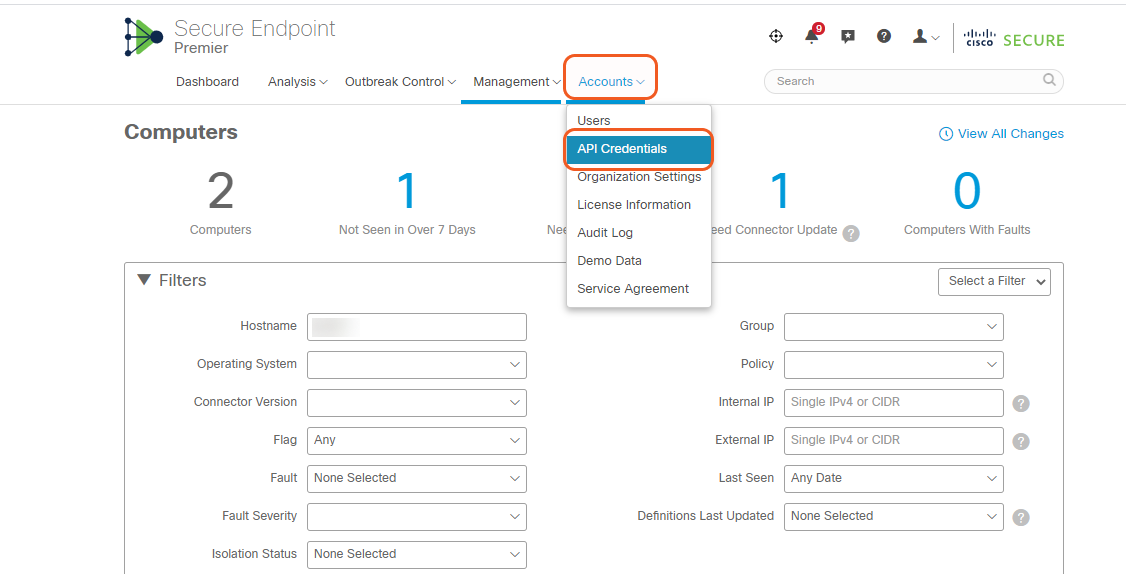
Click Accounts, then API Credentials
-
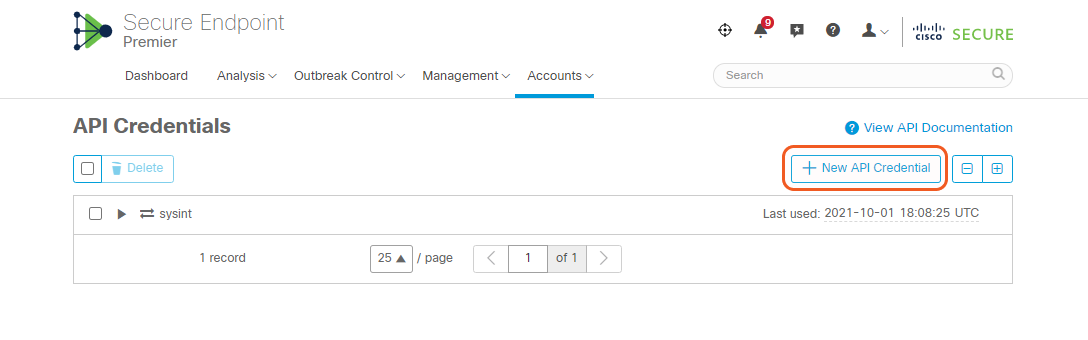
Click +New API Credential
-
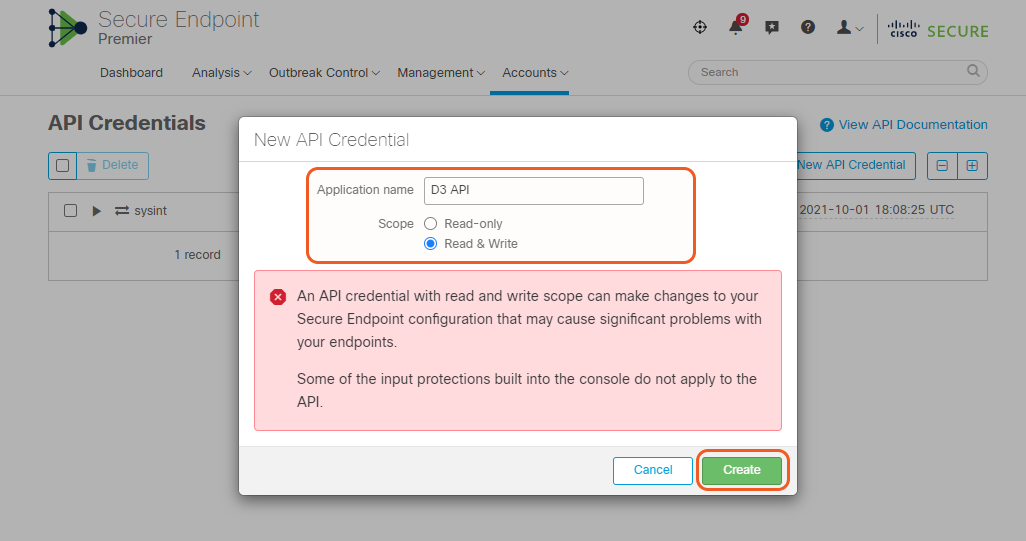
Enter Application name and select Read & Write as Scope. Then click Create.
-
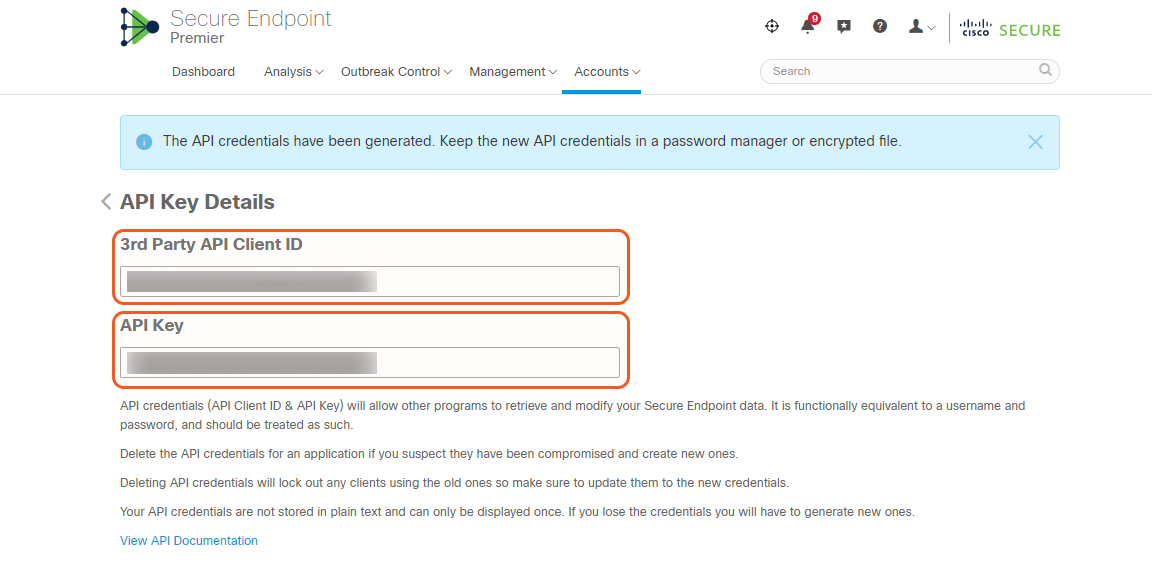
Save 3rd Party API Client ID and API Key.
Configuring D3 to Work with Cisco Secure Endpoint
-
Log in to D3.
-
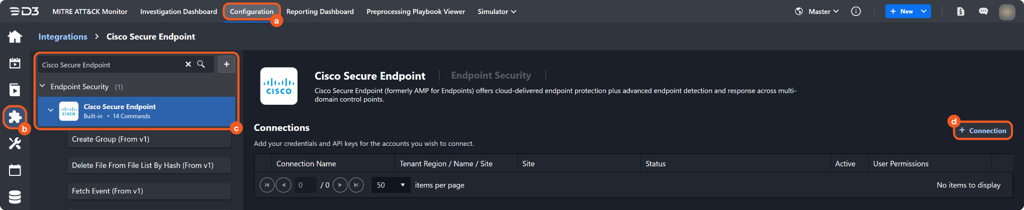
Find the Cisco Secure Endpoint integration.
-
Navigate to Configuration on the top header menu.
-
Click on the Integration icon on the left sidebar.
-
Type Cisco Secure Endpoint in the search box to find the integration, then click it to select it.
-
Click + Connection, on the right side of the Connections section. A new connection window will appear.
-
-
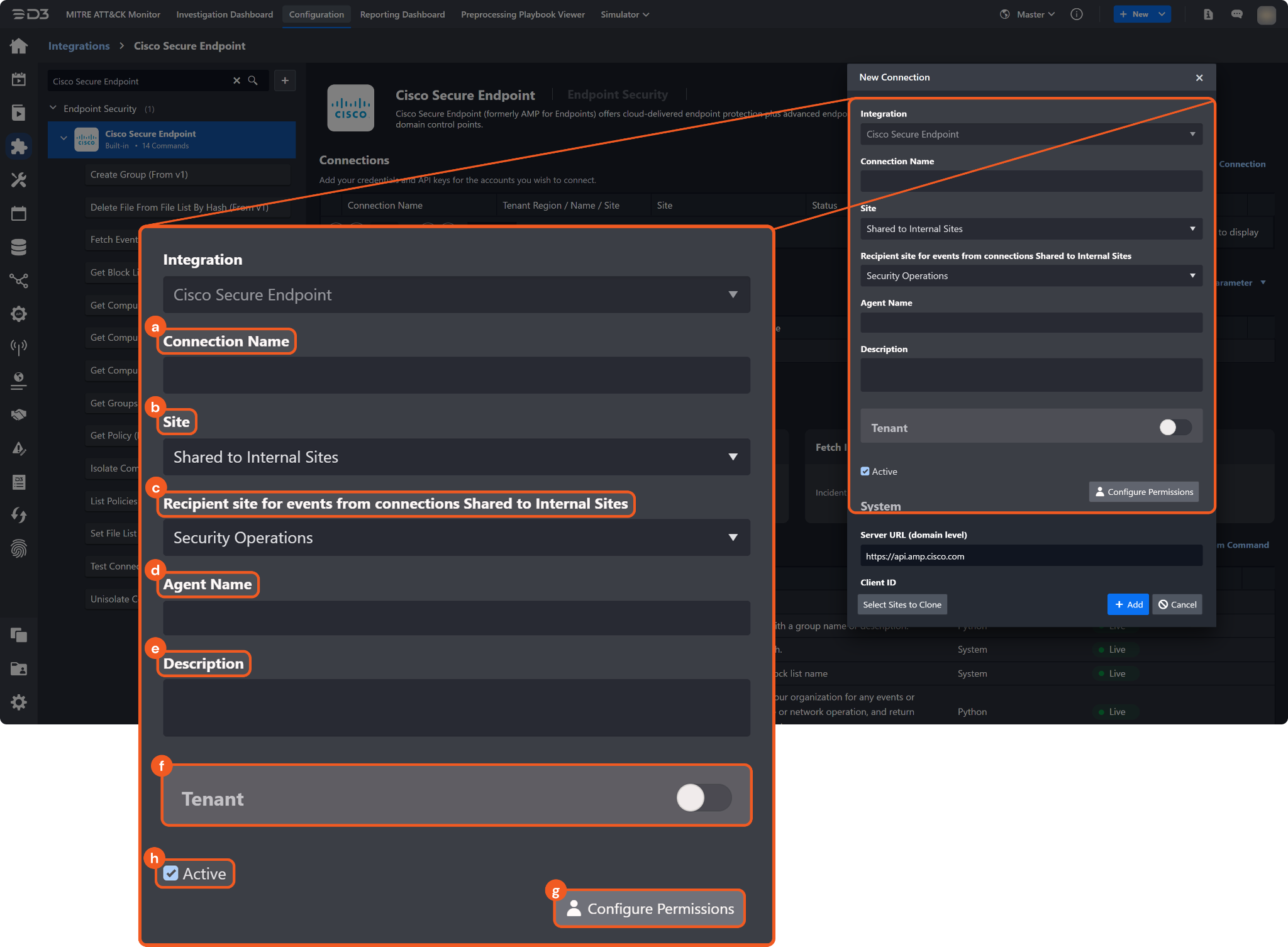
Configure the following fields to create a connection to Cisco Secure Endpoint.
-
Connection Name: The desired name for the connection.
-
Site: Specifies the site to use the integration connection. Use the drop-down menu to select the site. The Share to Internal Sites option enables all sites defined as internal sites to use the connection. Selecting a specific site will only enable that site to use the connection.
-
Recipient site for events from connections Shared to Internal Sites: This field appears if you selected Share to Internal Sites for Site to let you select the internal site to deploy the integration connection.
-
Agent Name (Optional): Specifies the proxy agent required to build the connection. Use the dropdown menu to select the proxy agent from a list of previously configured proxy agents.
-
Description (Optional): Add your desired description for the connection
-
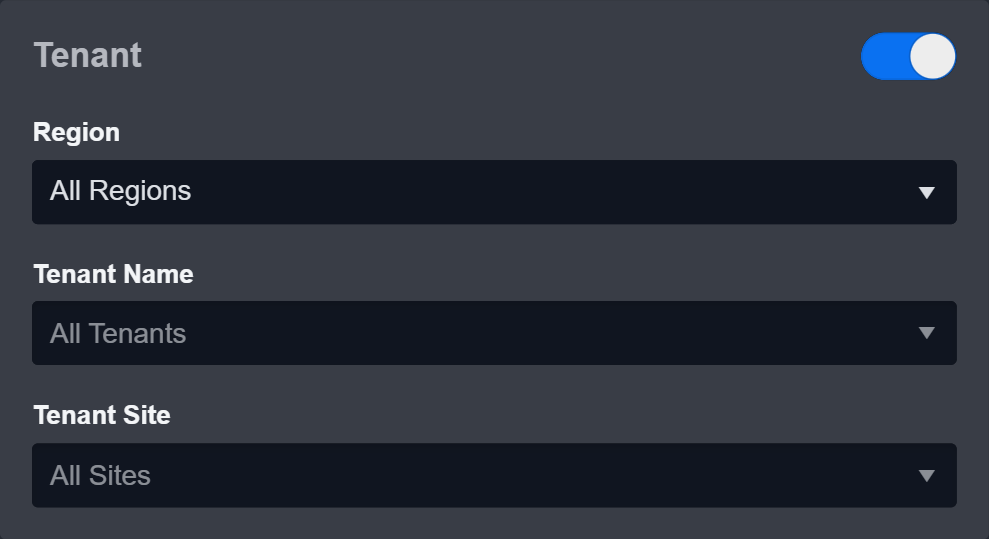
Tenant (Optional): When configuring the connection from a master tenant site, you have the option to choose the specific tenant sites you want to share the connection with. Once you enable this setting, you can filter and select the desired tenant sites from the dropdowns to share the connection.
-
Configure User Permissions: Defines which users have access to the connection.
-
Active: Check the tick box to ensure the connection is available for use.
-
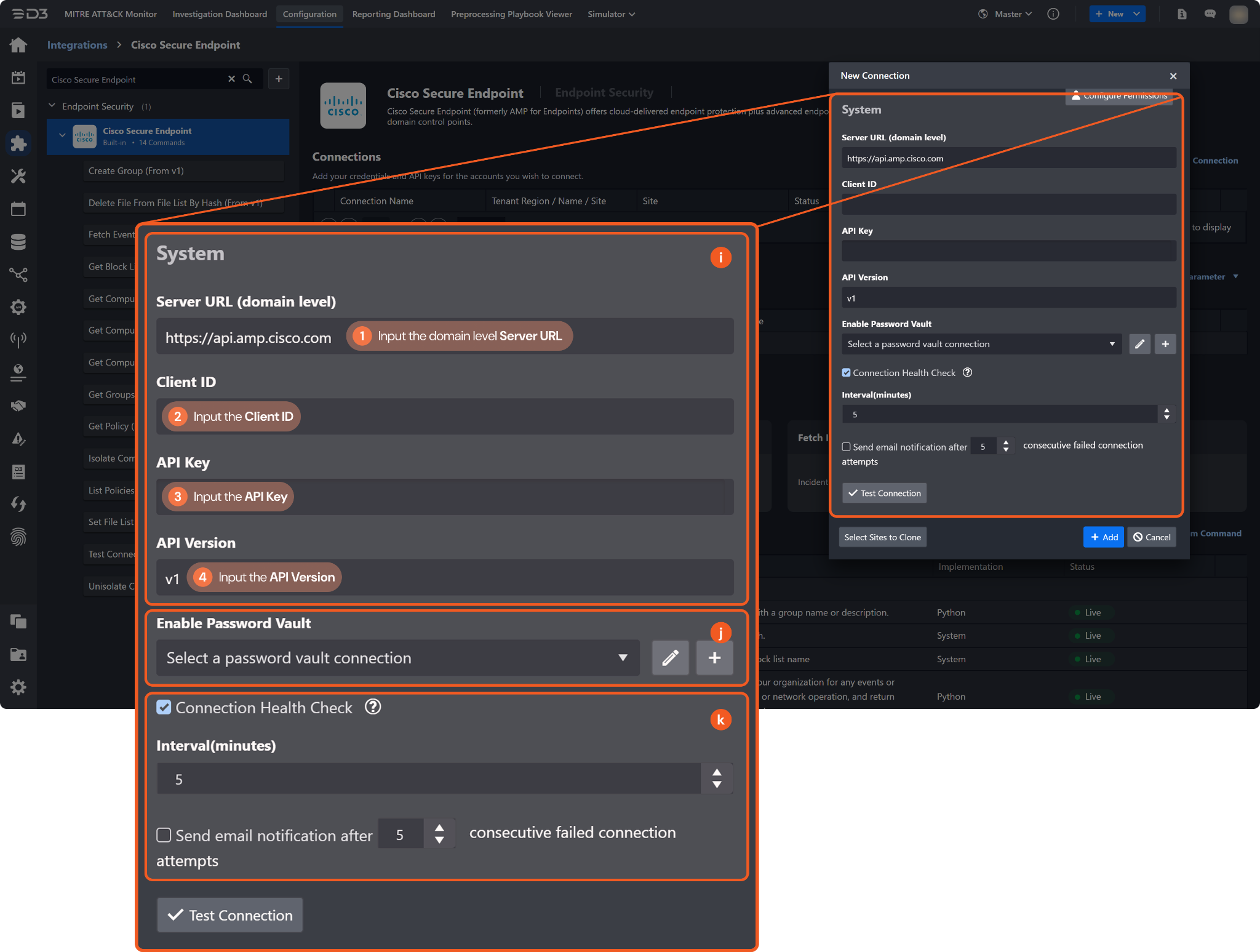
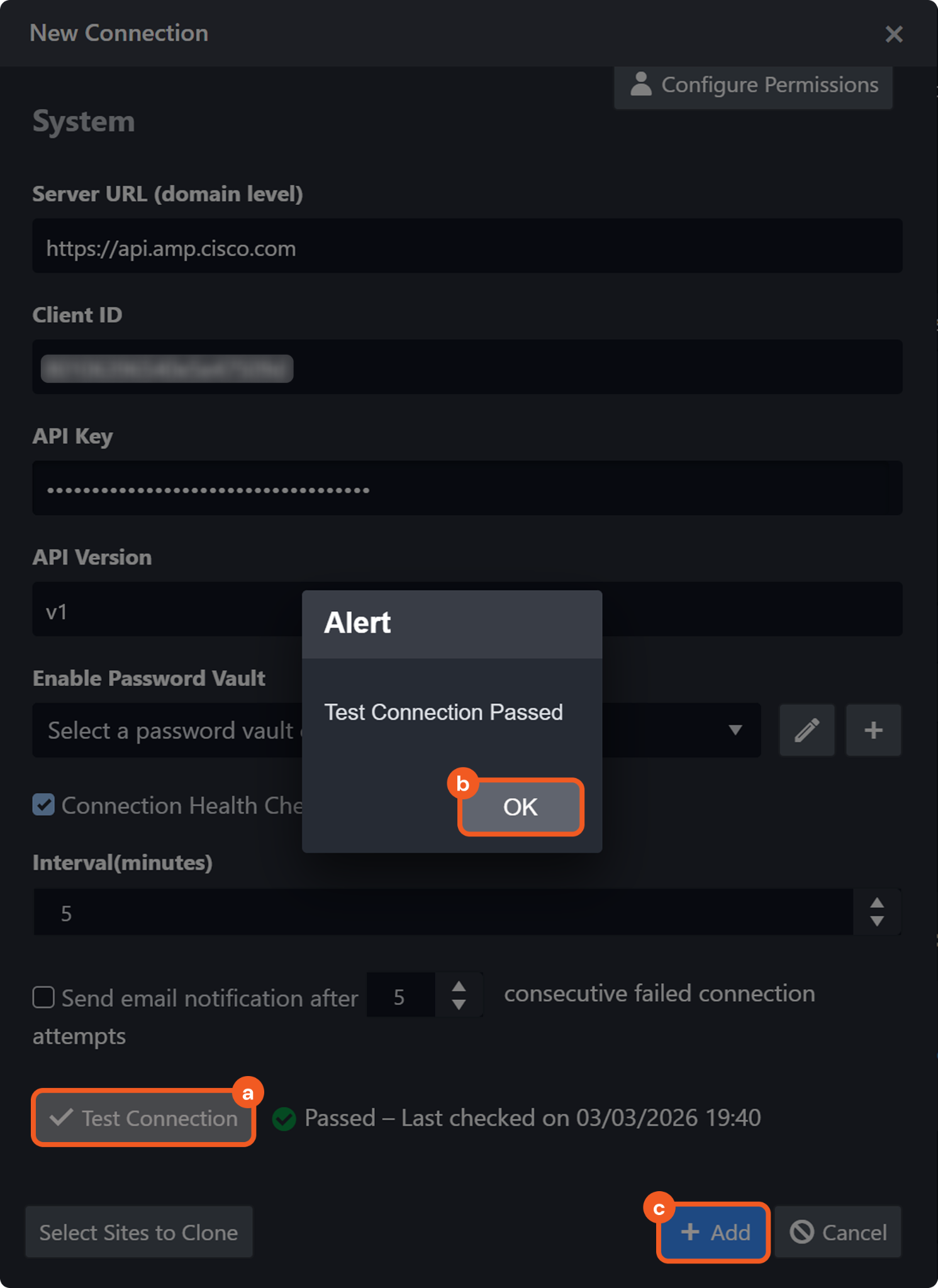
System: This section contains the parameters defined specifically for the integration. These parameters must be configured to create the integration connection.
1. Input the Server URL. The default value is https://api.amp.cisco.com.
2. Input your Client ID. Please refer to step 5 of Configuring Cisco Secure Endpoint to Work with D3.
3. Copy the API Key from the Cisco Secure Endpoint platform. Please refer to step 5 of Configuring Cisco Secure Endpoint to Work with D3.
4. Input the API Version. The default value is v1. -
Enable Password Vault: An optional feature that allows users to take the stored credentials from their own password vault. Please refer to the password vault connection guide if needed.
-
-
Test the connection.
-
Click Test Connection to verify the account credentials and network connection. If the Test Connection Passed alert window appears, the test connection is successful. You will see Passed with a green checkmark appear beside the Test Connection button. If the test connection fails, please check your connection parameters and try again.
-
Click OK to close the alert window.
-
Click + Add to create and add the configured connection.
-
Commands
Cisco Secure Endpoint includes the following executable commands for users to set up schedules or create playbook workflows. With the Test Command function, users can execute these commands independently for playbook troubleshooting.
Note for Time-related parameters
The input format of time-related parameters may vary based on user account settings, which may cause the sample data in commands to differ from what is displayed. To adjust the time format, follow these steps:
-
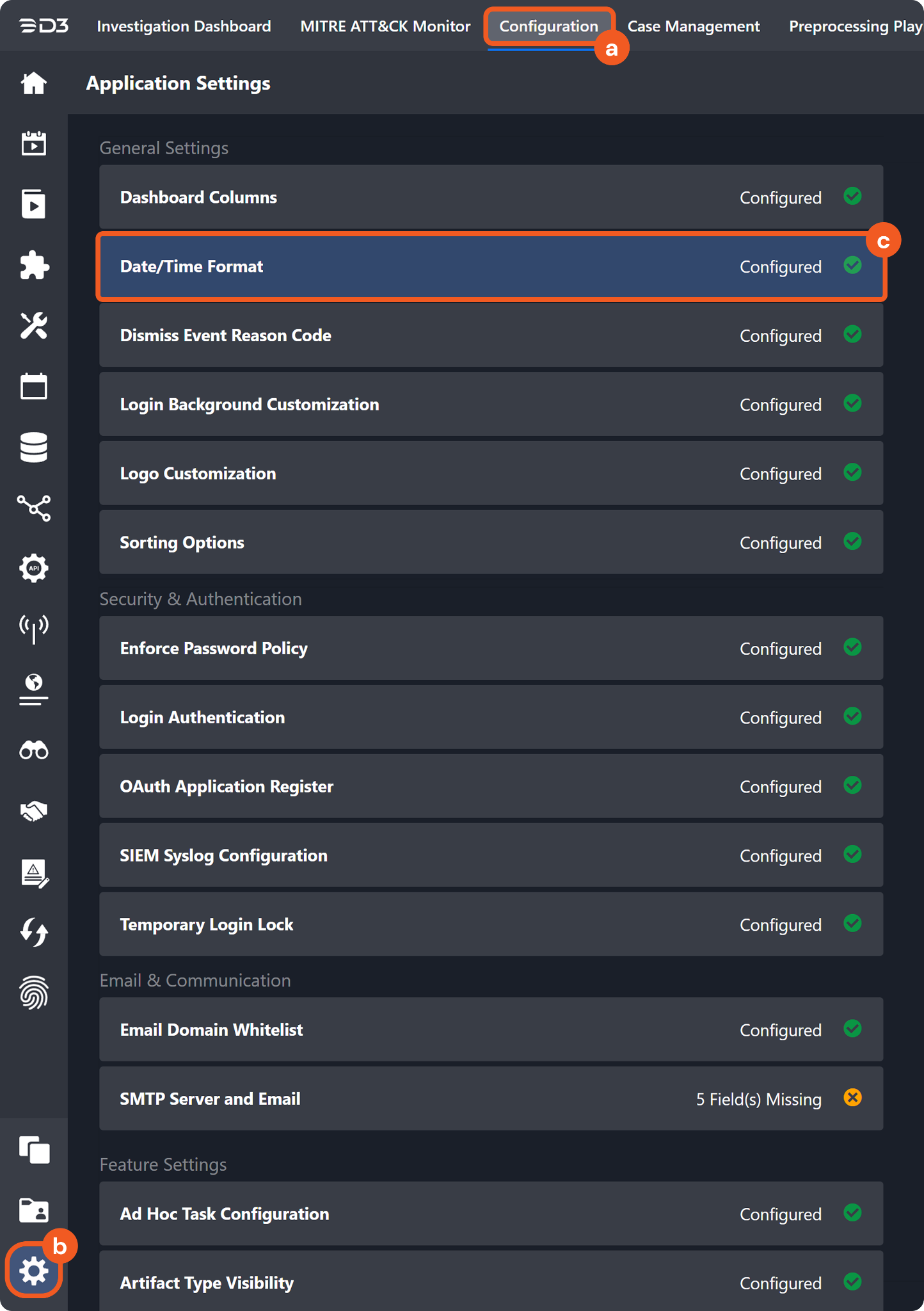
Navigate to Configuration > Application Settings. Select Date/Time Format.
-
-
Choose the desired date and time format, then click on the Save button.
-
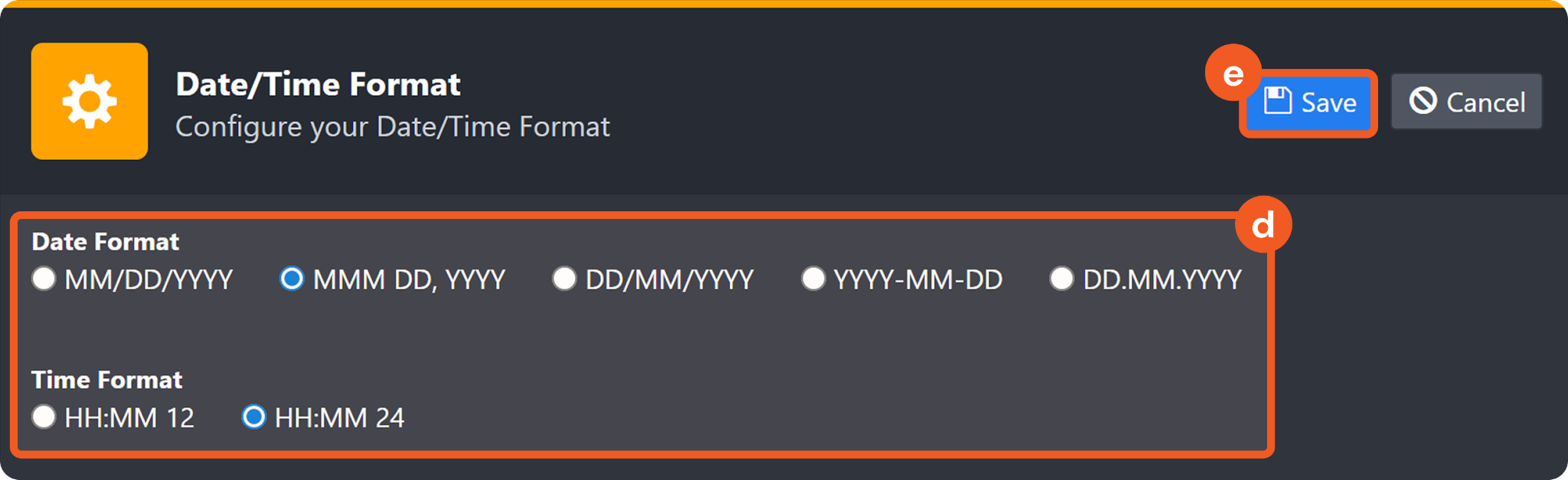
The selected time format will now be visible when configuring Date/Time command input parameters.
Create Group
Creates a new group.
Input
|
Input Parameter |
Required/Optional |
Description |
Example |
|
Name |
Optional |
The name of the group to be created. |
Finance Workstations |
|
Description |
Optional |
The description of the group to be created. |
Endpoints in the Finance department subject to PCI monitoring policy. |
Output
To view the sample output data for all commands, refer to this article.
Error Handling
If the Return Data displays Partially Successful or Failed, an Error tab will appear in the Test Result window.
The error tab contains the details responded from D3 or third-party API calls, including Failure Indicator, Status Code, and Message. This can help locate the root cause of a command failure.
|
Parts in Error |
Description |
Example |
|
Failure Indicator |
Indicates the command failure that happened at a specific input and/or API call. |
Create Group failed. |
|
Status Code |
The response code issued by the third-party API server or the D3 system that can be used to locate the corresponding error category. For example, if the returned status code is 401, the selected connection is unauthorized to run the command. The user or system support would need to check the permission setting in the Cisco Secure Endpoint portal. Refer to the HTTP Status Code Registry for details. |
Status Code: 403. |
|
Message |
The raw data or captured key error message from the integration API server about the API request failure. |
Message: You must have a valid Support account to call this API. |
|
Error Sample Data Create Group failed. Status Code: 403. Message: You must have a valid Support account to call this API. |
Delete File From File List By Hash
Deletes a file from a file list by hash.
Input
|
Input Parameter |
Required/Optional |
Description |
Example |
|
File List ID |
Optional |
The ID of the file list from which to delete the file. |
ff48*****5633 |
|
Hash |
Optional |
The hash of the file to delete. |
d5cb*****dc3b |
Output
To view the sample output data for all commands, refer to this article.
Error Handling
If the Return Data displays Failed, an Error tab will appear in the Test Result window.
The error tab contains the details responded from D3 or third-party API calls, including Failure Indicator, Status Code, and Message. This can help locate the root cause of a command failure.
|
Parts in Error |
Description |
Example |
|
Failure Indicator |
Indicates the command failure that happened at a specific input and/or API call. |
Delete File From File List By Hash failed. |
|
Status Code |
The response code issued by the third-party API server or the D3 system that can be used to locate the corresponding error category. For example, if the returned status code is 401, the selected connection is unauthorized to run the command. The user or system support would need to check the permission setting in the Cisco Secure Endpoint portal. Refer to the HTTP Status Code Registry for details. |
Status Code: 403. |
|
Message |
The raw data or captured key error message from the integration API server about the API request failure. |
Message: You must have a valid Support account to call this API. |
|
Error Sample Data Delete File From File List By Hash failed. Status Code: 403. Message: You must have a valid Support account to call this API. |
Fetch Event
Fetches events from the platform, filtered by specified criteria.
Input
|
Input Parameter |
Required/Optional |
Description |
Example |
|
Start Time |
Optional |
The start of the time range for fetching events (datetime format: yyyy-MM-dd HH:mm, in UTC). By default, the value is 24 hours before the End Time. |
2026-05-01 08:00
|
|
End Time |
Optional |
The end of the time range for fetching events (datetime format: yyyy-MM-dd HH:mm, in UTC). By default, the value is the current time. |
2026-05-01 10:00
|
|
Number of Event(s) Fetched |
Optional |
The maximum number of events to return. |
10 |
|
Search Condition |
Optional |
Filters events by event type. For example, Endpoint Isolation Start Success. |
Endpoint Isolation Stop Success |
|
Artifact |
Optional |
Filters events by artifact. |
44d8*****a3f1 |
Output
To view the sample output data for all commands, refer to this article.
Fetch Event Field Mapping
See Field Mappings.
The Cisco Secure Endpoint system integration includes pre-configured field mappings for the default event source.
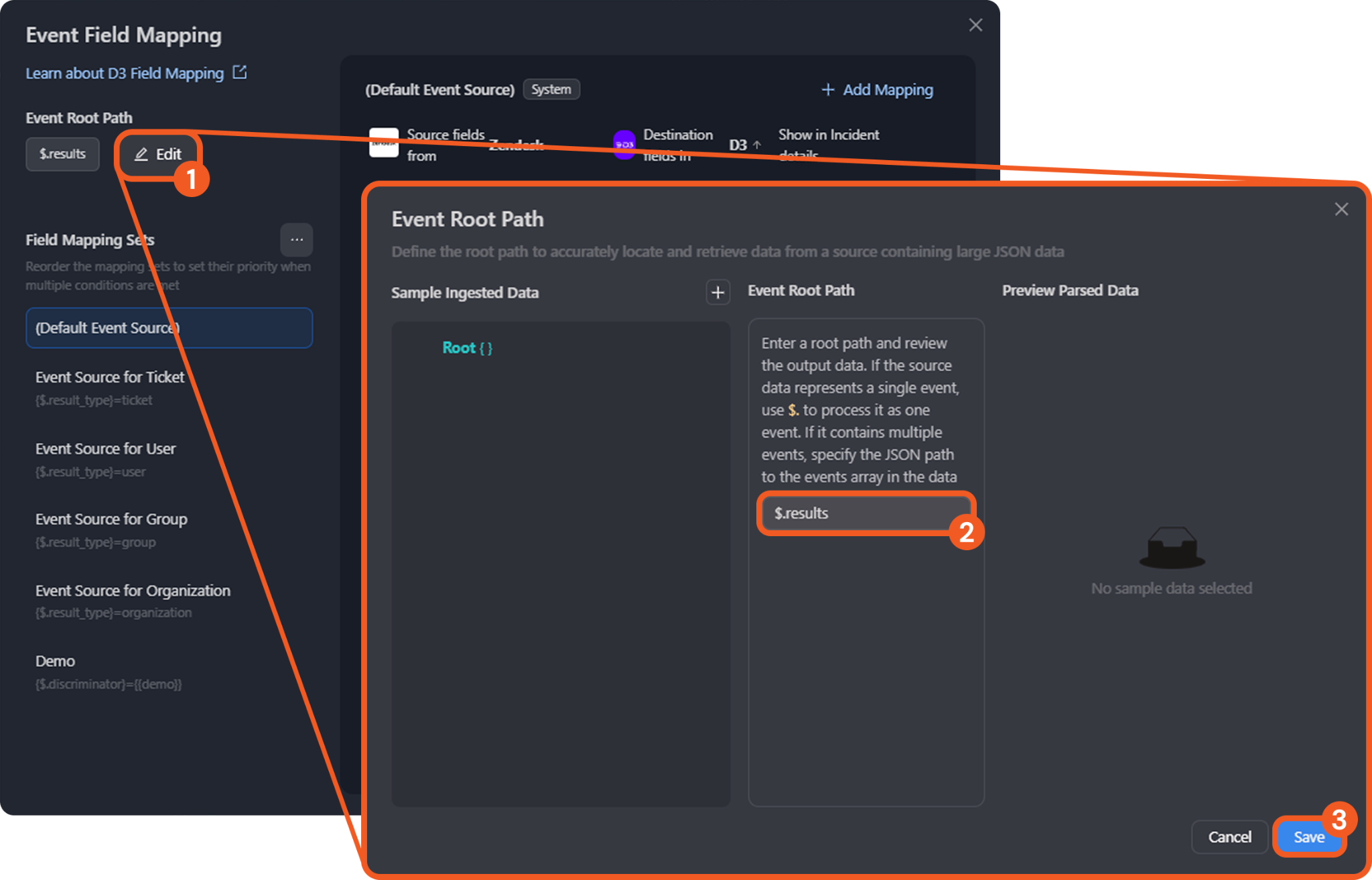
The Default Event Source is the default system-provided set of field mappings applied when the Fetch Event command is executed. It defines the Event Root Path (previously called Main Event JSON Path), which is the JSONPath expression that points to the base array of event objects. The Condition (previously called Source Field) defines a path, relative to the event root path, at which the value must match in order for the associated field mapping set to apply.
-
Event Root Path: $
The array at the event root path contains objects used to create D3 events. Within each object, the key id, for instance, denotes the Unique Event Key field. As such, the full JSONPath expression to extract the Unique Event Key is $.id.
The pre-configured field mappings are detailed below:
|
Field Name |
Source Field |
|
Unique Event Key |
.id |
|
Start Time |
.date |
|
Event Type |
.event_type |
|
Hostname |
.computer.hostname |
|
ExternalIPAddress |
.computer.external_ip |
|
NetworkAddresses |
.computer.network_addresses.[*].ip |
|
Severity |
.severity |
|
Disposition |
.file.disposition |
|
Filename |
.file.file_name |
|
Filepath |
.file.file_path |
|
File Hash SHA256 |
.file.identity.sha256 |
|
File Hash SHA1 |
.file.identity.sha1 |
|
File Hash MD5 |
.file.identity.md5 |
Error Handling
If the Return Data displays Failed, an Error tab will appear in the Test Result window.
The error tab contains the details responded from D3 or third-party API calls, including Failure Indicator, Status Code, and Message. This can help locate the root cause of a command failure.
|
Parts in Error |
Description |
Example |
|
Failure Indicator |
Indicates the command failure that happened at a specific input and/or API call. |
Fetch Event failed. |
|
Status Code |
The response code issued by the third-party API server or the D3 system that can be used to locate the corresponding error category. For example, if the returned status code is 401, the selected connection is unauthorized to run the command. The user or system support would need to check the permission setting in the Cisco Secure Endpoint portal. Refer to the HTTP Status Code Registry for details. |
Status Code: 403. |
|
Message |
The raw data or captured key error message from the integration API server about the API request failure. |
Message: You must have a valid Support account to call this API. |
|
Error Sample Data Fetch Event failed. Status Code: 403. Message: You must have a valid Support account to call this API. |
Get Block List
Retrieves a block list.
Input
|
Input Parameter |
Required/Optional |
Description |
Example |
|
Block List Name |
Optional |
The name of the block list to retrieve. |
Blocked Application List |
|
Limit |
Optional |
The maximum number of block lists to return in a single request. |
10 |
|
Offset |
Optional |
The offset for paginating the block list results. By default, the value is 0. |
0 |
Output
To view the sample output data for all commands, refer to this article.
Error Handling
If the Return Data displays Failed, an Error tab will appear in the Test Result window.
The error tab contains the details responded from D3 or third-party API calls, including Failure Indicator, Status Code, and Message. This can help locate the root cause of a command failure.
|
Parts in Error |
Description |
Example |
|
Failure Indicator |
Indicates the command failure that happened at a specific input and/or API call. |
Get Block List failed. |
|
Status Code |
The response code issued by the third-party API server or the D3 system that can be used to locate the corresponding error category. For example, if the returned status code is 401, the selected connection is unauthorized to run the command. The user or system support would need to check the permission setting in the Cisco Secure Endpoint portal. Refer to the HTTP Status Code Registry for details. |
Status Code: 403. |
|
Message |
The raw data or captured key error message from the integration API server about the API request failure. |
Message: You must have a valid Support account to call this API. |
|
Error Sample Data Get Block List failed. Status Code: 403. Message: You must have a valid Support account to call this API. |
Get Computer Activity
Returns computers with events or activities associated with a specified file or network operation.
Input
|
Input Parameter |
Required/Optional |
Description |
Example |
|
Query |
Optional |
A free-form query string. Accepted values are an IPv4 address, a SHA256 hash, a filename, or a URL fragment. The endpoint searches at most 5,000 historical entries per request. |
powershell |
|
Limit |
Optional |
The maximum number of computers to return in a single request. Valid values are integers between 1 and 500. By default, the value is 500. |
12 |
|
Offset |
Optional |
The offset for paginating computer results. For example, when the value is 10, results start from index 10. By default, the value is 0. |
0 |
Output
To view the sample output data for all commands, refer to this article.
Error Handling
If the Return Data displays Failed, an Error tab will appear in the Test Result window.
The error tab contains the details responded from D3 or third-party API calls, including Failure Indicator, Status Code, and Message. This can help locate the root cause of a command failure.
|
Parts in Error |
Description |
Example |
|
Failure Indicator |
Indicates the command failure that happened at a specific input and/or API call. |
Get Computer Activity failed. |
|
Status Code |
The response code issued by the third-party API server or the D3 system that can be used to locate the corresponding error category. For example, if the returned status code is 401, the selected connection is unauthorized to run the command. The user or system support would need to check the permission setting in the Cisco Secure Endpoint portal. Refer to the HTTP Status Code Registry for details. |
Status Code: 403. |
|
Message |
The raw data or captured key error message from the integration API server about the API request failure. |
Message: You must have a valid Support account to call this API. |
|
Error Sample Data Get Computer Activity failed. Status Code: 403. Message: You must have a valid Support account to call this API. |
Get Computer By Connector
Retrieves a computer by its connector GUID.
Input
|
Input Parameter |
Required/Optional |
Description |
Example |
|
Connector GUID |
Optional |
The GUID of the connector for which to retrieve the computer. |
fa41*****d253 |
Output
To view the sample output data for all commands, refer to this article.
Error Handling
If the Return Data displays Partially Successful or Failed, an Error tab will appear in the Test Result window.
The error tab contains the details responded from D3 or third-party API calls, including Failure Indicator, Status Code, and Message. This can help locate the root cause of a command failure.
|
Parts in Error |
Description |
Example |
|
Failure Indicator |
Indicates the command failure that happened at a specific input and/or API call. |
Get Computer By Connector failed. |
|
Status Code |
The response code issued by the third-party API server or the D3 system that can be used to locate the corresponding error category. For example, if the returned status code is 401, the selected connection is unauthorized to run the command. The user or system support would need to check the permission setting in the Cisco Secure Endpoint portal. Refer to the HTTP Status Code Registry for details. |
Status Code: 403. |
|
Message |
The raw data or captured key error message from the integration API server about the API request failure. |
Message: You must have a valid Support account to call this API. |
|
Error Sample Data Get Computer By Connector failed. Status Code: 403. Message: You must have a valid Support account to call this API. |
Get Computers
Retrieves computers matching a hostname search. The search uses an ending wildcard, returning a list of hosts if multiple matches exist.
Input
|
Input Parameter |
Required/Optional |
Description |
Example |
|
Limit |
Optional |
The maximum number of computers to return in a single request. Valid values are integers between 1 and 500. By default, the value is 500. |
5 |
|
Offset |
Optional |
The offset for paginating computer results. For example, when the value is 10, results start from index 10. By default, the value is 0. |
5 |
|
Hostname |
Optional |
The hostname of the computer to search for. |
FIN-WS-0142 |
Output
To view the sample output data for all commands, refer to this article.
Error Handling
If the Return Data displays Failed, an Error tab will appear in the Test Result window.
The error tab contains the details responded from D3 or third-party API calls, including Failure Indicator, Status Code, and Message. This can help locate the root cause of a command failure.
|
Parts in Error |
Description |
Example |
|
Failure Indicator |
Indicates the command failure that happened at a specific input and/or API call. |
Get Computers failed. |
|
Status Code |
The response code issued by the third-party API server or the D3 system that can be used to locate the corresponding error category. For example, if the returned status code is 401, the selected connection is unauthorized to run the command. The user or system support would need to check the permission setting in the Cisco Secure Endpoint portal. Refer to the HTTP Status Code Registry for details. |
Status Code: 403. |
|
Message |
The raw data or captured key error message from the integration API server about the API request failure. |
Message: You must have a valid Support account to call this API. |
|
Error Sample Data Get Computers failed. Status Code: 403. Message: You must have a valid Support account to call this API. |
Get Groups
Retrieves groups filtered by name.
Input
|
Input Parameter |
Required/Optional |
Description |
Example |
|
Group Name |
Optional |
The name of the group to retrieve. |
Audit |
|
Limit |
Optional |
The maximum number of groups to return in a single request. |
3 |
Output
To view the sample output data for all commands, refer to this article.
Error Handling
If the Return Data displays Partially Successful or Failed, an Error tab will appear in the Test Result window.
The error tab contains the details responded from D3 or third-party API calls, including Failure Indicator, Status Code, and Message. This can help locate the root cause of a command failure.
|
Parts in Error |
Description |
Example |
|
Failure Indicator |
Indicates the command failure that happened at a specific input and/or API call. |
Get Groups failed. |
|
Status Code |
The response code issued by the third-party API server or the D3 system that can be used to locate the corresponding error category. For example, if the returned status code is 401, the selected connection is unauthorized to run the command. The user or system support would need to check the permission setting in the Cisco Secure Endpoint portal. Refer to the HTTP Status Code Registry for details. |
Status Code: 403. |
|
Message |
The raw data or captured key error message from the integration API server about the API request failure. |
Message: You must have a valid Support account to call this API. |
|
Error Sample Data Get Groups failed. Status Code: 403. Message: You must have a valid Support account to call this API. |
Get Policy
Retrieves policy information by policy GUID.
READER NOTE
The parameter Policy GUIDs is required to run this command.
-
Run the List Policies command to obtain Policy GUIDs. Policy GUIDs can be found in the raw data at the path $.data[*].guid.
Input
|
Input Parameter |
Required/Optional |
Description |
Example |
|
Policy GUIDs |
Optional |
The GUIDs of the policies to retrieve. Policy GUIDs can be obtained using the List Policies command. |
cbaa*****0e8d |
Output
To view the sample output data for all commands, refer to this article.
Error Handling
If the Return Data displays Failed, an Error tab will appear in the Test Result window.
The error tab contains the details responded from D3 or third-party API calls, including Failure Indicator, Status Code, and Message. This can help locate the root cause of a command failure.
|
Parts in Error |
Description |
Example |
|
Failure Indicator |
Indicates the command failure that happened at a specific input and/or API call. |
Get Policy failed. |
|
Status Code |
The response code issued by the third-party API server or the D3 system that can be used to locate the corresponding error category. For example, if the returned status code is 401, the selected connection is unauthorized to run the command. The user or system support would need to check the permission setting in the Cisco Secure Endpoint portal. Refer to the HTTP Status Code Registry for details. |
Status Code: 403. |
|
Message |
The raw data or captured key error message from the integration API server about the API request failure. |
Message: You must have a valid Support account to call this API. |
|
Error Sample Data Get Policy failed. Status Code: 403. Message: You must have a valid Support account to call this API. |
Isolate Computer
Isolates the specified computers.
Input
|
Input Parameter |
Required/Optional |
Description |
Example |
|
Connector GUIDs |
Optional |
The GUIDs of the computer connectors to isolate. Connector GUIDs can be obtained using the Get Computer By Connector or Get Computers command. |
b753*****67aa |
Output
To view the sample output data for all commands, refer to this article.
Error Handling
If the Return Data displays Failed, an Error tab will appear in the Test Result window.
The error tab contains the details responded from D3 or third-party API calls, including Failure Indicator, Status Code, and Message. This can help locate the root cause of a command failure.
|
Parts in Error |
Description |
Example |
|
Failure Indicator |
Indicates the command failure that happened at a specific input and/or API call. |
Isolate Computer failed. |
|
Status Code |
The response code issued by the third-party API server or the D3 system that can be used to locate the corresponding error category. For example, if the returned status code is 401, the selected connection is unauthorized to run the command. The user or system support would need to check the permission setting in the Cisco Secure Endpoint portal. Refer to the HTTP Status Code Registry for details. |
Status Code: 403. |
|
Message |
The raw data or captured key error message from the integration API server about the API request failure. |
Message: You must have a valid Support account to call this API. |
|
Error Sample Data Isolate Computer failed. Status Code: 403. Message: You must have a valid Support account to call this API. |
List Policies
Lists policies, filtered by name and product type.
Input
|
Input Parameter |
Required/Optional |
Description |
Example |
|
Policy Name |
Optional |
Filters policies by name. |
Domain |
|
Product Type |
Optional |
Filters policies by product type. |
Windows |
|
Limit |
Optional |
The maximum number of policies to return in a single request. Valid values are integers between 1 and 500. By default, the value is 500. |
12 |
|
Offset |
Optional |
The offset for paginating policy results. For example, when the value is 10, results start from index 10. By default, the value is 0. |
0 |
Output
To view the sample output data for all commands, refer to this article.
Error Handling
If the Return Data displays Partially Successful or Failed, an Error tab will appear in the Test Result window.
The error tab contains the details responded from D3 or third-party API calls, including Failure Indicator, Status Code, and Message. This can help locate the root cause of a command failure.
|
Parts in Error |
Description |
Example |
|
Failure Indicator |
Indicates the command failure that happened at a specific input and/or API call. |
List Policies failed. |
|
Status Code |
The response code issued by the third-party API server or the D3 system that can be used to locate the corresponding error category. For example, if the returned status code is 401, the selected connection is unauthorized to run the command. The user or system support would need to check the permission setting in the Cisco Secure Endpoint portal. Refer to the HTTP Status Code Registry for details. |
Status Code: 403. |
|
Message |
The raw data or captured key error message from the integration API server about the API request failure. |
Message: You must have a valid Support account to call this API. |
|
Error Sample Data List Policies failed. Status Code: 403. Message: You must have a valid Support account to call this API. |
Set File List By Hash
Sets the file hash for a file list.
Input
|
Input Parameter |
Required/Optional |
Description |
Example |
|
File List ID |
Optional |
The ID of the file list to which the file will be added. |
ff48*****5633 |
|
Hash |
Optional |
The hash of the file to add to the file list. |
d5cb*****dc3b |
Output
To view the sample output data for all commands, refer to this article.
Error Handling
If the Return Data displays Failed, an Error tab will appear in the Test Result window.
The error tab contains the details responded from D3 or third-party API calls, including Failure Indicator, Status Code, and Message. This can help locate the root cause of a command failure.
|
Parts in Error |
Description |
Example |
|
Failure Indicator |
Indicates the command failure that happened at a specific input and/or API call. |
Set File List By Hash failed. |
|
Status Code |
The response code issued by the third-party API server or the D3 system that can be used to locate the corresponding error category. For example, if the returned status code is 401, the selected connection is unauthorized to run the command. The user or system support would need to check the permission setting in the Cisco Secure Endpoint portal. Refer to the HTTP Status Code Registry for details. |
Status Code: 403. |
|
Message |
The raw data or captured key error message from the integration API server about the API request failure. |
Message: You must have a valid Support account to call this API. |
|
Error Sample Data Set File List By Hash failed. Status Code: 403. Message: You must have a valid Support account to call this API. |
Unisolate Computer
Unisolates the specified computers.
Input
|
Input Parameter |
Required/Optional |
Description |
Example |
|
Connector GUIDs |
Optional |
The GUIDs of the computer connectors to unisolate. Connector GUIDs can be obtained using the Get Computer By Connector or Get Computers command. |
b753*****67aa |
Output
To view the sample output data for all commands, refer to this article.
Error Handling
If the Return Data displays Failed, an Error tab will appear in the Test Result window.
The error tab contains the details responded from D3 or third-party API calls, including Failure Indicator, Status Code, and Message. This can help locate the root cause of a command failure.
|
Parts in Error |
Description |
Example |
|
Failure Indicator |
Indicates the command failure that happened at a specific input and/or API call. |
Unisolate Computer failed. |
|
Status Code |
The response code issued by the third-party API server or the D3 system that can be used to locate the corresponding error category. For example, if the returned status code is 401, the selected connection is unauthorized to run the command. The user or system support would need to check the permission setting in the Cisco Secure Endpoint portal. Refer to the HTTP Status Code Registry for details. |
Status Code: 403. |
|
Message |
The raw data or captured key error message from the integration API server about the API request failure. |
Message: You must have a valid Support account to call this API. |
|
Error Sample Data Unisolate Computer failed. Status Code: 403. Message: You must have a valid Support account to call this API. |
Test Connection
Performs a health check on the integration connection. A periodic health check can be scheduled by selecting Connection Health Check when editing the integration connection.
Input
N/A
Output
|
Output Type |
Description |
Return Data Type |
|
Return Data |
Indicates one of the possible command execution states: Successful or Failed. The Failed state can be triggered by any of the following errors:
More details about an error can be viewed in the Error tab. |
String |
Error Handling
If the Return Data displays Failed, an Error tab will appear in the Test Result window.
The error tab contains the details responded from D3 or third-party API calls, including Failure Indicator, Status Code, and Message. This can help locate the root cause of a command failure.
|
Parts in Error |
Description |
Example |
|
Failure Indicator |
Indicates the command failure that happened at a specific input and/or API call. |
Test Connection failed. Failed to check the connector. |
|
Status Code |
The response code issued by the third-party API server or the D3 system that can be used to locate the corresponding error category. For example, if the returned status code is 401, the selected connection is unauthorized to run the command. The user or system support would need to check the permission setting in the Cisco Secure Endpoint portal. Refer to the HTTP Status Code Registry for details. |
Status Code: 403. |
|
Message |
The raw data or captured key error message from the integration API server about the API request failure. |
Message: You must have a valid support account to call this API. |
|
Error Sample Data Test Connection failed. Failed to check the connector. Status Code: 403. Message: You must have a valid Support account to call this API. |