
Last Updated: October 23, 2026
Starting from version 16.8.206.0, the feature enables customer agents to update to the latest available version automatically, ensuring that ongoing tasks remain undisturbed. This capability better ensures operational continuity and timely access to new features and security patches.
BEFORE STARTING
Ensure that the agent service has full control over the D3PlaybookAgent folder.
The Upgrading Process
Agent Management Foundations
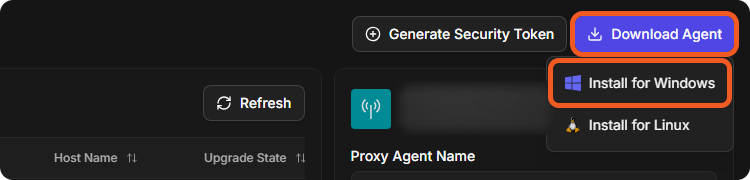
The automatic upgrading process assumes pre-existing version 16.8.206.0+ Windows Proxy Agent installation. The latest agent can be downloaded from Configuration > Proxy Agent Management > Download Agent > Install for Windows. For detailed installation instructions, please refer to our installation guide.
READER NOTE
-
As of July 2024:
-
Agent versioning aligns with the D3 vSOC versioning.
-
Downgrading to a lower version is not supported.
-
-
To enable automatic agent updates, the D3 vSOC must be upgraded to version 16.8.206.0 or higher first.
-
For questions regarding D3 vSOC upgrade, please contact the D3 Support Team.
-
Agent Upgrade Workflow
Through a built-in task manager, D3 vSOC periodically monitors a status indicator in agents to determine whether any updates are necessary. Upon the release of a new agent version, the built-in task manager within D3 vSOC will pause all currently active tasks linked to the agent to avoid interference. In addition, new tasks are held until the upgrade completes.
Agent Upgrade Status
-
Ensure that the Windows Proxy Agent is version 16.8.206.0 or higher.
-
If it is not, refer to the Windows Proxy Agent installation guide to upgrade.
-
If the Windows Proxy Agent is already version 16.8.206.0 or higher, the auto-upgrading process will take effect after the vSOC upgrade.
-
-
Check the agent's Version and Upgrade State on the Proxy Agent Management page: select the agent and look under Proxy Agent Details.
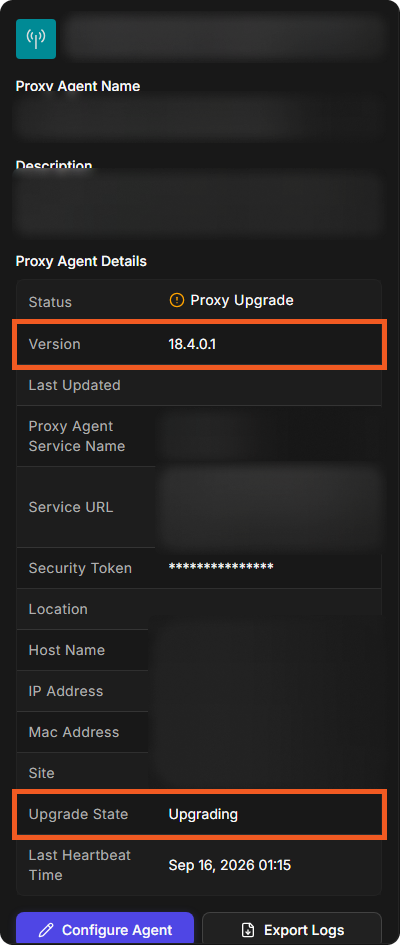
The Upgrade State can be any of the following:
|
N/A |
Indicates the agent upgrade is complete. Verify that the version is 16.8.206.0 or higher to confirm a successful upgrade. |
|
Request |
Indicates that the upgrade process has been initiated. |
|
Upgrading |
Indicates that the upgrade is currently in progress. |
|
Error |
Indicates the agent upgrade has failed. |
|
Ready |
Indicates that the agent has completed all tasks and is prepared for an upgrade. |
|
Done |
Indicates that the agent upgrade is complete, and the system is restarting to connect to D3 vSOC. |
READER NOTE
-
If an agent upgrade fails, its Upgrade State shows Error. For help, contact the D3 Support Team.
If all upgrade attempts fail, please contact D3 Support for assistance.