
Last Updated: October 23, 2026
Overview
The control flow of a playbook is the order its tasks run in. On the canvas it is drawn as arrows from the trigger node to the tasks, and from task to task. Each task also has run options that decide whether it runs by itself and how it waits for the tasks before it.
Connecting Tasks
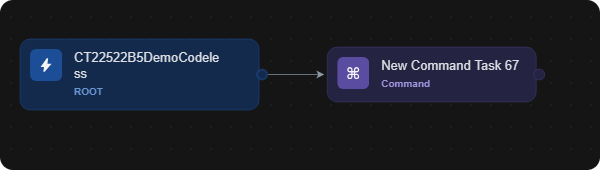
When you add a task with the + button on the right edge of a node, the new task is connected to that node with an arrow, so it runs after it. See Playbook Tasks.
A task connected to the trigger node
Branches are built with conditional tasks, and a codeless playbook command can be used inside another playbook. See Conditional Tasks and Nested Playbooks.
Run Mode
Run Mode in a task's settings sets how the task waits for the tasks connected before it. The options are:
-
Wait for Any, Run Always (the default)
-
Wait for Any, Run Once
-
Wait for All
Task Run Options
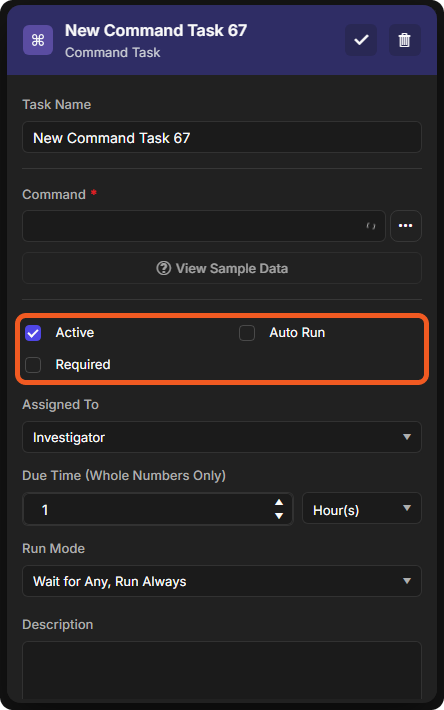
The run options are at the top of a task's settings, under the command.
-
Active: the task is in use. It is ticked by default.
-
Auto Run: the task runs by itself when its turn comes.
-
Required: shown when Auto Run is not ticked, together with Assigned To and Due Time (Whole Numbers Only).
-
Long Run: shown for some commands, for example Extract Domains from Text in an investigation playbook.
Run options with Auto Run off
Run options with Auto Run on
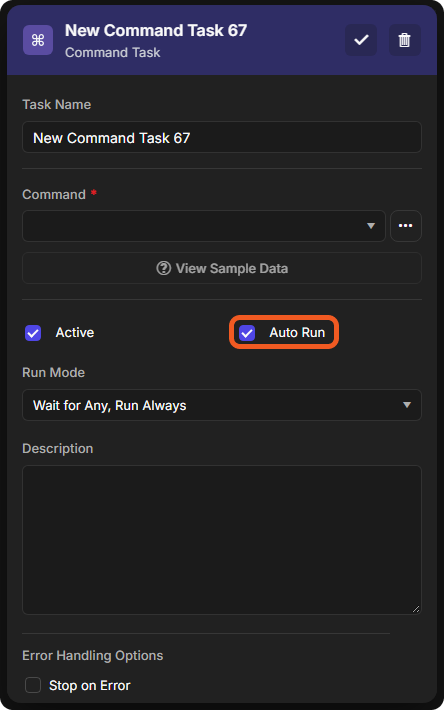
In a new task of an investigation playbook, Auto Run is ticked by default. In a new task of a codeless utility command, it is not.