
Last Updated: mar 25, 2025
D3 system commands are primarily written in Python scripts. These system scripts are similar to custom Python scripts, so this section explains how to write effective custom Python scripts using D3 scripting practices.
Command & Script
Below are the facts that demonstrate how the D3 command is being implemented and associated with the Python script.
-
Each system/custom command is associated with a Python function, whose name matches that of the internal name.
-
All system/custom commands of integration should be written in a system/custom Python script
-
For the same integration, the custom script includes the system script codebase, even though it is not displayed in the UI. Users can reference functions, classes, and variables from the system script.
-
The functions, classes, variables, and modules in the custom scripts can override those defined in the system script if they share the same name.
-
Input parameters are passed to the corresponding command function in order. Users can reference parameters in either of the following ways.
Pythondef commandName(param1,param2,param3): def commandName(*args): param1,param2,param3 = args[0],args[1],args[2]
-
For integration command, connection parameters can be referenced by the global variable `runtime`, using either way:
Pythonruntime['connector']['serverurl']or
Pythonruntime.get('connector',{}).get('serverurl','<your default value>') -
Output data can be separated into result data, return data, raw data, errors log and passdown data, and turn into command output through function `pb.returnOutputModel`. For details, refer to Return Output Model.
-
One custom integration can only define one system-defined command, which includes testconnection, fetchevent, fetchincident, etc.
Convention
-
Do not define a class named PlaybookRunTime. It is reserved for D3 playbook engine.
-
Do not define a class named APIError. It is reserved for D3 playbook engine.
-
Do not define a class named HTTPAPIError. It is reserved for D3 playbook engine.
-
Do not define a variable or object named pb. It is reserved for D3 playbook engine.
-
Do not define a variable or object named args. It is reserved for D3 playbook engine.
-
Do not define a variable or object named runtime. It is reserved for D3 playbook engine.
-
Do not define a variable or object named input. It is reserved for D3 playbook engine.
-
Do not use the different function name from the command name in the command script.
-
Do not import a library which is neither Python standard library nor D3 3rd party library.
-
Use pb.log function to output the standard output instead of using print function, or any other function.
-
Data must be returned and output from the command through pb.returnOutputModel()
-
Do not include OAuth 2.0 logic in the command because D3 custom integrations currently do not support OAuth 2.0 authentication.
Return Output Model
The return output model is a D3 helper function that formats the return data of a command into D3 output model.
pb.returnOutputModel( result, returnData, keyFields, contextData, rawData, errors, passdownData)
READER NOTE
The returnData should return the status of the command which is either Successful, Partially Successful, or Failed. It it suggested to keep both the keyFields and contextData fields as an empty string "", as these fields are deprecated.
Error Handling
The success or failure of a command is determined solely by the errors field. If the errors field is not False, indicating the presence of an error message, the command will fail.
READER NOTE
errors field is a text field where it should only include one error message.
Although the returnData contains the status of the command, it is not directly related to the success or failure of the command. This means that if returnData is ‘Failed' and the errors field is empty, the command will still be considered successful.
User Case I
When a command generates multiple error messages, the errors field can store only a single text value. To preserve all errors, users can place a general message in the errors field and store the detailed error messages in the errorMessages field within rawData. In this case, the rawData field should use a JSON object format, with error messages stored as an array. This approach preserves all error details while maintaining organized error handling.
User Case II
When a command execution includes multiple requests, individual requests may return errors without requiring the entire command to fail. To handle these cases, users can store error messages in the rawData field instead of the errors field. This allows the command to return a Partially Successful status while preserving successful results and handling errors individually.
# This is the JSON format for rawData field that D3 recommend to use in case of handling multiple errors.

rawData = {
results: [<response rawData>]
errorMessages: [<error Messages>]
}
READER NOTE
Retry a command in order to handle a specific error. Please refer to Command Retry Mechanism
Passdown
To enable the scheduled advancement of a timed command, a Passdown data must be configured to contain the next start time. This ensures that the command is pushed according to the specified schedule.
READER NOTE
For more information on how and when to set passdown data, please reference the real case in the code sample - Fetch Event/Fetch Incident Passdown Data.
D3 Python Library
Utility Command & Integration Command Calls
Custom Python scripts can use built-in D3 system utility commands and integration commands.
To call a Utility Command within the Python Script
D3.Utility.{Command Name}<{Command Type}>(parameters)
def utilityCommandCalls():
    return D3.Utility.concatToRear <Text>("Join ", "Text")
WARNING
Please be aware that Command Name is the internal name of the command
Command Type is the first parameter type of the command.
Here are some useful and commonly used utility commands in the custom Python Script
|
Command Internal Name |
Command Display Name |
Description |
Calls |
Input |
Output |
|
equals |
Text Equals to |
Checks if the two input texts are identical |
D3.Utility.equals<Text>("ASOC","ASOC") |
Input 1 - Text ASOC Input 2 - Text ASOC |
Return Data - Data Type: Boolean true |
|
contains |
Contains Text |
Checks if the input text contains the specified text |
D3.Utility.contains<Text>("Welcome to use the ASOC product","ASOC") |
Input - Text Welcome to use the ASOC product Search Value - Text ASOC |
Return Data - Data Type: Boolean true
|
|
GetUTCTimeNow |
Get Current UTC Time |
Gets current UTC time |
D3.Utility.GetUTCTimeNow<>() |
Site: dropdown list |
Return Data - Data Type: Text "2020-05-28 23:08:39"
|
|
ExtractArtifactsToJsonObjectArrayWithArrayKeyValueO |
Extract Key/Value Pairs from JSON Object |
Extracts values of specified keys from a JSON Object |
D3.Utility.GetUTCTimeNow<>() |
Input - JSON Object The JSON Object to extract some key's value from Sample Data { "IPAddress": "***.***.***.***", "RiskLevel": "Low", "Type": "Cyber" } Keys - Text Array The keys list Sample Data [ "IPAddress", "RiskLevel" ]
|
Context Data - Data Type: JSON Object: { "IPAddress": "***.***.***.***", "RiskLevel": "Low" } |
|
greaterThan |
Greater than |
Checks if the first number is greater than the second number |
D3.Utility.greaterThan<Number>(8000,8000) |
Input 1 - Number 8000 Input 2 - Number 8000
|
Return Data - Data Type: Boolean false
|
READER NOTE
For more information about the Utility Commands, please refer to the Utility Command
To call an Integration Command within the Python Script
D3.Integration.{Integration Name}.{Command Name}(parameters)
READER NOTE
Data type is not necessary
The limitations are:
-
Only custom Integration Commands can execute other Integration Commands that belong to the same Integration
-
Custom Utility Commands cannot execute any Integration Commands.
D3 Helper Functions
D3 provides users with pre-defined helper functions to assist developers in writing cleaner, more modular, and efficient code in D3 ways.
Each helper function can be used with pb.{function name}
isJson(jsonString)
-
Returns
Trueif the input is valid JSON, else returnsFalse. -
Parameters:
-
jsonString:the JSON string to validate
-
Sample Input: pb.isJson('{"Simple":"Simple JSON"}')
Sample Output: True
log(message)
-
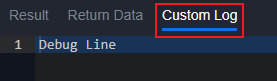
Log any message to show in the Custom Log tab. The tab will only show when testing command
Sample Input: pb.log("Debug Line")
Sample Output:
returnOutputModel(result, returnData, outputData, contexData, rawData, error, passdownData={})
-
Generates our D3 output model. Recommended to be used for writing custom commands.
-
Parameters:
-
result: HTML formatted data displayed in the Result tab -
returnData: Simple data that can be directly used by subsequent commands -
outputData: Should be left empty. This will be automatically generated using Key Fields configuration -
contextData: Contextual data to be shared with other tasks -
rawData: Raw data from the command -
error: Error details -
passdownData: An Event Intake and Incident Intake related field that can pass down parameter values to the next scheduled instance.
-
Sample Input:
pb.returnOutputModel("<body><h1>Sample Result Data</h1></body>", "Sample Return Data", "", {"SampleContextData": "ContextData"}, {"SampleRawData": "Rawdata"}, "Sample Error", passdownData = {})
Sample Output:
{
  "result": {
    "description": "<body><h1>Sample Result Data</h1></body>",
    "references": [],
    "actions": []
  },
  "returnData": "Sample Return Data",
  "outputData": "",
  "contextData": {
    "SampleContextData": "ContextData"
  },
  "rawData": {
    "SampleRawData": "Rawdata"
  },
  "error": "Sample Error",
  "passdownData": {},
  "customLog": "",
  "others": {}
}
uploadFile(fileObject)
Uploads a file to D3 as Playbook File (PB_FILE). The function accepts a JSON object with file metadata, including the file name and content.
Parameter:
-
fileObject (JSON object): A dictionary representing the file to be uploaded. It must follow the structure:
Python{ "file": (fileName, fileContent) }-
fileName (string): The name of the uploaded file.
-
fileContent (string): The file content in binary format.
-
Example of fileObject:
{
    "file": (
        "example.txt",
        b"Sample binary content of the file"
    )
}
Return:
Upon successful upload, the function returns a JSON object containing the following fields:
-
fileId(string): A unique identifier assigned for the uploaded file. -
fileName(string): The name of the uploaded file. -
md5(string): The MD5 checksum of the uploaded file, used to verify its integrity. -
sha1(string): The SHA-1 hash of the uploaded file, used for additional integrity verification. -
sha256(string): The SHA-256 hash of the uploaded file, used for enhanced integrity checks.
Example Usage:
fileObject = {
    "file": ("example.txt", b"File content in binary")
}

response = uploadFile(fileObject)
# response = {'fileId': '115924', 'fileName': 'example.txt', 'md5': '517A6396037BE94D96EF2D00AB65C913', 'sha1': '2E46DD7BF55755FE5938181E4335252FE207B609', 'sha256': '9D5CFCA834F1F67EFF7A1A57B2FAD25FBB4544C4845B99F0238357315271E2C2'}
The uploadFile function is often used in conjunction with the formatDownloadFileResult function to generate an HTML table displaying the metadata of uploaded files and providing direct download links for each file.
def Uploadfile(*args):
    rawData = {}
    resultData = {}
    returnData = "Successful"
    contextData = ""
    keyFields = {}
    error = ""
    fileObjects = [{"file": ("example1.txt", b"File example 1")}, {"file": ("example2.txt", b"File example 2")}]
    fileResults = []
    for fileObject in fileObjects:
        result = pb.uploadFile(fileObject)
        fileResults.append(result)
    resultData, reference = pb.formatDownloadFileResult(fileResults)
    return pb.returnOutputModel(resultData, returnData, keyFields, contextData, rawData, error, reference)
-20240925-023816.png?cb=cf5bc0f826c06d679ad06511a2805021)
downloadFile(fileid, filesource)
Retrieves a file based on the provided fileID and fileSource. It returns the file name and content, enabling access to files from sources such as incident attachments, playbook files, or artifact files.
Parameters:
-
fileid (string): A unique identifier for the file to be retrieved.
-
filesource (string): The source of the file. The options are:
-
IR_ATCHMNT- Incident attachment files -
PB_FILE- Playbook files -
KC_AF_FILE- Artifact files
-
Return:
The function returns a tuple containing the file name and file content:
-
fileName (string): The name of the downloaded file.
-
fileContent (string): The actual content of the file in binary format.
Example Usage:
response = pb.downloadFile("115924","PB_FILE")
# response = ("example.txt", b"File content in binary")
READER NOTE
Generally, when retrieving binary content through a file, if the file is base64 encoded, the client needs to decode or normalize the binary content for subsequent use. After the file content has been properly decoded, it can be sent to a third-party integration for analysis via an API request or processed through a built-in command.
Debugging & Testing
When writing D3 Python scripts, users can log command execution output with the pb.log() helper function.
-
Logged data will be displayed in command testing, and in playbook runtime while testing a playbook.
-
Logged data will be saved even if the command exits due to an exception.
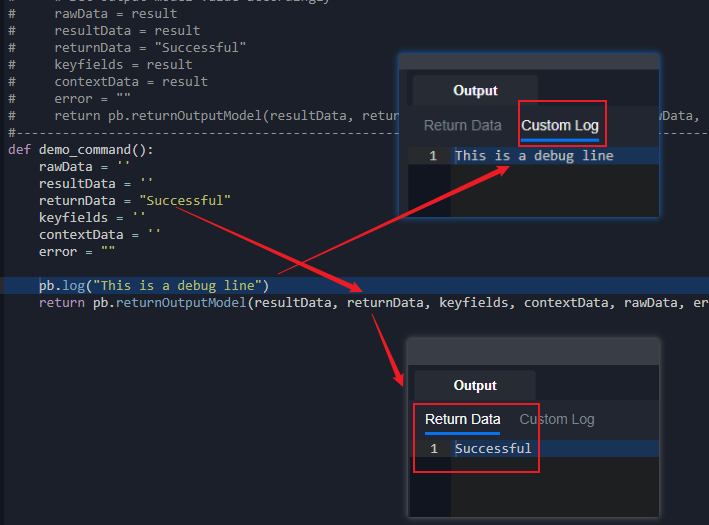
Use the traceback library to get the full stack trace of exceptions.
-
Stack traces will match the line number of the command script if a command exits due to an exception.
-
Use
traceback.format_exc()to get full stack trace during exception handling.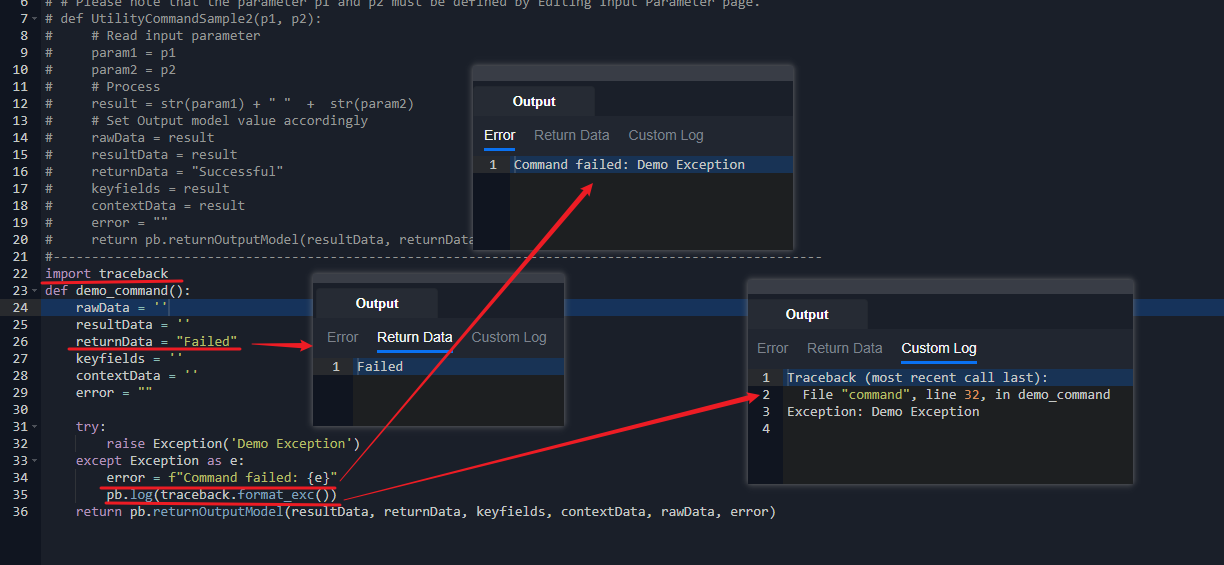
Command Retry Mechanism
If a command fails unexpectedly, users can return "__RETRY__" as returnData in the D3 output model to rerun the command. The retry count can be retrieved using pb.runtime.get('retrycount', 0).
def retrySample():
    errors = []
    rawData = []
    result = []
    returnData = "Failed"
    # get the retry count
    retrycount = pb.runtime.get("retrycount", 0)
    # retry if updateEvents throw an expection and the retry count is less than 10. It will stop at the 10th time and return "Failed"
    try:
        return updateEvents()
    except Exception:
        if retrycount < 10:
            retryOptions = {
                "__ACTION__": "__RETRY__",
                "__DELAY__": [10, 20, 30, 40]
            }
            return pb.returnOutputModel(result, retryOptions, "", "", rawData,
                                        errors)
    return pb.returnOutputModel(result, returnData, "", "", rawData, errors)
Code Sample
Fetch Event/Fetch Incident
Schedule Command Execution
During data ingestion schedules, each command execution can have a different end time. Adjust the end time based on the start time provided in the command input parameters.
Case 1: When Current Time (UTCNowTime) - Start Time >= 1 hour, the schedule is significantly behind. In this case, the command should catch up to the current time to maintain schedule responsiveness.
Solution: Since the MAX catch up time D3 recommend is 1 hour, the End Time should be set to 1 hour after Start Time.
EndTime = StartTime + 1 hour
Case 2: If Current Time (UTCNowTime) - Start Time < 1 hour, it means that the schedule is either a little behind or right on time.
Solution: Since the schedule is either on time or a little behind, the End Time should be set to the current time to make the schedule responsive to the present timeline.
EndTime = UTCNowTime
Tolerance Scope
As the data of the product may have a gap between the data generated in the product and then able to be queried by the REST API service, we often need to set a tolerance scope in minutes for the command to cover a little bit past time to get the data that generated but not able to be ingested by the REST call.
Calculate the Start Time by applying the Tolerance Scope: StartTime = StartTime - ToleranceScope
Passdown Data
Since fetchEvent and fetchIncident commands are usually time-sensitive, it is important to schedule the next start time for the next round of fetch events/incidents. In our system commands, this situation is handled as long as the start time of the command and the schedule interval is filled. If a custom fetchEvent/fetchIncident is needed, the next start time can be handled by the passdown data.
Calculate the next start time which basically will be the current end time of the current task and set it to the passdown data object with the key StartTime and set the format to D3's datetime format "%Y-%m-%d %H:%M:%S".
After generating the Passdown data, it must be set in the return model to be used for the next schedule
Passdown = {
    "StartTime": EndTime.strftime("%Y-%m-%d %H:%M:%S")
}
return pb.returnOutputModel(result, returnData, "", "", returnData, errors, passdownData=Passdown )
Sample Code
def fetchEvent(*args):
    # args[0]: StartTime
    # args[1]: EndTime
    # args[2]: topRecentEventNumber
    # args[3]: SearchCondition
    # args[4]: ToleranceScope

    errors = []
    returnData = ""
    result = ""
    returnData = "Successful"

    passdown = {}
    passdownMinutes = int(args[4])

    # Only calculate the endTime when the Tolerance scope has a value which indicate the task is for schedule
    def _calcEndTime(start, endTime):
        if start < datetime.utcnow() - timedelta(hours = 1):
            if endTime < datetime.utcnow() - timedelta(hours = 1):
                nextEndtime = endTime + timedelta(hours = 1)
            else:
                nextEndtime = datetime.utcnow()
        else:
            if endTime >= datetime.now():
                endTime = datetime.now() # auto-adjustment invalid input time


        passdown = {
            "StartTime": endTime.strftime("%Y-%m-%d %H:%M:%S")
        }

        return Endtime, passdown


    try:
        startTime, endTime = args[0].replace(tzinfo=pytz.utc), args[1].replace(tzinfo=pytz.utc)
        topRecentEventNumber = int(args[2])

        if args[4] > 0:
            endTime, passdown = _calcEndTime(startTime, endTime)
            startTime = startTime - timedelta(minutes = int(args[4]))


        ## conn is a variable with the credential setup
        params = {
            "startDate": startTime,
            "endDate": endTime,
            "filter": args[3]
        }

        ## remove the datetime in the request field if the year value is 1900
        if startTime.year == 1900:
            params.pop("startDate")
        if endTime.year == 1900:
            params.pop("endDate")


        returnData, error = conn.sendRequest("GET", "REST endpoint path", params=params)
        if not error:
            caseItems = returnData.get("results", [])
            if topRecentEventNumber > 0:
                caseItems = caseItems[:topRecentEventNumber]
                returnData["results"] = caseItems
            result = {
                "Start Time (UTC)": startTime.strftime("%Y-%m-%d %H:%M:%S"),
                "End Time (UTC)": endTime.strftime("%Y-%m-%d %H:%M:%S"),
                "Events Count": len(caseItems)
            }
        else:
            errors.append(error)

        if len(errors) == 0 and len(caseItems) == 0:
            returnData = "Successful with No Event Data"
        elif len(errors) > 0 and len(caseItems) > 0:
            returnData = "Partially Successful"
        elif len(errors) > 0 and len(caseItems) == 0:
            returnData = "Failed"

    except Exception as ex:
        errors += list(ex.args)
        returnData = "Failed"

    return pb.returnOutputModel(result, returnData, "", "", "", errors, passdownData=passdown)
Test Connection
To test an integration connection, manually send a request to the third-party API and monitor the response. If the response indicates a connection issue, the test connection command should fail. Otherwise, it should succeed.
READER NOTE
Test connection commands can be scheduled for periodic connection health checks. D3 recommends using low-impact, low-cost requests, such as simple GET requests, when building test connection commands.
Sample Code
def TestConnection():
    # Set output model initial value
    rawData = ""
    resultData = ""
    returnData = ""
    keyFields = ""
    contextData = ""
    error = ""

    # Process and set output model value
    try:
        r = requests.get(url="http://ip.jsontest.com/", verify=False)
        if(r.ok):
          rawData = r.json()
          returnData = "Successful"
        else:
          error = "cannot connect to the site."
    except Exception as e:
        error = str(e)
        returnData = "Failed"
    return pb.returnOutputModel(resultData, returnData, keyFields, contextData, rawData, error)