
Last Updated: Oct 5, 2024
Introduction
Normalization structures data consistently to reduce redundancy, improve processing efficiency, and simplify management. In addition, normalization also improves playbook adaptability and enables more effective integration, search, and correlation across the security stack.
D3's 3-Tier Data Model
D3's data model is designed with a flexible three-tier structure:
-
Subevent
-
Event
-
Incident
This hierarchical model provides the flexibility to map external events or flows into D3 in different ways based on the desired structure and event importance. The three levels support systematic categorization at varying levels of detail.
Mapping External Systems to D3
Example with QRadar Integration:
-
Option 1
-
QRadar Offenses → D3 Events
-
QRadar Events or Flows → D3 Subevents
-
-
This approach uses the D3 pipeline to filter false positives and dismiss offenses as events. Maintaining granular detail helps identify and handle false positives before escalation, ensuring that only significant threats progress through the incident response process.
-
Option 2
-
QRadar Offenses → D3 Incidents
-
QRadar Events or Flows → D3 Events
-
-
This approach is suitable when all offenses are confirmed true positives and should be mapped directly to incidents. Mapping offenses directly to incidents prioritizes immediate incident response and removes the need for the subevent level.
Benefits of the 3-Tier Model
The flexibility provided by D3's 3-tier model offers several advantages:
-
Adaptability to Various Systems: Easily accommodates different external alert structures and systems without sacrificing clarity or efficiency.
-
Scalable Data Organization: Supports granular and high-level data structuring to match operational requirements.
-
Improved Incident Response: Facilitates more effective incident tracking and management by providing a clear hierarchy of information.
-
Enhanced Playbook Effectiveness: The structured data model allows playbooks to be more adaptable, increasing their effectiveness across different scenarios.
-
Efficient Cross-Tool Integration: Normalized data improves search, correlation, integration, and analysis across the security stack.
Field Mapping in D3: Aligning with D3 Data Model and Normalization
Effective data ingestion and normalization are crucial for incident management and response in today's complex security environments. D3 uses a flexible 3-tier data model—Subevent, Event, and Incident—to structure and process incoming data from various sources. Field mapping serves as a vital bridge between external data points and how they are represented within this model on the D3 investigation dashboard.
This document outlines how field mapping works in the context of the 3-tier data model and explains the inheritance of mappings between event sources and the main JSON field mapping.
The 3-Tier Data Model
1. Subevent
-
Definition: The most granular level, representing individual data points or raw alerts from integrated systems.
-
Source: Raw data from systems like SIEMs, EDRs, email protection tools, etc.
-
Purpose: Subevents are undetermined data points that haven't yet been assessed for potential security risks.
2. Event
-
Definition: A collection of subevents that are related or grouped together based on predefined criteria.
-
Source: Aggregated subevents that share common attributes or are correlated through rules.
-
Purpose: Events help in organizing and making sense of multiple subevents by grouping them logically.
3. Incident
-
Definition: A higher-level aggregation of events that require investigation and response.
-
Source: One or more events that are flagged as potentially malicious.
-
Purpose: Incidents are actionable items that the security team needs to address, often triggering playbooks and workflows.
Why Field Mapping?
Field mapping ensures that data from integrated sources is accurately represented within the D3 platform's 3-tier data model. It provides a standardized data format for consistency, facilitating data correlation, efficient automation, and streamlined incident handling.
How Field Mapping Works
Field mappings are configured for commands that retrieve data from external sources:
-
Fetch Event: Retrieves data and inputs them as events into D3.
-
Fetch Incident: Retrieves data and inputs them as incidents into D3.
READER NOTE
-
For Fetch Event commands, configure Event Field Mapping, which also supports subevent mapping.
-
For Fetch Incident commands, both Event and Incident Field Mappings need to be configured.
Field Mapping Configuration
Event Field Mapping
For built-in integrations, D3 provides default event field mappings. Users can modify existing mappings or add new mappings to meet their requirements. Configure event field mapping by navigating to: Configuration > Integrations > [The Desired Integration] > Event Intake > Setup Event Field Mapping
Event Sources
Some third-party platforms, like SIEM or XDR, offer different types of retrievable data. Most built-in integrations come with a single default event source that covers most data ingestion needs, but there are exceptions. For example, Microsoft Sentinel SIEM provides various data types for ingestion, such as incidents, events, and alerts. Each of these requires a separate event source, and data schemas can differ significantly, like between network events and user events, even though they all come from Microsoft Sentinel.
Inheritance of Mappings
Field mappings are inherited between default event source mappings and additional event source mappings. Mappings defined at the default event source level are automatically applied to all events within that source unless overridden. This inheritance model ensures consistency and simplifies configuration.
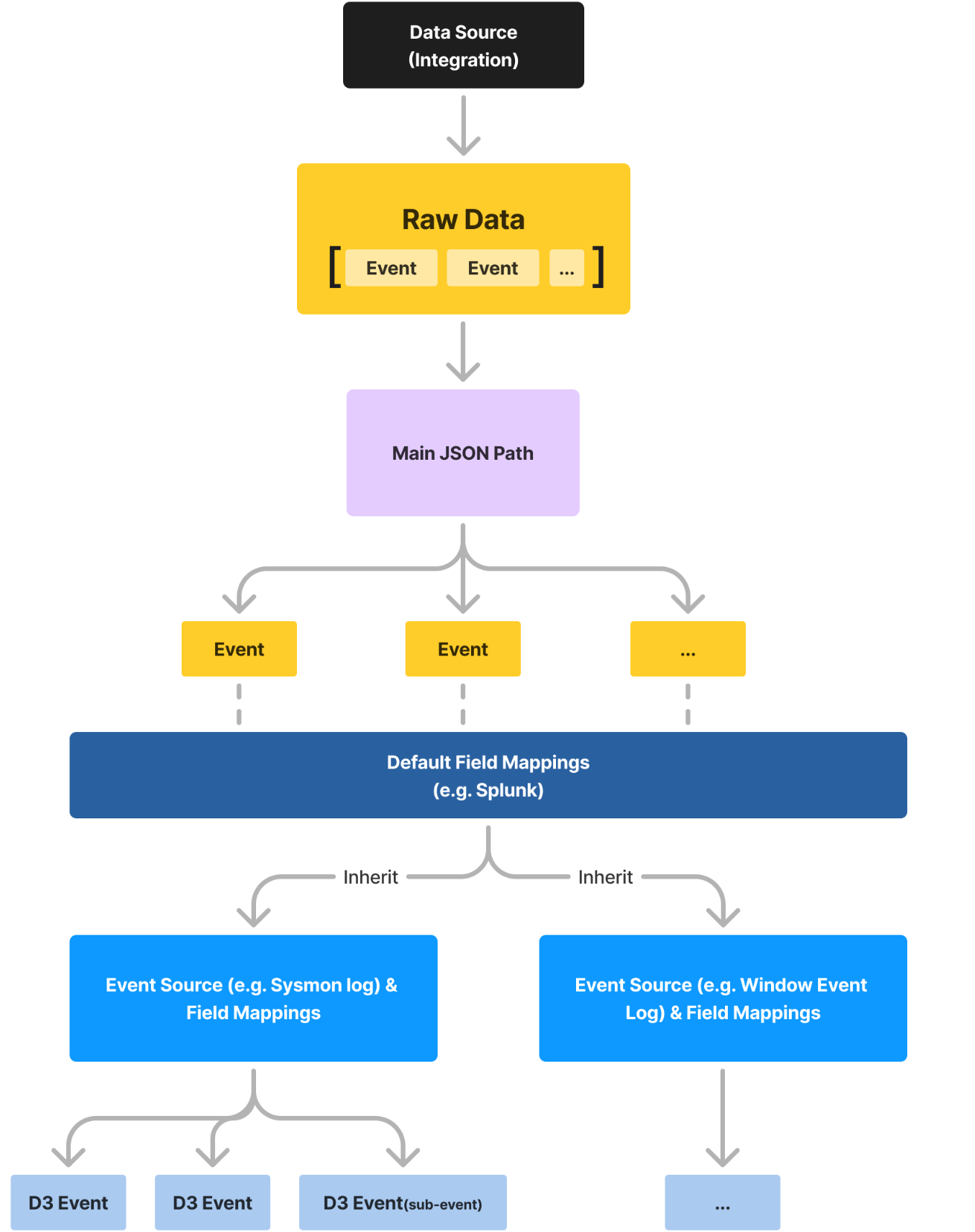
Main Event JSON Path
The Main Event JSON Path specifies the parent JSON array in the ingested data's structure for the event source. By configuring this path, the system knows where to look for the relevant data.
Example Consider the following condensed JSON structure representing event data:
{
    "@odata.context": "https://graph.microsoft.com/v1.0/$metadata#...",
    "value": [
        {
            "id": "AAMkAGI5ODVlN...",
            "createdDateTime": "2021-05-13T21:48:49Z",
            "subject": "Phishing1",
            // Additional fields...
        }
    ]
}
The most relevant event data resides under the key $.value. By setting the Main Event JSON Path to $.value, you can simplify field mappings by referencing fields directly (e.g., .id, .subject) without repeating the full JSON path.
Inheritance
The Main Event JSON Path is inherited by all event sources under the fetch command. This means that once set, it applies to all mappings within that event source.
Search String
The Search String feature enables an event source to be added by sifting through ingested data, focusing solely on specific values or based on regular expressions.
Format
Search strings can be specified using one of the following formats:
-
{jsonpath}=value -
{jsonpath}={{regex}} -
jsonpath=value
Example To capture only events from Office 365 with a "high" importance level found at the path $.value.importance, set the search string to $.value.importance=high.
Order Priority
When several event sources are set up for a fetch command, the system gives precedence to the event source with the lowest Order Priority number, especially in cases of overlapping field mappings.
Mapped Fields
Event sources have fields that map the relationship between ingested data and an event field in D3.
-
Source Field: The JSONPath of the key to map from the ingested JSON data. When a Main Event JSON Path is configured, fields can be referenced relative to that path.
-
Source Type: The data type of the mapped field, such as Text, Datetime, Regex, or Placeholder.
Source Types Explained
-
Text: Formatted as plain text.
-
Datetime: Formatted as a datetime field (default format:
yyyy-MM-dd HH:mm:ss). -
Regex: Applies a regular expression to filter the field value.
-
Placeholder: Concatenates values from multiple mapped fields into a single text field.
Unique Key Field Mapping
The Unique Key field mapping tells D3 how to distinguish each event or incident upon ingestion and prevent duplicates.
Behavior
-
If the Unique Key Field is Mapped:
-
Only data with a unique key value is ingested.
-
New data containing an existing unique key with different raw event data will not be ingested.
-
-
If the Unique Key Field is NOT Mapped:
-
Only data containing unique raw data is ingested.
-
Data with identical raw event data as any existing data in the system will not be ingested.
-
Incident Field Mapping
Incident field mapping is available for Fetch Incident commands. It maps incident-specific fields from ingested data to D3 incident fields.
Configuration
Incident field mapping can be configured by navigating to:
Configuration > Integrations > [The Desired Integration] > Incident Intake > Setup Incident Field Mapping
Required Mappings
Both Event and Incident Field Mappings need to be configured for Fetch Incident commands.
Incident Fields
The following incident-specific system fields can be mapped:.
-
Title
-
Description
-
Severity
-
Incident Type
-
Incident Creator
-
Incident Owner
-
Incident Playbook
-
Due Date
-
Unique Key
-
Tactics
-
Techniques
Main JSON Path for Incidents
Some systems offer incidents with embedded sub-events. The Main JSON Path specifies where the incident data starts in the JSON structure. If not specified, it defaults to the root path.
Inheritance
When a Main JSON Path is configured for incidents, it applies to all incident sources within the Fetch Incident command.
Site-Specific Mappings
Each site can have its own unique incident field mappings, allowing various sites to have distinct incident sources and associated mappings. By default, all sites utilize the "Default Site" mappings.
Customization Steps
-
Choose the desired site.
-
View or adjust its "Default Incident Source."
-
Modify mappings as needed.
Incident Sources
Multiple incident sources can be configured for each site. Adding a new incident source is optional unless a custom search string is required.
Search String and Order Priority
Similar to event sources, incident sources can utilize Search Strings and Order Priority to filter and prioritize data ingestion.
Unique Key Field Mapping for Incidents
The Unique Key field mapping for incidents functions similarly to that for events.
Behavior
-
If the Unique Key Field is Mapped:
-
Incidents with a unique key value are ingested.
-
If an incoming incident shares the same unique key as an existing one but presents different data, the original incident is replaced with the updated data.
-
-
If the Unique Key Field is NOT Mapped:
-
Only incidents containing unique raw data are ingested.
-
Incidents with identical raw data to what's already in the system will be excluded.
-
D3 Data Model Fields
The D3 data model includes a comprehensive set of built-in fields designed to standardize and organize event and incident data within the platform.
Built-In fields
Show / Hide Built-In Fields
|
Display Name |
Internal Name |
Data Type |
Description |
Special behavior |
|
Source vendor name |
Source |
Text |
The name of the vendor providing the source. |
|
|
Source type |
SourceType |
Text |
The type of source from which the event originated. |
|
|
Source vendor product name |
SourceVendorProduct |
Text |
The product name from the vendor associated with the source. |
|
|
Source product version |
SourceVersion |
Text |
The version of the source product. |
|
|
Operating system |
Os |
Text |
The operating system on which the event occurred. |
|
|
Original event ID |
EventRecordID |
Text |
The unique identifier for the original event. |
|
|
Event code |
EventID |
Text |
The code that identifies the specific event. |
|
|
Rule name |
RuleName |
Text |
The name of the rule that triggered the event. |
|
|
Severity |
Severity |
Text |
The severity level assigned to the event. |
|
|
Severity numeric ID |
SeverityId |
Text |
The numeric identifier for the severity level. |
|
|
Event name |
EventName |
Text |
The name assigned to the event. |
|
|
Event category |
EventCategory |
Text |
The category that classifies the event. |
|
|
Event Type |
EventType |
Text |
The classification of the event type. |
|
|
Action taken |
Operation |
Text |
The action that was taken during the event. |
|
|
Delay (ms) |
Delay |
Text |
The delay in milliseconds for the event processing. |
|
|
Action result |
ActionResult |
Text |
The outcome of the action taken during the event. |
|
|
Action result ID |
ActionResultId |
Text |
The identifier for the action result. |
|
|
Status |
Status |
Text |
The current status of the event or process. |
|
|
Description |
LogDescription |
Text |
A descriptive text detailing the event. |
Event Description |
|
Application layer protocol |
ApplicationProtocol |
Text |
The protocol used at the application layer for the event. |
|
|
Transport layer protocol |
TransportProtocol |
Text |
The protocol used at the transport layer. |
|
|
Protocol info |
ProtocolInfo |
Text |
Additional information about the protocol used. |
|
|
Pipe name |
PipeName |
Text |
The name of the communication pipe used in the event. |
|
|
Tag |
tag |
Text |
A label or tag associated with the event. |
|
|
Start time (UTC) |
UtcTime |
DateTime |
The original start time of the event in UTC. |
The original UTC Start time of the event UtcTime populate 'Time of Occurrence (UTC)' |
|
End time (UTC) |
EndTimeUtc |
DateTime |
The original end time of the event in UTC. |
The original UTC End time of the event |
|
Receipt time |
ReceiptTimeLocal |
DateTime |
The local time when the event was received. |
|
|
Aggregated / Correlated Event count |
EventCount |
Text |
The total number of events that were aggregated or correlated. |
|
|
Event level |
EventLevel |
Text |
The severity or level of the event. |
|
|
Alert type |
AlertType |
Text |
The type or category of alert generated by the event. |
|
|
Change type |
ChangeType |
Text |
The type of change that occurred during the event. |
|
|
DLP type |
DlpType |
Text |
The type of Data Loss Prevention (DLP) classification. |
|
|
IDS type |
IdsType |
Text |
The type of Intrusion Detection System (IDS) involved. |
|
|
Raw event data |
RawEvent |
Text |
The unprocessed raw data from the event. |
|
|
Host FQDN |
HostFQDN |
Text |
The fully qualified domain name of the host involved in the event. |
SourceProcessGuid --> Internal Endpoints/External Endpoints |
|
Hostname |
HostName |
Text |
The name of the host associated with the event. |
SourceProcessGuid --> Internal Endpoints/External Endpoints |
|
Source |
Src |
Text |
The source involved in the event. |
|
|
Source host FQDN |
SrcHostFQDN |
Text |
The fully qualified domain name of the source host. |
SourceProcessGuid --> Internal Endpoints/External Endpoints |
|
Source hostname |
SourceHostname |
Text |
The hostname of the source entity. |
create artifacts --> External Endpoint / Internal Endpoint External Endpoint Domain Name, IP |
|
Source MAC address |
SrcMac |
Text |
The MAC address of the source device. |
|
|
Source IP address |
SourceIPAddress |
Text |
The IP address of the source involved in the event. |
create artifacts --> External IP/Internal IP/ External Endpoint / Internal Endpoint, IP |
|
Source is IPv6 address |
SourceIsIpv6 |
Text |
Indicates whether the source IP address is IPv6. |
|
|
Source port |
SourcePort |
Text |
The port number used by the source. |
|
|
Source port name |
SourcePortName |
Text |
The name of the service associated with the source port. |
|
|
Source business unit |
SrcBunit |
Text |
The business unit associated with the source. |
|
|
Source category |
SrcCategory |
Text |
The category of the source involved in the event. |
|
|
Source Priority |
SrcPriority |
Text |
The priority level assigned to the source entity. |
|
|
Source NT domain |
SrcNtDomain |
Text |
The NT domain of the source entity. |
|
|
Source zone |
SrcZone |
Text |
The network zone associated with the source. |
|
|
Source interface |
SrcInterface |
Text |
The network interface used by the source. |
|
|
Source translated IP address |
SrcTranslatedIPAddress |
Text |
The translated IP address of the source (e.g., after NAT). |
|
|
Source translated port |
SrcTranslatedPort |
Text |
The translated port number of the source. |
|
|
Original source |
OrigSrc |
Text |
The original source before any translation occurred. |
|
|
Destination |
Dest |
Text |
The destination involved in the event. |
|
|
Destination FQDN |
DestFQDN |
Text |
The fully qualified domain name of the destination. |
SourceProcessGuid --> Internal Endpoints/External Endpoints |
|
Destination hostname |
DestinationHostname |
Text |
The hostname of the destination entity. |
Create artifacts --> External Endpoint / Internal Endpoint, External Endpoint Domain Name, IP |
|
Destination MAC |
DestMac |
Text |
The MAC address of the destination device. |
|
|
Destination IP address |
DestinationIPAddress |
Text |
The IP address of the destination. |
Create artifacts --> External IP/Internal IP/ External Endpoint / Internal Endpoint, IP |
|
Destination is IPv6 address |
DestinationIsIpv6 |
Text |
Indicates whether the destination IP address is IPv6. |
|
|
Destination port |
DestinationPort |
Text |
The port number used by the destination. |
|
|
Destination port name |
DestinationPortName |
Text |
The name of the service associated with the destination port. |
|
|
Destination translated IP address |
DestTranslatedIPAddress |
Text |
The translated IP address of the destination (e.g., after NAT). |
|
|
Destination translated port |
DestTranslatedPort |
Text |
The translated port number of the destination. |
|
|
Destination interface |
DestInterface |
Text |
The network interface used by the destination. |
|
|
Destination business unit |
DestBunit |
Text |
The business unit associated with the destination. |
|
|
Destination category |
DestCategory |
Text |
The category of the destination entity. |
|
|
Destination priority |
DestPriority |
Text |
The priority level assigned to the destination. |
|
|
Destination NT domain |
DestNtDomain |
Text |
The NT domain of the destination entity. |
|
|
Destination zone |
DestZone |
Text |
The network zone associated with the destination. |
|
|
Original destination |
OrigDest |
Text |
The original destination before any translation occurred. |
|
|
Device |
DvcHostName |
Text |
The device involved in the event. |
create artifacts --> External Endpoint / Internal Endpoint, External Endpoint Domain Name, IP |
|
Device business unit |
DvcBunit |
Text |
The business unit associated with the device. |
|
|
Device category |
DvcCategory |
Text |
The category of the device involved in the event. |
|
|
Device priority |
DvcPriority |
Text |
The priority level assigned to the device. |
|
|
Device zone |
DvcZone |
Text |
The network zone associated with the device. |
|
|
Device IP address |
DvcIPAddress |
Text |
The IP address of the device involved in the event. |
create artifacts --> External IP/Internal IP/ External Endpoint / Internal Endpoint, IP |
|
Device MAC address |
DvcMac |
Text |
The MAC address of the device involved in the event. |
|
|
Source username |
SrcUserName |
Text |
The username associated with the source. |
|
|
Source user business unit |
SrcUserBunit |
Text |
The business unit of the source user. |
|
|
Source user category |
SrcUserCategory |
Text |
The category of the source user. |
|
|
Source user priority |
SrcUserPriority |
Text |
The priority level assigned to the source user. |
|
|
Original recipient |
OrigRecipient |
Text |
The original recipient of the message. |
|
|
Recipient |
Recipient |
Text |
The recipient of the message. |
create artifacts --> Email Address |
|
Recipient count |
RecipientCount |
Text |
The total number of recipients. |
|
|
Recipient status |
RecipientStatus |
Text |
The current status of the recipient. |
|
|
Original sender |
OrigSender |
Text |
The original sender of the message. |
|
|
Sender |
Sender |
Text |
The sender of the message or email. |
create artifacts --> Email Address |
|
Log username |
LogUser |
Text |
The username associated with the log entry. |
|
|
Username |
UserName |
Text |
The username associated with the event. |
create artifacts --> User/Username |
|
User business unit |
UserBunit |
Text |
The business unit of the user involved in the event. |
|
|
User category |
UserCategory |
Text |
The category or role of the user. |
|
|
User priority |
UserPriority |
Text |
The priority level assigned to the user. |
|
|
Logon ID |
LogonId |
Text |
The identifier for the logon session. |
|
|
Logon GUID |
LogonGuid |
Text |
The GUID associated with the logon session. |
|
|
User security ID |
UserSID |
Text |
The security identifier (SID) of the user. |
create artifacts --> User/Username |
|
Content |
Content |
Text |
The content associated with the event. |
|
|
Duration |
Duration |
Text |
The duration of the event or process. |
|
|
TCP flags |
Flags |
Text |
The TCP flags set on the packet. |
|
|
Packets count |
PacketsCount |
Text |
The total number of packets transferred. |
|
|
Packets in |
PacketsIn |
Text |
The number of incoming packets. |
|
|
Packets out |
PacketsOut |
Text |
The number of outgoing packets. |
|
|
Bytes Count |
BytesCount |
Text |
The total number of bytes transferred. |
|
|
Bytes in |
BytesIn |
Text |
The number of incoming bytes. |
|
|
Bytes out |
BytesOut |
Text |
The number of outgoing bytes. |
|
|
Response time |
ResponseTime |
Number |
The time taken to receive a response. |
|
|
Initiated |
Initiated |
Text |
Indicates if the action was initiated. |
|
|
Packet direction |
Direction |
Text |
The direction of the network packet (inbound or outbound). |
|
|
Inbound interface |
InboundInterface |
Text |
The interface used for incoming traffic. |
|
|
Outbound interface |
OutboundInterface |
Text |
The interface used for outgoing traffic. |
|
|
TTL (time to live) |
Ttl |
Text |
The time-to-live value for a network packet. |
|
|
Type of service |
Tos |
Text |
The type of service field from the IP header. |
|
|
VLAN |
Vlan |
Text |
The Virtual LAN associated with the event. |
|
|
Wifi standard |
Wifi |
Text |
The Wi-Fi standard used (e.g., 802.11ac). |
|
|
SSID |
Ssid |
Text |
The SSID of the wireless network. |
|
|
Process Name |
ProcessName |
Text |
The name of the process involved in the event. |
create artifacts --> Process |
|
Process file path |
ProcessFilePath |
Text |
The file path of the process executable. |
create artifacts --> File/Process (if processpath is empty) |
|
Process file version |
ProcessVersion |
Text |
The version of the process executable. |
|
|
Process Description |
ProcessDescription |
Text |
A description of the process. |
|
|
Process product |
ProcessFileProduct |
Text |
The product name associated with the process. |
|
|
Process company |
ProcessFileCompany |
Text |
The company that produced the process executable. |
|
|
Process Hash |
ProcessHash |
Text |
The hash of the process executable. |
create artifacts --> Process |
|
Process Hash SHA256 |
ProcessHashSHA256 |
Text |
The SHA256 hash of the process executable. |
create artifacts --> File Hash SHA256 |
|
Process Hash SHA1 |
ProcessHashSHA1 |
Text |
The SHA1 hash of the process executable. |
create artifacts --> File Hash SHA1 |
|
Process Hash MD5 |
ProcessHashMD5 |
Text |
The MD5 hash of the process executable. |
create artifacts --> File Hash MD5 |
|
Process GUID |
ProcessGuid |
Text |
The GUID of the process. |
create artifacts --> Process |
|
Process ID |
ProcessId |
Number |
The identifier of the process. |
|
|
Process command line |
ProcessCommandLine |
Text |
The command line used to start the process. |
create artifacts
|
|
Process current directory |
ProcessCurrentDirectory |
Text |
The current working directory of the process. |
|
|
Process integrity level |
ProcessIntegrityLevel |
Text |
The integrity level of the process. |
|
|
Process signature |
ProcessSignature |
Text |
The digital signature of the process executable. |
|
|
Existence of process signature |
ProcessSignatureExists |
Text |
Indicates whether a process signature exists. |
|
|
Process signature is verified |
ProcessSignatureVerified |
Text |
Indicates whether the process signature is verified. |
|
|
Driver name |
DriverName |
Text |
The name of the driver associated with the event. |
|
|
Driver image path |
DriverImagePath |
Text |
The file path of the driver executable. |
|
|
Driver version |
DriverVersion |
Text |
The version of the driver executable. |
|
|
Driver description |
DriverDescription |
Text |
A description of the driver. |
|
|
Driver product |
DriverProduct |
Text |
The product name associated with the driver. |
|
|
Driver company |
DriverCompany |
Text |
The company that produced the driver. |
|
|
Driver Hash |
DriverHash |
Text |
The hash of the driver executable. |
|
|
Driver Hash SHA256 |
DriverHashSHA256 |
Text |
The SHA256 hash of the driver executable. |
|
|
Driver Hash SHA1 |
DriverHashSHA1 |
Text |
The SHA1 hash of the driver executable. |
|
|
Driver Hash MD5 |
DriverHashMD5 |
Text |
The MD5 hash of the driver executable. |
|
|
Driver base address |
DriverBaseAddr |
Text |
The base memory address of the driver. |
create artifacts --> Driver |
|
Driver signature |
DriverSignature |
Text |
The digital signature of the driver executable. |
|
|
Existence of driver signature |
DriverSignatureExists |
Text |
Indicates whether a driver signature exists. |
|
|
Driver signature is verified |
DriverSignatureVerified |
Text |
Indicates whether the driver signature is verified. |
|
|
Source thread ID |
SourceThreadId |
Text |
The identifier for the source thread. |
|
|
Target process GUID |
TargetProcessGuid |
Text |
The GUID of the target process. |
create artifacts --> Process |
|
Target process ID |
TargetProcessId |
Number |
The identifier for the target process. |
|
|
Target image |
TargetImage |
Text |
The image or executable targeted by the event. |
create artifacts --> Process |
|
Service name |
ServiceName |
Text |
The name of the service involved in the event. |
|
|
Service image path |
ServiceFilePath |
Text |
The file path of the service executable. |
|
|
Service version |
ServiceFileVersion |
Text |
The version of the service executable. |
|
|
Service description |
ServiceFileDesc |
Text |
A description of the service file. |
|
|
Service product |
ServiceFileProduct |
Text |
The product name associated with the service. |
|
|
Service company |
ServiceFileCompany |
Text |
The company that produced the service executable. |
|
|
Service Hash |
ServiceHash |
Text |
The hash of the service executable. |
|
|
Service Hash SHA256 |
ServiceHashSHA256 |
Text |
The SHA256 hash of the service executable. |
|
|
Service Hash SHA1 |
ServiceHashSHA1 |
Text |
The SHA1 hash of the service executable. |
|
|
Service Hash MD5 |
ServiceHashMD5 |
Text |
The MD5 hash of the service executable. |
|
|
Service signature |
ServiceSignature |
Text |
The digital signature of the service executable. |
|
|
Existence of service signature |
ServiceSignatureExists |
Text |
Indicates whether a service signature exists. |
|
|
Service signature is verified |
ServiceSignatureVerified |
Text |
Indicates whether the service signature is verified. |
|
|
Service start mode |
ServiceStartMode |
Text |
The startup mode of the service (e.g., automatic, manual). |
|
|
Service status |
ServiceStatus |
Text |
The current status of the service (e.g., running, stopped). |
|
|
Service ID |
ServiceId |
Text |
The identifier of the service. |
|
|
Parent process name |
ParentProcessName |
Text |
The name of the parent process. |
create artifacts --> Process |
|
Parent process ID |
ParentProcessId |
Number |
The identifier for the parent process. |
|
|
Parent process GUID |
ParentProcessGuid |
Text |
The GUID of the parent process. |
create artifacts --> Process |
|
Parent process image path |
ParentProcessFilePath |
Text |
The file path of the parent process. |
create artifacts --> Process |
|
Parent process commandline |
ParentProcessCommandLine |
Text |
The command line used to start the parent process. |
Create artifacts
|
|
Module name |
ModuleName |
Text |
The name of the module involved in the event. |
|
|
Module image path |
ModuleImagePath |
Text |
The file path of the module. |
|
|
Image module version |
ModuleVersion |
Text |
The version of the module involved in the event. |
|
|
Module Description |
ModuleDescription |
Text |
A description of the module. |
|
|
Module product |
ModuleProduct |
Text |
The product name associated with the module. |
|
|
Module company |
ModuleCompany |
Text |
The company that produced the module. |
|
|
Module Hash |
ModuleHash |
Text |
The hash of the module executable. |
|
|
Module Hash SHA256 |
ModuleHashSHA256 |
Text |
The SHA256 hash of the module executable. |
|
|
Module Hash SHA1 |
ModuleHashSHA1 |
Text |
The SHA1 hash of the module executable. |
|
|
Module Hash MD5 |
ModuleHashMD5 |
Text |
The MD5 hash of the module executable. |
|
|
Module base address |
ModuleBaseAddr |
Text |
The base memory address of the module. |
Create artifacts --> Module |
|
Module signature |
ModuleSignature |
Text |
The digital signature of the module executable. |
|
|
Existence of module signature |
ModuleSignatureExists |
Text |
Indicates whether a module signature exists. |
|
|
Module signature is verified |
ModuleSignatureVerified |
Text |
Indicates whether the module signature is verified. |
|
|
App |
App |
Text |
The application associated with the event. |
|
|
Message body |
Body |
Text |
The body content of the message. |
create artifacts
|
|
Email subject |
Subject |
Text |
The subject line of the email. |
|
|
Signature |
Signature |
Text |
The signature associated with the event. |
create artifacts --> SignatureIdentity |
|
Signature Type |
SignatureType |
Text |
The type of the signature used. |
|
|
Signature ID |
SignatureID |
Text |
The unique identifier for the signature. |
|
|
Signature version |
SignatureVersion |
Text |
The version of the signature used. |
|
|
Signature extra |
SignatureExtra |
Text |
Additional information related to the signature. |
|
|
Certificate expiry time (UTC) |
CertEndTime |
DateTime |
The expiry time of the certificate in UTC. |
|
|
Certificate signature engine |
CertEngine |
Text |
The engine used for signing the certificate. |
|
|
Certificate hash |
CertHash |
Text |
The hash value of the certificate. |
|
|
Certificate is valid |
CertIsValid |
Text |
Indicates whether the certificate is valid. |
|
|
Certificate issuer distinguished name |
CertIssuer |
Text |
The distinguished name of the certificate issuer. |
|
|
Certificate issuer common name |
CertIssuerCommonName |
Text |
The common name of the certificate issuer. |
|
|
Certificate issuer email address |
CertIssuerEmail |
Text |
The email address of the certificate issuer. |
|
|
Certificate issuer locality |
CertIssuerLocality |
Text |
The locality of the certificate issuer. |
|
|
Certificate issuer organization |
CertIssuerOrganization |
Text |
The organization name of the certificate issuer. |
|
|
Certificate issuer's state (address) |
CertIssuerState |
Text |
The state or province of the certificate issuer. |
|
|
Certificate issuer's street (address) |
CertIssuerStreet |
Text |
The street address of the certificate issuer. |
|
|
Certificate issuer's organizational unit |
CertIssuerUnit |
Text |
The organizational unit of the certificate issuer. |
|
|
Certificate name |
CertName |
Text |
The name of the certificate. |
|
|
Certificate policies |
CertPolicies |
Text |
The policies associated with the certificate. |
|
|
Certificate's public key |
CertPublicKey |
Text |
The public key contained in the certificate. |
|
|
Certificate public key algorithm |
CertPublicKeyAlgorithm |
Text |
The algorithm used for the certificate's public key. |
|
|
Certificate serial number |
CertSerial |
Text |
The serial number assigned to the certificate. |
|
|
Certificate session ID |
CertSessionId |
Text |
The session ID associated with the certificate. |
|
|
Certificate signature algorithm |
CertSignatureAlgorithm |
Text |
The algorithm used for the certificate's signature. |
|
|
Certificate start time (UTC) |
CertStartTime |
DateTime |
The start time of the certificate's validity in UTC. |
|
|
Certificate subject distinguished name |
CertSubject |
Text |
The distinguished name of the certificate subject. |
|
|
Certificate subject common name |
CertSubjectCommonName |
Text |
The common name of the certificate subject. |
|
|
Certificate subject email address |
CertSubjectEmail |
Text |
The email address of the certificate subject. |
|
|
Certificate subject locality |
CertSubjectLocality |
Text |
The locality of the certificate subject. |
|
|
Certificate subject organization |
CertSubjectOrganization |
Text |
The organization name of the certificate subject. |
|
|
Certificate subject state (address) |
CertSubjectState |
Text |
The state or province of the certificate subject. |
|
|
Certificate subject street (address) |
CertSubjectStreet |
Text |
The street address of the certificate subject. |
|
|
Certificate subject organizational unit |
CertSubjectUnit |
Text |
The organizational unit of the certificate subject. |
|
|
Certificate validity length (seconds) |
CertValidityWindow |
Text |
The duration of the certificate's validity in seconds. |
|
|
Certificate version |
CertVersion |
Text |
The version of the certificate. |
|
|
Object |
Object |
Text |
The object involved in the event. |
|
|
Object attributes |
ObjectAttrs |
Text |
The attributes of the object involved in the event. |
|
|
Object category |
ObjectCategory |
Text |
The category of the object involved in the event. |
|
|
Object ID |
ObjectId |
Text |
The unique identifier of the object involved in the event. |
|
|
Object path |
ObjectPath |
Text |
The path to the object involved in the event. |
|
|
Initiating Command |
Command |
Text |
The command that initiated the event. |
|
|
Device volume |
Device |
Text |
The device volume involved in the event. |
|
|
Filename |
Filename |
Text |
The name of the file involved in the event. |
create artifacts --> Filename, File |
|
Filepath |
FilePath |
Text |
The path to the file involved in the event. |
create artifacts --> File |
|
File Hash |
FileHash |
Text |
The hash value of the file involved in the event. |
|
|
File Hash SHA256 |
FileHashSHA256 |
Text |
The SHA256 hash of the file involved in the event. |
create artifacts --> File / File Hash SHA256 |
|
File Hash SHA1 |
FileHashSHA1 |
Text |
The SHA1 hash of the file involved in the event. |
create artifacts --> File / File Hash SHA1 |
|
File Hash MD5 |
FileHashMD5 |
Text |
The MD5 hash of the file involved in the event. |
create artifacts --> File / File Hash MD5 |
|
File size |
FileSize |
Number |
The size of the file in bytes. |
create artifacts --> File |
|
File access time (UTC) |
FileAccessTimeUtc |
DateTime |
The time when the file was last accessed in UTC. |
|
|
File create time (UTC) |
CreationUtcTime |
DateTime |
The creation time of the file in UTC. |
|
|
Previous file create time (UTC) |
PreviousCreationUtcTime |
DateTime |
The previous creation time of the file in UTC. |
|
|
File modify time (UTC) |
FileModifyTimeUtc |
DateTime |
The time when the file was last modified in UTC. |
|
|
File access control |
FileAccessControl |
Text |
The access control settings of the file. |
|
|
Registry hive |
RegistryHive |
Text |
The root key in the registry (e.g., HKEY_LOCAL_MACHINE). |
|
|
Registry path |
RegistryPath |
Text |
The full path to the registry key. |
create artifacts --> Registry / Registry Key |
|
New registry path |
NewRegistryPathName |
Text |
The new path of the registry key. |
|
|
Registry key name |
RegistryKey |
Text |
The name of the registry key. |
create artifacts --> Registry / Registry Key |
|
Registry value name |
RegistryValueName |
Text |
The name of the registry value. |
|
|
Registry details |
RegistryDetails |
Text |
Additional details about the registry operation. |
|
|
Registry value type |
RegistryValueType |
Text |
The data type of the registry value. |
|
|
Registry value data |
RegistryValueData |
Text |
The data stored in the registry value. |
|
|
Registry value text |
RegistryValueText |
Text |
The text representation of the registry value. |
|
|
Internal message ID |
InternalMessageId |
Text |
An internal identifier for the message. |
|
|
Message ID |
MessageId |
Text |
The identifier for the message. |
|
|
Message info |
MessageInfo |
Text |
Information related to the message. |
|
|
Number of retries |
Retries |
Number |
The number of times an action or message was retried. |
|
|
Return address |
ReturnAddr |
Text |
The return address associated with an email or message. |
|
|
Message size |
MessageSize |
Number |
The size of the message. |
|
|
URL |
Url |
Text |
The URL involved in the event. |
create artifacts --> Url if url contains IP, the External IP/Internal IP artifacts be created |
|
Defanged URL |
DefangedUrl |
Text |
The sanitized version of the URL to prevent exploitation. |
|
|
xdelay |
Xdelay |
Text |
The delay experienced, often in email delivery. |
|
|
Xref |
Xref |
Text |
Cross-reference information related to the event. |
|
|
Filter action |
FilterAction |
Text |
The action taken by the filter during the event processing. |
|
|
Filter score |
FilterScore |
Number |
The score assigned by the filter based on its evaluation. |
|
|
Network Lease duration (seconds) |
LeaseDuration |
Number |
The duration of the network lease in seconds. |
|
|
Network Lease scope |
LeaseScope |
Text |
The scope of the network lease. |
|
|
Session ID |
TerminalSessionId |
Text |
The identifier for the terminal session. |
|
|
Vulnerability name |
VulnerabilityName |
Text |
The name of the vulnerability identified. |
|
|
Vulnerability category |
VulnerabilityCategory |
Text |
The category to which the vulnerability belongs. |
|
|
CVE |
VulnerabilityCVE |
Text |
The Common Vulnerabilities and Exposures (CVE) identifier. |
|
|
CERT |
VulnerabilityCert |
Text |
The CERT advisory associated with the vulnerability. |
|
|
CVSS |
VulnerabilityCvss |
Text |
The Common Vulnerability Scoring System (CVSS) score. |
|
|
MSFT security advisory |
VulnerabilityMSFT |
Text |
The Microsoft security advisory related to the vulnerability. |
|
|
MSKB |
VulnerabilityMSKB |
Text |
The Microsoft Knowledge Base article number. |
|
|
HTTP cookie |
HttpCookie |
Text |
The HTTP cookie data associated with the event. |
|
|
HTTP content type |
HttpContentType |
Text |
The content type of the HTTP response. |
|
|
HTTP method |
HttpMethod |
Text |
The HTTP method used (e.g., GET, POST). |
|
|
HTTP referrer |
HttpReferrer |
Text |
The referrer URL from the HTTP request. |
|
|
HTTP user agent |
HttpUserAgent |
Text |
The user agent string from the HTTP request. |
|
|
HTTP user agent length |
HttpUserAgentLength |
Number |
The length of the user agent string. |
|
|
Sysmon service state |
SysmonServiceState |
Text |
The state of the Sysmon service at the time of the event. |
|
|
Sysmon version |
SysmonVersion |
Text |
The version of Sysmon running on the device. |
|
|
Sysmon config version |
SchemaVersion |
Text |
The version of the Sysmon configuration schema. |
|
|
Configuration filename |
Configuration |
Text |
The filename of the configuration used. |
|
|
Configuration File Hash |
ConfigurationFileHash |
Text |
The hash of the configuration file. |
|
|
Configuration File Hash SHA256 |
ConfigurationFileHashSHA256 |
Text |
The SHA256 hash of the configuration file. |
|
|
Configuration File Hash SHA1 |
ConfigurationFileHashSHA1 |
Text |
The SHA1 hash of the configuration file. |
|
|
Configuration File Hash MD5 |
ConfigurationFileHashMD5 |
Text |
The MD5 hash of the configuration file. |
|
|
New thread ID |
NewThreadId |
Text |
The identifier for the new thread created. |
|
|
Start memory address |
StartAddress |
Text |
The starting memory address of the process or module. |
|
|
Start module |
StartModule |
Text |
The module that initiated the start of the event. |
|
|
Start function |
StartFunction |
Text |
The function that initiated the event. |
|
|
Granted Access |
GrantedAccess |
Text |
The access rights granted to the process. |
|
|
Call trace |
CallTrace |
Text |
The sequence of function calls leading to the event. |
|
|
WMI Event namespace |
EventNamespace |
Text |
The namespace in which the WMI event occurred. |
|
|
WMI filter name |
FilterName |
Text |
The name of the WMI filter applied during the event. |
|
|
WMI filter query |
Query |
Text |
The query associated with the WMI filter. |
|
|
WMI consumer name |
WMIConsumerName |
Text |
The name of the WMI consumer. |
|
|
WMI consumer type |
WMIConsumerType |
Text |
The type of WMI consumer. |
|
|
WMI consumer commandline |
WmiConsumerCommandLine |
Text |
The command line of the WMI consumer. |
|
|
WMI consumer path |
WmiConsumerPath |
Text |
The file path of the WMI consumer. |
|
|
WMI filter |
Filter |
Text |
The WMI filter applied during the event processing. |
|
|
DNS query name |
DNSQueryName |
Text |
The name queried in the DNS request. |
|
|
DNS query status |
DNSQueryStatus |
Text |
The status of the DNS query result. |
|
|
DNS query results |
DNSQueryResults |
Text |
The results obtained from the DNS query. |
|
|
Device Product |
DvcProduct |
Text |
The product associated with the device involved in the event. |
|
|
Device DAT version |
DvcDatVersion |
Text |
The DAT version of the device. |
|
|
Device detection method |
DvcDetectionMethod |
Text |
The method used for detecting the device. |
|
|
Device engine version |
DvcEngineVersion |
Text |
The version of the engine used by the device. |
|
|
Device product name |
DvcProductName |
Text |
The name of the device product. |
|
|
Device product version |
DvcProductVersion |
Text |
The version of the device product. |
|
|
Target process name |
TargetProcessName |
Text |
The name of the target process involved in the event. |
create artifacts --> Process |
|
Threat action taken |
ThreatAction |
Text |
The action taken in response to a detected threat. |
|
|
Threat category |
ThreatCategory |
Text |
The category of the detected threat. |
|
|
Threat event ID |
ThreatEventId |
Text |
The event ID associated with the detected threat. |
|
|
Threat handled |
ThreatHandled |
Text |
Indicates whether the detected threat was handled. |
|
|
Threat name |
ThreatName |
Text |
The name of the detected threat. |
|
|
Threat severity |
ThreatSeverity |
Text |
The severity level assigned to the detected threat. |
|
|
Threat type |
ThreatType |
Text |
The type of threat detected. |
|
|
Unique Event Key |
EventKey |
Text |
The unique key that identifies the event. |
If the EventKey is mapped, the system treats any matching value as the same event and won't create duplicates. If it's not mapped, the data be hashed to check if it's a duplicate event. |
|
toRecipients |
toRecipients |
Text |
The list of recipients for the message. |
create artifacts --> Email Address |
|
CcRecipients |
CcRecipients |
Text |
The list of carbon copy recipients for the message. |
create artifacts --> Email Address |
|
bodyPreview |
bodyPreview |
Text |
A preview of the body content of the message. |
|
|
Tactics |
Tactics |
Text |
The tactics involved in the event. |
Map to Dashboard Tactics & Techniques |
|
Techniques |
Techniques |
Text |
The techniques used in the event. |
Map to Dashboard Tactics & Techniques |
|
Alert Raw Log |
RawLog |
Text |
The raw log data associated with the alert. |
|
|
Alert Timestamp |
AlertTimestamp |
Text |
The timestamp for when the alert was generated. |
|
|
Source Product |
SourceProduct |
Text |
The product name associated with the source. |
|
|
Alert Name |
AlertName |
Text |
The name of the alert generated. |
|
|
Alert URI |
AlertURI |
Text |
The URI associated with the alert. |
|
|
File Content |
FileContent |
Text |
The content of the file involved in the event. |
create artifacts --> File |
|
MFA Used |
MFAUsed |
Boolean |
Indicates whether Multi-Factor Authentication was used. |
|
|
User Identify Invoked By |
UserIdentifyInvokedBy |
Text |
The user identity that invoked the action. |
|
|
Session Name |
SessionName |
Text |
The name of the session involved in the event. |
|
|
Source Device |
SourceDvcHostName |
Text |
The hostname of the source device. |
create artifacts --> External Endpoint / Internal Endpoint, IP |
|
Source Device IP address |
SourceDvcIPAddress |
Text |
The IP address of the source device. |
create artifacts --> External IP/Internal IP/ External Endpoint / Internal Endpoint, IP |
|
Destination Device |
DestinationDvcHostName |
Text |
The hostname of the destination device. |
create artifacts --> External Endpoint / Internal Endpoint, IP |
|
Destination Device IP address |
DestinationDvcIPAddress |
Text |
The IP address of the destination device. |
|
|
Message |
Message |
Text |
The message content associated with the event. |
|
|
Start Time |
LocalTime |
DateTime |
The local start time of the event. |
|
|
Start time time zone |
LocalTimeTimezone |
Text |
The timezone for the start time of the event. |
The original Start Time Timezone of Event Start time time zone map to Dashboard Column 'Start Time Time Zone' |
|
End Time |
EndTimeLocal |
DateTime |
The local end time of the event. |
The original End time of the event |
|
End time time zone |
EndTimeLocalTimezone |
Text |
The timezone for the end time of the event. |
The Original End Time Timezone of Event |
|
Receipt time (UTC) |
ReceiptTimeUtc |
DateTime |
The receipt time of the event in UTC. |
|
|
Receipt time time zone |
ReceiptTimeLocalTimezone |
Text |
The timezone for the receipt time of the event. |
|
|
Certificate start time |
CertStartTimeLocal |
DateTime |
The local start time of the certificate. |
|
|
Certificate start time time zone |
CertStartTimeLocalTimezone |
Text |
The timezone for the certificate start time. |
|
|
Certificate expiry time |
CertEndTimeLocal |
DateTime |
The local expiry time of the certificate. |
|
|
Certificate expiry time time zone |
CertEndTimeLocalTimezone |
Text |
The timezone for the certificate expiry time. |
|
|
File access time |
FileAccessTimeLocal |
DateTime |
The local access time of the file. |
|
|
File access time time zone |
FileAccessTimeLocalTimezone |
Text |
The timezone for the file access time. |
|
|
File create time |
FileCreateTimeLocal |
DateTime |
The local creation time of the file. |
|
|
File create time time zone |
FileCreateTimeLocalTimezone |
Text |
The timezone for the file creation time. |
|
|
Previous file create time |
PreviousCreationTimeLocal |
DateTime |
The local previous creation time of the file. |
|
|
Previous file create time time zone |
PreviousCreationTimeLocalTimezone |
Text |
The timezone for the previous file creation time. |
|
|
File modify time |
FileModifyTimeLocal |
DateTime |
The local modification time of the file. |
|
|
File modify time time zone |
FileModifyTimeLocalTimezone |
Text |
The timezone for the file modification time. |
|
|
Sub Event |
SubEvent |
Text |
Additional details or sub-events related to the main event. |
Event SubEvent |
|
Extra Data |
ExtraData |
Text |
Additional data associated with the event. |
|
|
Document ID |
DocumentId |
Text |
The unique identifier for the document. |
|
|
Instance ID |
InstanceId |
Text |
The unique identifier for the instance. |
|
|
Instance Name |
InstanceName |
Text |
The name of the instance. |
|