
Last updated: November 10, 2026
Overview
The Reputation Check Interval is the setting that decides how long D3 Morpheus reuses a stored threat intelligence verdict before it asks the vendor again. Threat intelligence vendors meter their APIs, and most verdicts do not change from one hour to the next, so asking again for an answer you already hold spends quota for nothing. With one interval, the automatic checks of Morpheus, playbooks and commands, and incoming events all follow the same rule, and the setting shows you how many vendor calls that rule saves.
The Reputation Check Interval settings
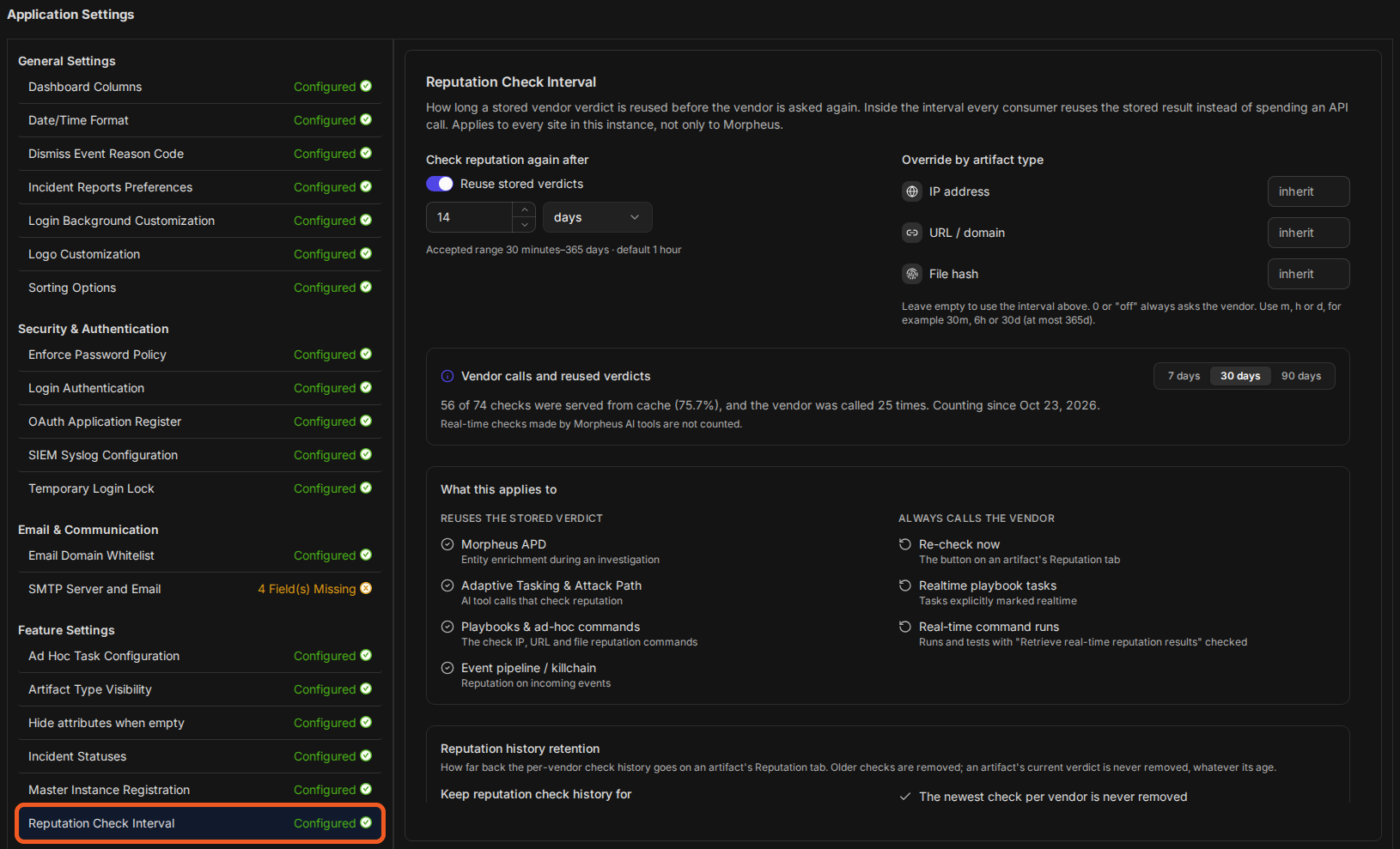
The same page also sets Reputation history retention: how long the history of past checks is kept on each artifact's Reputation tab. Caching longer and keeping more history go together, so both live in one place.
The setting is found under Global Settings > Application Settings > Reputation Check Interval, in the new UI. It is one value for the whole instance, and the page says so: "Applies to every site in this instance, not only to Morpheus."
In short
|
# |
Stage |
Where it happens |
|---|---|---|
|
1 |
Set how long a stored verdict is reused |
Reputation Check Interval > Check reputation again after |
|
2 |
(Optional) Give IP addresses, URLs and domains, or file hashes their own interval |
Override by artifact type, on the same page |
|
3 |
See how many vendor calls the interval saves |
Vendor calls and reused verdicts, on the same page |
|
4 |
Set how long check history is kept |
Reputation history retention, on the same page |
|
5 |
See, per artifact, which check was reused and how old it is |
The Reputation tab of the Artifact Detail panel |
What the Interval Applies To
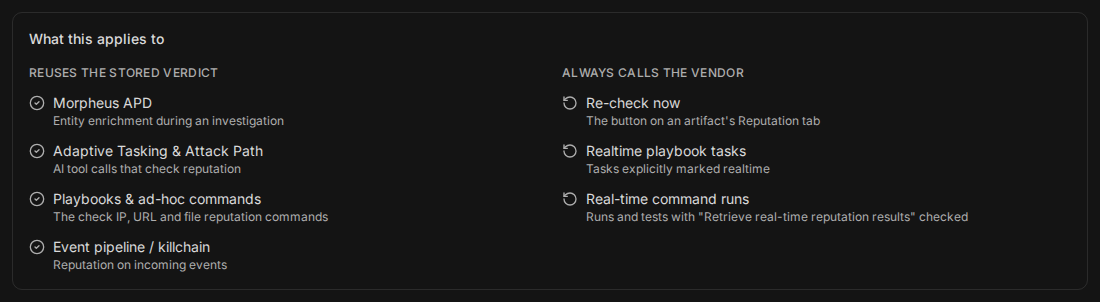
The interval governs the automatic reputation checks listed on the page, so a verdict fetched by one part of the product can save a vendor call in another. The What this applies to section of the page lists both sides: what reuses a stored verdict inside the interval, and what always asks the vendor.
What this applies to
|
Reuses the stored verdict |
What it covers |
|---|---|
|
Morpheus APD |
Entity enrichment during an investigation |
|
Adaptive Tasking & Attack Path |
AI tool calls that check reputation |
|
Playbooks & ad-hoc commands |
The check IP, URL and file reputation commands |
|
Event pipeline / killchain |
Reputation on incoming events |
|
Always calls the vendor |
What it covers |
|---|---|
|
Re-check now |
The button on an artifact's Reputation tab |
|
Realtime playbook tasks |
Tasks explicitly marked realtime |
|
Real-time command runs |
Runs and tests with Retrieve real-time reputation results selected |
The always-live cases are how you get a fresh answer on demand: select Re-check now on the artifact, mark a playbook task realtime, or select the real-time option when you run or test a command—Retrieve real-time reputation results in the classic UI, Retrieve Real-Time Reputation Results on a command's test panel in the new UI. None of them waits for the interval to pass. Testing a command with Log Request Details selected also asks the vendor, because that option takes priority.
READER NOTE
Morpheus APD used to follow a separate setting for reusing a verdict (30 days by default). It now follows this interval like playbooks and the event pipeline, so a shorter interval means APD asks vendors more often, and a longer one means less often.
READER NOTE
Among playbook and command reputation checks, only the check IP, URL and file reputation commands reuse a stored verdict. A command run from the Execute Command dialog in the new UI always asks the vendor.
Setting the Reputation Check Interval
Set the interval to match how fast your vendors' verdicts go stale for you: longer saves more vendor calls, shorter gives fresher answers. Any value from 30 minutes to 365 days is accepted. A new installation starts at 1 hour; an upgraded site keeps the value it already had.
You need access to Application Settings to change this setting. The figures on the page are shown to administrators only.
-
Go to Global Settings > Application Settings.
-
Select Reputation Check Interval. It is listed under Morpheus AI when Morpheus AI is turned on for your instance, and under Feature Settings otherwise.
-
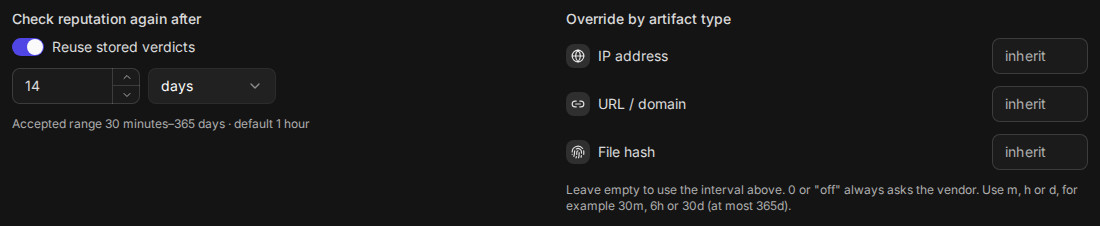
Under Check reputation again after, make sure Reuse stored verdicts is on.
-
Enter a whole number and choose its unit: minutes, hours or days.
The interval and its overrides
-
Select Save.
RESULT
The message Reputation Check Interval saved appears. From then on, every consumer listed under Reuses the stored verdict reuses a vendor's verdict until it is older than the new interval.
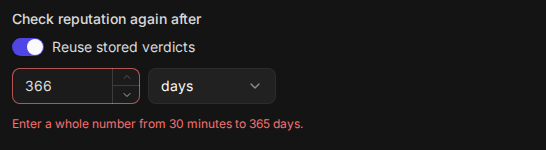
A value outside the range is refused rather than rounded to the nearest limit, so the interval is always exactly what you entered. The field says Enter a whole number from 30 minutes to 365 days., and Save answers Fix the highlighted fields before saving. until you correct it.
A value outside the accepted range
Only the values you change are saved. Values you did not touch keep exactly what was stored, so saving the interval never rewrites your overrides or your retention. Cancel puts every field back to its saved value.
Turning Reuse Off
Switch off Reuse stored verdicts when every automatic check must ask the vendor—for example, while you evaluate a new vendor and want each answer fresh. The number and unit are greyed out, and the hint reads Off: every check asks the vendor.
Reuse switched off
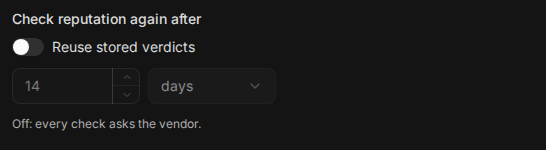
Switching reuse back on brings back the number you had. If the saved setting was already off, it starts at 1 hour, which you can change before you save.
WARNING
With reuse off, every automatic check spends a vendor API call, including every event the pipeline enriches. On a busy site this can use up a metered vendor quota quickly.
Overriding the Interval by Artifact Type
A file hash verdict rarely changes, while an IP address can change owner in a day. Override by artifact type gives each of the three kinds of artifact its own interval, so you can reuse hash verdicts for weeks without keeping IP verdicts that long.
|
Override |
Applies to |
|---|---|
|
IP address |
IP Address and External IP artifacts, and External Endpoint artifacts whose value is an IP address |
|
URL / domain |
URL, Web Address, Domain Name and External Endpoint Domain Name artifacts, and External Endpoint artifacts whose value is a host name |
|
File hash |
File, File Hash MD5, File Hash SHA1 and File Hash SHA256 artifacts |
Every other artifact type uses the interval above.
Each override takes one of these entries:
|
Enter |
What it means |
|---|---|
|
Nothing (the field shows inherit) |
Use the interval above. This is the default |
|
|
Always ask the vendor for this kind of artifact |
|
A number with |
Reuse for that long, from 30 minutes to 365 days. A number with no letter is read as minutes |
An override applies whether or not Reuse stored verdicts is on. So you can turn reuse off for everything except file hashes, or keep reuse on and set one kind of artifact to off.
-
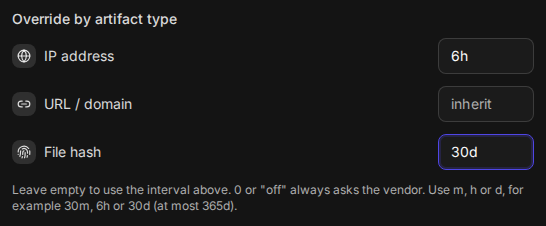
Under Override by artifact type, enter a value beside IP address, URL / domain or File hash.
Overrides entered
-
Select Save.
RESULT
Artifacts of that kind are reused for the override's interval; the others keep following the interval above.
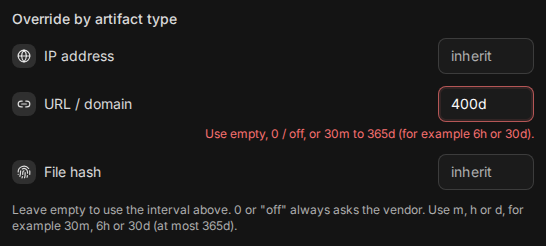
An entry the field cannot read, or one outside the range, is marked in red with Use empty, 0 / off, or 30m to 365d (for example 6h or 30d).
An override outside the accepted range
Vendor Calls and Reused Verdicts
Vendor calls and reused verdicts is the measured result of your interval: how many reputation checks were answered from a stored verdict instead of a vendor call. Use it to see what the interval saves, and to judge a change before you make it.
Measured vendor calls and reuse

Choose 7 days, 30 days or 90 days to set the period. The figure reads, for example, 56 of 74 checks were served from cache (75.7%), and the vendor was called 25 times.
-
The percentage counts only checks that were allowed to reuse a verdict.
-
The vendor calls include the always-live checks too—Re-check now, realtime tasks and real-time command runs—so the number can be higher than the checks the interval missed. In the example, 18 checks missed and 7 more were always-live.
-
Real-time checks made by Morpheus AI tools are not counted.
Counting starts when your site is upgraded to this release, so there is no figure for the time before. Until the first check is counted, the figure reads Nothing has been counted yet. Counting starts with the next reputation check. While the period reaches back before counting began, the figure adds Counting since and the date.
Estimating a Change Before Saving It
While the page has valid changes you have not saved, the figure adds an estimate of what those settings would have done over the same period, worked out from the checks already counted. Try a longer interval or a different override, read the estimate, and save only if the trade is worth it.
An estimate for unsaved settings

The estimate reads, for example, Estimate at these settings: 20 vendor calls instead of 74, 73% served from cache (approximate). The first number is the vendor calls these settings would have made; the second is the calls with no reuse at all. Always-live checks are left out of both, since no interval changes them.
Checks are counted by age in steps—30 minutes, 1 hour, 3 hours, 6 hours, 12 hours, 24 hours, 7 days and 30 days. For an interval between two of those steps, the estimate leans toward more vendor calls rather than fewer, and ends with (approximate).
The estimate disappears when you save or cancel.
Reputation History Retention
Reputation history retention is how far back the per-vendor check history goes on an artifact's Reputation tab. Every check adds a record, with the vendor's raw and formatted reports, so the history is the bulk of what reputation stores; retention keeps it from growing without limit. An artifact's current verdict is never removed, whatever its age.
Reputation history retention
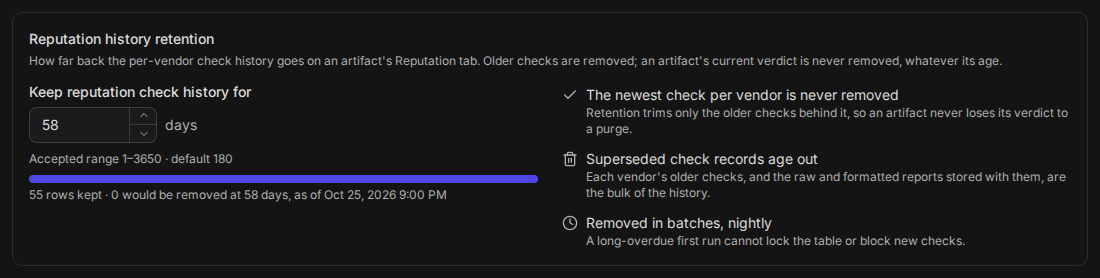
What retention does, as the page states it:
-
The newest check per vendor is never removed. Retention trims only the older checks behind it, so an artifact never loses its verdict and never starts reading as never checked.
-
Superseded check records age out. Each vendor's older checks, and the reports stored with them, are removed once they are older than the retention.
-
Removed in batches, nightly. The clean-up runs every night at 04:00 UTC, a batch at a time, so even a long-overdue first run cannot lock reputation or block new checks.
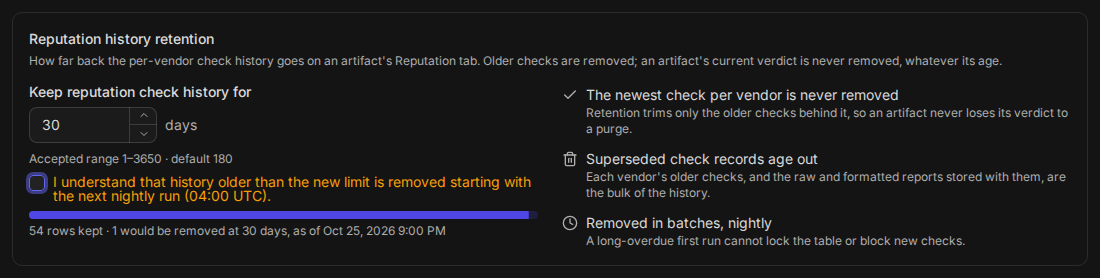
Under the field, the page shows how much history the setting keeps: N rows kept · M would be removed at D days, as of the date it was counted, with a bar showing the share kept. While you type a new value, the line already shows what that value would keep and remove. The count itself is refreshed by the nightly run, so it reads First count in progress. until the first run has finished. If the latest run did not finish, the page says The most recent nightly run did not finish; these figures are from the last one that did.
Changing How Long History Is Kept
Keep history longer when analysts need to see how a verdict changed over months; keep it shorter to save storage. Any whole number of days from 1 to 3650 is accepted, and a new installation starts at 180.
WARNING
Lowering the retention permanently removes the older check history, starting with the next nightly run at 04:00 UTC. It cannot be brought back by raising the value again.
-
Under Reputation history retention, enter the number of days in Keep reputation check history for.
-
If the new value is lower than the saved one, select I understand that history older than the new limit is removed starting with the next nightly run (04:00 UTC). Save stays unavailable until you do; to back out instead, put the saved value back.
Lowering the retention
-
Select Save. When you lowered the value, the Confirm change dialog asks: Lowering the retention permanently removes older reputation check history, starting with the next nightly run (04:00 UTC). Continue? Select Continue.
RESULT
The message Reputation Check Interval saved appears. The next nightly run removes the checks older than the new retention, except each vendor's latest, and the Reputation tab of every artifact states the new limit.
A value outside 1–3650 is marked with Enter a whole number of days from 1 to 3650.
Reuse and Age on the Reputation Tab
The Reputation tab of an artifact shows how the interval applied to that artifact: which interval it follows, how old each vendor's verdict is, and whether automatic checks will keep reusing it. It answers the question an analyst has when a verdict looks stale—was this asked today, or reused from last week?
The Reputation tab of an IP address
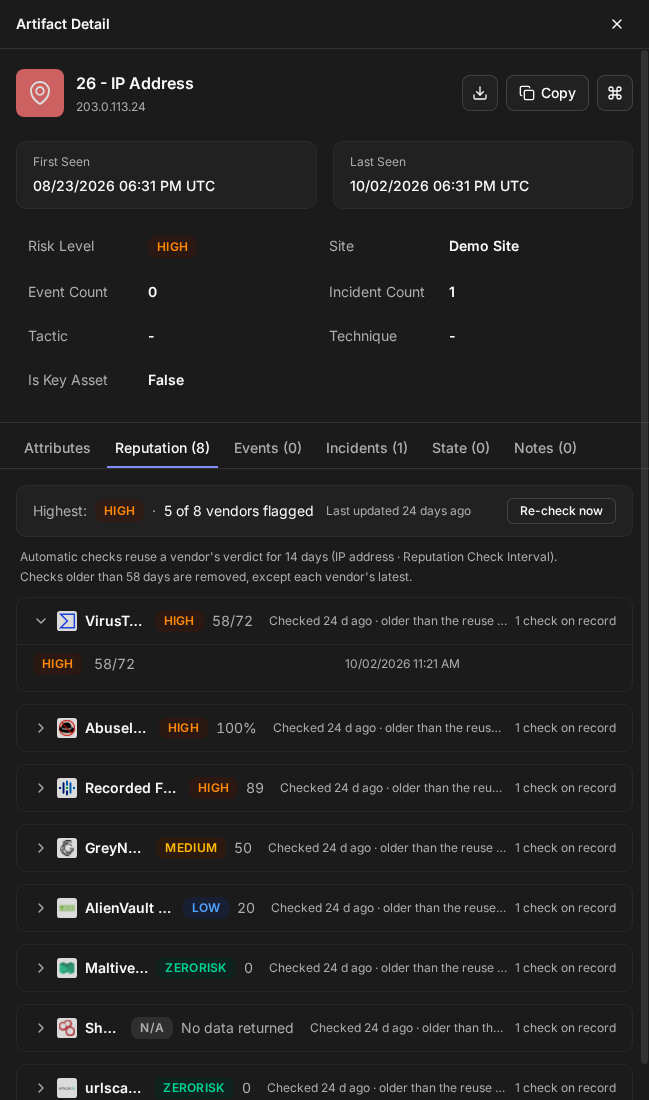
Under the overall verdict, two lines describe the artifact:
-
Automatic checks reuse a vendor's verdict for the interval, followed by the override it comes from—for example (IP address · Reputation Check Interval), or (platform interval · Reputation Check Interval) for an artifact type outside the three override kinds. When reuse is off for the artifact, the line reads, for example, Automatic checks always ask the vendor for this artifact: reuse is off (IP address · Reputation Check Interval).
-
Checks older than N days are removed, except each vendor's latest. This is the retention, so a shorter history after a nightly clean-up does not read as lost data.
Each vendor's row says how old its verdict is and what happens next:
|
The row reads |
What it means |
|---|---|
|
Checked 3 h ago · reused until a time |
Automatic checks reuse this verdict until that time |
|
Checked 20 d ago · older than the reuse interval |
This vendor's verdict on this artifact is older than the interval, so it is not reused for this artifact on its own. A newer check of the same value, for example on another IP artifact, can still be reused |
|
Checked 2 d ago · reuse is off |
Reuse is off for this kind of artifact |
|
Set 1 h ago · not reused as a vendor check, on a Set by analyst row |
An analyst set this verdict, so automatic checks never reuse it as a vendor's answer |
|
Recorded 4 d ago · not reused, on an Unattributed row |
A verdict with no vendor named; automatic checks never reuse it |
|
Checked 5 d ago, on an older line of the same vendor |
An earlier check, kept as history; it is never reused |
Ages are worked out from the server's clock, so they do not depend on your computer's clock.
Select Re-check now to ask the vendors again straight away, whatever the interval. It does this for External Endpoint, URL and File artifacts (see Limitations).
READER NOTE
The Reputation tab of the Artifact Details window in an incident's workspace shows the retention line only.
Upgrading From an Earlier Release
Upgrading keeps your results the same wherever it can, and changes them only where the old behavior was the problem:
-
Your interval is kept. A site that had 14 days still has 14 days. The overrides start empty, so every kind of artifact keeps following it.
-
Retention starts at the history you already have. It is set to cover the oldest check your site already holds, up to 3650 days, so the first nightly run removes nothing you can see today. You can lower it afterwards.
-
Morpheus APD follows the interval instead of its separate setting, which was 30 days by default (see What the Interval Applies To).
-
A busy artifact is now asked again once per interval. Before, reusing a verdict made it look newly checked, so an artifact seen in many events could keep an old verdict indefinitely. Now a verdict ages from the time the vendor actually gave it, which can mean somewhat more vendor calls than before, and always means honest ages on the Reputation tab.
-
The old Web Config rows are gone. The two reputation rows under Feature Settings > Web Config are replaced by this page.
-
The help text beside Retrieve real-time reputation results now points to the Reputation Check Interval instead of naming a fixed 60 minutes.
Limitations
-
One value for the whole instance. All sites in an instance share the interval, the overrides and the retention. On an MSSP instance, an administrator who can open Application Settings changes them for every client site.
-
The classic UI does not show this setting. It is set in the new UI only.
-
Re-check now asks the vendors only for External Endpoint, URL and File artifacts. On other types, such as IP Address, External IP, Domain Name and the File Hash types, it currently brings back no new result. Use a realtime playbook task or a real-time command run instead.
-
The legacy killchain re-check step still uses its previous reuse setting, not this interval. That setting has no control on this page.
-
"Reused until" is exact for an integration's own reputation commands; for the built-in Check IP Reputation command, Morpheus and incoming events it is approximate. When its connection reuses verdicts, an integration's check IP, URL or file reputation command reuses only that integration's own verdict, which is what each label describes. The built-in Check IP Reputation utility command (it has the same name as the integrations' commands), Morpheus APD and the event pipeline treat an artifact as fresh as soon as any vendor's check is inside the interval, so they may reuse a verdict after its row says "Older than the reuse interval".
-
Only three kinds of artifact can have their own interval: IP addresses, URLs and domains, and file hashes.
-
The figures start at zero on the day your site is upgraded.
FAQs
Why did a playbook ask the vendor when the verdict was only an hour old? Either the task is marked realtime, the command was run with Retrieve real-time reputation results selected, the command was tested with Log Request Details selected, the command is not one of the check IP, URL or file reputation commands, an override sets that kind of artifact to a shorter interval or to off, or reuse is switched off. The artifact's Reputation tab names the interval that applies to it.
I raised the retention. Does deleted history come back? No. Raising it keeps more from then on; checks already removed are gone.
Can the nightly clean-up leave an artifact with no verdict? No. Each vendor's newest check is always kept, whatever the retention.
Does a longer interval change verdicts already stored? No. It only changes how long automatic checks reuse them. For a fresh answer at any time, select Re-check now on an External Endpoint, URL or File artifact, or run a realtime task or a real-time command.
Why are the Vendor calls and reused verdicts figure and the rows kept line missing? Both are shown to administrators only. Ask an administrator.