
last updated: june 20, 2025
Merge tasks collect desired playbook data and combine them into a single array. This array—the merge result—is found in the Raw Data tab of the Playbook Task Details popover.

Merge is useful when consolidating data from upstream task nodes that arrive either as:
-
Distinct parallel playbook nodes
Example - Merging Parallel Nodes *
objective – Merge the return data of three parallel task nodes into a string array.
-
Build the following playbook:
%201-20250603-013214.png?cb=7772c67ab02a15a31ffad00c0f368c7b)
-
Configure task A to return the string "A", task B to return "B", and task C to return "C".
-20250603-020456.png?cb=0cc402c47784ea9b8f774b5dcf58123c)
-
Provide the following configuration as input for the Merge task:
JSON{ "groupBy": "Playbook Instance", "dataJsonPath": "$.*.returnData" }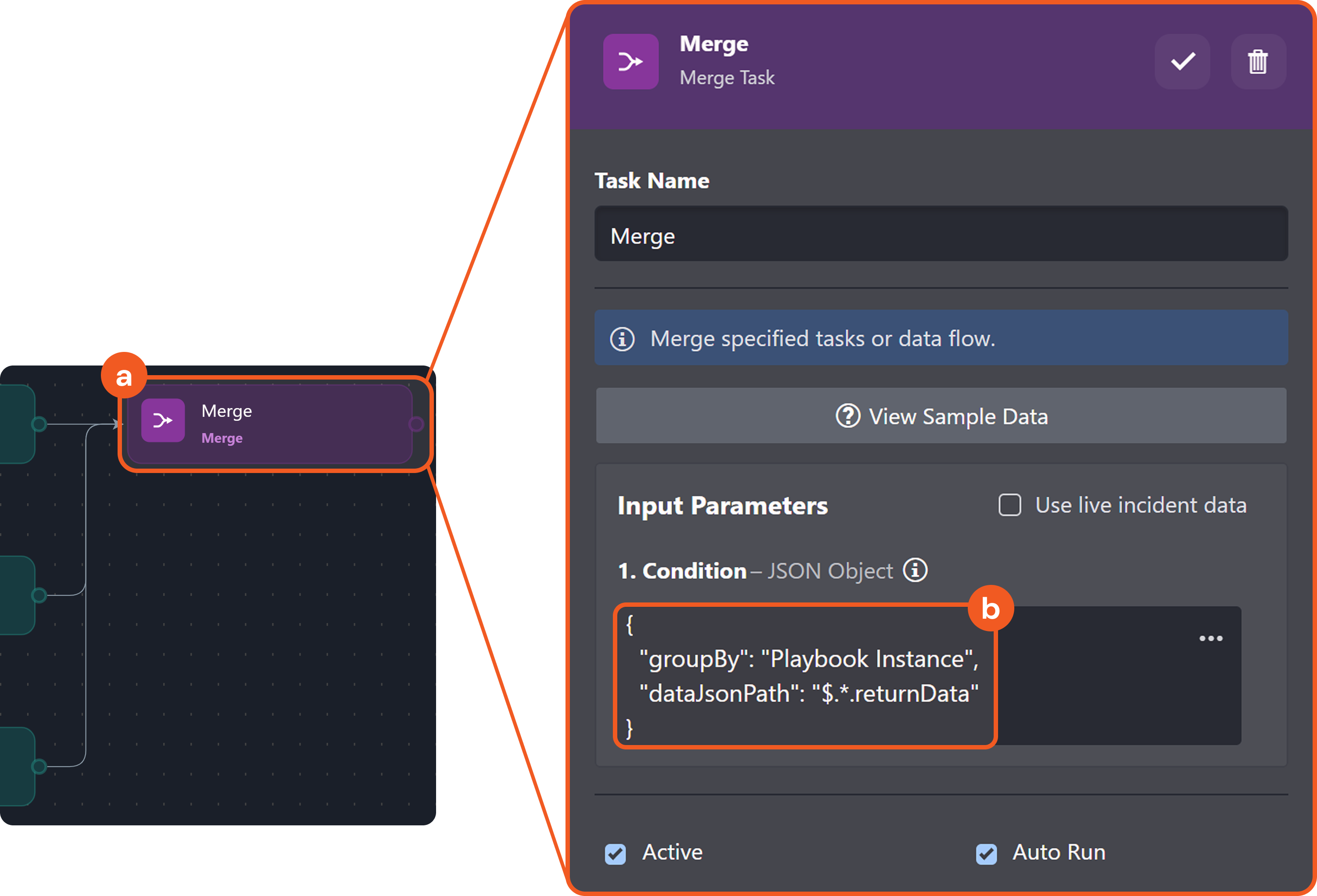
-
Test run the playbook.
-20250602-235821.png?cb=c032453eece5586bf925821cb0e65b3b)
-
Observe the execution results for each task.
-
Data Formatter tasks:
-20250603-012513.png?cb=a49ced10e96927000763ef3f978ba3e6)
-
Merge task:
-20250603-013016.png?cb=3db79aaffb67decf0b37ee0cc8ed4d41)
-
-
Multiple instances of the same task
Example - Merging Data from Instances of the Same Task *
objective – Use an Unwind task to split a list of objects into individual objects, update each one using a Data Formatter task, and then recombine the modified objects with a Merge task.
-
Build the following playbook:
%201-20250602-233956.png?cb=6eb724326a4abf778d59b65bb8550eef)
-
Provide the following JSON data as input for the JSON Data parameter of the Unwind task:
JSON[ { "key1": "value1", "key2": "value2" }, { "key3": "value3", "key4": "value4" }, { "key5": "value5", "key6": "value6" } ] -
Provide the following Jinja logic as input for the Process Object (Data Formatter) task:
JSON{ {% set k1 = PlaybookData | jsonpath('$.Unwind.contextData.data.key1') %} {% set k2 = PlaybookData | jsonpath('$.Unwind.contextData.data.key2') %} {% set k3 = PlaybookData | jsonpath('$.Unwind.contextData.data.key3') %} {% set k4 = PlaybookData | jsonpath('$.Unwind.contextData.data.key4') %} {% set k5 = PlaybookData | jsonpath('$.Unwind.contextData.data.key5') %} {% set k6 = PlaybookData | jsonpath('$.Unwind.contextData.data.key6') %} {% if k1 %} "key1": "UPDATED VALUE 1"{% if k2 %},{% endif %} {% endif %} {% if k2 %} "key2": "UPDATED VALUE 2"{% if k3 %},{% endif %} {% endif %} {% if k3 %} "key3": "UPDATED VALUE 3"{% if k4 %},{% endif %} {% endif %} {% if k4 %} "key4": "UPDATED VALUE 4"{% if k5 %},{% endif %} {% endif %} {% if k5 %} "key5": "UPDATED VALUE 5"{% if k6 %},{% endif %} {% endif %} {% if k6 %} "key6": "UPDATED VALUE 6" {% endif %} } -
Provide the following configuration as input for the Merge task:
JSON{ "groupBy": "Task", "taskName": "Unwind", "dataJsonPath": "$['Process Object'].returnData" } -
Test run the playbook.
-
Observe the execution results for each task.
-
Unwind task:
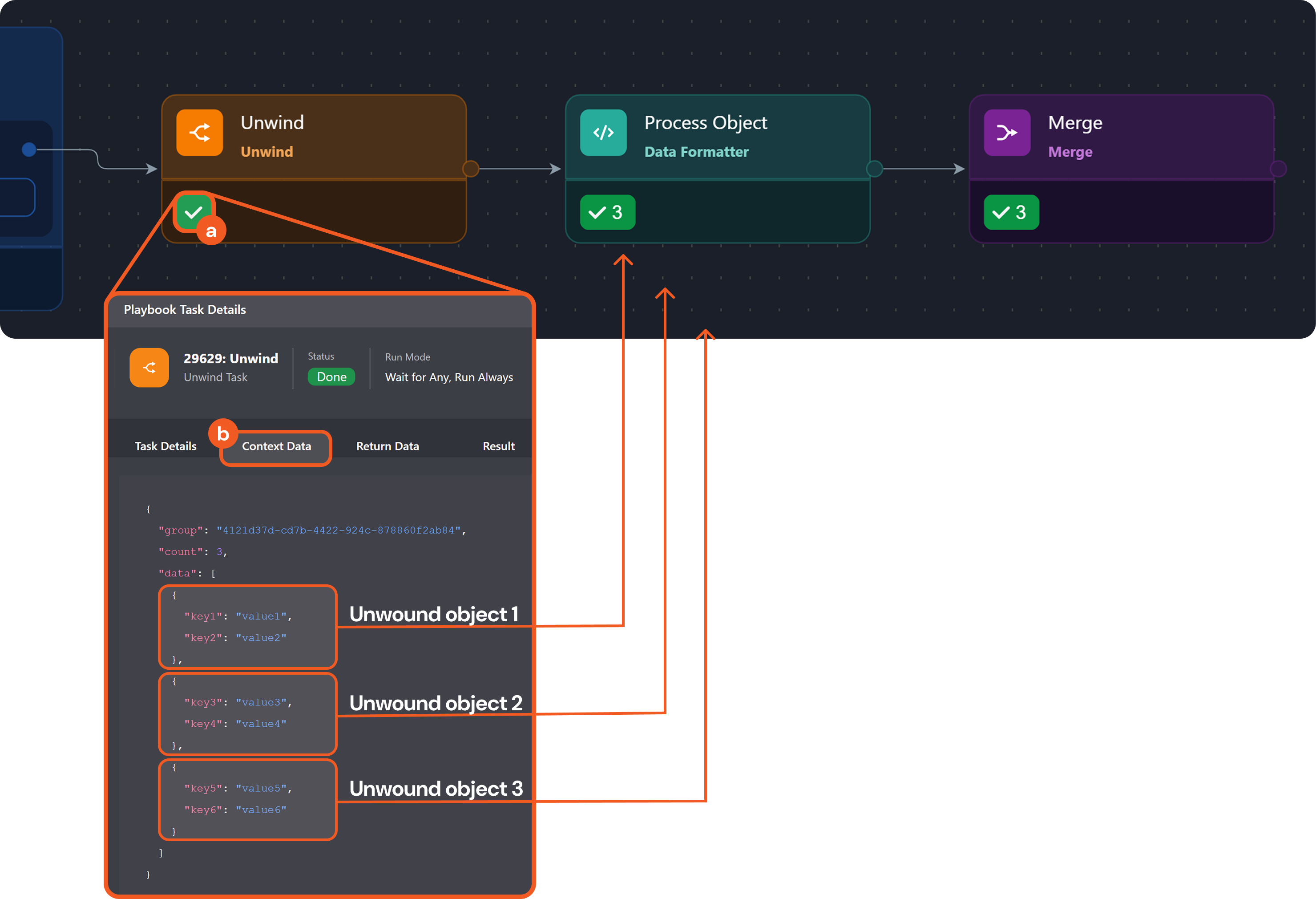
-
Process Object (Data Formatter) task:
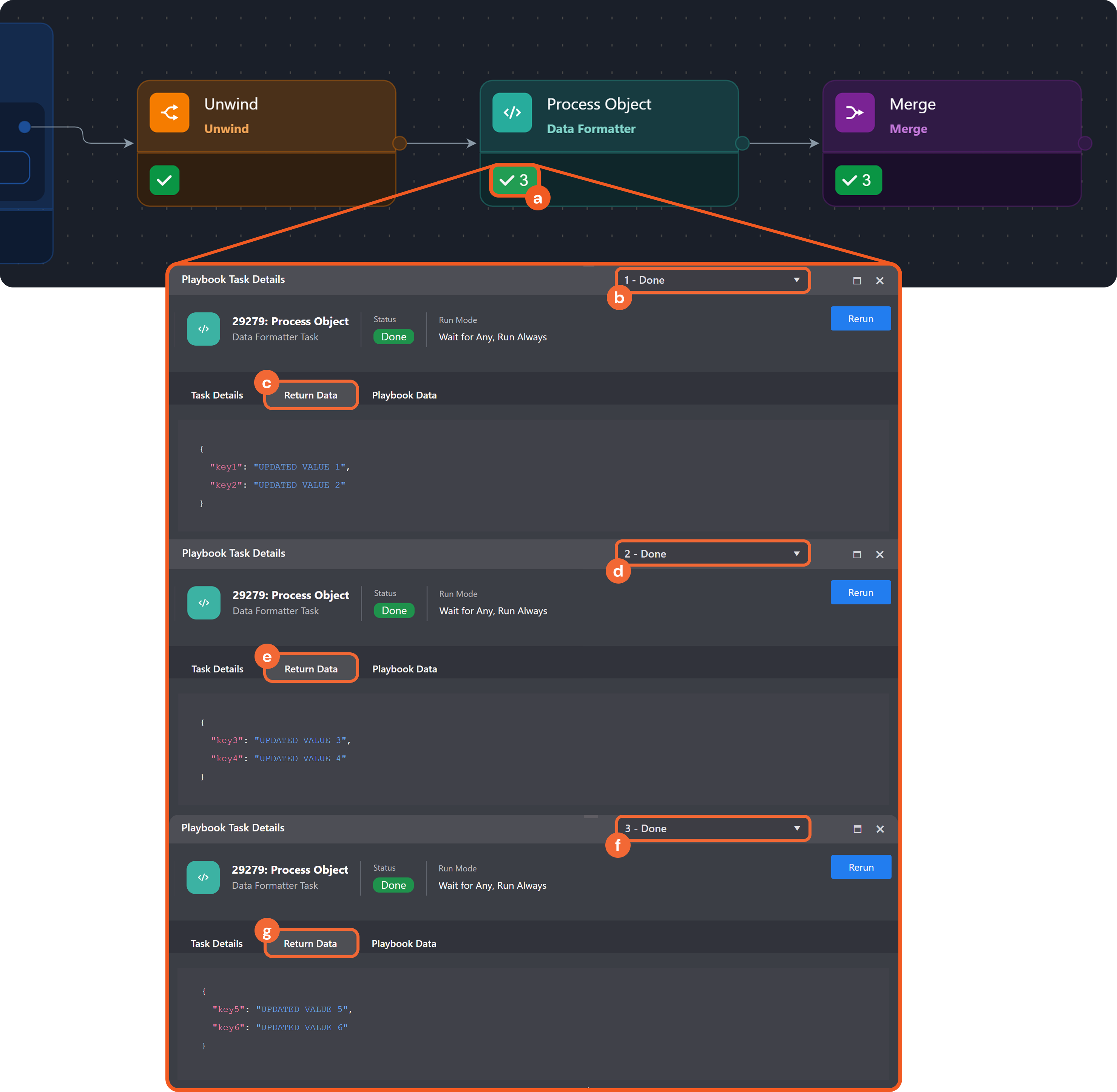
-
Merge task:
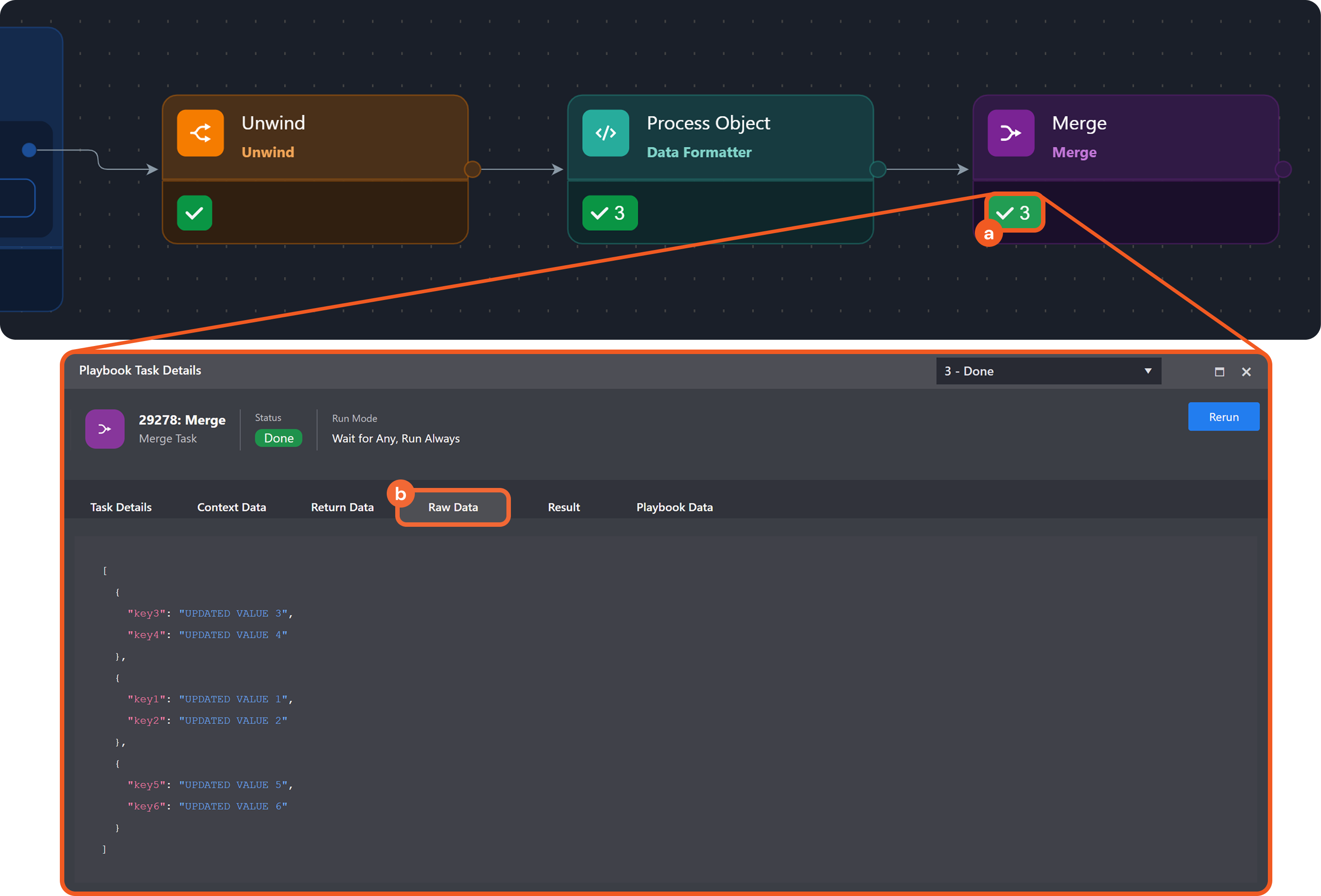
-
Merge Condition
The merge condition is a JSON object that tells the system how to group data based on a shared lineage—such as by Playbook Instance, Task, Task Instance, or Path—(lineage grouping), which data to filter, and the required match count for producing the merge result.
-20250609-190302.png?cb=ad5b32c7b5e32f4448f98df9a04c9865)
Merge Condition Schema
{
  "groupBy": "<Playbook Instance | Task | Task Instance | Path>",
  "taskName": "<Display name of the task>",
  "paths": [
    "<JSON path 1>",
    "<JSON path 2>",
    "<JSON path 3>",
    ...
    "<JSON path N>"
  ],
  "dataJsonPath": "<JSON path>",
  "count": <Number>
}
The following tables list the (case-sensitive) keys for the merge condition.
Grouping Fields
These key-value pairs define the criteria for grouping data that share a common lineage. This defines the lineage grouping behavior.
|
Key |
Data Type |
Description |
|---|---|---|
|
groupBy |
|
|
|
taskName |
|
|
|
paths |
|
|
Post-Grouping Fields
These key-value pairs control how grouped data is handled after lineage grouping has been applied.
|
Key |
Data Type |
Description |
|---|---|---|
|
dataJsonPath |
|
|
|
count |
|
|
Example - Using the dataJsonPath Key
Objective – Understand the functionality and benefit of using the dataJsonPath key.
-
Build the following playbook:
%201-20250609-234959.png?cb=8c44f84d38bc3b650364e80b70516822)
-
Configure the playbook tasks:
-
Configure task A to return the string
"A". -
Configure task B to return the string
"B". -
Configure task C to return the array:
JSON[ { "key1": "value1", "key2": "value2" }, { "key3": "value3", "key4": "value4" }, { "key5": "value5", "key6": "value6" } ] -
Configure Unwind to target
{{ $.PlaybookData.C.returnData }}(i.e., the JSON Data parameter). -
Configure task ABC to return
"Hypothetically processed data". -
Configure Merge with the following condition:
JSON{ "groupBy": "Playbook Instance" }
-
-
Test run the playbook.
-
Open D's task details, then select the Playbook Data tab.
-
Expand the Merge > rawData field, then inspect each object in the rawData array.
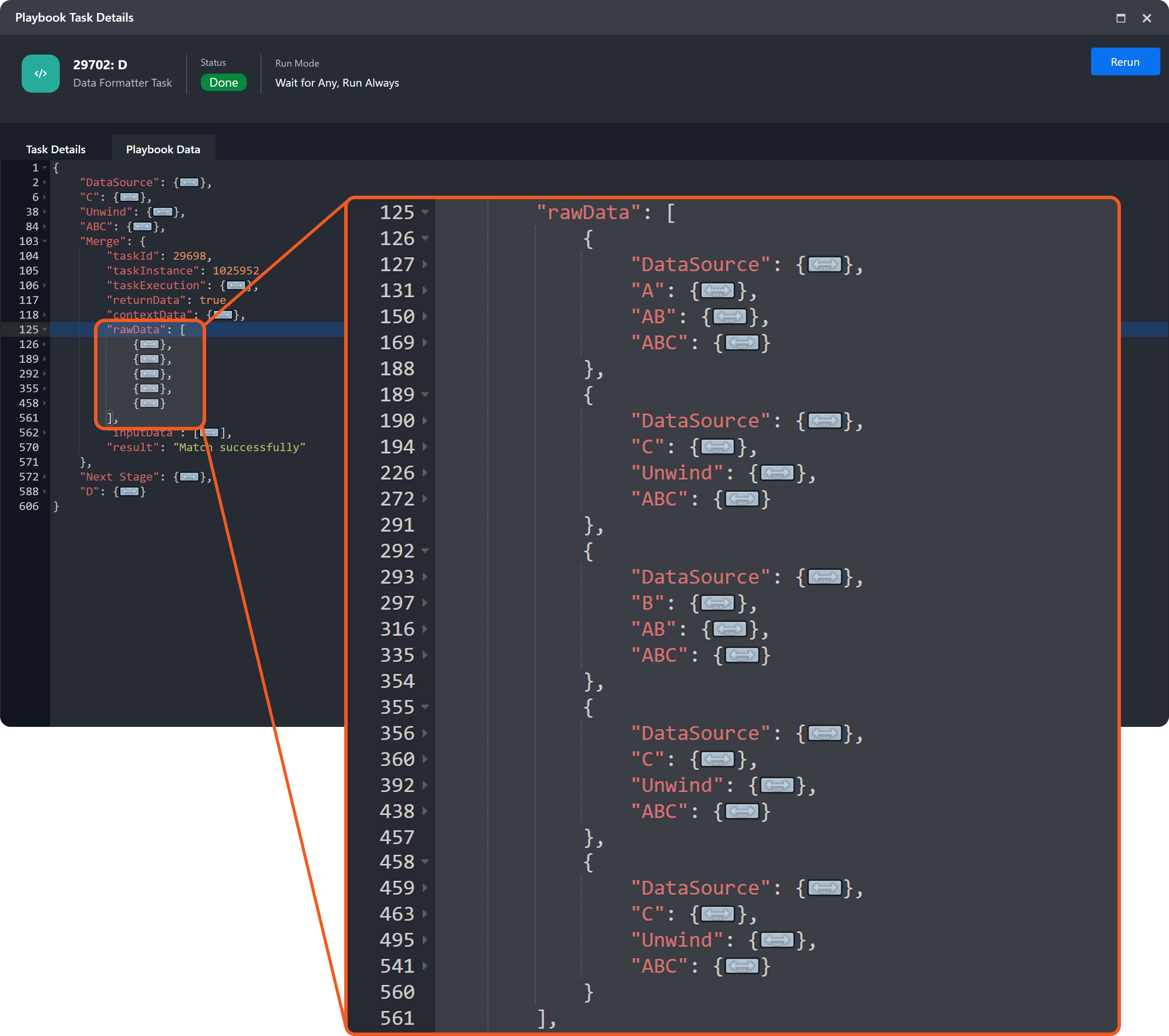
Each object represents an execution lineage that led to the Merge task. In a real vSOC operation, this array may be significant in length.
-
Update the merge condition to the following:
JSON{ "groupBy": "Playbook Instance", "dataJsonPath": "$['ABC'].returnData" } -
Repeat steps 3–5, then recheck the rawData field.
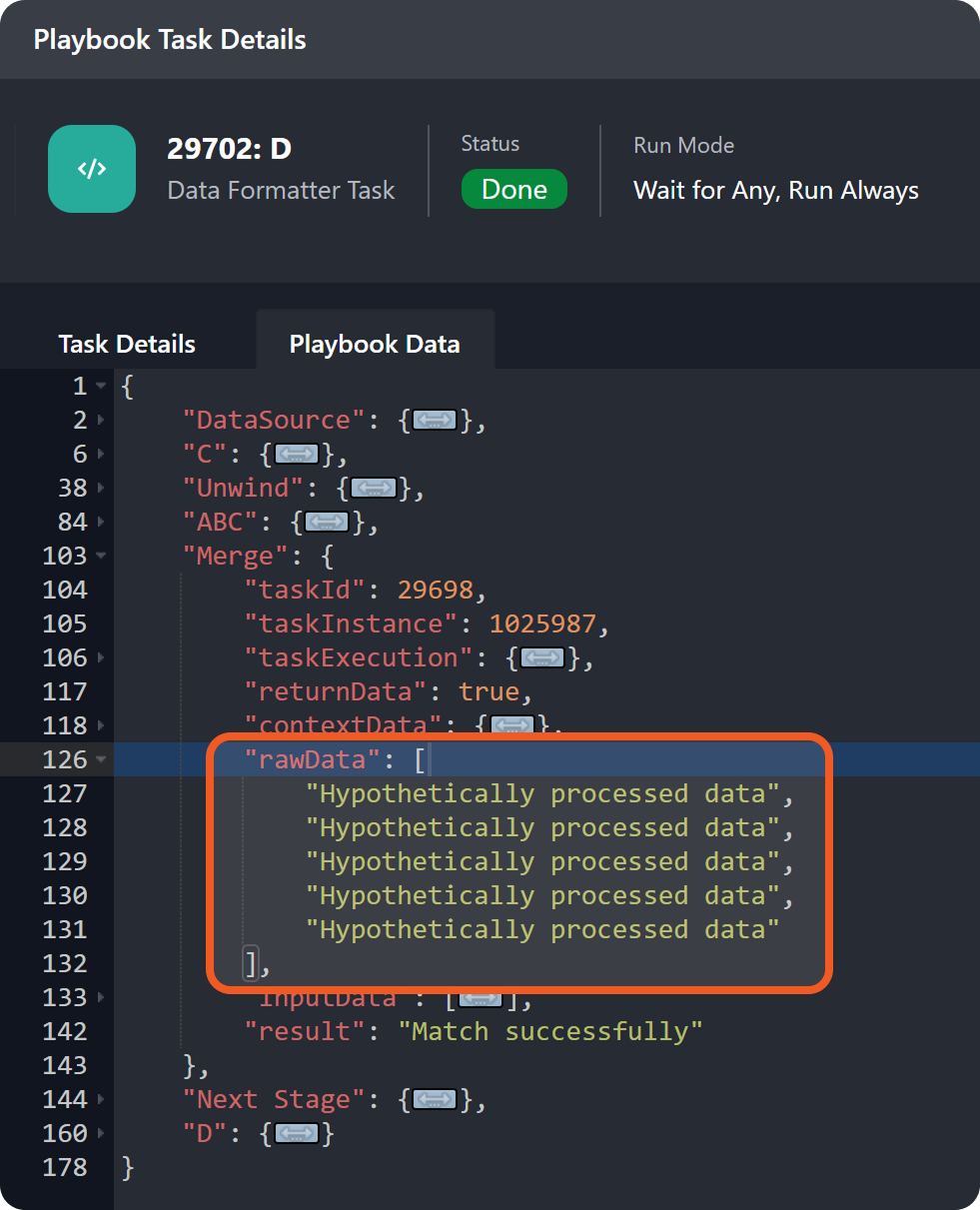
This time, the rawData array contains only the returnData from task ABC instances.
READER NOTE
-
In a real scenario, each entry in the
rawDataarray would typically contain distinct data, rather than identical hardcoded values. -
The reduction to targeted task results simplifies data handling, improves clarity, and better supports debugging and modification.
Example - Using the count Key
Objective – Understand the functionality and benefit of using the count key.
-
Build the following playbook:

-
Configure the playbook tasks:
-
Configure task A to return the string
"A". -
Configure task B to return the string
"B". -
Configure task C to return the array:
JSON[ { "key1": "value1", "key2": "value2" }, { "key3": "value3", "key4": "value4" }, { "key5": "value5", "key6": "value6" } ] -
Configure Unwind to target
{{ $.PlaybookData.C.returnData }}. -
Configure task ABC to return
"Hypothetically processed data". -
Configure Merge with the following condition:
JSON{ "groupBy": "Playbook Instance" }
-
-
Test run the playbook.
-
Open the D's task details, then select the Playbook Data tab.
-
Expand the Merge > rawData field, then count the number of objects in the rawData array.
Each object represents an execution lineage that led to the Merge task. There is a count of five objects.
-
Update the merge condition to the following:
JSON{ "groupBy": "Playbook Instance", "count": 2 } -
Repeat steps 3–5, then recheck the rawData field.
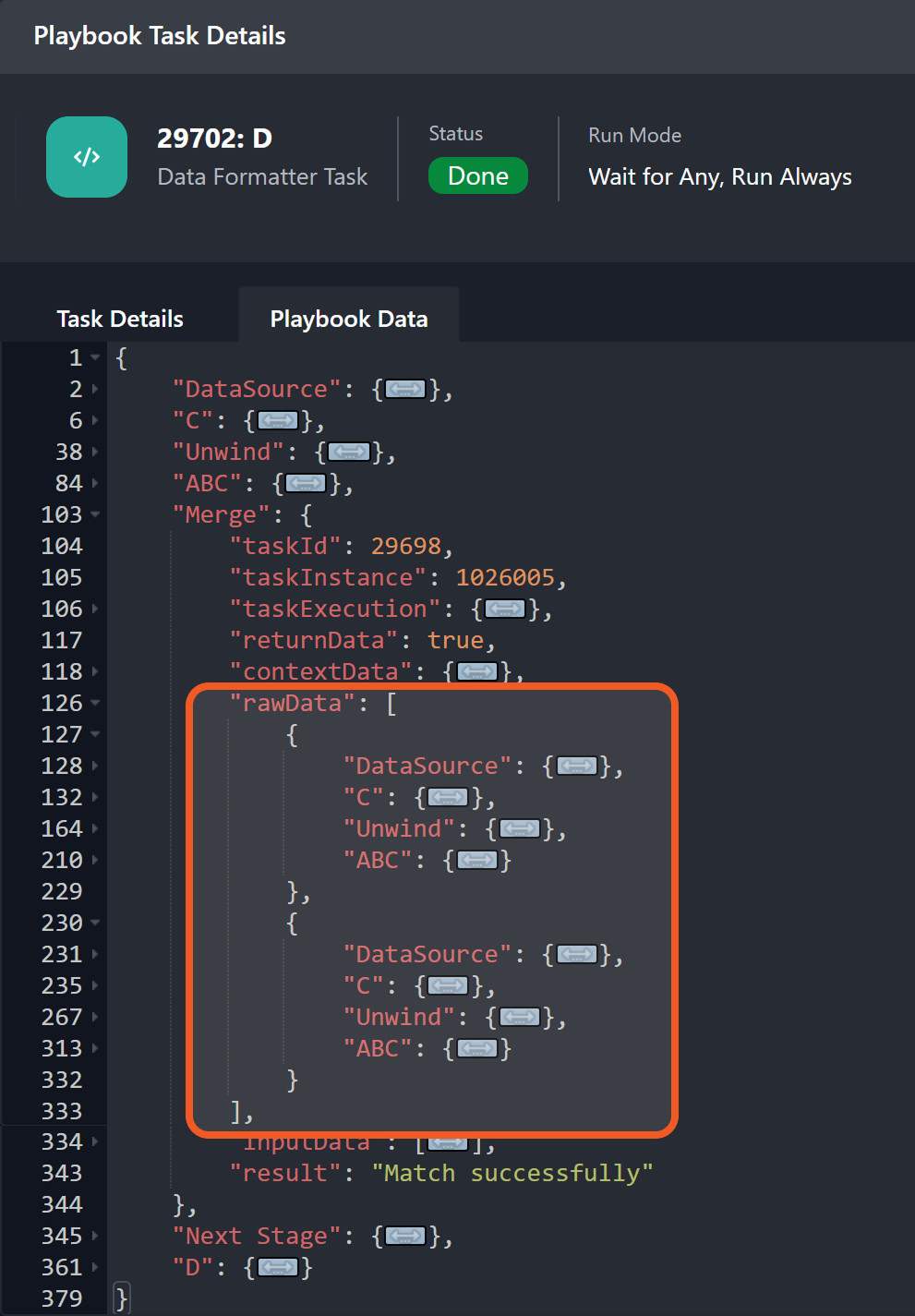
This time, there is a count of two objects in the rawData array.
TAKEAWAY
The count key limits the number of execution-lineage objects returned in the rawData field.
FAQ
What are execution-lineage objects?
Execution-lineage object = A JSON object containing the full sequence of task metadata and outputs that lead to an active execution point.
example
Given the following playbook build configuration:
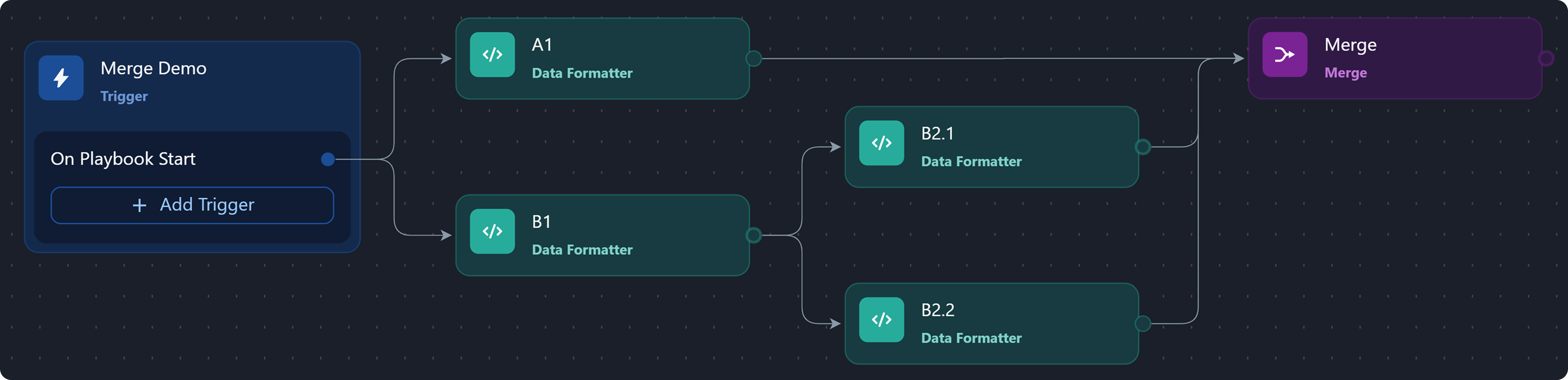
Provided that the Merge task serves as the reference active execution point, the following are the execution lineages and their corresponding object representations:
lineage 1
-20250620-174137.png?cb=b1e7824059d813f3ead009238b2d2418)
{
  "DataSource": { ... },
  "A1": { ... }
}
lineage 2
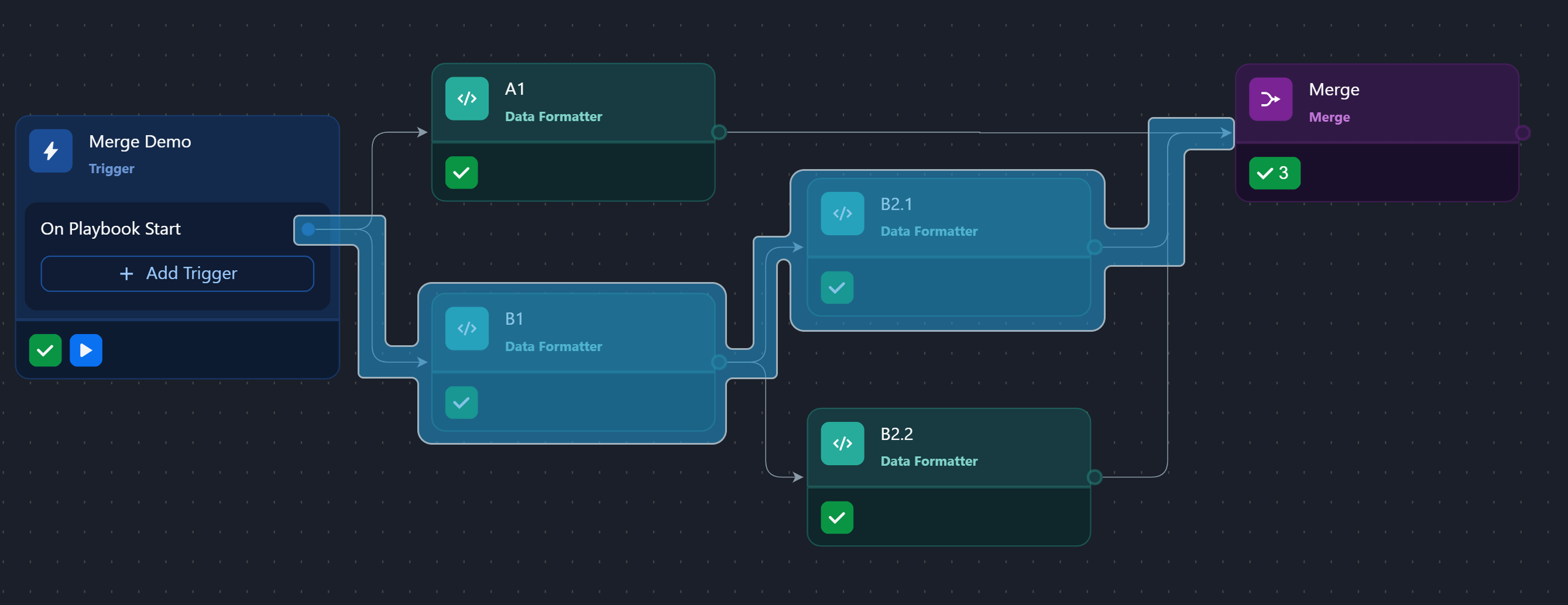
{
  "DataSource": { ... },
  "B1": { ... },
  "B2.1": { ... }
}
lineage 3
-20250620-180019.png?cb=d45df4170b5a5aa8713aa1d306a46653)
{
  "DataSource": { ... },
  "B1": { ... },
  "B2.2": { ... }
}
Assuming the default merge condition is applied, the resulting merged output will be as follows:
[
  {
    "DataSource": { ... },
    "A1": { ... }
  },
  {
    "DataSource": { ... },
    "B1": { ... },
    "B2.1": { ... }
  },
  {
    "DataSource": { ... },
    "B1": { ... },
    "B2.2": { ... }
  }
]
TAKEAWAYS
-
An execution-lineage object describes a complete ancestral chain of task executions.
-
The default merge condition—unlike other grouping modes—will not, on its own, cause the merge result to exclude execution-lineage objects of any:
-
Divergent lineages (e.g., as with lineage 1 and lineage 2/3)
-
Sibling lineages (e.g., as with lineage 2 and lineage 3)
-
How can one use the dataJsonPath key to extract deeply nested values?
example 1
-
Build the following playbook.
%201-20250610-211201.png?cb=0c3eea9c274b4f104f5c3fb33d8e8643)
-
Configure task A1 to return the following output:
JSON[ { "key1": "value1", "key2": "value2" }, { "key3": "value3", "key4": "value4" }, { "key5": "value5", "key6": "value6" } ] -
Configure Merge with the following condition:
JSON{ "groupBy": "Path", "paths": ["$.['A1'].returnData"], "dataJsonPath": "$['A1'].returnData[?(@.key2=='value2')]" } -
Test run the playbook.
-
Check the merge results.
Merge resultJSON[ { "key1": "value1", "key2": "value2" } ]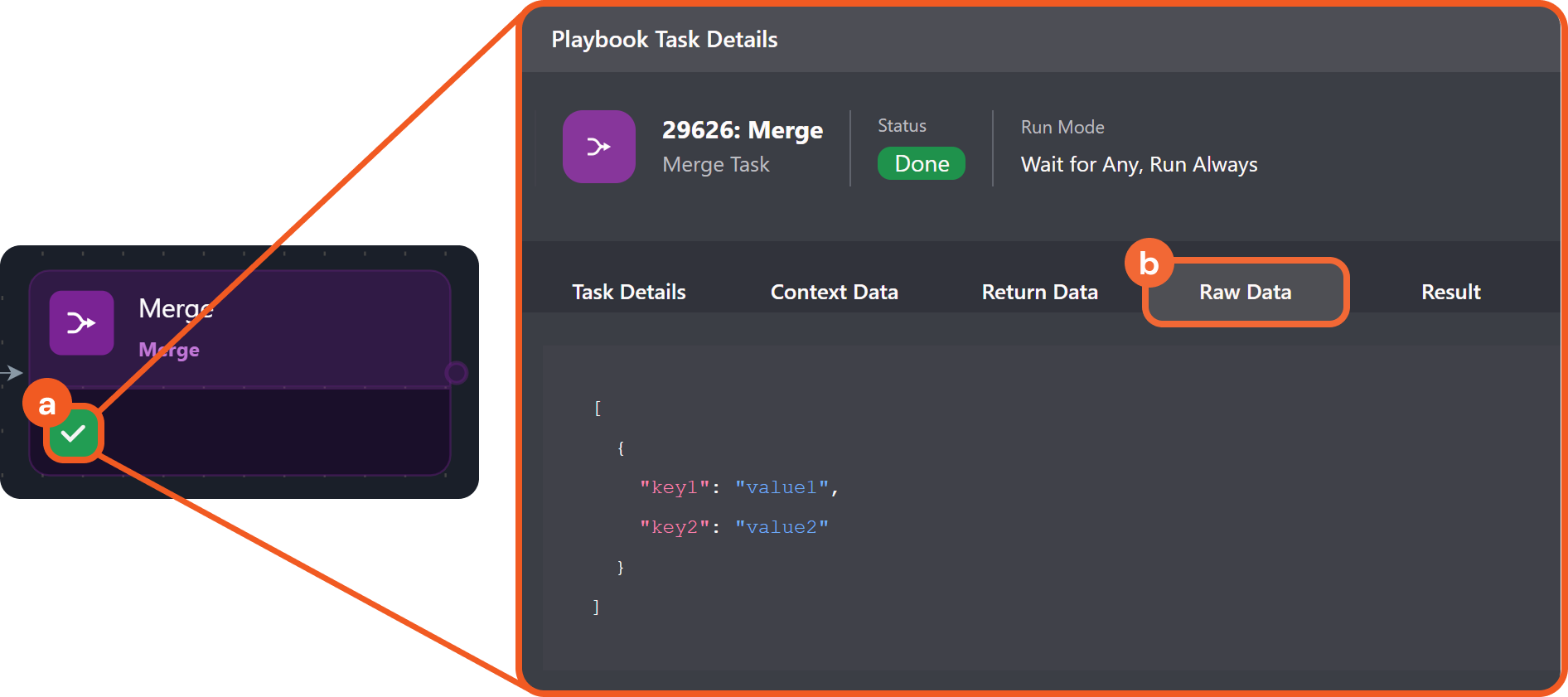
example 2
-
Configure task A1 to return the following output:
JSON[ { "A": { "B": { "C": { "D": { "TARGET": { "id": 1, "value": "match" } } } } } }, { "A": { "B": { "C": { "D": { "TARGET": { "id": 2, "value": "no-match" } } } } } } ] -
Configure Merge with the following condition:
JSON{ "groupBy": "Path", "paths": ["$['A1'].returnData"], "dataJsonPath": "$['A1'].returnData[?(@.A.B.C.D.TARGET.value=='match')].A.B.C.D.TARGET" } -
Test run the playbook.
-
Check the merge result.
merge resultJSON[ { "id": 1, "value": "match" } ]-20250610-212624.png?cb=02943e2c63bd06b38ae822165ba80953)