
last updated: mar 21, 2025
Preprocessing playbooks are used to automate preparatory operations on newly ingested, normalized activity data (see Configuring Data Ingestion). Preparatory operations commonly include deduplication, data enrichment, triage, and correlation.
On the landing page of the Preprocessing Playbooks module, users can search for existing playbooks or create new ones.
-20250121-230038.png?cb=23176e4ecc932b48db9c15dbbf29b9d1)
UI Breakdown
Playbook Search Panel
Purpose: Allows users to search, browse, and create custom preprocessing playbook categories.
Key Features:
-
Search Bar: Provides text-based search functionality for quick access to specific playbooks.
-
Playbook Categories: Organizes playbooks into predefined categories.
-
Custom Folders: Enables users to create and organize playbooks into custom folders.
%201-20250121-231459.png?cb=3a709e01025936896716d03f0c61c55b)
-
Playbook Count: Displays the number of playbooks available in each category or folder.
Playbook Addition Menu (Top Left Dropdown)
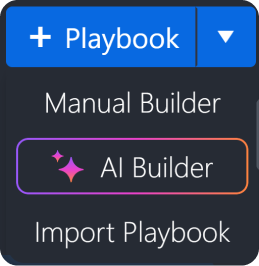
Purpose: Enables users to add new playbooks using various methods.
Key Features:
-
Manual Builder: Opens an interface for manual creation of playbooks.
%201-20250121-231828.png?cb=bc968ce11760786025ed1167f7ce4386)
-
AI Builder: Uses AI to assist in generating playbooks.
%201-20250121-232044.png?cb=923047f6e13b8f83e71c85024ccae482)
-
Import Playbook: Allows importing existing playbooks.
%201-20250121-004617.png?cb=52d083344d50fc3c49408787379d5f9a)
Playbook Listing Panel
Purpose: Displays a grid view of available playbooks within the selected category or folder.
Key Features:
-
Playbook Cards – Each playbook is represented as a card that includes:
-
Playbook Name: Clearly labeled for easy identification.
-20250121-233706.png?cb=8693560ecb4417d13a676e2ec31b5077)
-
Task Count: Indicates the total number of tasks in the playbook.
-20250121-233719.png?cb=61b29a72f9f5031c8941195d7b5902f1)
-
Permission: Whether the user is a viewer, editor, or owner of the playbook.
-20250121-233754.png?cb=2937c6286c78067a70c18693713728ba)
-
Operational Mode and Availability Indicator: The operational mode of a current playbook—orange for 10.2.0.134_BetaPreview_VSOC_LifeServer.aspx_div=dashboard&Open=Other&t2=d3d3e3ddc21712d49d65d2b9468c62a737399c5b4e55dd7d9a542e8defd01fc0 (18) 1 (1)-20250121-011219.png mode and green for 10.2.0.134_BetaPreview_VSOC_LifeServer.aspx_div=dashboard&Open=Other&t2=d3d3e3ddc21712d49d65d2b9468c62a737399c5b4e55dd7d9a542e8defd01fc0 (17) 1 (1)-20250121-011246.png mode.
-20250121-233828.png?cb=1433bfb9a0b0d5f82982deff07bb0b42)
-20250121-233844.png?cb=23d2ffd19a301321d7c980a9e84e7faa)
Description: A summary or use case for the playbook.
-20250121-233457.png?cb=96ca6eee58df94cb2f923e0e9172c42c)
-20250121-233644.png?cb=7bf3ee1647c6d2eb19a87ba1074ef247)
-
-
Sorting Options: Organizes playbooks by integration, last modified time, or alphabetical order.

%201%20(1)-20250121-011219.png?cb=89119344146b6ea8872621d08e6dc59a)
%201%20(1)-20250121-011246.png?cb=381f4986b6a6f5364d22a80113e97354)
Playbook Library (Top Right Button)
See Playbook Library.
Life Cycle
The life cycle of a preprocessing playbook starts when raw data is ingested from an integration. The data undergoes field mapping, and a D3 event is created following the execution of the preprocessing playbook.
READER NOTE
See Event-Incident Correlation for details.
Preprocessing Playbook Types
Built-in Investigation Playbooks
Built-in preprocessing playbooks are preconfigured by D3, serving as templates for customization.
Example
-20250122-001104.png?cb=9b37a5876c8160031a83cbe0662248f4)
Custom Investigation Playbooks
Custom preprocessing playbooks are user-defined workflows used to address unique operational needs.
READER NOTE
-
See My Second Playbook to create your first playbook.
-
D3 engineers assist in designing playbooks tailored to unique business requirements. Contact us today.
-
[February 2025] New AI-assisted playbook builder is under development! Stay tuned.