
last updateD: june 18, 2025
The Merge task's "groupBy": "Task Instance" configuration operates similarly to grouping by "Task" with one distinction: it creates a separate merge array for each instance of the specified task.
Merge Condition Format
To apply this configuration, the merge condition must include at least the following two keys:
{
  "groupBy": "Task Instance",
  "taskName": "<Display name of a task node>"
}
Core Concepts
Example 1 - Group By Task Instance Basics
OBJECTIVE – Understand the relationship between the number of executions of the specified task in the merge condition and the quantity of merge results produced.
-
Build the following playbook:
%201-20250617-202319.png?cb=14b3c0dbd5256663fe4cca3217093653)
-
Use the following merge condition:
JSON{ "groupBy": "Task Instance", "taskName": "A" }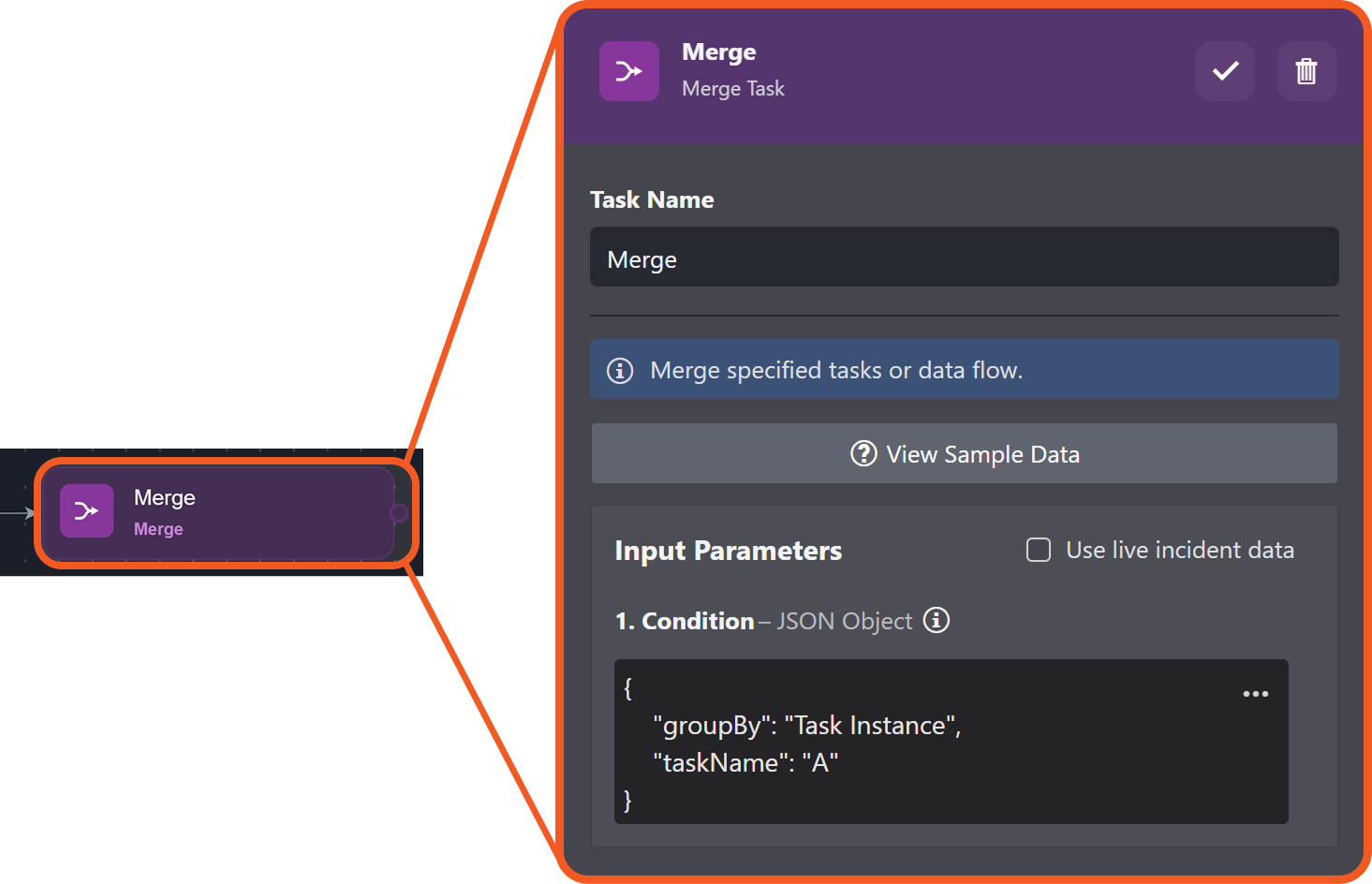
-
Test run the playbook.
-20250602-235821.png?cb=c032453eece5586bf925821cb0e65b3b)
-
Click on the lab1.d3securityonline.net_d3_main_release_p1_VSOC_LifeServer.aspx_div=dashboard&Open=Other&t2=4e6e6559792ad8114acfdd4b94ec28dcac4d83a3ec3f7c606867870633ba2cdb (14) 2-20250617-192926.png icon within the Merge task.
-20250617-205028.png?cb=fdcb76f9f0a0580fe1043333d56ee088)
-
Note that two out of the three execution instances lack merge results.
-20250617-212045.png?cb=249aad66e8decb4f8409f3a481d9ed1f)
-
Observe the execution result in the instance rendering the Raw Data tab.
merge resultJSON[ { "DataSource": { ... }, "A": { ... }, "D": { ... } } ]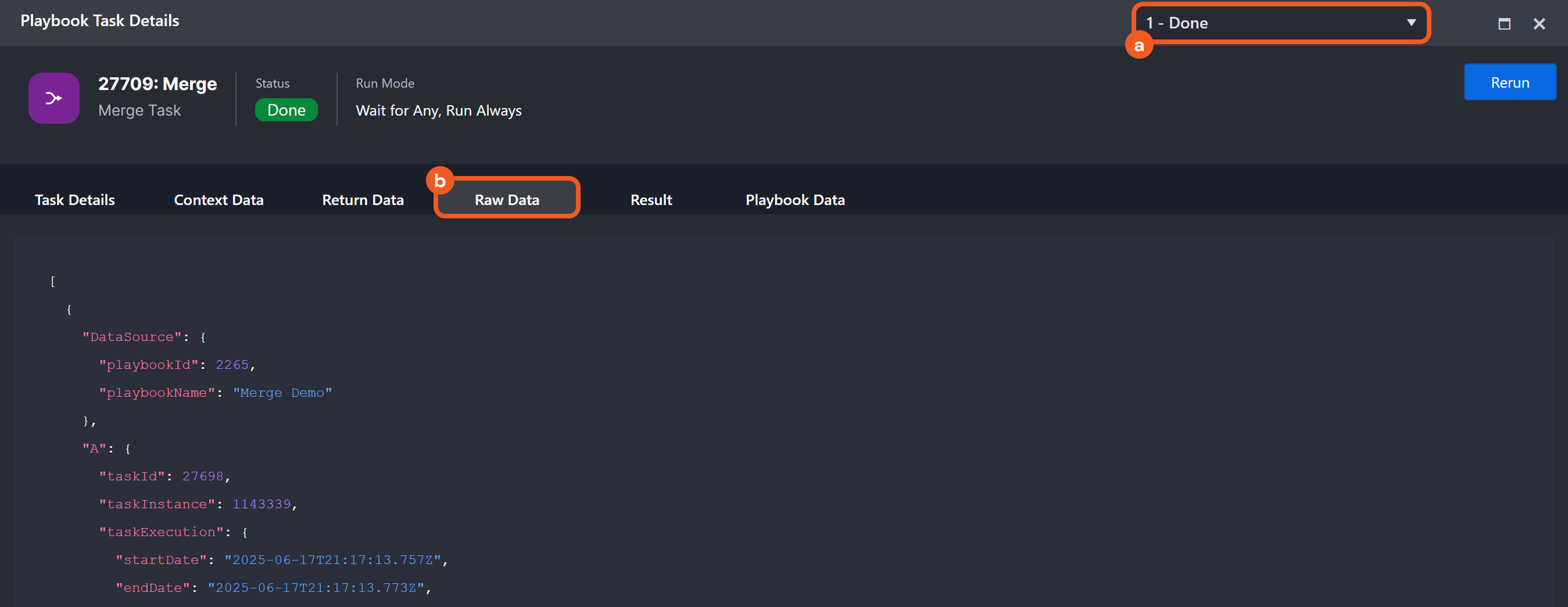
-
Repeat steps 2-6 with "B" as the merge condition taskName:
JSON{ "groupBy": "Task Instance", "taskName": "B" }merge result
JSON[ { "DataSource": { ... }, "B": { ... }, "D": { ... } } ] -
Repeat steps 2-6 with "C" as the merge condition taskName:
JSON{ "groupBy": "Task Instance", "taskName": "C" }merge result
JSON[ { "DataSource": { ... }, "C": { ... }, "D": { ... } } ] -
Repeat steps 2-6 with "D" as the merge condition taskName:
JSON{ "groupBy": "Task Instance", "taskName": "D" }merge result 1
JSON[ { "DataSource": { ... }, "A": { ... }, "D": { ... } } ]merge result 2
JSON[ { "DataSource": { ... }, "B": { ... }, "D": { ... } } ]merge result 3
JSON[ { "DataSource": { ... }, "C": { ... }, "D": { ... } } ]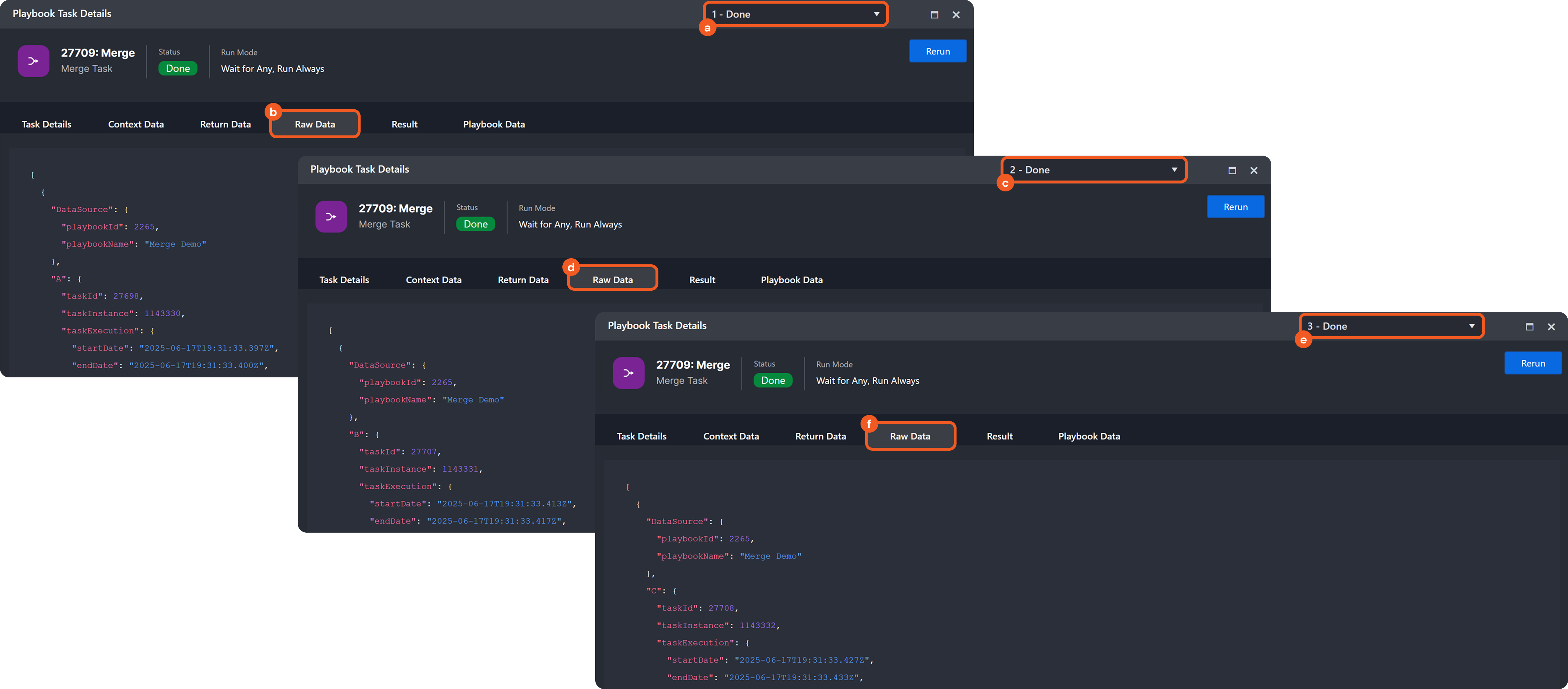
%202-20250617-192926.png?cb=14968c01c55f3ad066ff43483783d620)
TAKEAWAYS
-
The Raw Data tab, containing the merge results, renders only for execution instances that match the task name specified in the merge condition.
-
There is a 1:1 correspondence between the number of executions of the specified task and the number of merge results.
-
Tasks A, B, and C each execute only once. Consequently, selecting any of them in a groupBy Task Instance situation produces a single merge instance containing the merge result.
-
Task D executes three times. Consequently, selecting it in a groupBy Task Instance situation results in three merge execution instances each containing an execution lineage object.
-
Had step 9 been executed using the merge condition grouping by Task rather than by Task Instance, the outcome would have been a single Merge instance containing the merge result.
group by task Merge result
[
  {
    "DataSource": { ... },
    "A": { ... },
    "D": { ... },
    "Merge": { ... }
  },
  {
    "DataSource": { ... },
    "C": { ... },
    "D": { ... },
    "Merge": { ... }
  },
  {
    "DataSource": { ... },
    "B": { ... },
    "D": { ... }
  }
]
Example 2 - Merging Using a Task with Upstream and Downstream Nodes
OBJECTIVE – Understand how the Merge task processes execution lineage permutations with a designated task, considering its upstream and downstream nodes.
-
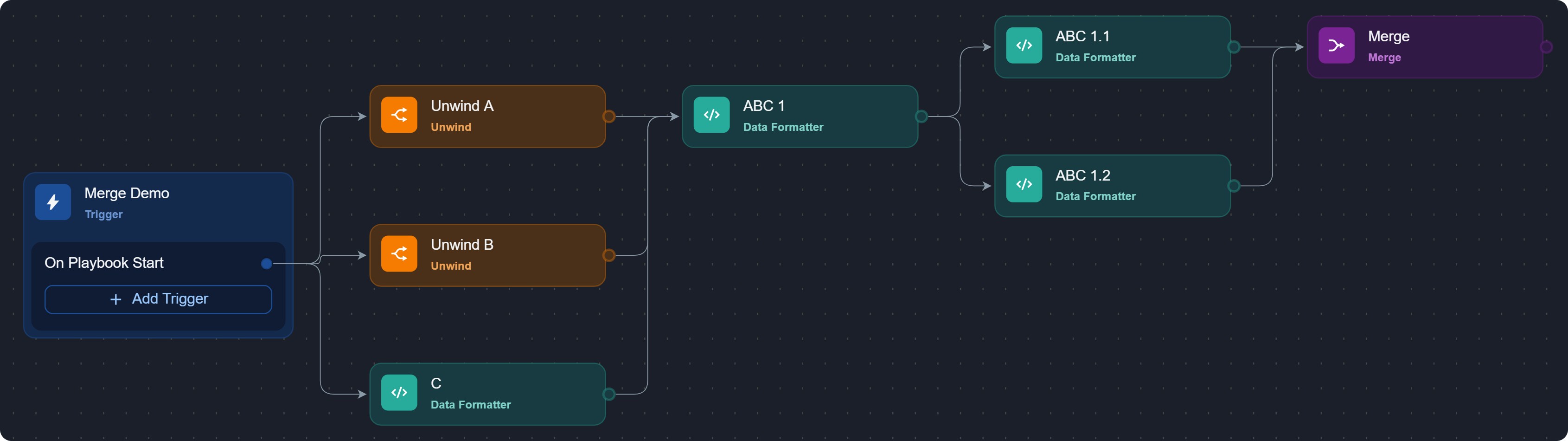
Build the following playbook:
-
Configure the JSON Data parameter of the Unwind A node as follows:
JSON[ { "id": 1, "name": "Object 1" }, { "id": 2, "name": "Object 2" } ]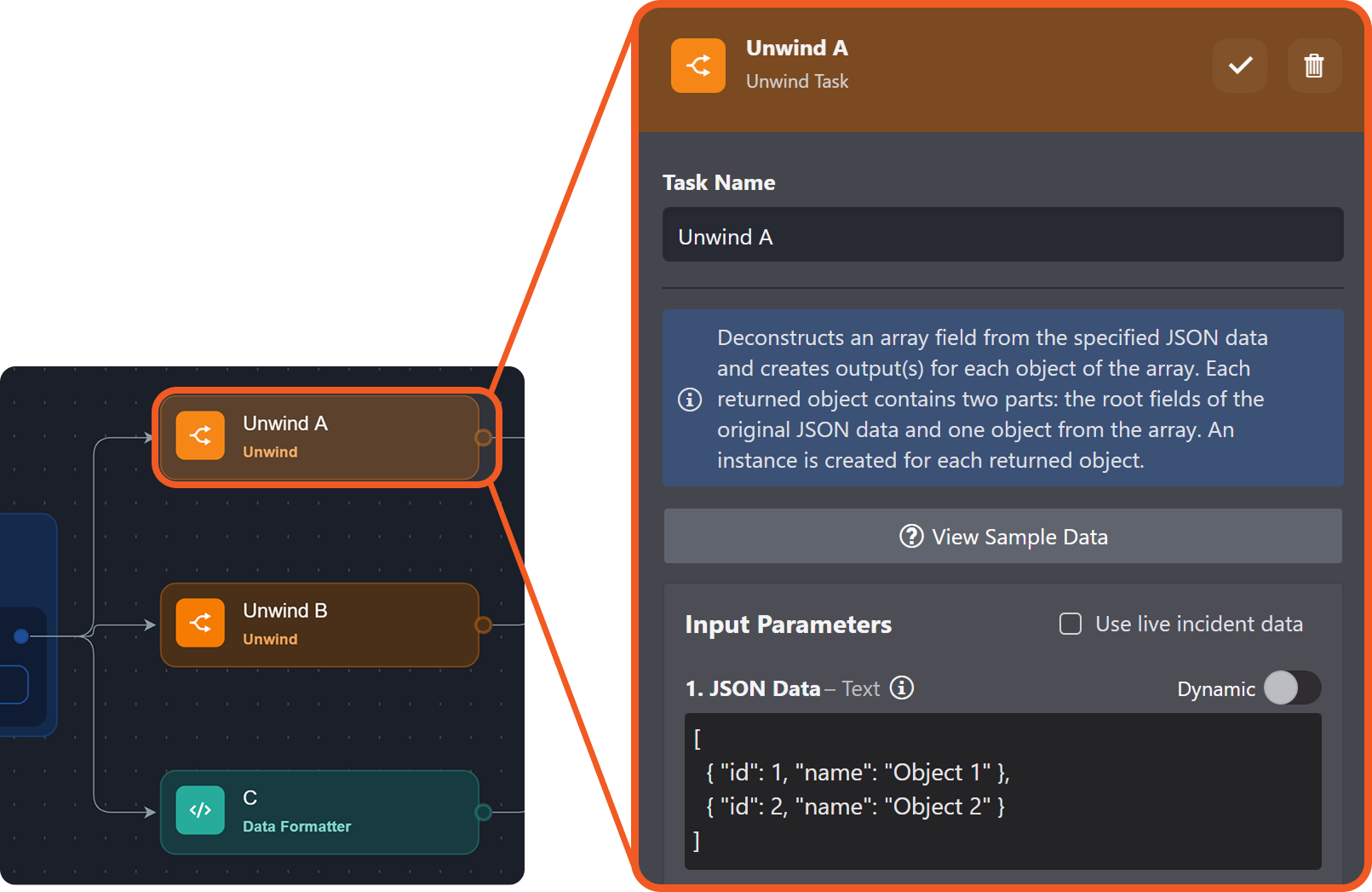
-
Configure the JSON Data parameter of the Unwind B node as follows:
JSON[ { "id": 3, "name": "Object 3" }, { "id": 4, "name": "Object 4" }, { "id": 5, "name": "Object 5" } ]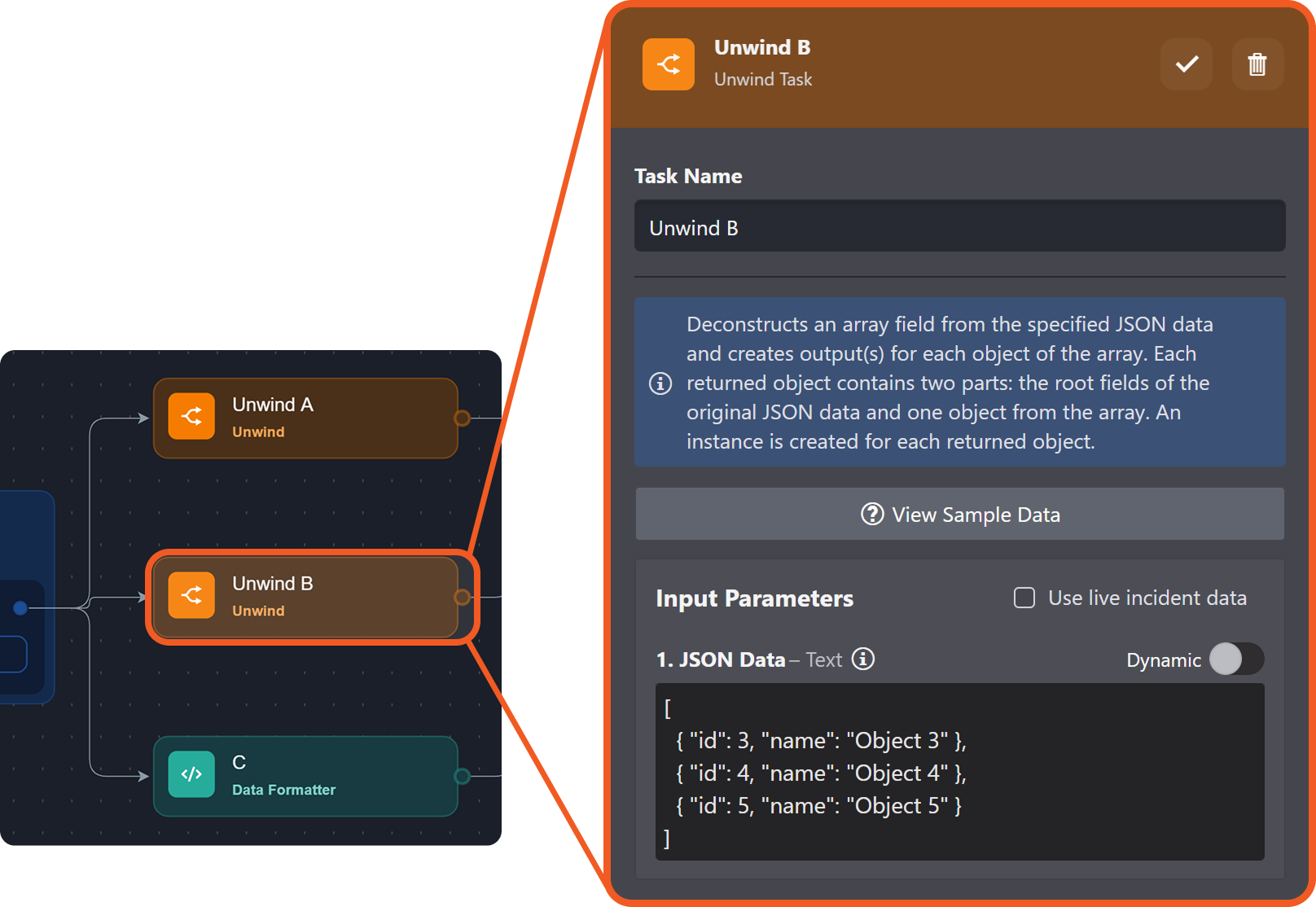
-
Input the following merge condition:
JSON{ "groupBy": "Task Instance", "taskName": "ABC 1" }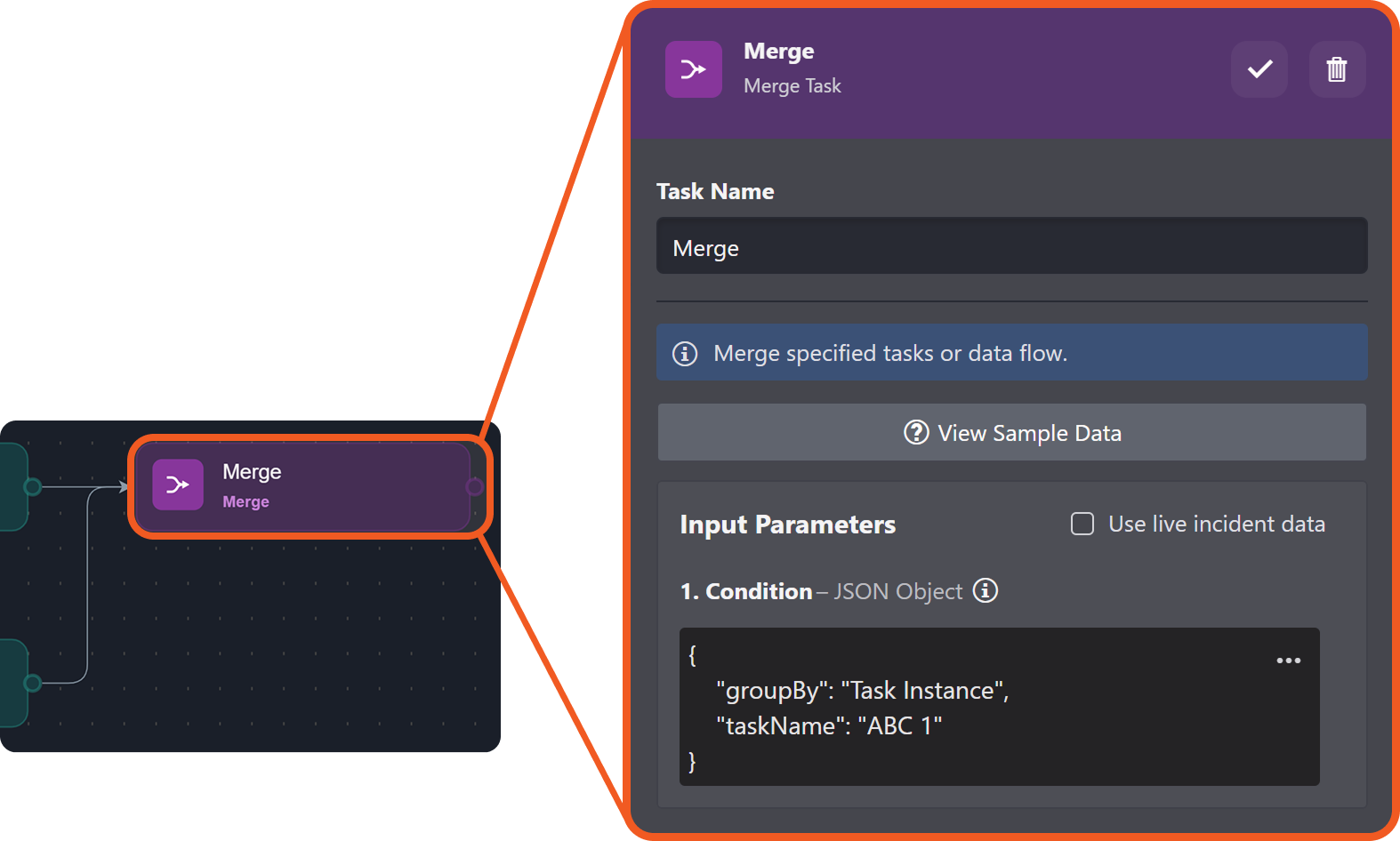
-
Click on the
%202-20250617-170925.png?cb=7b32e285e8df276c2d578ef333c16eb8)
%201-20250617-171224.png?cb=25c8dbee85a86b17b9b2eaced4037bcb)
-
Locate execution instances with the Raw Data tab visible, then review the execution result.
MERGE RESULT 1
JSON[ { "DataSource": { ... }, "Unwind A": { ... }, "ABC 1": { ... }, "ABC 1.1": { ... } }, { "DataSource": { ... }, "Unwind A": { ... }, "ABC 1": { ... }, "ABC 1.2": { ... } } ]MERGE RESULT 2
JSON[ { "DataSource": { ... }, "Unwind A": { ... }, "ABC 1": { ... }, "ABC 1.1": { ... } }, { "DataSource": { ... }, "Unwind A": { ... }, "ABC 1": { ... }, "ABC 1.2": { ... } } ]MERGE RESULT 3
JSON[ { "DataSource": { ... }, "Unwind B": { ... }, "ABC 1": { ... }, "ABC 1.1": { ... } }, { "DataSource": { ... }, "Unwind B": { ... }, "ABC 1": { ... }, "ABC 1.2": { ... } } ]MERGE RESULT 4
JSON[ { "DataSource": { ... }, "Unwind B": { ... }, "ABC 1": { ... }, "ABC 1.1": { ... } }, { "DataSource": { ... }, "Unwind B": { ... }, "ABC 1": { ... }, "ABC 1.2": { ... } } ]MERGE RESULT 5
JSON[ { "DataSource": { ... }, "Unwind B": { ... }, "ABC 1": { ... }, "ABC 1.1": { ... }, "Merge": { ... } }, { "DataSource": { ... }, "Unwind B": { ... }, "ABC 1": { ... }, "ABC 1.2": { ... } } ]MERGE RESULT 6
JSON[ { "DataSource": { ... }, "C": { ... }, "ABC 1": { ... }, "ABC 1.1": { ... }, "Merge": { ... } }, { "DataSource": { ... }, "C": { ... }, "ABC 1": { ... }, "ABC 1.2": { ... } }Configuring the merge condition with groupBy Task instead of Task Instance will result in a single Merge execution containing one consolidated array of the same twelve objects.
TAKEAWAY
Merge results will be distributed across instances, instead of being chunked altogether in one Merge execution instance.
Example 3 - Wait for All Run Mode Vs. Merge
OBJECTIVE – Understand why the Wait for All run mode can produce a variable number of downstream executions, and how substituting a Merge task makes the execution count predictable.
-
Build the following playbook with ta
k with task D set to the Wait for All run mode:
-
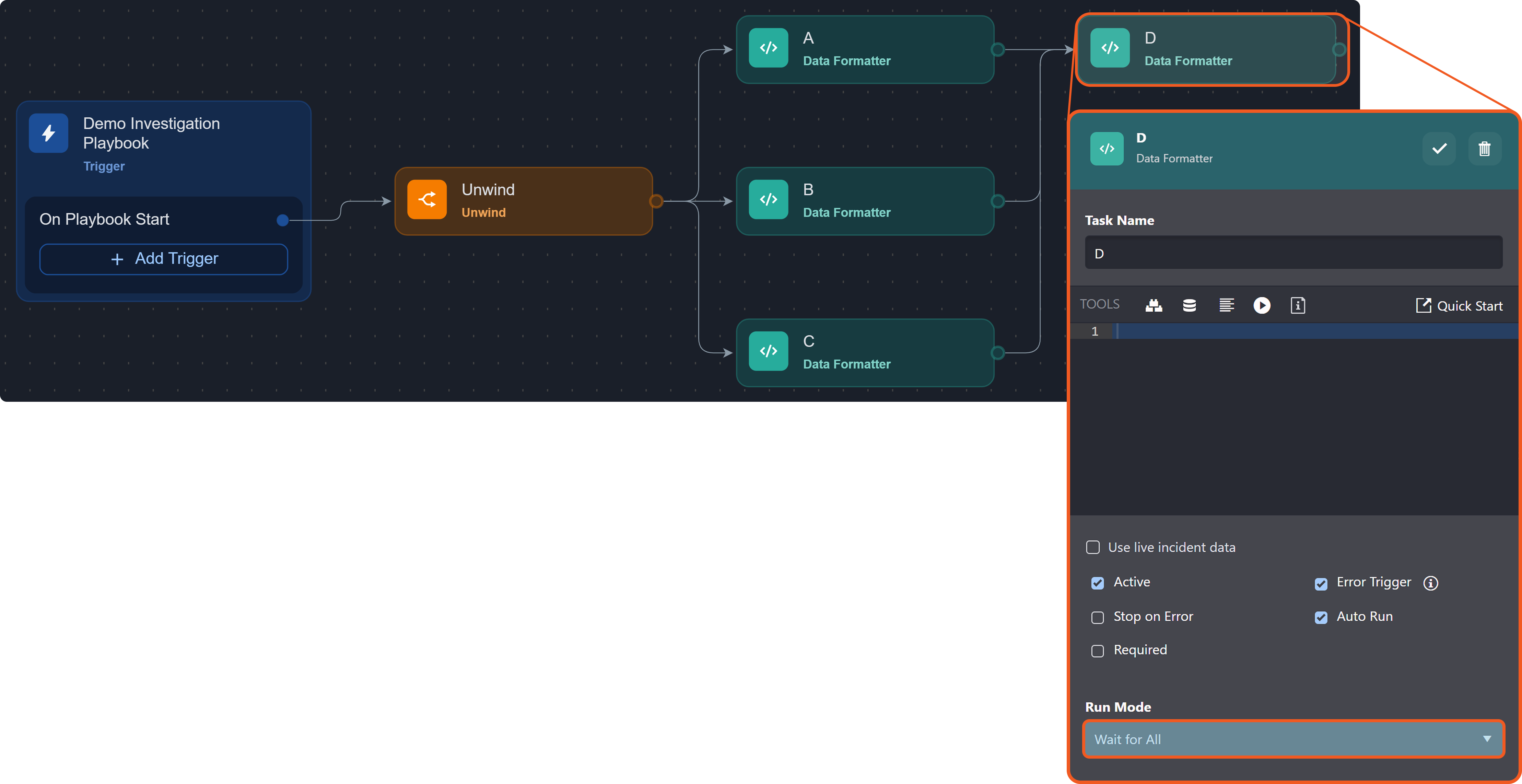
Configure the JSON Data parameter of the Unwind node as follows:
JSON[ { "id": 1, "name": "Object 1" }, { "id": 2, "name": "Object 2" }, { "id": 3, "name": "Object 3" } ]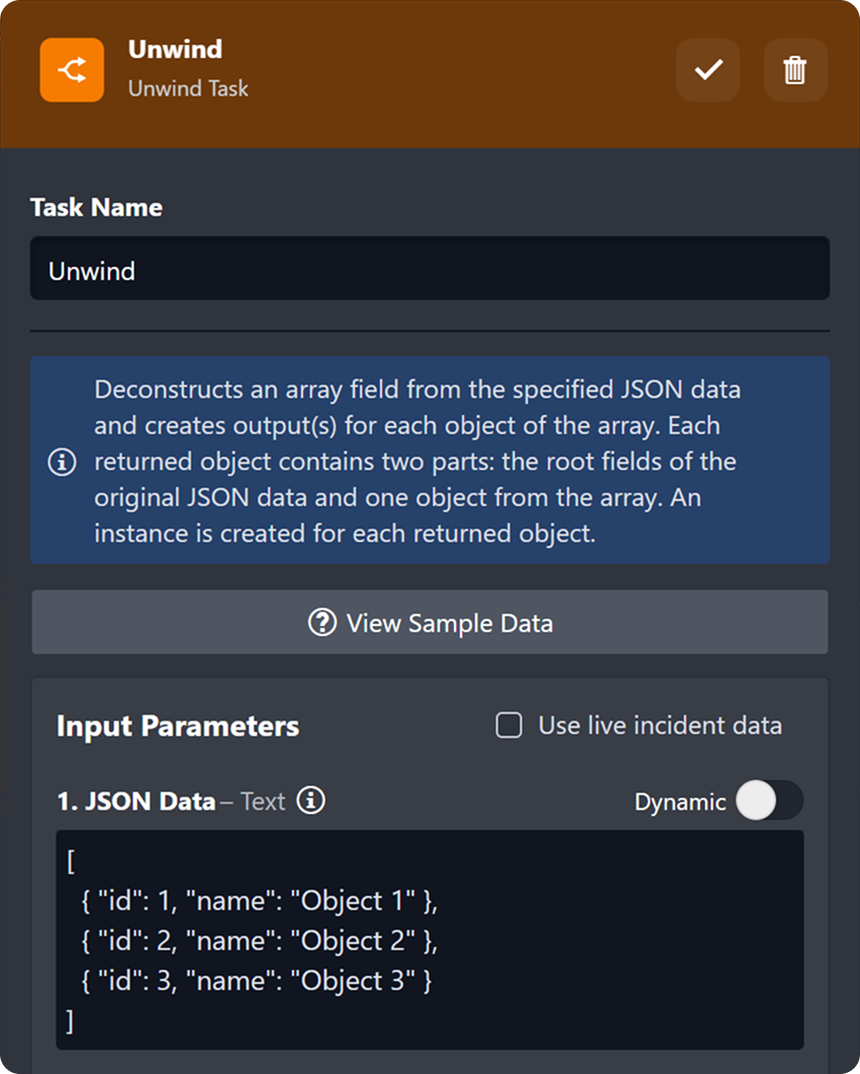
-
Run the playbook multiple times, and verify that three outcomes are possible for task D.
%201.png?cb=1e3e115ea169479a9697e342883f6e8e)
Task D may execute once %201.png?cb=3152ee0e065d5a6f44825b0702da0a73)
Task D may execute twice 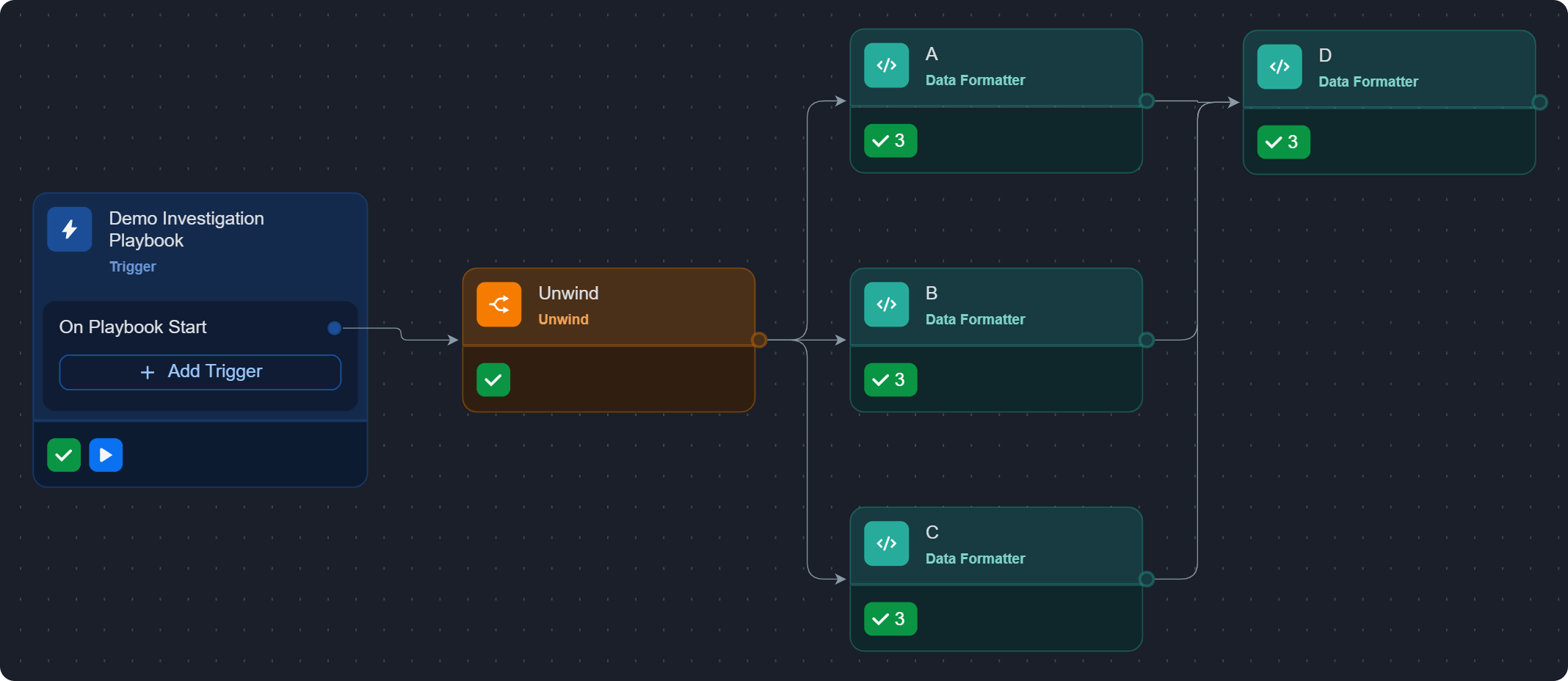
Task D may execute three times
EXPLANATION
Under the Wait for All run mode, task D executes once per complete set of inputs received from its upstream tasks (A, B, and C). The Unwind task produces three arrivals from each upstream task (A1, B1, C1, A2, B2, C2, A3, B3, and C3), and the order in which those nine arrivals reach D determines how many complete sets form.
Arrivals that do not combine into a full set are left unmatched, so D may execute one, two, or three times depending on runtime arrival order.
Example Arrival Orders at task d
-
A1, A2, A3, B1, B2, B3, C1, C2, C3: The first set completes at C1. D executes and resets. The earlier A2, A3, B2, B3 are not retained, and the remaining C2, C3 cover only one letter, so no further set forms. D executes once. -
A1, B1, A2, C1, B2, C2, A3, B3, C3: The first set completes at C1. D executes and resets, and the extra A2 is not retained. The second set completes at A3 (after B2, C2). The trailing B3, C3 cover only two letters. D executes twice. -
A1, B1, C1, A2, B2, C2, A3, B3, C3: Each group of three completes a set. D executes three times.
-
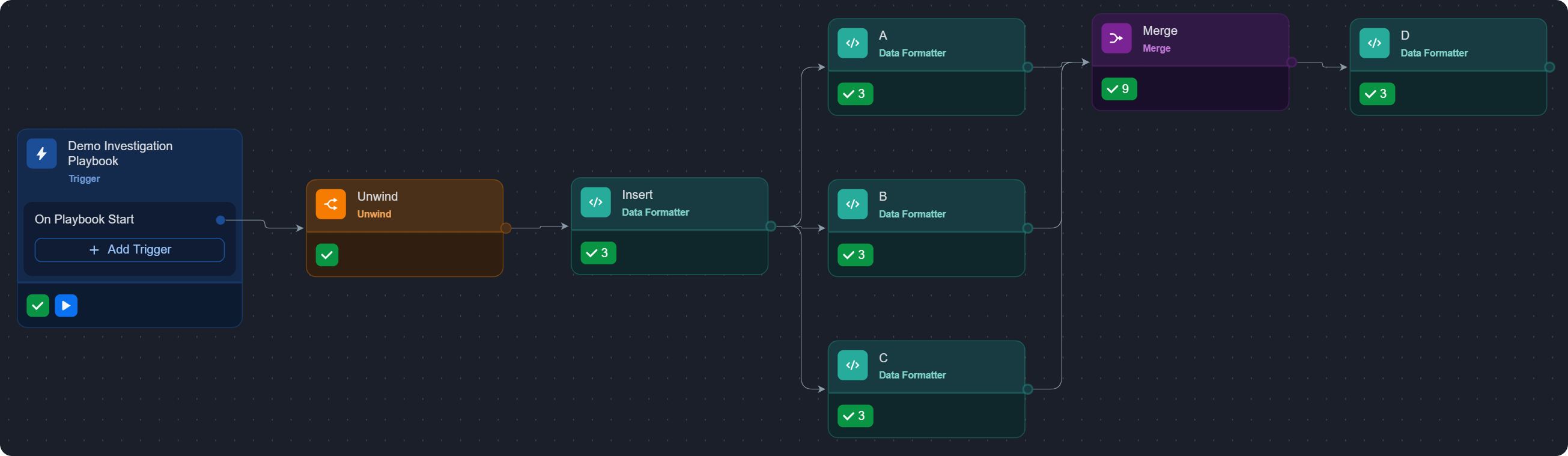
Build the following playbook with all tasks set to the Wait for Any, Run Always run mode.
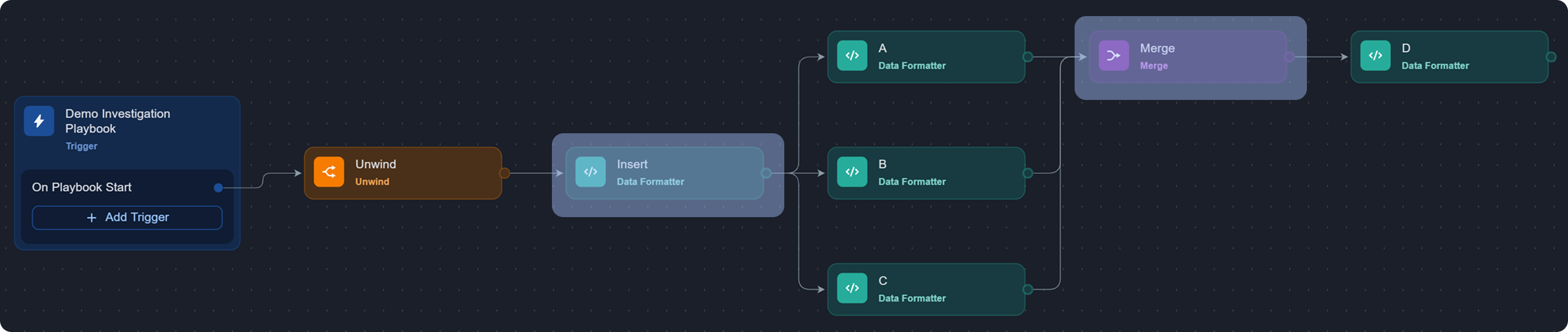
-
Input the following merge condition:
JSON{ "groupBy": "Task Instance", "taskName": "Insert" }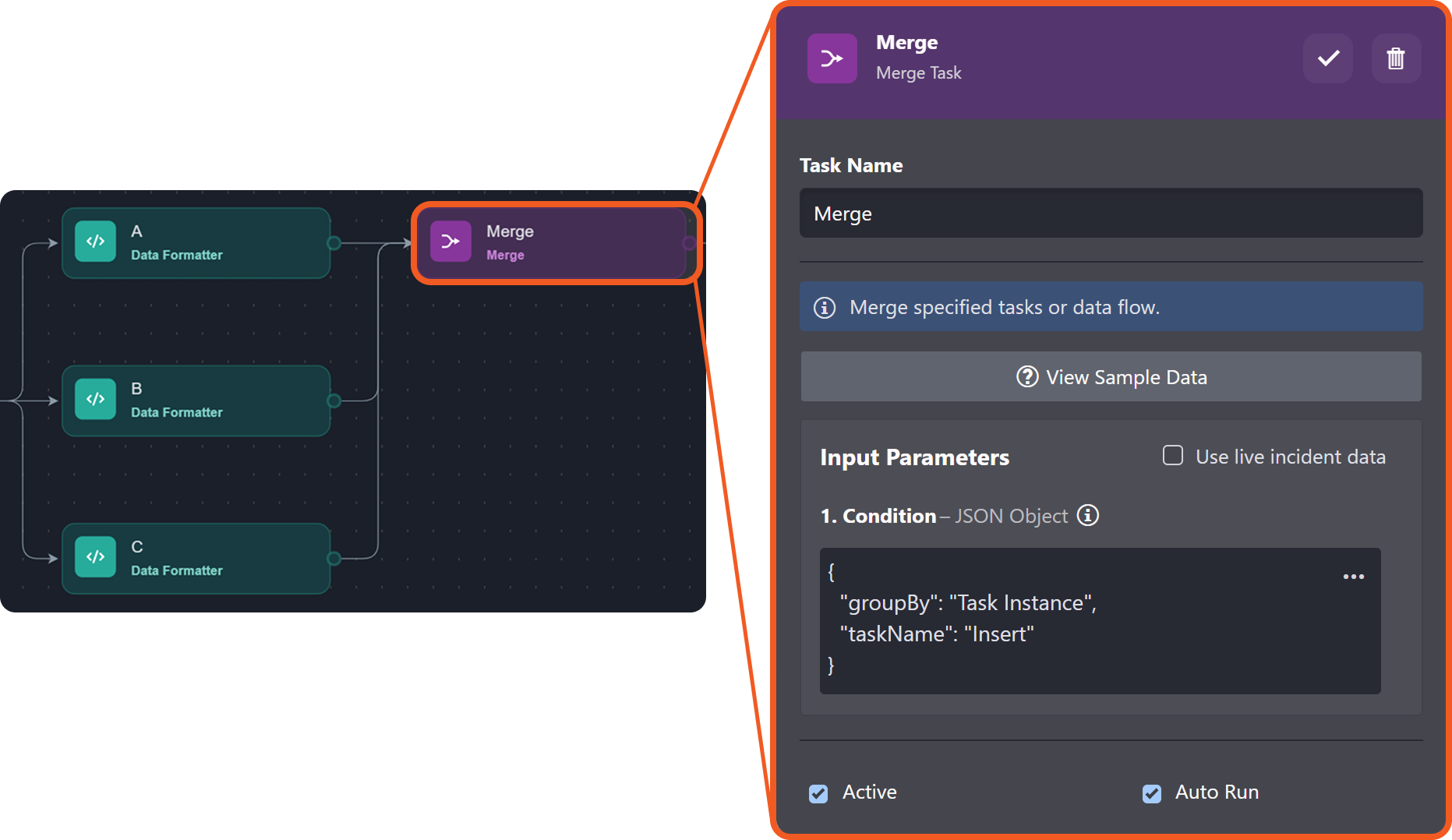
-
Run the playbook multiple times, and verify that task D can only execute three times.
-
Review the results of the Merge task within the corresponding Raw Data tabs:
MERGE RESULT 1
JSON[ { "DataSource": { ... }, "Unwind": { ... }, "Insert": { ... }, "A": { ... } }, { "DataSource": { ... }, "Unwind": { ... }, "Insert": { ... }, "B": { ... } }, { "DataSource": { ... }, "Unwind": { ... }, "Insert": { ... }, "C": { ... } } ]MERGE RESULT 2
JSON[ { "DataSource": { ... }, "Unwind": { ... }, "Insert": { ... }, "A": { ... } }, { "DataSource": { ... }, "Unwind": { ... }, "Insert": { ... }, "C": { ... } }, { "DataSource": { ... }, "Unwind": { ... }, "Insert": { ... }, "B": { ... } } ]MERGE RESULT 3
JSON[ { "DataSource": { ... }, "Unwind": { ... }, "Insert": { ... }, "A": { ... } }, { "DataSource": { ... }, "Unwind": { ... }, "Insert": { ... }, "B": { ... } }, { "DataSource": { ... }, "Unwind": { ... }, "Insert": { ... }, "C": { ... }
TAKEAWAY
With the Merge task in place, every upstream arrival is captured and grouped into a merge result before being passed to task D. No arrivals are left unmatched, and task D's execution count becomes fixed (one execution per merge result).
RELATED ARTICLES