
Last Updated: October 24, 2026
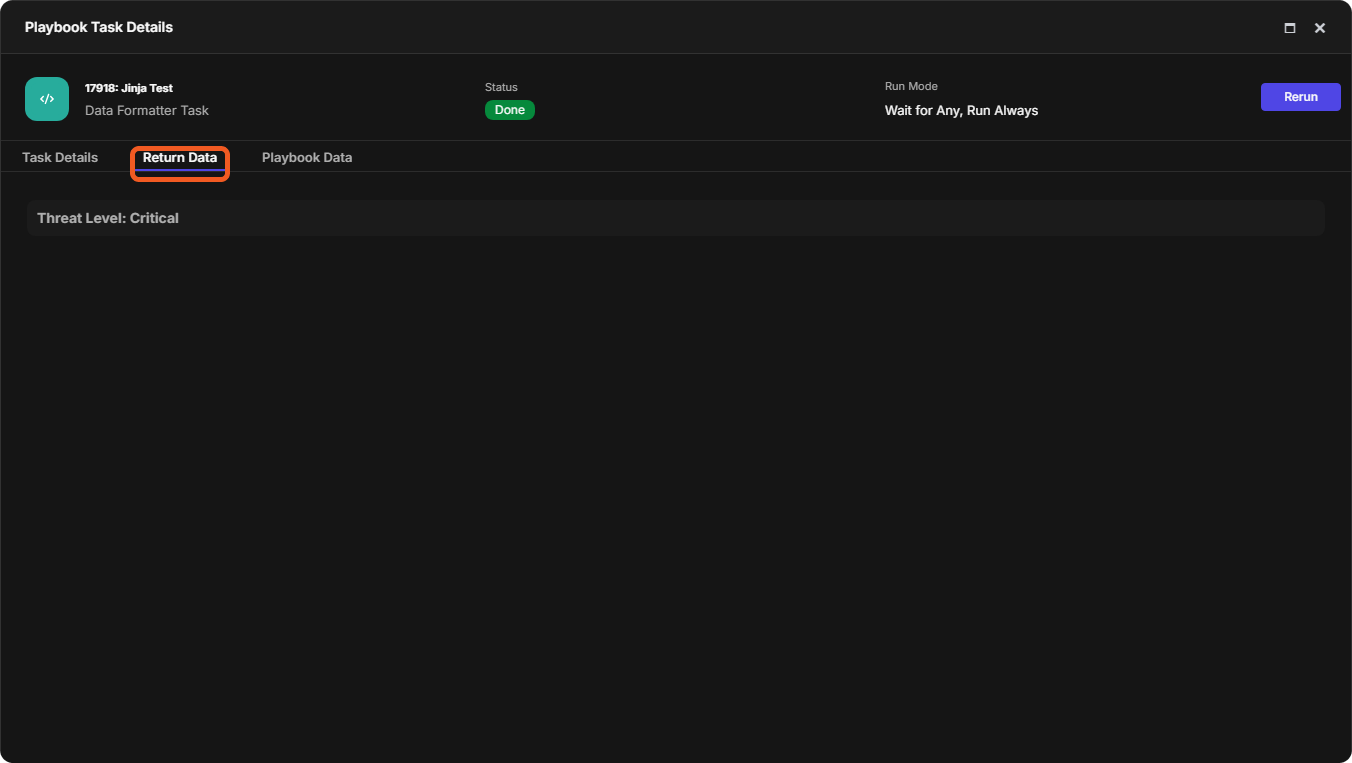
Jinja is a templating language, with a syntax like Python's, that D3 playbooks use to retrieve, change and present data. You write Jinja in playbook tasks, for example in a Data Formatter task. Every example on this page was run in a Data Formatter task with Test Playbook, and the output shown is the task's Return Data. See Data Formatter Tasks and Playbook Testing and Task Node Re-runs.
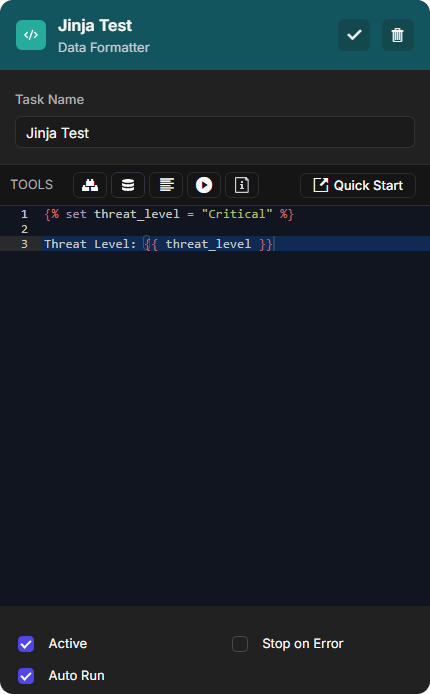
An example in a Data Formatter task
Its return data
Data and Expressions
Data Types
A data type defines a value's structure and what you can do with it.
|
Group |
Type |
Example |
|---|---|---|
|
Primitives (one value) |
String ( |
|
|
Integer ( |
|
|
|
Float ( |
|
|
|
Boolean ( |
|
|
|
None ( |
|
|
|
Collections (several values) |
List ( |
|
|
Tuple ( |
|
|
|
Dictionary ( |
|
|
|
Special |
Undefined ( |
|
-
In the task output, a tuple is shown as a list:
{% set t = ( 1, 2, 3 ) %}{{ t }}returns[ 1, 2, 3 ]. -
Booleans and None are written in title case or lower case.
TRUEandNONEare undefined variables and render as nothing. -
An undefined variable does not make the task fail, and it produces no return data: the task's details have no Return Data tab.
Assigning Variables
The {% set %} statement defines a variable and assigns it a value. Use {{ variable_name }} to show the value in the task output.
Example 1: assigning and referencing a variable in one task
{% set user = {
    "username": "Alice",
    "department": "Security Operations Center",
    "role": "Incident Responder",
    "access_level": "Tier-1",
    "last_login": "2024-02-07T10:30:00Z"
} %}

{{ user }}
Output:
{
  "username": "Alice",

  "department": "Security Operations Center",

  "role": "Incident Responder",

  "access_level": "Tier-1",

  "last_login": "2024-02-07T10:30:00Z"

}
The task in this example is named Defining and Assigning Variables. Example 2: reading another task's output and overriding a value
{% set user = PlaybookData | jsonpath('$.["Defining and Assigning Variables"].returnData') %}

{% set updated_user = {
    "username": user.username,
    "department": user.department,
    "role": user.role,
    "access_level": "Tier-2",
    "last_login": user.last_login
} %}

{{ updated_user }}
Output:
{
  "username": "Alice",

  "department": "Security Operations Center",

  "role": "Incident Responder",

  "access_level": "Tier-2",

  "last_login": "2024-02-07T10:30:00Z"

}
This task reads the return data of the Defining and Assigning Variables task from the playbook data, and sets a new access_level. See Dynamically Selecting Data.
Expressions
An expression is anything that evaluates to one value: literal values, variable references, arithmetic, logical expressions, comparisons, macro calls, filters and tests.
Literal values
{{ "D3 Security" }}
{{ 2025 }}
{{ true }}
{{ none }}
Output:
D3 Security
2025
True
None
Variable references
{% set threat_level = "Critical" %}

Threat Level: {{ threat_level }}
Output:
Threat Level: Critical
Arithmetic
{% set failed_attempts = 5 %}

Lockout Threshold: {{ failed_attempts * 2 }}
Output:
Lockout Threshold: 10
Logical expressions (and, or, not)
{% set is_malicious = True %}
{% set is_whitelisted = False %}

Suspicious: {{ is_malicious and not is_whitelisted }}
Output:
Suspicious: True
Comparisons return True or False.
|
Operator |
Description |
Example |
|---|---|---|
|
|
Equal to |
|
|
|
Not equal to |
|
|
|
Greater than |
|
|
|
Less than |
|
|
|
Greater than or equal to |
|
|
|
Less than or equal to |
|
A comparison
{% set x = 10 %}
{% set y = 5 %}

x greater than y: {{ x > y }}
Output:
x greater than y: True
Macro (function) calls
{% macro greet_user(username) %}
    Hello {{ username }}!
{% endmacro %}

{{ greet_user("Alice") }}
{{ greet_user("Emily") }}
Output:
Hello Alice!

Hello Emily!
Filters
{% set log_entry = "User jdoe logged in from 192.168.1.100 at 7:30 AM." %}

Sanitized Log: {{ log_entry
    | replace("jdoe", "[REDACTED_USER]")
    | replace("192.168.1.100", "[REDACTED_IP]") }}
Output:
Sanitized Log: User [REDACTED_USER] logged in from [REDACTED_IP] at 7:30 AM.
Tests check a property of a value and return True or False.
A test
{% set user_role = "admin" %}

Admin Role Defined: {{ user_role is defined }}
Guest Role Defined: {{ guest_role is defined }}
Output:
Admin Role Defined: True
Guest Role Defined: False
|
Test |
Description |
Example |
Output |
|---|---|---|---|
|
|
Checks whether a variable exists. |
|
False |
|
|
Checks whether a variable does not exist. |
|
True |
|
|
Checks whether a value is None. |
|
True |
|
|
Checks whether a value is a number (integer or float). |
|
True |
|
|
Checks whether a value is a string. |
|
True |
|
|
Checks whether a value is a sequence (list, tuple or string). |
|
True |
|
|
Checks whether a number is even. |
|
False |
|
|
Checks whether a number is odd. |
|
True |
|
|
Checks whether a value is greater than another. |
|
True |
|
|
Checks whether a value is less than another. |
|
True |
|
|
Checks whether an item is in a list or string. |
|
True |
Control Structures
Filters
Filters change a value. Chain them with the pipe: {{ variable | filter1(arguments) | filter2 }}. Jinja2's built-in filters are listed in the Jinja2 documentation. D3's own filters have their own pages, for example Text Filters and Array Filters.
Example 1: a filter without an argument
{{ "D3 Security" | length }}
Output:
11
Example 2: a filter with an argument
{% set alert = {"description": "Malware detected on endpoint."} %}

{{ alert.description | replace("Malware", "SUSPICIOUS ACTIVITY") }}
Output:
SUSPICIOUS ACTIVITY detected on endpoint.
Example 3: chaining filters
{% set alert = {
    "timestamps": [
        "2024-02-06T14:15:00",
        "2024-02-06T10:00:00",
        "2024-02-06T12:30:00",
        "2024-02-06T09:45:00",
        "2024-02-06T16:00:00"
    ]
} %}

{% set first_time = alert.timestamps | sort | first | replace("T", " ") %}
{% set last_time = alert.timestamps | sort | last | replace("T", " ") %}

First Seen: {{ first_time }}
Last Seen: {{ last_time }}
Output:
First Seen: 2024-02-06 09:45:00
Last Seen: 2024-02-06 16:00:00
sort puts the timestamps in order, first and last take the earliest and latest, and replace changes the T to a space.
Conditionals and Loops
-
If statements:
{% if condition %} ... {% elif condition %} ... {% else %} ... {% endif %} -
For loops:
{% for variable in iterable %} ... {% endfor %}, over a list, a range, a dictionary or a string.
Conditional example 1: an elif branch is chosen
{% set severity = "Medium" %}

{% if severity == "High" %}
    Alert requires immediate attention.
{% elif severity == "Medium" %}
    Alert should be reviewed soon.
{% else %}
    No immediate action required.
{% endif %}
Output:
Alert should be reviewed soon.
Conditional example 2: nested conditions
{% set threat = {
    "severity": "Critical",
    "anomaly_detected": True,
    "attack_vector": "Ransomware"
} %}

{% if threat.severity == "Critical" %}
    Immediate escalation is required.
    {% if threat.anomaly_detected %}
        Anomaly confirmed. Engage the incident response team.
    {% else %}
        Anomaly not detected. Reassess threat data.
    {% endif %}
{% else %}
    No immediate action is required.
{% endif %}
Output:
Immediate escalation is required.

Anomaly confirmed. Engage the incident response team.
Conditional example 3: not
{% set firewall_enabled = False %}
{% if not firewall_enabled %}
    SOC Alert: Firewall is not enabled.
{% endif %}
Output:
SOC Alert: Firewall is not enabled.
Loop example 1: looping over a list
{% set ip_addresses = [
    "192.168.1.10",
    "10.0.0.5",
    "172.16.0.3",
    "203.0.113.25",
    "198.51.100.42",
    "192.168.2.15"
] %}

{# The allowed IP ranges are private networks: 192.168.x.x, 10.x.x.x, and 172.16.x.x. #}
{% for ip in ip_addresses %}
    {% if not (ip.startswith("192.168") or ip.startswith("10.") or ip.startswith("172.16")) %}
        External IP flagged: {{ ip }}
    {% endif %}
{% endfor %}
Output:
External IP flagged: 203.0.113.25

External IP flagged: 198.51.100.42
Text between {# and #} is a comment and is not shown in the output. Loop example 2: looping over nested lists
{% set file_hash = "a3f1c4b92e7d6f8098b2a1d5c3e4f7g601a2b3c4d5e6f7h8091a2b3c4d5e6f7a" %}
{% set segments = file_hash | batch(8, '') | list %}

{% for index in range(8) %}
    Segment {{ index + 1 }}: {{ segments[index] | join('') }}
{% endfor %}
Output:
Segment 1: a3f1c4b9

Segment 2: 2e7d6f80

Segment 3: 98b2a1d5

Segment 4: c3e4f7g6

Segment 5: 01a2b3c4

Segment 6: d5e6f7h8

Segment 7: 091a2b3c

Segment 8: 4d5e6f7a
batch(8, '') splits the string into chunks of 8 characters, list turns them into a list, range(8) gives the indexes 0 to 7, and join('') turns each chunk back into a string. Loop example 3: looping over a dynamic range
{% set ip_address = "192.168.1.100" %}
{% set octets = ip_address.split('.') %}

{% for index in range(octets | length) %}
    Octet {{ index + 1 }}: {{ octets[index] }}
{% endfor %}
Output:
Octet 1: 192

Octet 2: 168

Octet 3: 1

Octet 4: 100
split('.') gives the four octets, and range(octets | length) gives one index for each. Loop example 4: looping over a dictionary
{% set security_events = {
    "Unauthorized Access": "Critical",
    "Malware Infection": "High",
    "Suspicious Login": "Medium"
} %}

{% for event, severity in security_events.items() %}
    Event "{{ event }}" has a severity level of: {{ severity }}
{% endfor %}
Output:
Event "Unauthorized Access" has a severity level of: Critical

Event "Malware Infection" has a severity level of: High

Event "Suspicious Login" has a severity level of: Medium
Loop example 5: looping over a string
{% set filename = "malware$payload.exe" %}
{% set suspicious_chars = "!@#$%^&*" %}

{% for char in filename %}
    {% if char in suspicious_chars %}
        Alert: Suspicious character "{{ char }}" found in filename.
    {% endif %}
{% endfor %}
Output:
Alert: Suspicious character "$" found in filename.
Loop example 6 (advanced): a recursive loop that builds nested lists
{% set incident_list = [
    {"Incident": "Incident 1", "related_events": [
        {"Incident": "Incident 1.1"},
        {"Incident": "Incident 1.2", "related_events": [
            {"Incident": "Incident 1.2.1"},
            {"Incident": "Incident 1.2.2"}
        ]}
    ]},
    {"Incident": "Incident 2", "related_events": [
        {"Incident": "Incident 2.1"},
        {"Incident": "Incident 2.2"}
    ]}
] %}

{{ '[' }}
{% for object in incident_list recursive %}
    "{{ object.Incident }}"
    {% if object.related_events %}, [
        {{ loop(object.related_events) }}
    ]{% endif %}
    {% if not loop.last %}, {% endif %}
{% endfor %}
{{ ']' }}
Output:
[
  "Incident 1",

  [

    "Incident 1.1",

    "Incident 1.2",

    [

      "Incident 1.2.1",

      "Incident 1.2.2"

    ]

  ],

  "Incident 2",

  [

    "Incident 2.1",

    "Incident 2.2"

  ]

]
The recursive modifier lets the loop call itself on a sub-list with loop(...). {{ '[' }} outputs a bracket, and {% if not loop.last %}, {% endif %} adds a comma after every item except the last one at each level. Dictionary keys are case-sensitive.
Lists
Lists hold several values in square brackets ([]) and support indexing, slicing, looping, filtering and transformation.
Example 1: removing duplicates
{% set alerts = [
    "Failed Login from 192.168.1.10",
    "Malware Detected on Endpoint",
    "Failed Login from 192.168.1.10",
    "Unauthorized Access Attempt",
    "Malware Detected on Endpoint"
] %}

{% set unique_alerts = alerts | unique %}

Unique Security Alerts:
{% for alert in unique_alerts %}
    - {{ alert }}
{% endfor %}
Output:
Unique Security Alerts:

- Failed Login from 192.168.1.10

- Malware Detected on Endpoint

- Unauthorized Access Attempt
Example 2: combining lists
{% set list1 = ["malicious.com", "badactor.net"] %}
{% set list2 = ["phishingsite.org", "hacker.xyz"] %}

{% set combined = list1 + list2 %}

All Malicious Domains: {{ combined }}
Output:
All Malicious Domains: ['malicious.com', 'badactor.net', 'phishingsite.org', 'hacker.xyz']
Example 3: counting and keeping repeated values
{% set security_events = [
    {"username": "alice", "event": "Phishing Attempt"},
    {"username": "bob", "event": "Brute Force Attack"},
    {"username": "alice", "event": "Credential Stuffing"},
    {"username": "dave", "event": "DLP Violation"},
    {"username": "alice", "event": "Unauthorized Access Attempt"},
    {"username": "bob", "event": "Failed MFA Authentication"},
    {"username": "eve", "event": "Brute Force Attack"}
] %}

{# Step 1: Extract usernames from the list of events #}
{% set targeted_users = security_events | map('username') | list %}

{# Step 2: Count occurrences using a dictionary #}
{% set user_counts = {} %}
{% for user in targeted_users %}
    {% if user_counts[user] is not defined %}
        {% set _ = user_counts.update({user: 1}) %}
    {% else %}
        {% set _ = user_counts.update({user: user_counts[user] + 1}) %}
    {% endif %}
{% endfor %}

{# Step 3: Filter users who appear more than once #}
{% set repeated_targets = [] %}
{% for user, count in user_counts.items() %}
    {% if count > 1 %}
        {% set _ = repeated_targets.append(user) %}
    {% endif %}
{% endfor %}

{# Step 4: Output Users Who Were Targeted Multiple Times #}
Repeatedly Targeted Users:
{% for user in repeated_targets %}
    - {{ user }}
{% endfor %}
Output:
Repeatedly Targeted Users:

- alice

- bob
_ is a throwaway variable for a statement whose result is not needed. Example 4: filtering a list with selectattr
{% set security_events = [
    {"event": "Event1", "severity": "Critical"},
    {"event": "Event2", "severity": "Low"},
    {"event": "Event3", "severity": "Critical"},
    {"event": "Event4", "severity": "Informational"},
    {"event": "Event5", "severity": "High"},
    {"event": "Event6", "severity": "Medium"},
    {"event": "Event7", "severity": "High"},
    {"event": "Event8", "severity": "Critical"}
] %}

{% set high_critical_events = security_events | selectattr("severity", "in", ["High", "Critical"]) | list %}

High-Priority Security Events:
{% for event in high_critical_events %}
    - {{ event.event }} ({{ event.severity }})
{% endfor %}
Output:
High-Priority Security Events:

- Event1 (Critical)

- Event3 (Critical)

- Event5 (High)

- Event7 (High)

- Event8 (Critical)
Example 5: slicing
{% set ipv6_address = "2001:0db8:85a3:0000:0000:8a2e:0370:7334" %}
{% set segments = ipv6_address.split(':') %}

First 4 Segments: {{ segments[:4] | join(':') }}
Last 4 Segments: {{ segments[-4:] | join(':') }}
Output:
First 4 Segments: 2001:0db8:85a3:0000
Last 4 Segments: 0000:8a2e:0370:7334
Slicing follows Python syntax. With events = ["A", "B", "C", "D", "E"]:
|
Notation |
Result |
Example |
Output |
|---|---|---|---|
|
|
Elements from start to end-1 |
|
|
|
|
From the beginning to end-1 |
|
|
|
|
From start to the end |
|
|
|
|
The last n elements |
|
|
|
|
Without the last n elements |
|
|
|
|
From start to end-1, by step |
|
|
|
|
All elements, by step |
|
|
|
|
The list reversed |
|
|
Macros (Functions)
Macros work like functions in other programming languages.
{%- and -%} trim the whitespace and line breaks before or after a tag. {% ... %} keeps them.
Example 1: hexadecimal to binary
{% macro hex_to_binary(hex_value) %}
    {%- set binary_str = [] -%}
    {%- for char in hex_value -%}
        {%- set binary_digit = "{:04b}".format(char | int(base=16)) -%}
        {%- set _ = binary_str.append(binary_digit) -%}
    {%- endfor -%}
    {{ binary_str | join(" ") }}
{% endmacro %}

Binary Representation: {{ hex_to_binary("ABCD") }}
Output:
Binary Representation: 1010 1011 1100 1101
Example 2: detecting SQL injection
{% macro detect_sqli(request) %}
    {% set sqli_signatures = ["SELECT ", "UNION ", "DROP ", "--", "' OR '1'='1", "INSERT ", "UPDATE ", "DELETE "] %}
    {% set detected_signatures = [] %}

    {%- for sig in sqli_signatures -%}
        {%- if sig in request -%}
            {%- set _ = detected_signatures.append(sig) -%}
        {%- endif -%}
    {%- endfor -%}

    {%- if detected_signatures -%}
        {
            "alert": "SQL Injection Attempt Detected",
            "request": "{{ request }}",
            "matched_signatures": {{ detected_signatures | join(", ") }},
            "severity": "High"
        }
    {%- endif -%}
{% endmacro %}

SQLi Detection Output: {{ detect_sqli("GET /search?q=' OR '1'='1' UNION SELECT password FROM users") }}
Output:
SQLi Detection Output:

{
"alert": "SQL Injection Attempt Detected",
"request": "GET /search?q=' OR '1'='1' UNION SELECT password FROM users",
"matched_signatures": SELECT , UNION , ' OR '1'='1,
"severity": "High"
}
Example 3: detecting cross-site scripting (XSS)
{% macro detect_xss(input_data) %}
    {% set xss_signatures = ["<script", "javascript:", "onerror=", "onload=", "alert(", "document.cookie", "eval("] %}
    {% set detected_signatures = [] %}

    {%- for sig in xss_signatures -%}
        {%- if sig in input_data -%}
            {%- set _ = detected_signatures.append(sig) -%}
        {%- endif -%}
    {%- endfor -%}

    {%- if detected_signatures -%}
        {
            "alert": "Cross-Site Scripting (XSS) Attempt Detected",
            "input": "{{ input_data }}",
            "matched_signatures": {{ detected_signatures | join(", ") }},
            "severity": "High"
        }
    {%- endif -%}
{% endmacro %}

XSS Detection Output: {{ detect_xss('<script>alert("XSS")</script>') }}
Output:
XSS Detection Output:

{
"alert": "Cross-Site Scripting (XSS) Attempt Detected",
"input": "<script>alert("XSS")</script>",
"matched_signatures": <script, alert(,
"severity": "High"
}
Troubleshooting
When a Data Formatter task fails, its Status is Error, Return Data shows Failed, and the error message is on the Task Details tab.
A failed task's error
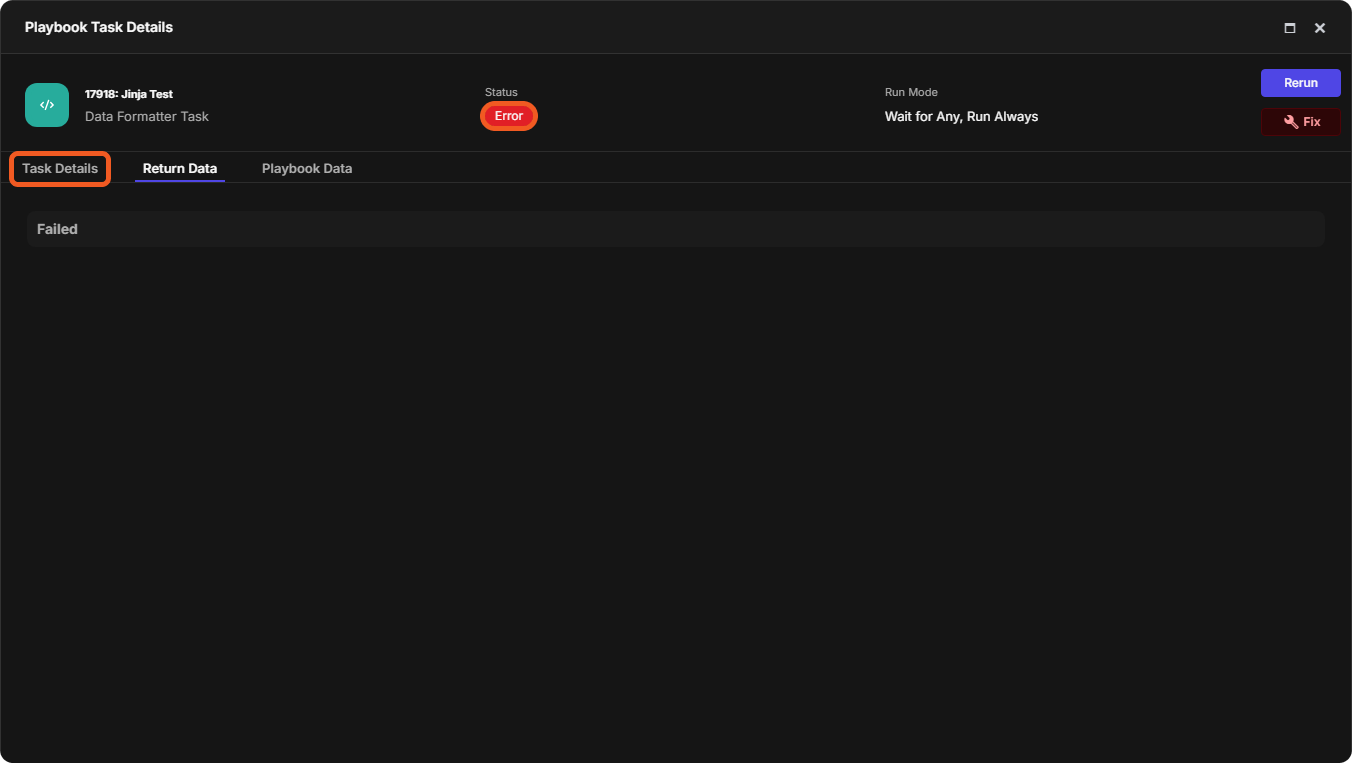
Error: can only concatenate str (not "int") to str
{% set num = 25 %}
{{ "The number is " + num }}
The task fails with can only concatenate str (not "int") to str.
Fix: convert the number to a string with the string filter.
{% set num = 25 %}
{{ "The number is " + num | string }}
Output:
The number is 25
Error: map() takes 3 positional arguments but 4 were given
{% set users = [{"name": "Elon"}, {"name": "Alice"}, {"name": "Emily"}] %}

{{ users | map("attribute", "name") | list }}
The task fails with map() takes 3 positional arguments but 4 were given.
Fix: loop over the list and append the attribute you need to a new list.
{% set users = [{"name": "Elon"}, {"name": "Alice"}, {"name": "Emily"}] %}

{% set result = [] %}
{% for user in users %}
    {% set _ = result.append(user.name) %}
{% endfor %}

{{ result | list }}
Output:
[
  "Elon",

  "Alice",

  "Emily"

]
Syntax Error: trunc (when writing a path)
{{ "C:\Users\name\Downloads" }}
The task fails with Syntax Error: trunc at line 1.
Fix: use double backslashes (\\).
{{ "C:\\Users\\name\\Downloads" }}
Output:
C:\Users\name\Downloads
Syntax Error: No filter named 'first.name'
{% set data = {"users": [{"name": "Alice"}, {"name": "Emily"}]} %}

First User: {{ data.users | first.name }}
The task fails with Syntax Error: No filter named 'first.name'. at line 3.
Fix: apply the filter, store the result in a variable, then read the attribute from the variable. You cannot read an attribute (.name) directly after a filter (first).
{% set data = {"users": [{"name": "Alice"}, {"name": "Emily"}]} %}

{% set first_user = data.users | first %}

First User: {{ first_user.name }}
Output:
First User: Alice
Syntax Error: expected token ':', got 'Unit'
{% set results = [] %}

{% set results = {
    Region: "demo_region",
    Business Unit: "demo_business_unit",
    Application ID: "demo_app_ID",
} %}

{{ results | tojson }}
The task fails with Syntax Error: expected token ':', got 'Unit' at line 5.
Fix: put dictionary keys in double quotes.
{% set results = [] %}

{% set results = {
    "Region": "demo_region",
    "Business Unit": "demo_business_unit",
    "Application ID": "demo_app_ID",
} %}

{{ results | tojson }}
Output:
{
  "Application ID": "demo_app_ID",

  "Business Unit": "demo_business_unit",

  "Region": "demo_region"

}