
last updated: mar 21, 2025
On Playbook Start
-20250110-200013.png?cb=106d114cb2b7e5664a9d47a20fccff24)
Executes tasks either during the playbook's test run or after the playbook is added to an incident— via utility commands, the Escalate playbook task, the playbook automation widget, or the .png?cb=be56978f21a30e0dc008b613b2382a5a)
Example - Notifying a Manager
scenario A manager has requested to be notified whenever an incident is created. To fulfill this request, the analyst will perform the following tasks.
Task 1: Add the Send Email Utility Command
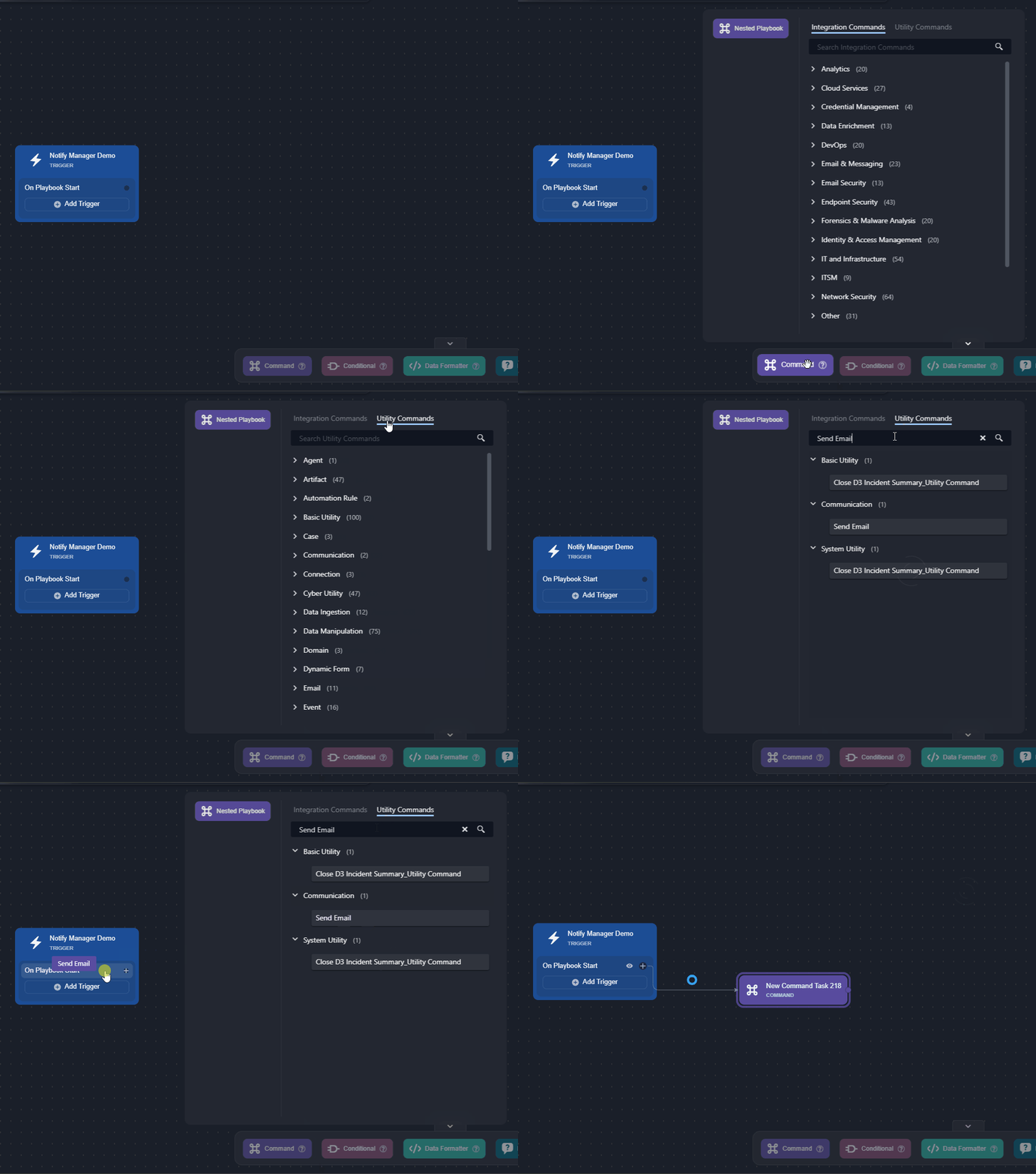
The analyst will begin by adding the Send Email utility command task to the On Playbook Start trigger in an investigation playbook.
-
Add the Send Email utility command to the trigger.
-
Configure the fields as necessary.
.png?cb=2efd94b4b0d54430d781e1948ffc7adc)
-
Enter the task name.
-
Input the manager's email address.
-
Enter the email subject.
-
Enter the email body containing a static message combined with the dynamically retrieved incident number.
{{ "A new incident has been created: " ~ (PlaybookData | jsonpath('$.DataSource.incident.IncidentNo')) }}
-
-
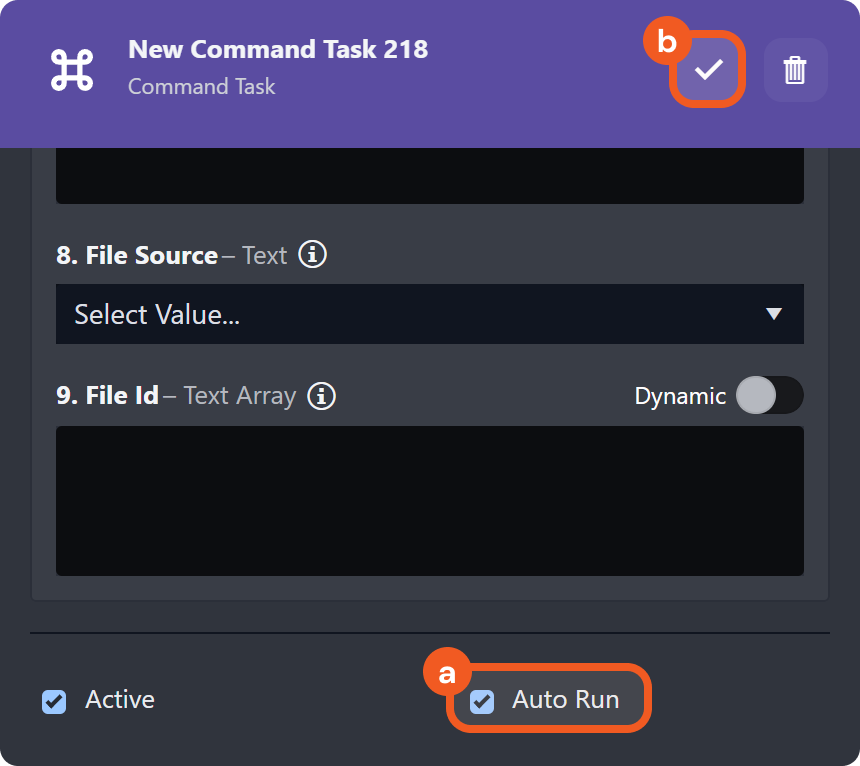
Check the Auto Run checkbox, then click on the checkmark button to save.
-
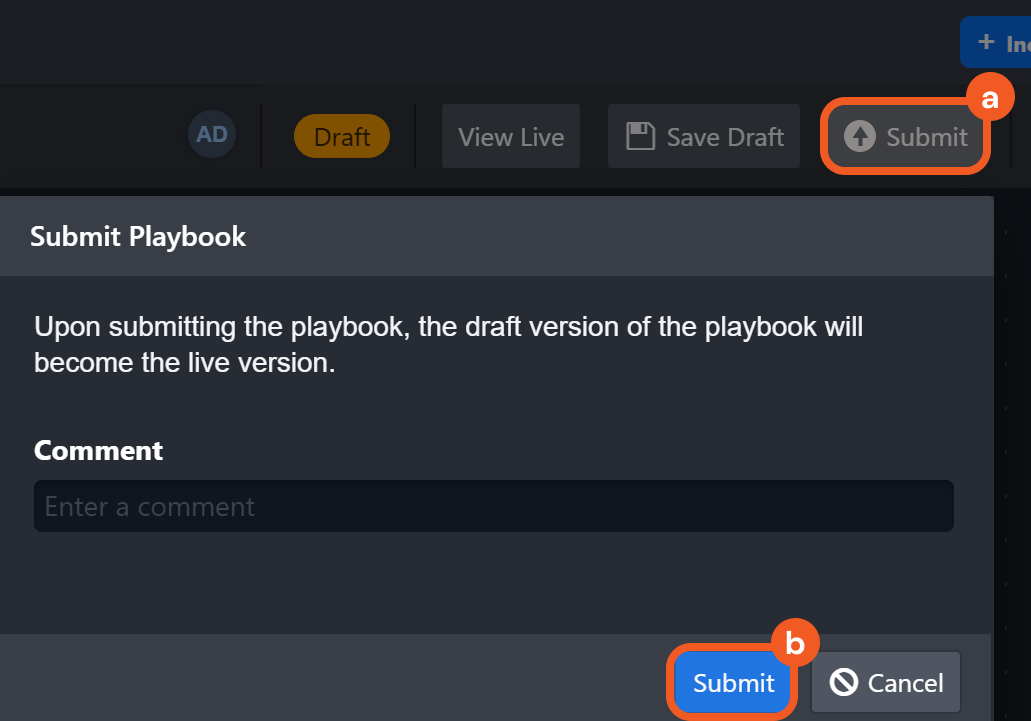
Click on the Submit button, then confirm the playbook submission.
-
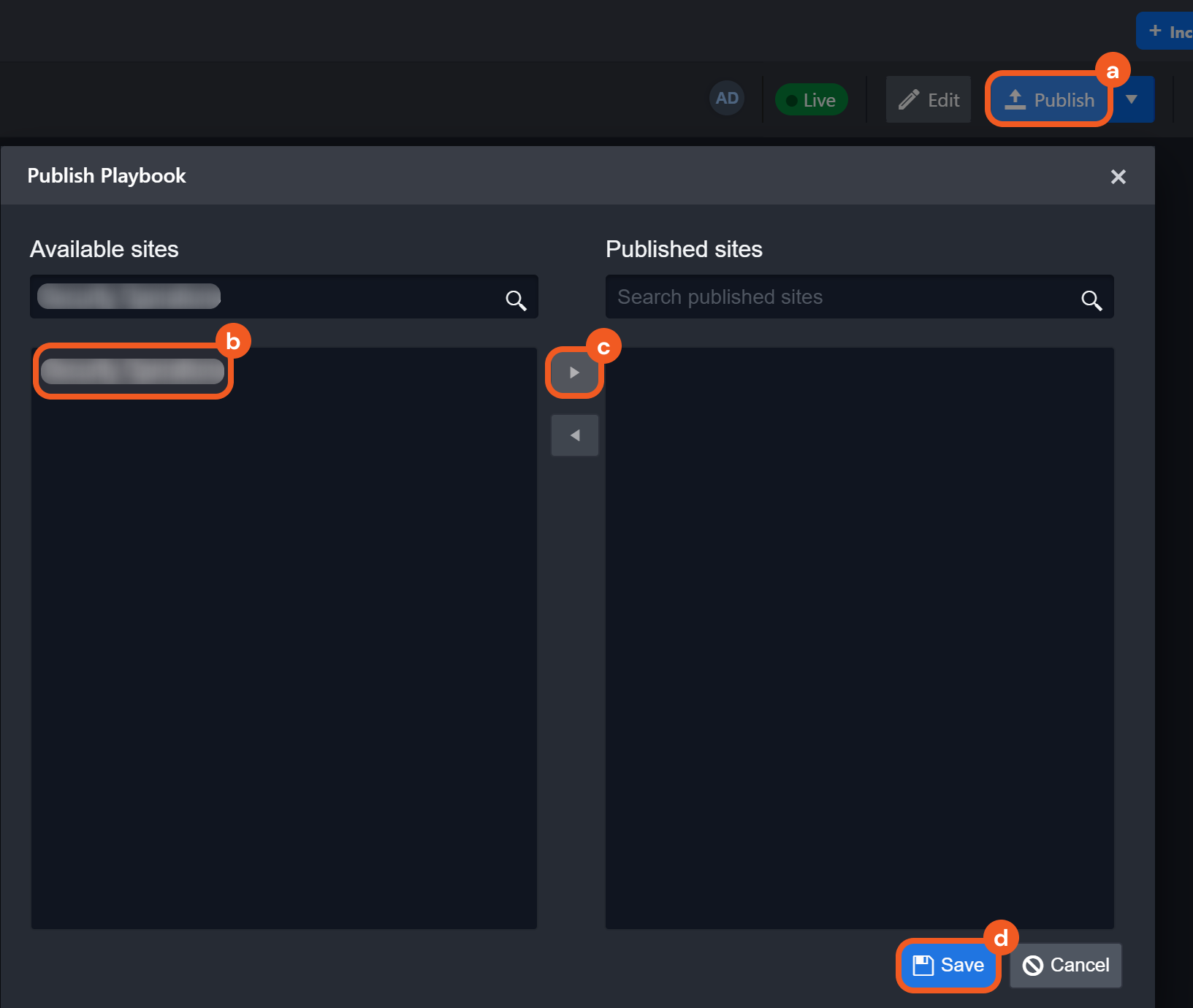
Click on the Publish button, select a site to which to publish the playbook, then click on the Save button.
Task 2: Use the Investigation Playbook in a Preprocessing Playbook
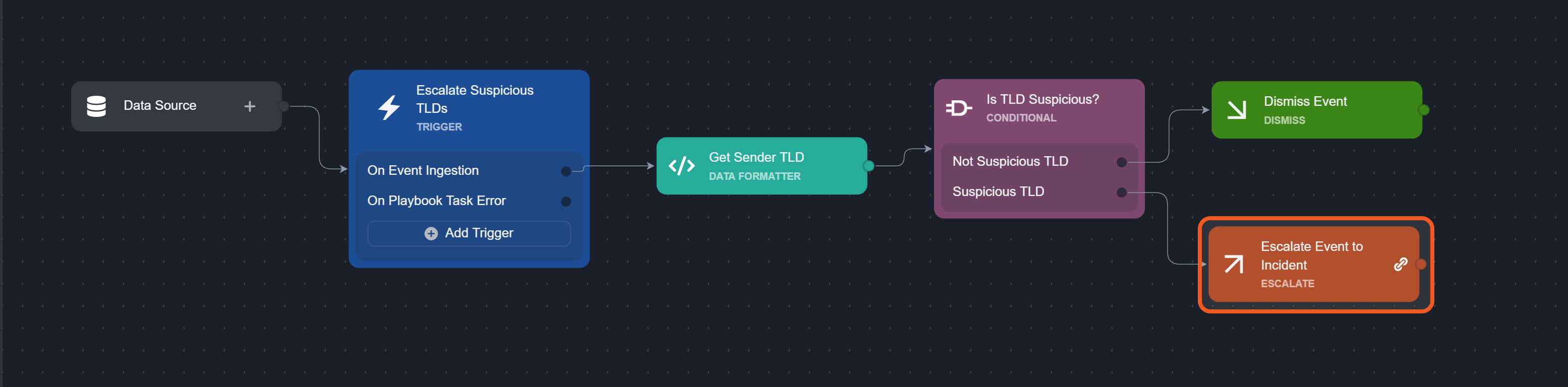
After publishing the investigation playbook, the analyst will use it in an escalate task within a preprocessing playbook. They have already completed most of the preprocessing playbook workflow, with only the escalate task remaining to be configured.
-
Click into the escalate task.
-
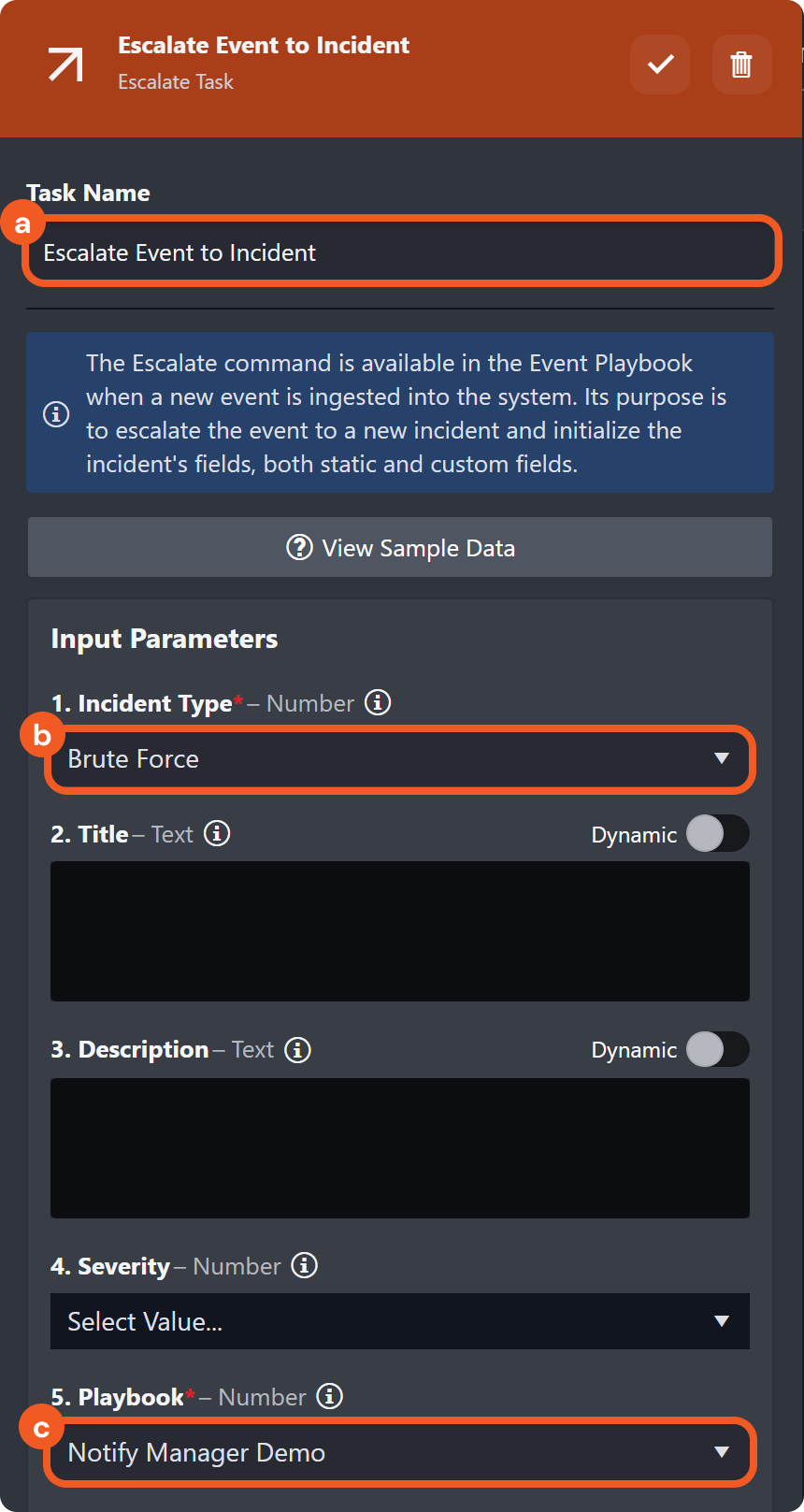
Configure the fields as necessary.
-
Enter the task name.
-
Select an incident type.
-
Select the previously created investigation playbook.
-
-
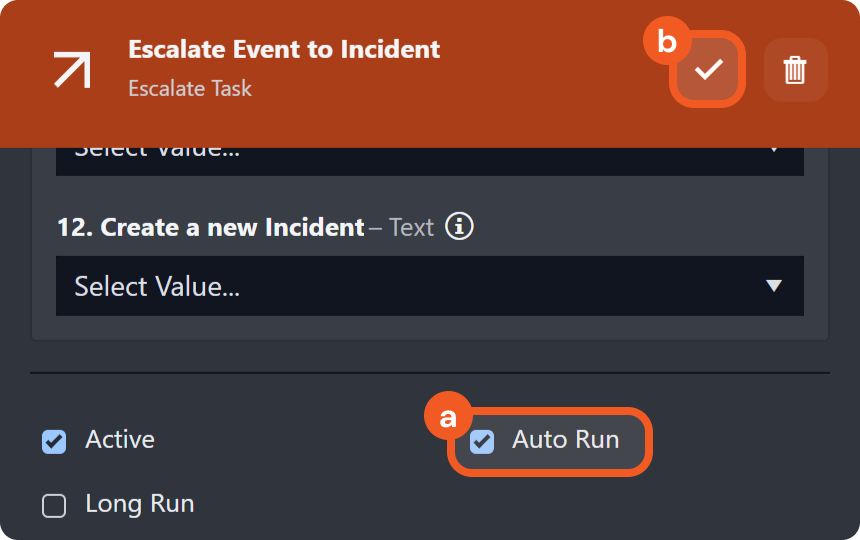
Check the Auto Run checkbox, then click on the checkmark button to save.
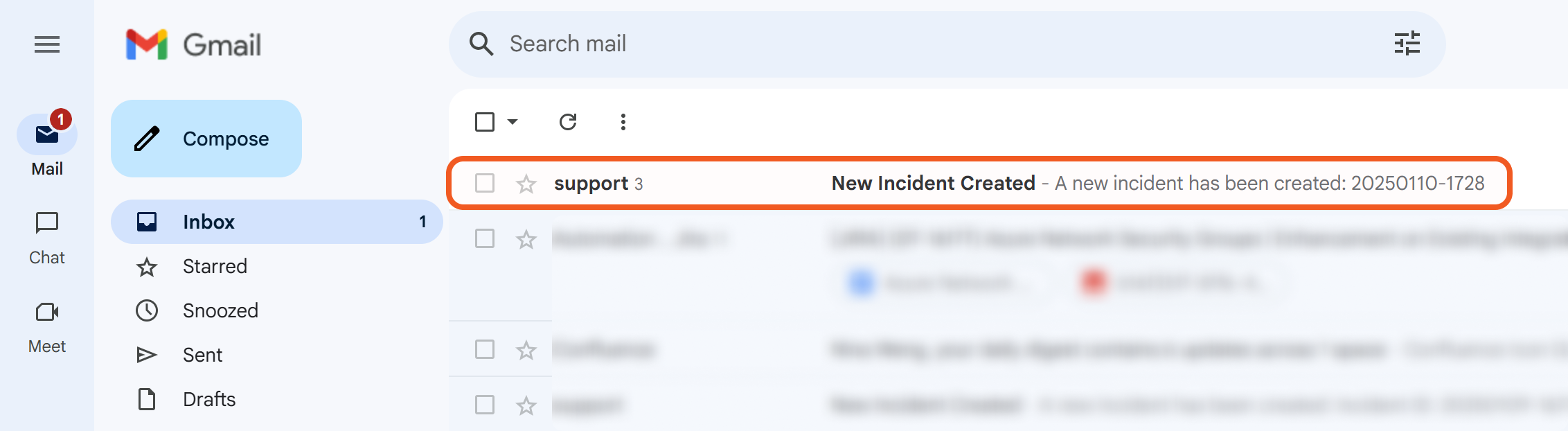
RESULT
Whenever a new incident is created through the preprocessing playbook, the investigation playbook configured in task 1 will execute automatically.
On Incident Close
Executes tasks after:
-
Manually closing an incident
-
Manually performing batch closures of incidents
-
Closing incidents using utility commands, either manually or automatically
-20250110-200216.png?cb=f27439bad34569d0b74ef6f9e3bcab6e)
On Playbook Task Error
-20250110-195027.png?cb=37cdc739cc9128634000df18ebeefb27)
Executes tasks when a current-level task or nested playbook command encounters an error.
Send Email Example
-
Create a Codeless Playbook utility command.
-20250110-002910.png?cb=4841ac50ca685c7db18d5871f545afc7)
-
Setup a task that would result in an error.
-20250110-004014.png?cb=42eaf4f6bd64f4ab59a550edb3001ba0)
-
Enable its use as a command task.
-20250110-011541.png?cb=6abd83ab7e309bca112dd27f634b899e)
-
Use a passdown task to emit an error message to the parent playbook.
-20250110-020555.png?cb=5072a04f11dee60381aafff0ad47036e)
-
Submit this utility command.
-20250110-004926.png?cb=790b310cc54fd19fe9a34e87d1412de8)
-
Create an incident (investigation) playbook.
-20250110-011805.png?cb=429dc1f882cf0a971b270c0f5704e9a8)
-
Set up the Demo Nested Playbook Utility Command task.
-20250110-021551.png?cb=db77680cb235f12c9dc82606e87677c4)
READER NOTE *
Ensure that the Error Trigger checkbox is ticked.
-20250110-192902.png?cb=e817c91136effc60158e1a780180358f)
-
Set up a Send Email utility command task for the On Playbook Task Error trigger.
-20250110-022452.png?cb=2e4d6e13f46ad4b57e95de52e433273a)
-
Test run this playbook, ensuring that the Demo Nested Playbook Utility Command task results in lab190.d3securityonline.net_16_8_VSOC_LifeServer.aspx_div=dashboard&Open=Other&t2=0136de1ab403e957e8f2e3830f55e0d07561dc2f2fc5b0d4be07936dd48d9993 (5) 2-20250110-022826.png, and the Send Email task results in lab190.d3securityonline.net_16_8_VSOC_LifeServer.aspx_div=dashboard&Open=Other&t2=0136de1ab403e957e8f2e3830f55e0d07561dc2f2fc5b0d4be07936dd48d9993 (5) 3-20250110-022810.png.
%201-20250110-022606.png?cb=d85fa5bc281792139d00c19ac8625d34)
-
Check the email for the error message.
-20250110-023018.png?cb=705c462885847d3d0d9273a4563c890e)
%202-20250110-022826.png?cb=71401f63ccf61ba45709da14642b0595)
%203-20250110-022810.png?cb=afb1a1db20a19fe9a574af9a0eda008d)
Common use cases include notifying relevant stakeholders of task failures and automatically retrying the task.
On Incident Reopen
Executes tasks whenever a previously closed incident (i.e. Status: Closed) is manually or automatically reopened (i.e. Status: Open).
-20250110-195200.png?cb=6625a88dda176807ed02512172890eec)
On Incident Change
-20250110-195310.png?cb=d113d96aa5d538e35e80b5b04670cd9a)
Executes tasks whenever changes are made to the content within the Overview section of the incident workspace.
On Incident Status Change
Executes tasks whenever an incident's status transitions between the following states:
-
Open
-
In Progress
-
On Hold
Common use cases:
-
Automatically assign tasks based on the new status
-
Notify relevant stakeholders of the status change
-20250110-195440.png?cb=0a8e66d5a19d4c023d6a5900044ab51e)
On Incident External Action
-20250110-195610.png?cb=159e362ff2e301f3fc423a33c7013ef9)
Executes tasks when the Trigger Incident External Action utility command identifies an incident that matches a specific search criteria—facilitating cross-incident automation and coordination.
The On Incident External Action workflows of all playbooks associated with the first matching incident will be executed.
Example
-
Create a Demo Trigger investigation playbook with an auto-running task connected to the On Incident External Action trigger.
-20250110-201041.png?cb=525dc2872dadbf9b2111e54d6c120105)
-
Submit the playbook.
-20250110-201630.png?cb=edcbb8715e8c5b107b17408c83905919)
-
Publish the playbook.
-20250110-202652.png?cb=45b1a2d4902c79bfc708357e990e020a)
-
Create three incident having the following characteristics:
-
Title: Demo Incident 1, 2, or 3
-
Type: Suspicious Network Activity
-
Severity: Medium
-20250110-203418.png?cb=33808b704150a444e899803bc664fe50)
%201-20250110-215432.png?cb=9881dc259302041012e8def134d13498)
-
-
Ensure the Demo Trigger investigation playbook is attached to each incident.
-20250110-214923.png?cb=49f3b2b3ea403f630a6bce9a2d18e66a)
-
Navigate to the Trigger Incident External Action utility command.
-20250110-204745.png?cb=2169585700a114cc36ed5e70ebdcfd71)
-
Test the utility command with the following for the Search Condition input parameter:
JSON{ "Type": "Suspicious Network Activity", "Severity": "Medium", "Title": { "$regex": "Demo Incident" } }-20250110-220153.png?cb=176dd5505dd7a4a93298ae6d7f483454)
-
Verify that the Demo Trigger playbook has completed execution only within the first incident (Demo Incident 1).
-20250110-221928.png?cb=7c344b82fa516a57aecf2202b2c37621)
-20250110-221219.png?cb=3fa7e6f3e9da9a676d23b26050eb043d)
On Investigation Change
Executes tasks whenever summary, findings, remediations & mitigations, and recommendations data within the Investigation tab of the incident workspace changes.
Common use cases:
-
Notifying the team of new evidence
-
Re-evaluating the incident based on updated investigation details
-20250110-195743.png?cb=781684dee055d30b2a756f95a69a3388)