Returns the Base64-encoded form of the piped text as a Base64 string. Arrays and objects collapse to their first scalar value unless they are converted into strings before encoding.
Decodes Base64URL data by accepting underscores (_) and permitting missing padding (=) in the final 4-character group, which normally causes the strict Base64 decoder to fail.
Examples - base64url_safe_decode
example 1
Input:
{% set encoded_url='aHR0cHM6Ly9kZW1vLmNvbS8_cT1-MDA=' %}
{{ encoded_url | base64url_safe_decode }}
Return Data:
https://demo.com/?q=~00
Input:
{% set encoded_url='aHR0cHM6Ly9kZW1vLmNvbS8_cT1-MDA=' %}
{{ encoded_url | base64_decode }}
Error:
Invalid base64-encoded string: number of data characters (29) cannot be 1 more than a multiple of 4
example 2
Input:
{% set encoded_url='aHR0cHM6Ly9kZW1vLmNvbS8_cGF0aD1kb2MlMkZ2MQ==' %}
{{ encoded_url | base64url_safe_decode }}
Return Data:
https://demo.com/?path=doc%2Fv1
Input:
{% set encoded_url='aHR0cHM6Ly9kZW1vLmNvbS8_cGF0aD1kb2MlMkZ2MQ==' %}
{{ encoded_url | base64_decode }}
Error:
Invalid base64-encoded string: number of data characters (41) cannot be 1 more than a multiple of 4
example 3
Input:
{% set url='aHR0cHM6Ly9kZW1vLmNvbS8_cT1hfHo=' %}
{{ encoded_url | base64url_safe_decode }}
Return Data:
https://demo.com/?q=a|z
Input:
{% set url='aHR0cHM6Ly9kZW1vLmNvbS8_cGF0aD1kb2MlMkZ2MQ==' %}
{{ encoded_url | base64_decode }}
Error:
Incorrect padding
base64url_safe_encode
Encodes a URL string into Base64 and applies Base64URL character substitutions by replacing the plus sign (+) with a hyphen (-) and the forward slash (/) with an underscore (_).
Examples - base64url_safe_encode
example 1
Input:
{% set url='https://demo.com/?q=~00' %}
{{ url | base64url_safe_encode }}
Return Data:
aHR0cHM6Ly9kZW1vLmNvbS8_cT1-MDA=
Input:
{% set url='https://demo.com/?q=~00' %}
{{ url | base64_encode }}
Return Data:
aHR0cHM6Ly9kZW1vLmNvbS8/cT1+MDA=
example 2
Input:
{% set url='https://demo.com/?path=doc%2Fv1' %}
{{ url | base64url_safe_encode }}
Return Data:
aHR0cHM6Ly9kZW1vLmNvbS8_cGF0aD1kb2MlMkZ2MQ==
Input:
{% set url='https://demo.com/?path=doc%2Fv1' %}
{{ url | base64_encode }}
Return Data:
aHR0cHM6Ly9kZW1vLmNvbS8/cGF0aD1kb2MlMkZ2MQ==
example 3
Input:
{% set url='https://demo.com/?q=a|z' %}
{{ url | base64url_safe_encode }}
Return Data:
aHR0cHM6Ly9kZW1vLmNvbS8_cT1hfHo=
Input:
{% set url='https://demo.com/?q=a|z' %}
{{ url | base64_encode }}
Return Data:
aHR0cHM6Ly9kZW1vLmNvbS8/cT1hfHo=
capitalize
Returns a string with the first character capitalized. When the piped input is an array, it returns the first element with its first character capitalized. When piped input is an object, it returns the first value with its first character capitalized.
Returns a defanged URL string. Defanging replaces specific URL characters with safe alternatives to prevent the URL from functioning as a clickable link. How it works:
Schemes (http, https, ftp) are rewritten into obfuscated forms (hXXp, hXXps, fXp).
The colon following a valid scheme becomes [:] (http[:]//).
Dot characters in IPv4 dotted-quad patterns are placed inside square brackets ([.]) for hostnames, path segments, query parameters, fragment components, and userinfo suffixes.
If the text before :// is not a valid scheme, up to the last 12 characters of that text are placed inside parentheses.
LIMITATIONS
No defanging of IPv6 literal hosts enclosed in brackets.
{% set eml_string = "Received: from hostA 203.0.113.1 by hostB 198.51.100.2 with SMTP; Tue, 02 Jan 2026 09:00:00 -0000" %}
{{ eml_string | eml_parse }}
{% set eml_string = "Received: from A [203.0.113.10] by B [198.51.100.20]; Tue, 02 Jan 2026 10:00:00 -0000
Received: from C [192.0.2.5] by A [203.0.113.10]; Tue, 02 Jan 2026 09:59:50 -0000

x" %}

{{ eml_string | eml_parse }}
Return Data:
JSON
{
  "body": [
    {
      "content_header": {},
      "hash": "2d71*****4881"
    }
  ],
  "header": {
    "subject": "",
    "to": [],
    "date": "1970-01-01T00:00:00+00:00",
    "received": [
      {
        "src": "from a [203.0.113.10] by b [198.51.100.20]; tue, 02 jan 2026 10:00:00 -0000",
        "from": [
          "203.0.113.10"
        ],
        "by": [
          "198.51.100.20"
        ],
        "date": "2026-01-02T10:00:00+00:00"
      },
      {
        "src": "from c [192.0.2.5] by a [203.0.113.10]; tue, 02 jan 2026 09:59:50 -0000",
        "from": [
          "192.0.2.5"
        ],
        "by": [
          "203.0.113.10"
        ],
        "date": "2026-01-02T09:59:50+00:00"
      }
    ],
    "header": {
      "received": [
        "from A [203.0.113.10] by B [198.51.100.20]; Tue, 02 Jan 2026 10:00:00 -0000",
        "from C [192.0.2.5] by A [203.0.113.10]; Tue, 02 Jan 2026 09:59:50 -0000"
      ]
    }
  }
}
{% set eml_string = "MIME-Version: 1.0
Content-Type: text/plain; charset=utf-8
Content-Transfer-Encoding: 7bit
From: Sender Name <sender@example.com>
To: Recipient Name <recipient@example.com>
Subject: Quarterly Report Update
Date: Fri, 12 Apr 2026 11:30:00 -0000
Message-ID: <1767334200.12345@example.com>
Received: from mailout.example.net (mailout.example.net [203.0.113.10])
        by mx.example.com (Postfix) with ESMTPS id 4F2A812345
        for <recipient@example.com>; Fri, 12 Apr 2026 11:29:59 -0000
Received: from userpc.internal (userpc.internal [192.0.2.55])
        by mailout.example.net (Postfix) with ESMTPSA id 9B7C412345
        for <recipient@example.com>; Fri, 12 Apr 2026 11:29:57 -0000

Hello team,
This message confirms the updated schedule for the quarterly report." %}

{{ eml_string | eml_parse }}
Returns a string that applies HTML escaping to unescaped characters once. It preserves characters already represented as HTML entities and leaves all other characters unchanged.
Returns the first character of a string or the first element of an array.
Examples - first
example 1
Input:
{{ "Threat" | first }}
Return Data:
T
example 2
Input:
{% set vendors = ["D3 Security", "CrowdStrike", "Palo Alto Networks"] %}
{{ vendors | first }}
Return Data:
D3 Security
format(arg1, arg2, arg3, …, argN)
Returns a string that contains the result of replacing each format specifier in the piped-input template string with the corresponding formatted argument value.
Supported Format Specifiers
Format specifiers define how each argument is converted into text when substituted into the template string.
Specifiers
Description
%a
Converts the argument to an ASCII-only representation.
%c
Formats the argument as a single character. Accepts an integer code point or a single-character string.
%d
Formats the argument as a signed decimal integer. Requires a numeric argument.
%E
Formats a floating-point value in uppercase scientific notation. Requires a real number.
%e
Formats a floating-point value in lowercase scientific notation. Requires a real number.
%F
Formats a floating-point value using uppercase fixed-point notation with six decimal places. Requires a real number.
%f
Formats a floating-point value using fixed-point notation with six decimal places. Requires a real number.
%G
Formats a floating-point value using the shortest uppercase representational form. Requires a real number.
%g
Formats a floating-point value using the shortest representational form. Requires a real number.
%i
Same as %d. Formats a signed decimal integer. Requires a numeric argument.
%o
Formats the argument as an octal integer. Requires a numeric argument.
%r
Converts the argument to its repr-style string form.
%s
Converts the argument to a string representation. Accepts any type.
%u
Formats the argument as an unsigned decimal integer. Requires a numeric argument.
%X
Formats the argument as an uppercase hexadecimal integer. Requires a numeric argument.
%x
Formats the argument as a lowercase hexadecimal integer. Requires a numeric argument.
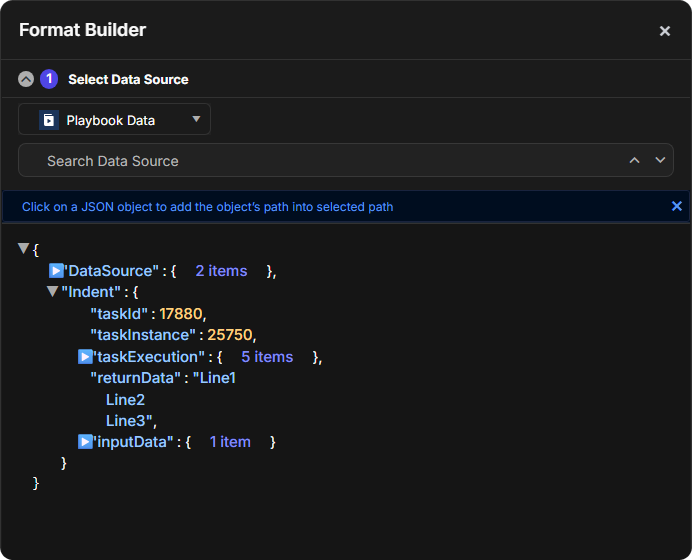
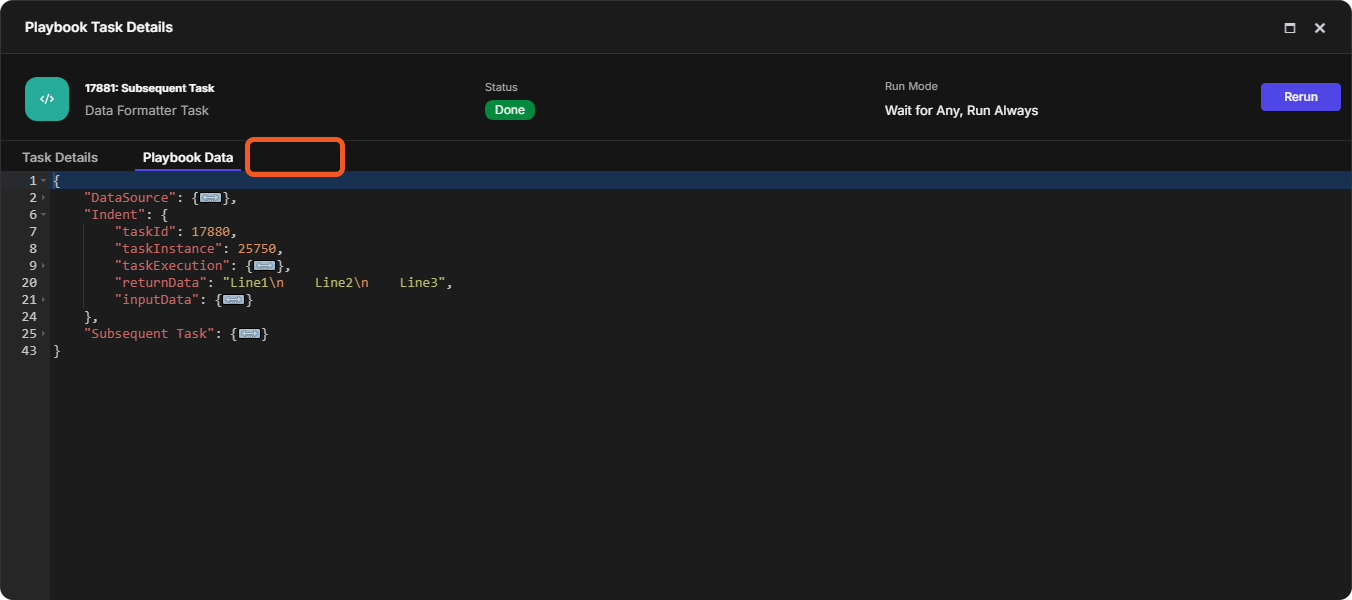
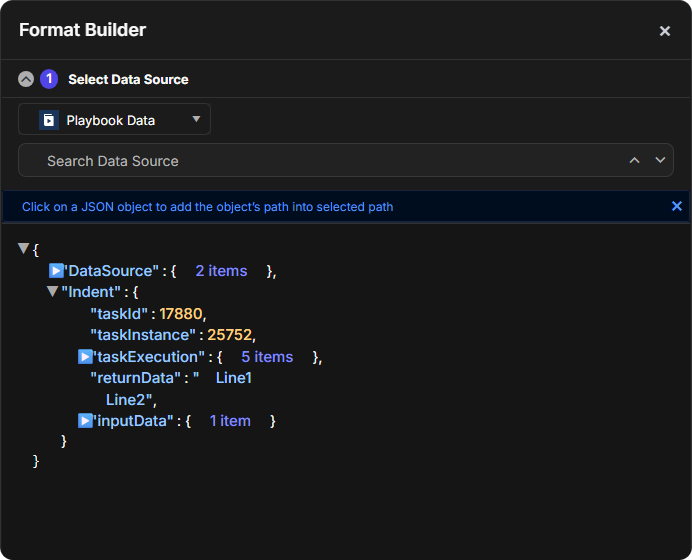
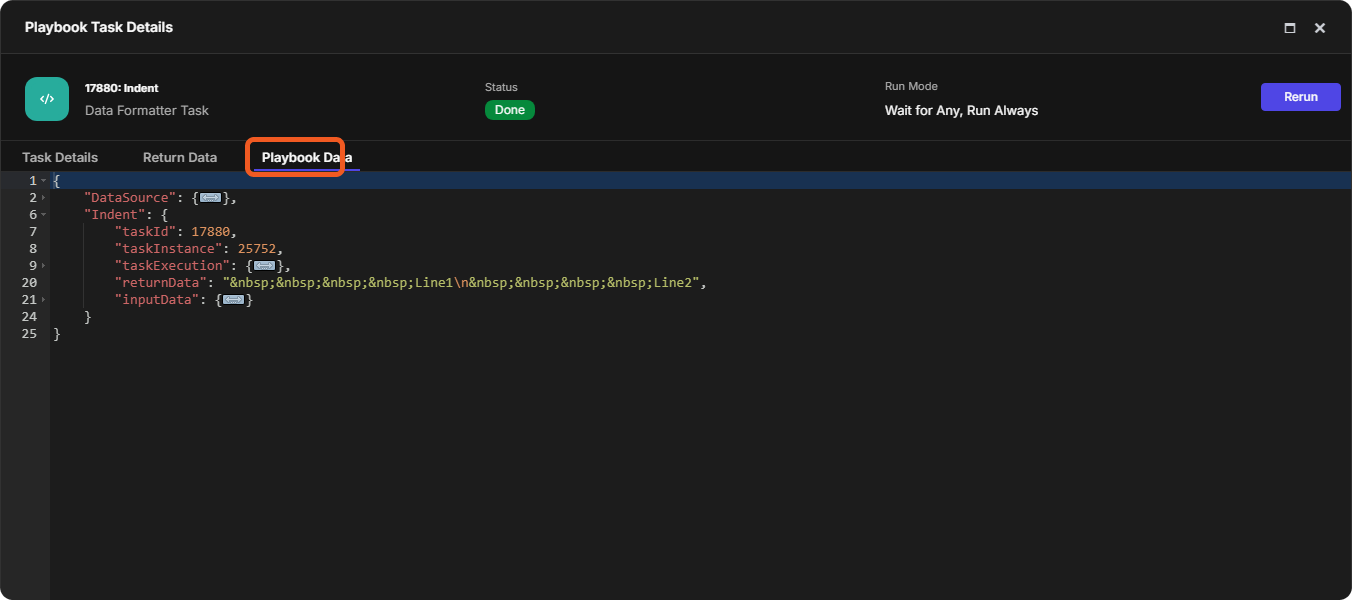
Applies a fixed-width indentation to lines that follow a newline (\n) character in a multiline string. The indentations can be observed in the Format Builder and Playbook Data > returnData field.
Returns a Boolean indicating whether the piped input and the comparison value represent equivalent data. The comparison is case-sensitive and ignores key order in JSON objects but respects element order in arrays.
Returns a string in which JSON escape sequences for control characters and double quotes are converted into their literal characters. No other backslash sequences are modified.
Examples - JSON_string_unescape
example 1
Input:
{% set s = "x\\ny" %}
{{ s }}
{{ s | JSON_string_unescape }}
Return Data:
x\ny
x
y
Explanation: After Jinja collapses \\ into \, that resulting single backslash—now an ordinary literal character in the stored string—does not initiate escape-sequence processing.
example 2
Input:
{% set s = "D3 \\\"Security\\\""%}
{{ s }}
{{ s | JSON_string_unescape }}
Return Data:
D3 \"Security\"
D3 "Security"
example 3
Input:
{% set s = "xyz\n\n\n" %}
{"k":"{{ s | replace('\n', '_') }}"}
{"k":"{{ s | JSON_string_unescape }}"}
Return Data:
{"k":"xyz___"}
{"k":"xyz


"}
last
Returns the final character of a string or the last element of an array.
Examples - last
example 1
Input:
{% set company = "D3 Security Management Systems Inc." %}
{{ company | last }}
Return Data:
.
example 2
Input:
{% set companies = ["Apple", "Microsoft", "Google"] %}
{{ companies | last }}
Return Data:
Google
length
Returns the number of characters in a string, the number of elements in an array, or the number of key-value pairs in a JSON object.
Converts the piped input into a list. Returns a new list containing the elements of the input sequence, string, tuple, set, or dictionary keys if the input is an object.
Examples - list
example 1
Input:
{{ "abc" | list }}
Return Data:
JSON
[
  "a",
  "b",
  "c"
]
example 2
Input:
{% set obj = {"x": 10, "y": 20} %}
{{ obj | list }}
Return Data:
JSON
[
  "x",
  "y"
]
example 3
Input:
{% set obj = {"x": 10, "y": 20} %}
{{ obj.values() | list }}
Return Data:
JSON
[
  10,
  20
]
lstrip
Returns a string whose leading spaces, tabs, and newlines are removed from the piped input, while all trailing whitespace is preserved.
Returns a Boolean value indicating whether the piped input does not end with the comparison string. The comparison uses the piped input's exact stringified form, and the comparison string must match the ending substring character-for-character.
USAGE ADVISORY
Pipe array or object data through tojson before using this filter to mitigate unpredictable string representations. See example 4.
Determines whether the piped input value differs from the specified comparison value. Returns True if the two values are different. Returns False if they are identical.
Examples - not_equal
example 1
Input:
{{ "a" | not_equal("b") }}
Return Data:
True
example 2
Input:
{{ [1,2,3] | not_equal([1,2,3]) }}
Return Data:
False
example 3
Input:
{% set object_a = {"id": 1} %}
{% set object_b = {"id": 2} %}
{{ object_a | not_equal(object_b) }}
Return Data:
True
not_start_with(compare_string)
Returns a Boolean value indicating whether the piped input does not begin with the compare string.
USAGE ADVISORY
Pipe array or object data through tojson before using this filter to mitigate unpredictable string representations. See example 4.
Returns the plural form of the piped input. The output remains the unmodified piped input when the parameter equals 1, and becomes a plural form for all other numbers.
Returns the sum for numeric inputs or a combined sequence for strings, arrays, or objects. For objects with shared keys, values from the added value override those in the piped input.
Returns a single element selected at random from the input array.
Examples - random_element
example 1
Input:
{{ ['x', 'y', 'z'] | random_element }}
Return Data:
x
or
y
or
z
example 2
Input:
{{ [ 22, 80, 443, 3389] | random_element }}
Return Data:
22
or
80
or
443
or
3389
regex_match(pattern, flag)
Returns a Boolean indicating whether the input string contains a substring that matches the provided regular expression pattern. Optional string flags include:
Flags
Function
I
Enables case-insensitive matching.
S
Allows the dot (.) to match newline characters.
X
Enables extended mode, allowing spaces and comments in the pattern for readability.
Returns updated text by replacing pattern-matched substrings with a new substring for the defined number of replacements. All matches are replaced when no replacement count is provided.
Returns updated text by replacing the old value with the new value for the defined number of replacements. All matches are replaced when no replacement count is provided.
Removes all trailing whitespace from the piped input. The filter processes characters from right to left and returns text with the ending whitespace removed.
Returns a substring extracted from the piped input, beginning at the specified start index and continuing left to right for the defined substring length. By default, the substring length is 1.
Returns a string with literal SGML and XML tags removed while preserving non-tag text, and collapses all adjacent whitespace characters into a single space.
{% macro title_case(text) %}
    {% set minor_words = ['a', 'an', 'the', 'and', 'but', 'or', 'nor', 'for', 'yet', 'so', 'as', 'if', 'than', 'though', 'although', 'at', 'by', 'down', 'from', 'in', 'into', 'like', 'near', 'of', 'off', 'on', 'onto', 'out', 'over', 'past', 'per', 'since', 'through', 'to', 'toward', 'towards', 'under', 'until', 'up', 'upon', 'via', 'with', 'within', 'without', 'vs'] %}
    {% set phrasal_map = {'log': ['in', 'out', 'on'], 'sign': ['in', 'out', 'up'], 'turn': ['off', 'on'], 'set': ['up'], 'shut': ['down'], 'back': ['up'], 'break': ['down'], 'check': ['in', 'out'], 'phase': ['out'], 'roll': ['out'], 'hand': ['off'], 'spin': ['up'], 'make': ['up'], 'take': ['over'], 'bring': ['up'], 'carry': ['on'], 'follow': ['up']} %}
    {% set lexical_units = {'real time': 'Real Time'} %}
    {% set brands = {'github': 'GitHub', 'youtube': 'YouTube', 'iphone': 'iPhone', 'ebay': 'eBay', 'macos': 'macOS', 'oauth': 'OAuth', 'ipv6': 'IPv6', '5g': '5G', 'nasa': 'NASA', 'out-of-band': 'Out-of-Band', 'follow-up': 'Follow-Up', 'log-on': 'Log-On', 'real-time': 'Real-Time', 'state-of-the-art': 'State-of-the-Art', 'up-to-date': 'Up-to-Date', 'once-in-a-lifetime': 'Once-in-a-Lifetime', 'make-up': 'Make-Up', 'walk-through': 'Walk-Through', 'nosql': 'NoSQL', 'ddos': 'DDoS', 'covid': 'COVID'} %}
    {% set acronyms = ['api', 'sql', 'ascii', 'nato', 'spa', 'tls', 'ssl', 'ml', 'ai', 'iam', 'pam', 'siem'] %}
    {% set clean = text | replace('\t', ' ') %}
    {% set raw = clean | split(' ') %}
    {% set ns = namespace(out = [], force_cap = True, len = raw | length) %}
    {% for i in range(ns.len) %}
        {% set word = raw[i] %}
        {% set lower = word | lower %}
        {% set prev = (raw[i-1] | lower) if i > 0 else '' %}
        {% set next = (raw[i+1] | lower) if i < ns.len - 1 else '' %}
        {% set lex_pair = lower ~ ' ' ~ next %}
        {% set is_phrasal = (prev in phrasal_map and lower in phrasal_map[prev]) %}
        {% set is_per_se = (lower == 'se' and prev == 'per') %}
        {% set treat_as_minor = ((lower in minor_words and not is_phrasal and i > 0 and i < ns.len - 1) or is_per_se) %}
        {% if lower in brands %}
            {% set final = brands[lower] %}
        {% else %}
            {% set safe = word | replace("'", "__AP__") %}
            {% set hparts = safe | split('-') %}
            {% set wn = namespace(segs = []) %}
            {% for h in hparts %}
                {% set h = h | replace("__AP__", "'") %}
                {% set sparts = h | split('/') %}
                {% set sp = namespace(segs = []) %}
                {% for s in sparts %}
                    {% set low = s | lower %}
                    {% set looks_acro = (s == s | upper and s | length > 1) or (low in acronyms) %}
                    {% if low in brands %}
                        {% set sp.segs = sp.segs + [brands[low]] %}
                    {% elif looks_acro %}
                        {% set sp.segs = sp.segs + [low | upper] %}
                    {% elif s != low %}
                        {% set sp.segs = sp.segs + [s] %}
                    {% else %}
                        {% set cap = (not treat_as_minor) or ns.force_cap or is_phrasal or i == 0 or i == ns.len - 1 %}
                        {% if cap %}
                            {% set sp.segs = sp.segs + [low | capitalize] %}
                        {% else %}
                            {% set sp.segs = sp.segs + [low] %}
                        {% endif %}
                    {% endif %}
                {% endfor %}
                {% set wn.segs = wn.segs + [sp.segs | join('/')] %}
            {% endfor %}
            {% set final = wn.segs | join('-') %}
        {% endif %}
        {% set ns.out = ns.out + [final] %}
        {% if word and word[-1] in [':', '.', '!', '?', ','] %}
            {% set ns.force_cap = True %}
        {% else %}
            {% set ns.force_cap = False %}
        {% endif %}
    {% endfor %}
    {% set joined = ns.out | join(' ') %}
    {% for k in lexical_units.keys() %}
        {% set joined = joined | replace(k, lexical_units[k]) %}
    {% endfor %}
    {{ joined }}
{% endmacro %}
example 1
Input:
{% set title1 = 'macro for title-style formatting' %}
{{ title_case(title1) }}
Return Data:
Macro for Title-Style Formatting
example 2
Input:
{% set title2 = 'input/output operations' %}
{{ title_case(title2) }}
Return Data:
Input/Output Operations
example 3
Input:
{% set title3 = 'once-in-a-lifetime event' %}
{{ title_case(title3) }}
Return Data:
Once-in-a-Lifetime Event
example 4
Input:
{% set title4 = 'out-of-band workflows' %}
{{ title_case(title4) }}
Return Data:
Out-of-Band Workflows
example 5
Input:
{% set title5 = 'the user\'s opt-in preferences' %}
{{ title_case(title5) }}
Return Data:
The User's Opt-In Preferences
example 6
Input:
{% set title6 = 'anti-ddos protections' %}
{{ title_case(title6) }}
Return Data:
Anti-DDoS Protections
example 7
Input:
{% set title7 = 'post-covid planning' %}
{{ title_case(title7) }}
Return Data:
Post-COVID Planning
trim(character_type)
Returns a new string with the specified type of leading and trailing character stripped from the original value. By default, the filter removes whitespace.
Returns a shortened version of the string containing only the first specified number of words, using spaces as delimiters. Appends a suffix to the end of the string if the input length exceeds the limit. By default, the suffix is an ellipsis.
Examples - truncatewords
example 1
Input:
{{ "D3 Security Management" | truncatewords(2) }}
Return Data:
D3 Security...
example 2
Input:
{{ "Error 404 Not Found" | truncatewords(1, ":") }}
Return Data:
Error:
example 3
Input:
{{ "D3 Security" | truncatewords(42) }}
Return Data:
D3 Security
example 4
Input:
{{ "Log\nTrace\nId" | truncatewords(2) }}
Return Data:
Log
Trace
Id
example 5
Input:
{{ "ChatGPT Claude Gemini Grok" | truncatewords(1, "") }}
Return Data:
ChatGPT
upper
Returns an uppercase representation of the piped input string.
Returns HTML anchor tags for URLs that use the http, https, or mailto schemes, as well as bare domains, while preserving all surrounding text. Optional parameters enable trimmed link text and control link attributes.
external: Identifies that the linked resource resides outside the current site.
nofollow: Instructs search engines not to follow the link or assign ranking signals to the target.
noopener (auto-applied): Prevents the new browsing context from accessing the originating document by disabling the window.opener property. This reduces the risk of tab-nabbing attacks.
noreferrer: Prevents the browser from sending the referring page's URL to the target resource.
ugc: Indicates that the link originates from user-generated content.
sponsored: Marks the link as paid, sponsored, or promotional in nature.
Collapses consecutive delimiters into a single boundary.
Examples - wordcount
example 1
Input:
{{ 'Word1 word2 \t word3' | wordcount }}
Return Data:
3
example 2
Input:
{{ '中文 français español भाषा' | wordcount }}
Return Data:
5
Explanation: Hindi vowel signs are technically marks, which the filter treats as spaces (effectively delimiters). This causes भाषा to be read as two separate words (भ and ष).
example 3
Input:
{{ 'x,y.z' | wordcount }}
Return Data:
3
example 4
Input:
{{ 'a_b' | wordcount }}
Return Data:
1
example 5
Input:
{{ '! @ # $ % ^ & * ( ) - + = ✏️' | wordcount }}
Return Data:
0
wordwrap(maximum_line_width)
Returns the input string wrapped to a specified maximum line width. How it works:
Contiguous words exceeding the maximum line width are segmented.
Line breaks are enforced before any standard whitespace character if the following word would exceed the maximum line width.
Non-breaking characters are treated as part of the contiguous word.
Examples - wordwrap
example 1
Input:
{% set w = 'Word1 word2\t\r\nword3 word4 word5 word6 word7 word8 word9 word10.' %}
{{ w | wordwrap(5) }}
{% set x = 'x12345 x123456' %}
{{ x | wordwrap(3) }}
Return Data:
x12
345
x12
345
6
example 6
Input:
{% set x = 'x12345-x123456' %}
{{ x | wordwrap(10) }}
Return Data:
x12345-x12
3456
FAQs
What are scalar values?
A scalar value is a single, atomic piece of data that cannot be expanded or decomposed into smaller structured components. The following are scalars in Jinja:
String (e.g., "D3")
Number (e.g., 1, 3.14)
Boolean (e.g., True, False)
None (e.g., none)
A dictionary key cannot be the first scalar value because Jinja overlooks keys and evaluates only dictionary values.
What is EML text?
EML text is the plain-text format of an email message that follows the Internet Message Formatdefined in RFC 5322.
What is an HTML entity?
An HTML entity is a safe text representation that begins with & and ends with ;.
Examples
& for &
< for <
> for >
" for "
' for '
What is an HMAC value?
The hash-based message authentication code (HMAC) value is a fixed-length cryptographic digest generated from a message and a shared secret key using algorithms like HMAC-SHA1 or HMAC-SHA256. It provides cryptographic assurance of integrity and authenticity by allowing any recipient with the same key to verify that the received message and its accompanying HMAC value match.
ALGORITHM COMPARISON
HMAC-SHA1 outputs exactly 40 hex characters.
16^40 = 2^160 unique possible hash outputs.
HMAC-SHA256 outputs exactly 64 hex characters.
16^64 = 2^256 unique possible hash outputs.
HMAC-SHA256 has 2^96 times more possible outputs than HMAC-SHA1.
What does escaping mean?
Escaping is the process of replacing a literal character with a safe or encoded representation to prevent it from performing its normal syntactic or structural function. The escaped representation removes a character's special behavior, while unescaping restores the original character and its normal behavior.
JSON string escaping
Escaped forms: \n, \", \\.
Unescaped results: newline, ", \.
HTML escaping
Escaped forms: <, >, &, ".
Unescaped results: <, >, &, ".
Unicode escaping
Escaped forms: \u002E, \u0041\u0049, \u5FC3.
Unescaped results: ., AI, 心.
UTF-8 byte escaping
Escaped forms (byte-level): \x2E, \x41\x49, \xE5\xBF\x83.
Unescaped results: ., AI, 心.
Escaping prevents characters from acting on the parser. For example, without escaping: