Skip table of contents

JSON Object Filters

LAST UPDATED: DECEMBER 31, 2025

check_type(data)

Determines the data type of the provided value or variable. Supported types include:

  • array (list)

  • BlockReference

  • Boolean (bool)

  • bytes

  • Cycler

  • dictionary / object (dict)

  • float

  • integer (int)

  • Joiner

  • LoopContext

  • Macro

  • Markup

  • Namespace

  • null / none (NoneType)

  • range

  • string (str)

  • TemplateReference

  • tuple

  • type

  • Undefined

Examples - check_type

EXAMPLE 1

Input:

CODE
{{ {"key": "value"} | check_type }}

Return Data:

TEXT
dict

EXAMPLE 2

Input:

CODE
{% set cert_text = "-----BEGIN CERTIFICATE-----MIIBsjCCARugAwIBAgIU...-----END CERTIFICATE-----" %}
{% set cert_bytes = cert_text.encode("utf-8") %}
{{ cert_bytes | check_type }}

Return Data:

TEXT
bytes

EXAMPLE 3

Input:

CODE
{% set html_output = "<b>Alert Confirmed</b>" | safe %}
{{ html_output | check_type }} 

Return Data:

TEXT
Markup 

EXAMPLE 4

Input:

CODE
{% for i in [1, 2, 3] %}
  {{ loop | check_type }}
{% endfor %}

Return Data:

TEXT
LoopContext

LoopContext

LoopContext

contains_key(key_string)

Returns True if the input object includes the specified key, matching key names case-sensitively. Returns False when the key is missing, or when the input is not an object.

Examples - contains_key

EXAMPLE 1

Input:

CODE
{{ {'A': 1, 'D': 3} | contains_key('D') }}

Return Data:

TEXT
True

EXAMPLE 2

Input:

CODE
{{ {'A': 1, 'D': 3} | contains_key('a') }}

Return Data:

TEXT
False

EXAMPLE 3

Input:

CODE
{{ 'a' | contains_key('a') }}

Return Data:

TEXT
False

EXAMPLE 4

Input:

CODE
{{ ['a', 'b', 'c'] | contains_key('a') }}

Return Data:

TEXT
False

contains_key_value_pair(search_object)

Returns True if the input object contains all key–value pairs from the search object. Returns False when any pair is missing or mismatched. Comparison is case-sensitive for both keys and values.

Examples - contains_key_value_pair

EXAMPLE 1

Input:

CODE
{{ {'A': 16, 'D': 3} | contains_key_value_pair({'D': 3}) }}

Return Data:

TEXT
True

EXAMPLE 2

Input:

CODE
{{ {'A': 16, 'D': 3} | contains_key_value_pair({'d': 3}) }}

Return Data:

TEXT
False

EXAMPLE 3

Input:

CODE
{{ {'x': 1, 'y': 2, 'z': 3} | contains_key_value_pair({'x': 1, 'z': 3}) }}

Return Data:

TEXT
True

EXAMPLE 4

Input:

CODE
{{ {'x': 1, 'y': 2, 'z': 3} | contains_key_value_pair({'x': 1, 'z': 4}) }}

Return Data:

TEXT
False

EXAMPLE 5

Input:

CODE
{{ {'A': 1, 'B': 2} | contains_key_value_pair({'a': 1}) }}

Return Data:

TEXT
False

EXAMPLE 6

Input:

CODE
{{ {'x': 'A', 'y': 'B'} | contains_key_value_pair({'x': 'a'}) }}

Return Data:

TEXT
False

contains_value(value)

Returns True if the input object contains the specified value among its key-value pairs. Returns False when the value is not found or when the input is not an object. Comparison is case-sensitive for string values. The filter performs shallow comparison and does not search within nested structures.

CHECKING NESTED VALUES

To check for deeply nested values, serialize the entire object to JSON and use the in operator for substring matching.

EXAMPLE

CODE
{{ '"c": 3' in ( {'a': { 'b': { 'c': 3 }}} | tojson ) }}
Examples - contains_value

EXAMPLE 1

Input:

CODE
{{ {'a': 1, 'b': 2} | contains_value(1) }}

Return Data:

TEXT
True

EXAMPLE 2

Input:

CODE
{{ {'x': 'A', 'y': 'B'} | contains_value('A') }}

Return Data:

TEXT
True

EXAMPLE 3

Input:

CODE
{{ {'x': 'A', 'y': 'B'} | contains_value('a') }}

Return Data:

TEXT
False

EXAMPLE 4

Input:

CODE
{{ {'a': [1, 2], 'b': [3, 4]} | contains_value([1, 2]) }}

Return Data:

TEXT
True

EXAMPLE 5

Input:

CODE
{{ {'a': [1, 2], 'b': [3, 4]} | contains_value([2, 1]) }}

Return Data:

TEXT
False

EXAMPLE 6

Input:

CODE
{{ {
  'x': { 'p': 1, 'q': 2 },
  'y': { 'r': 3 }
} | contains_value({ 'p': 1, 'q': 2 }) }}

Return Data:

TEXT
False

EXAMPLE 7

Input:

CODE
{{ {
  'x': { 'p': 1, 'q': 2 },
  'y': { 'r': 3 }
} | contains_value({ 'r': 3 }) }}

Return Data:

TEXT
False

default(default_value)

Returns a fallback value when the provided variable is undefined or empty. If the variable is defined, the original value is returned unchanged.

Examples - default

EXAMPLE 1

Input:

CODE
{% set alert = {"type": "Phishing Email", "severity": "high"} %}
{{ alert.non_existent_attribute | default("medium") }}

Return Data:

TEXT
medium  

Input:

CODE
{% set alert = {"type": "Phishing Email", "severity": "high"} %}
{{ alert.severity | default("medium") }}

Return Data:

TEXT
high

EXAMPLE 2

Input:

CODE
{{ data | default("Variable is not defined.") }}

Return Data:

TEXT
Variable is not defined.

Input:

CODE
{% set data = 42 %}
{{ data | default("Variable is not defined.") }}

Return Data:

TEXT
42

dictsort

Returns an object sorted lexicographically by its keys in ascending order.

Examples - dictsort

EXAMPLE 1

Input:

CODE
{% set data = {'a': 1, 'c': 3, 'd': 4, 'b': 2} %}
{{ data | dictsort }}

Return Data:

JSON
{
  "a": 1,
  "b": 2,
  "c": 3,
  "d": 4
}

EXAMPLE 2

Input:

CODE
{% set data = {
  'a': 'Management',
  'C': 'Security',
  'A': 'D3',
  'c': 'Systems'
} %}
{{ data | dictsort }}

Return Data:

TEXT
{
  "A": "D3",
  "C": "Security",
  "a": "Management",
  "c": "Systems"
}

downcase(value_to_convert)

Converts all uppercase characters in the provided value to lowercase.

Examples - downcase

EXAMPLE 1

Input:

CODE
{% set data = {"A": "B", "C": "D"} %}
{{ data | downcase }}

Return Data:

JSON
{
  "a": "b",
  "c": "d"
}

EXAMPLE 2

Input:

CODE
{% set domains = ["D3SECURITY.COM", "GOOGLE.COM", "MICROSOFT.COM", "VIRUSTOTAL.COM"] %}
{{ domains | downcase }}

Return Data:

JSON
[
  "d3security.com",
  "google.com",
  "microsoft.com",
  "virustotal.com"
]

EXAMPLE 3

Input:

CODE
{{ "D3SECURITY" | downcase }}

Return Data:

TEXT
d3security

equals(value)

Returns a Boolean that indicates whether the piped input and the comparison value are equivalent in content. Supports comparison of objects, arrays, strings, and numbers.

Examples - equals

EXAMPLE 1

Input:

CODE
{% set alert1 = {
  "alert_id": "INC-48392",
  "threat_type": "phishing",
  "severity": "high",
  "source": "splunk"
} %}

{% set alert2 = {
  "alert_id": "INC-48392",
  "threat_type": "phishing",
  "severity": "high",
  "source": "splunk"
} %}

{{ alert1 | equals(alert2) }}

Return Data:

TEXT
True

EXAMPLE 2

Input:

CODE
{{ "D3Security" | equals("d3security") }}

Return Data:

TEXT
False

EXAMPLE 3

Input:

CODE
{% set baseline_hashes = [
  "b7f9a3d2e4c6f8b92a47d5c1aa12bb34ef9c8902e2345ab19f37da7c1234eac1",
  "9a81b02f4cc5b7a0fbc21c5a923e2d3aa87f02b5cc99e3311a9f7df25f91d2c4",
  "a7d2c09fbd11e3b9b4a56f9320e57dfb88e5fa17d0b14a7bcd90a0f7adcefa91"
] %}

{% set recent_hashes = [
  "b7f9a3d2e4c6f8b92a47d5c1aa12bb34ef9c8902e2345ab19f37da7c1234eac1",
  "9a81b02f4cc5b7a0fbc21c5a923e2d3aa87f02b5cc99e3311a9f7df25f91d2c4",
  "a7d2c09fbd11e3b9b4a56f9320e57dfb88e5fa17d0b14a7bcd90a0f7adcefa91"
] %}

{{ baseline_hashes | equals(recent_hashes) }}

Return Data:

TEXT
True

EXAMPLE 4

Input:

CODE
{{ 3 | equals(3) }}
{{ 3 | equals('3') }}
{{ '3' | equals(3) }}

Return Data:

TEXT
True
True
True

json_equal(comparison_value)

Returns a Boolean indicating whether the piped input and the comparison value represent equivalent data. The comparison is case-sensitive and ignores key order in JSON objects but respects element order in arrays.

Examples - json_equal

EXAMPLE 1

Input:

CODE
{% set input1 = "{'a': 1, 'b': 2}" %}
{% set input2 = "{'b': 2, 'a': 1}" %}
{{ input1 | json_equal(input2) }}

Return Data:

TEXT
True

EXAMPLE 2

Input:

CODE
{% set input1 = "{'a': 1, 'b': 2}" %}
{% set input2 = "{'A': 1, 'b': 2}" %}
{{ input1 | json_equal(input2) }}

Return Data:

TEXT
False

EXAMPLE 3

Input:

CODE
{{ ['a', 'b'] | json_equal(['b', 'a']) }}

Return Data:

TEXT
False

EXAMPLE 4

Input:

CODE
{{ ['a', 'b'] | json_equal(['A', 'b']) }}

Return Data:

TEXT
False

jsonpath(json_path_string)

Filters JSON objects or arrays by evaluating expressions that match specific field values or conditions. The filter can reference data within the same task (intra-task) or from another task in the playbook (inter-task).

Examples - jsonpath

EXAMPLE 1

Input:

CODE
{% set j = {
  "a": [
    {"x": 1, "y": 2},
    {"x": 3, "y": 4}
  ]
} %}
{{ j | jsonpath("$..a") }}

Return Data:

JSON
[
  {
    "x": 1,
    "y": 2
  },
  {
    "x": 3,
    "y": 4
  }
]

EXAMPLE 2

Input:

CODE
{% set j = {
  "a": [
    {"x": 1, "y": 2},
    {"x": 3, "y": 4}
  ]
} %}
{{ j | jsonpath("$.a[?(@.x == 1)]") }}

Return Data:

JSON
{
  "x": 1,
  "y": 2
}

EXAMPLE 3

Input:

CODE
{% set j = {
  "a": [
    {"x": 1, "y": 2},
    {"x": 3, "y": 4}
  ]
} %}
{{ j | jsonpath("$.a[?(@.x == 1)].y") }}

Return Data:

TEXT
2

EXAMPLE 4

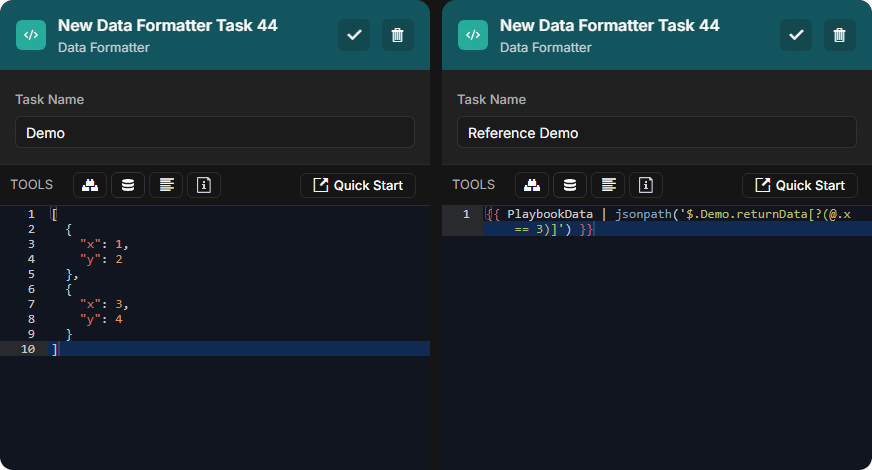
Frame 1-20251113-034313.png

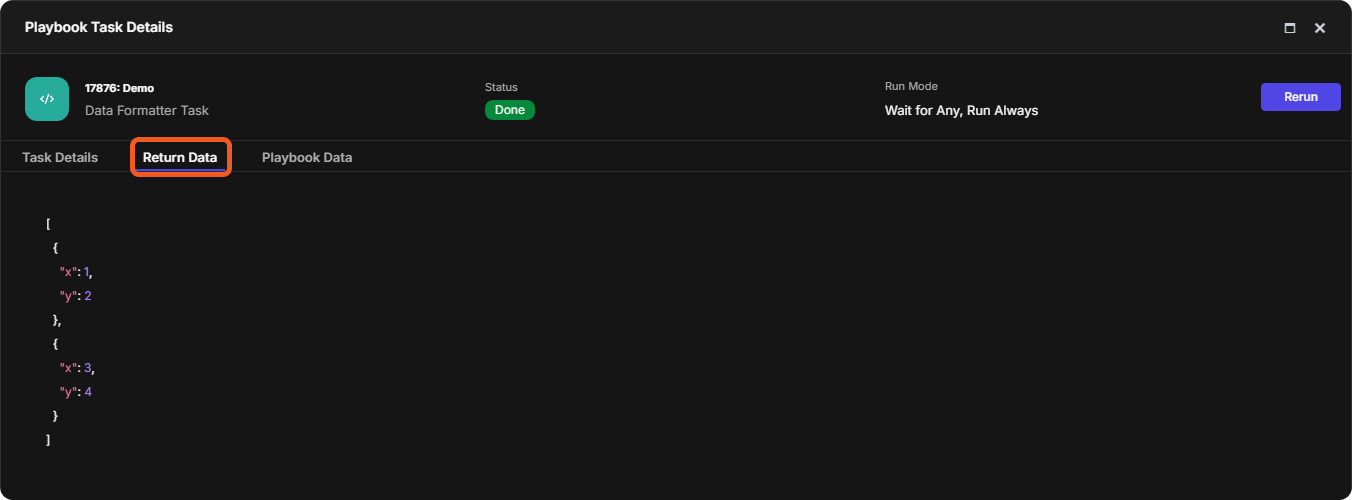
Inputs:

CODE
[
  {
    "x": 1,
    "y": 2
  },
  {
    "x": 3,
    "y": 4
  }
]
CODE
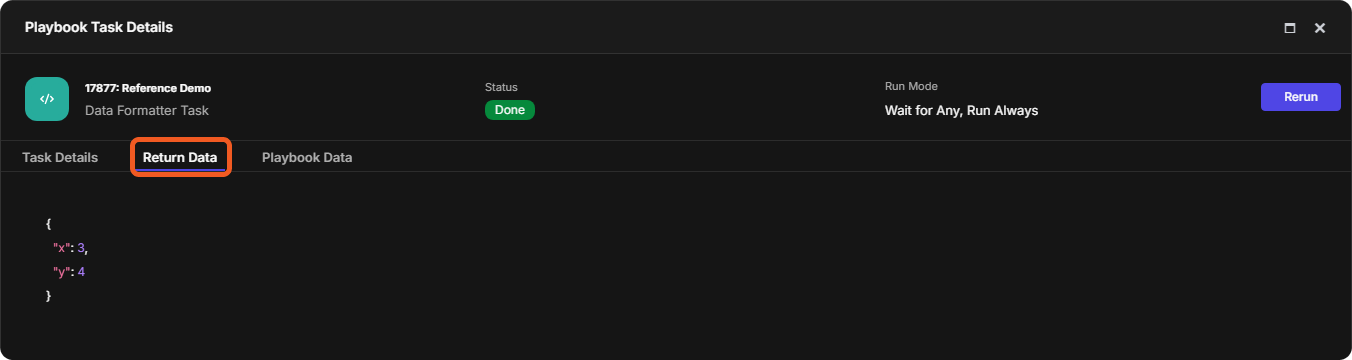
{{ PlaybookData | jsonpath('$.Demo.returnData[?(@.x == 3)]') }}

Return Data:

TEXT
{
  "x": 3,
  "y": 4
}
Frame 2-20251113-034841.png
Inter-Task JSONPath Referencing Schema

The general schema for inter-task JSONPath referencing is of the following structure:

CODE
{{ PlaybookData | jsonpath('$.<TaskName>.<DataField>[<SubscriptExpression>]') }}
  • The <TaskName> segment identifies the specific task within the current playbook whose output or metadata is being referenced.

  • The <DataField> segment identifies where the relevant information resides. It is typically a top-level key (e.g., returnData or contextData), but can also include nested attributes separated by dots (e.g., taskExecution.startDate or taskExecution.duration.Minutes).

Frame 3 (1)-20251113-190832.png
  • The <SubscriptExpression> segment specifies how to traverse or extract elements from an array or object within a task's data node. It is always enclosed in square brackets and may include:

    • Indexes: Retrieves a single element by its zero-based index in the array.

      • Syntax: [n]
        EXAMPLE

        CODE
        {{ PlaybookData | jsonpath('$.Demo.returnData[0]') }}

        Explanation: Retrieves the first element (object) in the returnData array.

    • Filter expressions: Retrieves array elements that satisfy a specified Boolean condition, such as matching a field value or logical comparison.

      • Syntax: [?()]
        EXAMPLE

        CODE
        {{ PlaybookData | jsonpath('$.Demo.returnData[?(@.x == 3)]') }}

        Explanation: Retrieves the element from the returnData array where key x equals 3.

    • Wildcards: Retrieves all elements within an array or all keys within an object.

      • Syntax: [*]
        EXAMPLE

        CODE
        {{ PlaybookData | jsonpath('$.Demo.returnData[*]') }}

        Explanation: Retrieves all elements (objects) from the returnData array.

    • Slice: Retrieves a subset of array elements by specifying a start and an end index. The end index is exclusive.

      • Syntax: [start:end]
        EXAMPLE

        CODE
        {{ PlaybookData | jsonpath('$.Demo.returnData[1:3]') }}

        Explanation: Retrieves the returnData array elements from index 1 up to (but not including) index 3.

length_equals_to(integer)

Returns a Boolean value indicating whether the number of key-value pairs, characters, or elements in the input equals the specified length.

Examples - length_equals_to

EXAMPLE 1

Input:

CODE
{% set obj = {"a": 1, "b": 2, "c": 3} %}
{{ obj | length_equals_to(4) }}

Return Data:

TEXT
False

EXAMPLE 2

Input:

CODE
{{ "D3 Security" | length_equals_to(11) }}

Return Data:

TEXT
True

EXAMPLE 3

Input:

CODE
{{ [] | length_equals_to(0) }}

Return Data:

TEXT
True

not_contain_key(key_string)

Returns a Boolean value indicating whether the piped input object does not contain the specified key.

Examples - not_contain_key

EXAMPLE 1

Input:

CODE
{{ {'key1': 'value1', 'key2': 'value2'} | not_contain_key('key3') }}

Return Data:

TEXT
True

EXAMPLE 2

Input:

CODE
{{ {'key1': 'value1', 'key2': 'value2'} | not_contain_key('key1') }}

Return Data:

TEXT
False

not_contain_key_value_pair(search_object)

Returns a Boolean value indicating whether the piped input object does not contain all key-value pairs defined in the search object.

Examples - not_contain_key_value_pair

EXAMPLE 1

Input:

CODE
{{ {
    'key1': 'value1',
    'key2': 'value2'
} | not_contain_key_value_pair({'key3': 'value3'}) }}

Return Data:

TEXT
True

EXAMPLE 2

Input:

CODE
{{ {
    'key1': 'value1',
    'key2': 'value2'
} | not_contain_key_value_pair({'key2': 'value2'}) }}

Return Data:

TEXT
False

not_contain_value(comparison_value)

Returns a Boolean value indicating whether the piped input object lacks the specified top-level value. The comparison is case-sensitive, shallow (values inside nested objects are ignored, unless they are stored as literal strings) and supports only positive integers and string values.

USAGE ADVISORY

  • Convert non-string input values, except positive integers, to text using either | tojson or | string before comparison.

    • Do not use | string and | tojson interchangeably.

    • | string produces Python-style strings (single quotes).

    • | tojson produces JSON-style strings (double quotes).

  • Do not stringify the comparison value.

Examples - not_contain_value

EXAMPLE 1

Input:

CODE
{{ {'a': 'D3'} | not_contain_value('d3') }}

Return Data:

TEXT
True

EXAMPLE 2

Input:

CODE
{{ {'a': 1, 'b': 2, 'c': 3} | not_contain_value(4) }}

Return Data:

TEXT
True

EXAMPLE 3

Input:

CODE
{{ {'a': '', 'b': 0} | not_contain_value('') }}

Return Data:

TEXT
False

EXAMPLE 4

Input:

CODE
{{ {'a': '1', 'b': '2'} | not_contain_value(1) }}

Return Data:

TEXT
False

EXAMPLE 5

Input:

CODE
{% set data = [
    {'x': 'a'},
    {'y': 'b'}
] %}

{{ { 'a': data | tojson } 
   | not_contain_value('[{"x": "a"}, {"y": "b"}]') }}

Return Data:

TEXT
False

EXAMPLE 6

Input:

CODE
{% set data = [
    {'x': 'a'},
    {'y': 'b'}
] %}

{{ { 'a': data | string } 
   | not_contain_value("[{'x': 'a'}, {'y': 'b'}]") }}

Return Data:

TEXT
False

EXAMPLE 6

Input:

CODE
{% set data = {'x': 'a', 'y': 'b'} %}

{{ { 'a': data | string } 
   | not_contain_value('{"x": "a", "y": "b"}') }}

Explanation: Inner quotes affect equality. The conversion data | string produces the Python-style string "{'x': 'a', 'y': 'b'}", which differs from the filter argument (JSON-style string).

Return Data:

TEXT
True

EXAMPLE 7

Input:

CODE
{% set data = {'x': 'a', 'y': 'b'} %}

{{ { 'a': data | tojson } 
   | not_contain_value("{'x': 'a', 'y': 'b'}") }}

Explanation: Inner quotes affect equality. The conversion data | tojson produces the JSON-style string '{"x": "a", "y": "b"}', which differs from the filter argument (Python-style string).

Return Data:

TEXT
True

not_equal(comparison_value)

Determines whether the piped input value differs from the specified comparison value. Returns True if the two values are different. Returns False if they are identical.

Examples - not_equal

EXAMPLE 1

Input:

CODE
{% set obj1= {"id": 1} %}  
{% set obj2 = {"id": 2} %}  
{{ obj1 | not_equal(obj2) }}  

Return Data:

TEXT
True

EXAMPLE 2

Input:

CODE
{{ [1,2,3] | not_equal([1,2,3]) }}

Return Data:

TEXT
False

EXAMPLE 3

Input:

CODE
{{ "a" | not_equal("b") }}

Return Data:

TEXT
True

plus(added_value)

Returns the sum for numeric inputs or a combined sequence for strings, arrays, or objects. For objects with shared keys, values from the added value override those in the piped input.

Examples - plus

EXAMPLE 1

Input:

CODE
{% set numbers = {"a": 2, "b": 3} %}  
{{ numbers.a | plus(numbers.b) }}  

Return Data:

TEXT
5

EXAMPLE 2

Input:

CODE
{{ [1,2,3] | plus([1,2]) }}

Return Data:

JSON
[
  1,
  2,
  3,
  1,
  2
]

EXAMPLE 3

Input:

CODE
{{ {"x":1,"y":2} | plus({"y":5,"z":9}) }}

Return Data:

JSON
{
  "x": 1,
  "y": 5,
  "z": 9
}

EXAMPLE 4

Input:

CODE
{{ 'D3' | plus( ' Security' ) }}

Return Data:

JSON
D3 Security

regex_replace_json_value(pattern, new_value, flag)

Returns a JSON object where attribute values matching the specified regular expression pattern are replaced with the new value. The filter applies the regex to each value within the object.

Optional flags include:

Flags

Function

I

Enables case-insensitive matching.

S

Allows the dot (.) to match newline characters.

X

Enables extended mode, allowing spaces and comments in the pattern for readability.

RELATED RESOURCE

Regular Expressions

Examples - regex_replace_json_value

EXAMPLE 1

Input:

CODE
{{ {'a': 'b'} | regex_replace_json_value('b', 'c') }}

See literal matching.

Return Data:

JSON
{
  "a": "c"
}

EXAMPLE 2

Input:

CODE
{{ {'file': 'report-2025.txt'} | regex_replace_json_value('\d{4}', '2026') }}

See digits and exact repetition.

Return Data:

JSON
{
  "file": "2026"
}

EXAMPLE 3

Input:

CODE
{{ {
    'status': 'error: connection failed'
} | regex_replace_json_value('error.*', 'resolved') }}

See wildcard character and zero or more.

Return Data:

JSON
{
  "status": "resolved"
}

EXAMPLE 4

Input:

CODE
{{ {
    'status': 'ERROR'
} | regex_replace_json_value('error', 'Resolved', 'I') }}

Return Data:

JSON
{
  "status": "Resolved"
}

EXAMPLE 5

Input:

CODE
{{ {
    'message': 'Line1
                Line2'
} | regex_replace_json_value('Line1.*Line2', 'Merged', 'S') }}

Return Data:

JSON
{
  "message": "Merged"
}

EXAMPLE 6

Input:

CODE
{{ {
    'id': '123-456'
} | regex_replace_json_value('^ \d{3}  # first 3 digits
                             -          # hyphen
                             \d{3} $   # last 3 digits', 
                             '888-888', 
                             'X') }}

See start anchors and end anchors.

Return Data:

JSON
{
  "id": "888-888"
}

json_pop(key)

Returns an object with the specified string key and its associated value removed from the piped input.

Examples - json_pop

EXAMPLE 1

Input:

CODE
{{ {'a': 'x', 'b': 'y', 'c': 'z'} | json_pop('a') }}

Return Data:

JSON
{
  "b": "y",
  "c": "z"
}

EXAMPLE 2

Input:

CODE
{{ {'a': 'x', 'b': 'y', 'c': 'z'} 
   | json_pop('a') 
   | json_pop('b') }}

Return Data:

JSON
{
  "c": "z"
}

jsonpath_replace(json_path_string, new_value)

Returns an object where values matching the specified JSON path are replaced with the new value. If the path does not match any element, the original JSON object is returned unchanged.

Examples - jsonpath_replace

EXAMPLE 1

Input:

CODE
{{ {'a': {'b': 'x'}} | jsonpath_replace('$.a.b', 'y') }}

Return Data:

JSON
{
  "a": {
    "b": "y"
  }
}

EXAMPLE 2

Input:

CODE
{{ {
    'a': {
        'b': {
            'c': {
                'd': 'x'
            }
        }
    }
} | jsonpath_replace('$.a..d', 'y') }}

Return Data:

JSON
{
  "a": {
    "b": {
      "c": {
        "d": "y"
      }
    }
  }
}

EXAMPLE 3

Input:

CODE
{{ {
    'a': {
        'items': [
            {'k': 'x', 'v': 1},
            {'k': 'y', 'v': 2},
            {'k': 'x', 'v': 3}
        ]
    }
} | jsonpath_replace('$.a.items[?(@.k=="x")].v', 9) }}

Return Data:

JSON
{
  "a": {
    "items": [
      {
        "k": "x",
        "v": 9
      },
      {
        "k": "y",
        "v": 2
      },
      {
        "k": "x",
        "v": 9
      }
    ]
  }
}

remove_element_by_jsonpath(json_path_string)

Returns an object after removing all elements that match the specified JSON path.

Examples - remove_element_by_jsonpath

EXAMPLE 1

Input:

CODE
{{ {
    'items': [{'a': 1}, {'b': 2}, {'c': 3}]
} | remove_element_by_jsonpath('$.items[*]') }}

Return Data:

JSON
{
  "items": []
}

EXAMPLE 2

Input:

CODE
{{ {'a': [{'k': 'x'}, {'k': 'y'}, {'k': 'z'}]
} | remove_element_by_jsonpath('$.a[?(@.k == "y")]') }}

Return Data:

JSON
{
  "a": [
    {
      "k": "x"
    },
    {
      "k": "z"
    }
  ]
}

EXAMPLE 3

Input:

CODE
{{ {
    'a': {
        'b': {
            'c': {
                'd': [
                    {'n': 1},
                    {'n': 2},
                    {'n': 3}
                ]
            }
        }
    }
} | remove_element_by_jsonpath('$.a..d[?(@.n >= 2)]') }}

Return Data:

JSON
{
  "a": {
    "b": {
      "c": {
        "d": [
          {
            "n": 1
          }
        ]
      }
    }
  }
}

remove_element_by_value(value_to_remove)

Returns an object that removes key-value pairs whose values match the removal value, while retaining empty objects created by this removal.

Examples - remove_element_by_value

EXAMPLE 1

Input:

CODE
{{ {"a": [
      {"key1": "value1"},
      {"key2": "value2"}
    ]} | remove_element_by_value("value2") }}

Return Data:

JSON
{
  "a": [
    {
      "key1": "value1"
    },
    {}
  ]
}

EXAMPLE 2

Input:

CODE
{{ {"a": 1, "b": 2, "c": 2} | remove_element_by_value(2) }}

Return Data:

JSON
{
  "a": 1
}

EXAMPLE 3

Input:

CODE
{{ {"arr": [
      {"a": "x"},
      {"a": "x", "b": "y", "c": "x"},
      {"a": "x"},
      {"a": "z"}
    ]} | remove_element_by_value("x") }}

Return Data:

JSON
{
  "arr": [
    {},
    {
      "b": "y"
    },
    {},
    {
      "a": "z"
    }
  ]
}

EXAMPLE 4

Input:

CODE
{{ {"a": true, "b": false} | remove_element_by_value(true) }}

Return Data:

JSON
{
  "b": false
}

EXAMPLE 5

Input:

CODE
{{ {
  "a": [
    {"x": ["x", {"k": "x"}]},
    {"x": "keep"}
  ]
} | remove_element_by_value("x") }}

Return Data:

JSON
{
  "a": [
    {
      "x": [
        "x",
        {}
      ]
    },
    {
      "x": "keep"
    }
  ]
}

EXAMPLE 6

Input:

CODE
{{ {
  "a": null,
  "b": {
    "c": null,
    "d": "value"
  }
} | remove_element_by_value(null) }}

Return Data:

JSON
{
  "b": {
    "d": "value"
  }
}

tojson

Returns a JSON-formatted string representation of the piped input.

Examples - tojson

EXAMPLE 1

Input:

CODE
{{ 'D3' | tojson }}
{{ "D3" | string }}

Return Data:

JSON
"D3"
D3

EXAMPLE 2

Input:

CODE
{{ {"D3": "Security"} | tojson }}
{{ ["D3", "Security"] | tojson }}
{{ [3, 3] | tojson }}
{{ [true, false] | tojson }}

Return Data:

JSON
{"D3": "Security"}
["D3", "Security"]
{{ [3, 3] | tojson }}
{{ [true, false] | tojson }}

EXAMPLE 3

Input:

CODE
{{ null }}
{{ None | tojson }}

Return Data:

JSON
None
null

EXAMPLE 4

Input:

CODE
{{ {"D":1} | replace(1,3) }}
{{ {"D":1} | tojson | replace(1,3) }}

Return Data:

JSON
3
{"D": 3}

EXAMPLE 5

Input:

CODE
{{ {"D3": " Security"} }}
{{ {"D3": " Security"} | trim }}
{{ {"D3": " Security"} | tojson | trim }}

Return Data:

JSON
{'D3': ' Security'}
Security
{"D3": " Security"}

EXAMPLE 6

Input:

CODE
{{ {"d3": "security"} }}
{{ {"d3": "security"} | upper }}
{{ {"d3": "security"} | tojson | upper }}

Return Data:

JSON
{'d3': 'security'}
SECURITY
{"D3": "SECURITY"}

FAQs

What is serialization?

Serialization converts a complex data structure (e.g., dictionary/object or array) into a single text string, usually in JSON format, for easier storage, transfer, or comparison.

For example, when

CODE
{{ {'a': {'b': {'c': 3}}} | tojson }}

is run, the hierarchical dictionary structure is converted into a JSON-formatted text string:

CODE
{"a": {"b": {"c": 3}}}

Although conversion result looks similar to the original dictionary, the result is no longer a structured object. It is a single continuous text string. This means filters that operate on objects (like contains_value) will no longer work, but text-based operations (like the in operator) can be used.

Other text-based operations that can be applied to serialized objects include:

  • Replace — Modifies text within the serialized JSON.

    CODE
    {{ ({'a': {'b': {'c': 3}}} | tojson | replace('"c": 3', '"c": 5')) }}
  • upper — Converts the serialized text to uppercase.

    CODE
    {{ ({'a': {'b': 'd3'}} | tojson | upper) }}
  • Truncate — Shortens long serialized strings for display.

    CODE
    {{ ({'a': {'b': {'c': 3, 'd': 4, 'e': 5}}} | tojson | truncate(20)) }}

JavaScript errors detected

Please note, these errors can depend on your browser setup.

If this problem persists, please contact our support.