Last Updated: October 23, 2026
array_pop(index)
Removes the element at the specified index from an array and returns the modified array. If the input array is empty, the operation will fail and return an error.
Examples - array_pop
example 1
Input :
{% set quarantined_files = {"array": ["b7f9a3d2e4c6f8b92a47d5c1aa12bb34ef9c8902e2345ab19f37da7c1234eac1",
                                      "9a81b02f4cc5b7a0fbc21c5a923e2d3aa87f02b5cc99e3311a9f7df25f91d2c4",
                                      "a7d2c09fbd11e3b9b4a56f9320e57dfb88e5fa17d0b14a7bcd90a0f7adcefa91"]} %}
{{ quarantined_files.array | array_pop(0) }}
Return Data :
[
  "9a81b02f4cc5b7a0fbc21c5a923e2d3aa87f02b5cc99e3311a9f7df25f91d2c4",
  "a7d2c09fbd11e3b9b4a56f9320e57dfb88e5fa17d0b14a7bcd90a0f7adcefa91"
]
example 2
Input :
{% set phishing_domains = {"array": ["login-secure-verification.com",
                                     "microsoft-updateportal.net",
                                     "secure-accountreview.org"]} %}
{{ phishing_domains.array | array_pop(1) }}
Return Data :
[
  "login-secure-verification.com",
  "secure-accountreview.org"
]
example 3
Input :
{% set suspicious_processes = {"array": [4521, 8834, 1207, 3099]} %}
{{ suspicious_processes.array | array_pop(2) }}
Return Data :
check_type(data)
Determines the data type of the provided value or variable. Supported types include:
integer (int)
Joiner
LoopContext
Macro
Markup
Namespace
null / none (NoneType)
range
string (str)
TemplateReference
tuple
type
Undefined
Examples - check_type
example 1
Input :
Return Data :
example 2
Input :
{% set cert_text = "-----BEGIN CERTIFICATE-----MIIBsjCCARugAwIBAgIU...-----END CERTIFICATE-----" %}
{% set cert_bytes = cert_text.encode("utf-8") %}
{{ cert_bytes | check_type }}
Return Data :
example 3
Input :
{% set html_output = "<b>Alert Confirmed</b>" | safe %}
{{ html_output | check_type }}
Return Data :
example 4
Input :
{% for i in [1, 2, 3] %}
  {{ loop | check_type }}
{% endfor %}
Return Data :
LoopContext

LoopContext

LoopContext
concat_arrays (array)
Joins the array before the pipe with the array specified in parentheses, preserving the order of elements from all input arrays.
Examples - concat_arrays
example 1
Input :
{{ ["192.168.1.10", "10.0.0.5"] | concat_arrays(["172.16.0.8", "8.8.8.8"]) }}
Return Data :
[
  "192.168.1.10",
  "10.0.0.5",
  "172.16.0.8",
  "8.8.8.8"
]
example 2
Input :
{{ ["192.168.10.15", "10.0.0.25"]
   | concat_arrays(["f9a8c1d2e3b4c5d6f7a8b9c0d1e2f3a4", "c3b2d9e8f1a0b4c6d7e8f9a1b2c3d4e"])
   | concat_arrays(["phishing_domain.com", "ransomware-domain.net"]) }}
Return Data :
[
  "192.168.10.15",
  "10.0.0.25",
  "f9a8c1d2e3b4c5d6f7a8b9c0d1e2f3a4",
  "c3b2d9e8f1a0b4c6d7e8f9a1b2c3d4e",
  "phishing_domain.com",
  "ransomware-domain.net"
]
example 3
Input :
{{ ["malware_hash_1", 443, true] | concat_arrays(["phishing_domain.com", null]) }}
Return Data :
[
  "malware_hash_1",
  443,
  true,
  "phishing_domain.com",
  null
]
contains_array(search_array)
Returns a boolean indicating whether all elements in the search array are contained within the source array.
Examples - contains_array
example 1
Input :
{% set authorized_users = ["Elon", "Bill", "Jack"] %}
{{ authorized_users | contains_array(["Elon", "Bill"]) }}
Return Data :
example 2
Input :
{% set blocked_ips = ["192.168.1.5", "10.0.0.9", "172.16.0.4"] %}
{{ blocked_ips | contains_array(["192.168.1.5", "8.8.8.8"]) }}
Return Data :
contains_element(search_element)
Returns a boolean indicating whether the search element exists within the source array.
Examples - contains_element
example 1
Input :
{% set users = ["Larry", "Mark", "Jeff"] %}
{{ users | contains_element("Mark") }}
Return Data :
example 2
Input :
{% set domains = [
  "https://www.d3security.com",
  "https://www.google.com",
  "https://www.microsoft.com",
  "https://www.crowdstrike.com",
  "https://www.paloaltonetworks.com",
  "https://www.splunk.com"
] %}
{{ domains | contains_element("https://www.virustotal.com") }}
Return Data :
default(default_value)
Returns a fallback value when the provided variable is undefined or empty. If the input is defined, the original value is returned unchanged.
Examples - default
example 1
Input :
{{ arr | default("Array is not defined.") }}
Return Data :
example 2
Input :
{% set alert = {"type": "Phishing Email", "severity": "high"} %}
{{ alert.severity | default("medium") }}
Return Data :
Input :
{% set alert = {"type": "Phishing Email", "severity": "high"} %}
{{ alert.non_existent_attribute | default("medium") }}
Return Data :
Example 3
Input :
{% set data = 42 %}
{{ data | default("Variable is not defined.") }}
Return Data :
downcase(value_to_convert)
Converts all uppercase characters in the provided value to lowercase.
Examples - downcase
example 1
Input :
{% set domains = [
  "D3SECURITY.COM",
  "GOOGLE.COM",
  "MICROSOFT.COM",
  "VIRUSTOTAL.COM"
] %}
{{ domains | downcase }}
Return Data :
[
  "d3security.com",
  "google.com",
  "microsoft.com",
  "virustotal.com"
]
example 2
Input :
{{ "D3SECURITY" | downcase }}
Return Data :
example 3
Input :
{% set data = {"A": "B", "C": "D"} %}
{{ data | downcase }}
Return Data :
equals(value)
Returns a Boolean that indicates whether the piped input and the comparison value are equivalent in content. Supports comparison of arrays, JSON objects, strings, and numbers.
Examples - equals
example 1
Input :
{{ "D3Security" | equals("d3security") }}
Return Data :
example 2
Input :
{% set alert1 = {
  "alert_id": "INC-48392",
  "threat_type": "phishing",
  "severity": "high",
  "source": "splunk"
} %}

{% set alert2 = {
  "alert_id": "INC-48392",
  "threat_type": "phishing",
  "severity": "high",
  "source": "splunk"
} %}

{{ alert1 | equals(alert2) }}
Return Data :
example 3
Input :
{% set baseline_hashes = [
  "b7f9a3d2e4c6f8b92a47d5c1aa12bb34ef9c8902e2345ab19f37da7c1234eac1",
  "9a81b02f4cc5b7a0fbc21c5a923e2d3aa87f02b5cc99e3311a9f7df25f91d2c4",
  "a7d2c09fbd11e3b9b4a56f9320e57dfb88e5fa17d0b14a7bcd90a0f7adcefa91"
] %}

{% set recent_hashes = [
  "b7f9a3d2e4c6f8b92a47d5c1aa12bb34ef9c8902e2345ab19f37da7c1234eac1",
  "9a81b02f4cc5b7a0fbc21c5a923e2d3aa87f02b5cc99e3311a9f7df25f91d2c4",
  "a7d2c09fbd11e3b9b4a56f9320e57dfb88e5fa17d0b14a7bcd90a0f7adcefa91"
] %}

{{ baseline_hashes | equals(recent_hashes) }}
Return Data :
example 4
Input :
{{ 3 | equals(3) }}
{{ 3 | equals('3') }}
{{ '3' | equals(3) }}
Return Data :
first
Returns the first element of an array or the first character of a string.
Examples - first
example 1
Input :
{% set vendors = ["D3 Security", "CrowdStrike", "Palo Alto Networks"] %}
{{ vendors | first }}
Return Data :
example 2
Input :
Return Data :
get_count_by_grouped_field(grouping_key, count_field)
Returns an array of objects that each contain the 1) value corresponding to the specified top-level grouping key, and 2) the item count derived from the specified top-level count field, where arrays contribute their number of elements; objects contribute their number of fields; all other value types contribute 1; and objects missing the grouping key return empty objects.
Examples - get_count_by_grouped_field
example 1
Input :
{% set arr = [
  {'key1': 'lorem ipsum'},
  {'key1': ['element1','element2']}
] %}
{{ arr | get_count_by_grouped_field("key1", "key1") }}
Return Data :
[
  {
    "groupByFieldValue": "value1",
    "count": 1
  },
  {
    "groupByFieldValue": [
      "element1",
      "element2"
    ],
    "count": 2
  }
]
example 2
Input :
{% set arr = [
  {'key1': 'value1', 'key2': ['element1','element2','element3']},
  {'key1': 'value2', 'key2': ['element1','element2','element3','element4']}
] %}
{{ arr | get_count_by_grouped_field('key1', 'key2') }}
Return Data :
[
  {
    "groupByFieldValue": "value1",
    "count": 3
  },
  {
    "groupByFieldValue": "value2",
    "count": 4
  }
]
example 3
Input :
{% set arr = [
  {"a": false}
] %}
{{ arr | get_count_by_grouped_field("a","a") }}
Return Data :
[
  {
    "groupByFieldValue": false,
    "count": 1
  }
]
example 4
{% set arr = [
  {"a": {"b":"c", "d":"e", "f":"g"}}
] %}
{{ arr | get_count_by_grouped_field("a","a") }}
Return Data :
[
  {
    "groupByFieldValue": {
      "b": "c",
      "d": "e",
      "f": "g"
    },
    "count": 3
  }
]
example 5
{% set arr = [
  {"a": "b"}
] %}
{{ arr | get_count_by_grouped_field("x","a") }}
Return Data :
get_diff_in_text_arrays(array)
Compares two text arrays and returns an array of elements that are not common between them.
Examples - get_diff_in_text_arrays
example 1
Input :
{% set array1 = ["a", "b", "c", "d", "e"] %}
{% set array2 = ["d", "e", "f", "g", "h"] %}
{{ array1 | get_diff_in_text_arrays(array2) }}
Return Data :
[
  "a",
  "b",
  "c",
  "f",
  "g",
  "h"
]
example 2
Input :
{% set array1 = [1, 2, 3, 4, 5] %}
{% set array2 = [4, 5, 6, 7, 8, 9] %}
{{ array1 | get_diff_in_text_arrays(array2) }}
Return Data :
example 3
Input :
{% set array1 = ["a", "b", "c", 1, 2, 3] %}
{% set array2 = ["b", "c", "d", 3, 4, 5] %}
{{ array1 | get_diff_in_text_arrays(array2) }}
Return Data :
groupby(attribute_name)
Returns a sorted object array in which items are grouped by the specified top-level attribute (key).
Examples - groupby
example 1
Input :
{% set arr = [
  {'x':'z'},
  {'x':'z'},
  {'x':'y'}
] %}
{{ arr | groupby('x') }}
Return Data :
[
  {
    "y": [
      {
        "x": "y"
      }
    ]
  },
  {
    "z": [
      {
        "x": "z"
      },
      {
        "x": "z"
      }
    ]
  }
]
example 2
Input :
{% set arr = [
  {'x':true},
  {'x':false},
  {'x':true}
] %}
{{ arr | groupby('x') }}
Return Data :
[
  {
    "false": [
      {
        "x": false
      }
    ]
  },
  {
    "true": [
      {
        "x": true
      },
      {
        "x": true
      }
    ]
  }
]
example 3
Input :
{% set arr = [
  {'x':1},
  {'x':0},
  {'x':1}
] %}
{{ arr | groupby('x') }}
Return Data :
[
  {
    "0": [
      {
        "x": 0
      }
    ]
  },
  {
    "1": [
      {
        "x": 1
      },
      {
        "x": 1
      }
    ]
  }
]
join(separator_string)
Concatenates all elements in an array into a single string, inserting the specified separator between items.
Examples - join
example 1
Input :
{% set letters = ["a", "b", "c"] %}
{{ letters | join(" ") }}
Return Data :
example 2
Input :
{% set numbers = [192, 168, 200, 37] %}
{{ numbers | join(".") }}
Return Data :
example 3
Input :
{% set x = {"seq": ["A", "B", 1, 2], "sep": "|"} %}
{{ x.seq | join(x.sep) }}
Return Data :
json_equal(value)
Returns a Boolean indicating whether two values are identical in structure and content.
Examples - json_equal
example 1
Input :
{% set list1 = ["a", "b", "c"] %}
{% set list2 = ["c", "b", "a"] %}
{{ list1 | json_equal(list2) }}
Return Data :
example 2
Input :
{% set dict1 = {"a": "z", "b": "y"} %}
{% set dict2 = {"a": "z", "c": "y"} %}
{{ dict1 | json_equal(dict2) }}
Return Data :
example 3
Input :
{% set dict1 = {"a": "z", "b": "y"} %}
{% set dict2 = {"b": "y", "a": "z"} %}
{{ dict1 | json_equal(dict2) }}
Return Data :
jsonpath(json_path_string)
Filters JSON objects or arrays by evaluating expressions
Examples - jsonpath
example 1
Input:
{% set j = {
  "a": [
    {"x": 1, "y": 2},
    {"x": 3, "y": 4}
  ]
} %}
{{ j | jsonpath("$..a") }}
Return Data:
[
  {
    "x": 1,
    "y": 2
  },
  {
    "x": 3,
    "y": 4
  }
]
example 2
Input:
{% set j = {
  "a": [
    {"x": 1, "y": 2},
    {"x": 3, "y": 4}
  ]
} %}
{{ j | jsonpath("$.a[?(@.x == 1)]") }}
Return Data:
example 3
Input:
{% set j = {
"a": [
{"x": 1, "y": 2},
{"x": 3, "y": 4}
]
} %}
{{ j | jsonpath("$.a[?(@.x == 1)].y") }}
Return Data:
example 4
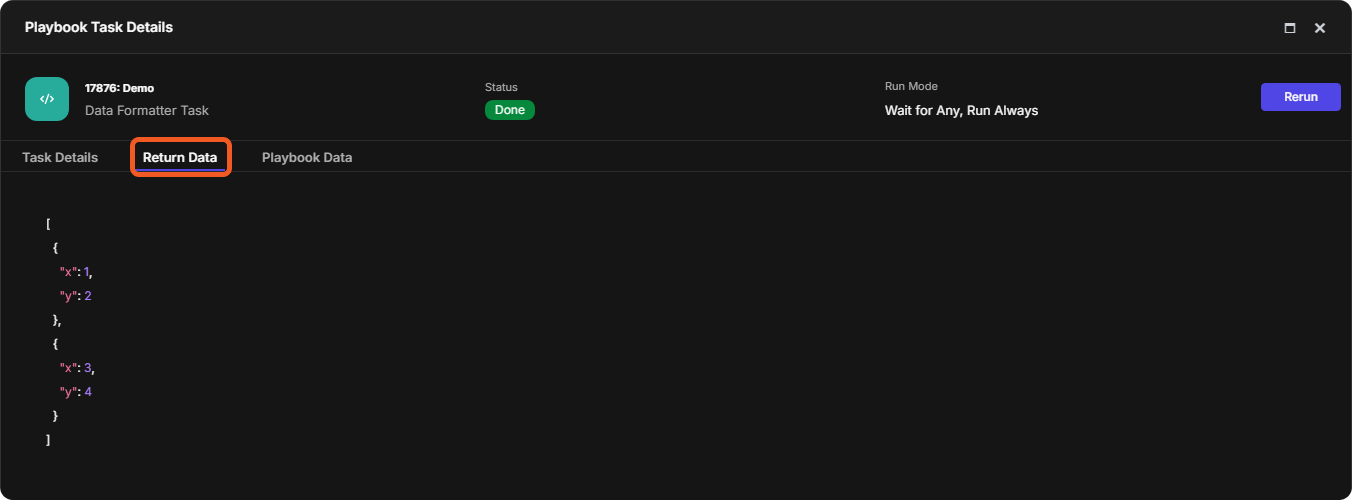
Inputs:
[
{
  "x": 1,
  "y": 2
},
{
  "x": 3,
  "y": 4
}
]
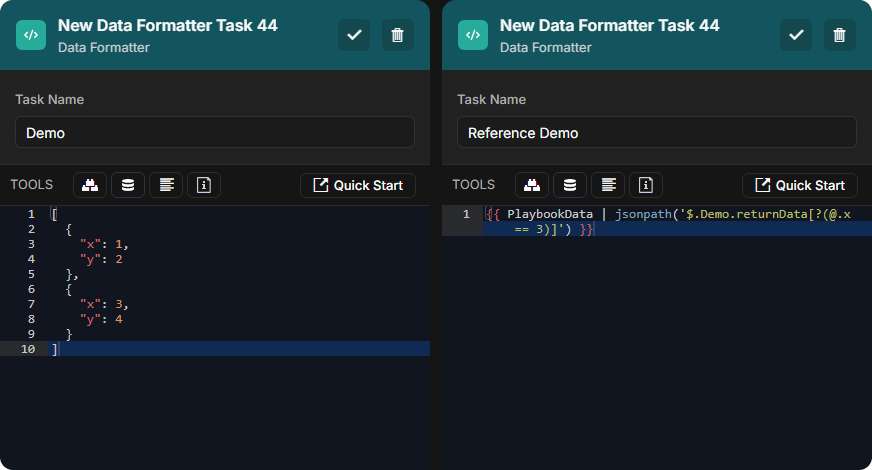
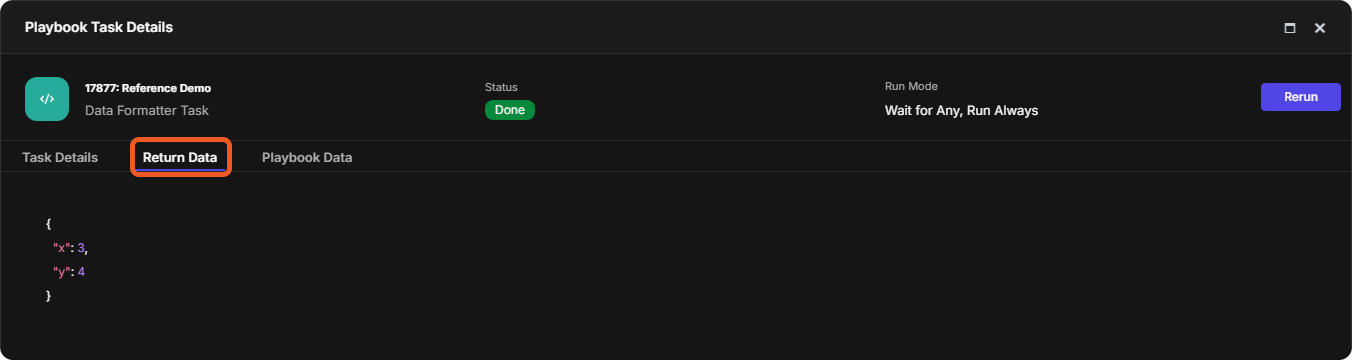
{{ PlaybookData | jsonpath('$.Demo.returnData[?(@.x == 3)]') }}
Return Data:
Inter-Task JSONPath Referencing Schema
inter-task JSONPath referencing is of the following structure:
{{ PlaybookData | jsonpath('$.<TaskName>.<DataField>[<SubscriptExpression>]') }}
The <TaskName> segment identifies the specific task within the current playbook whose output or metadata is being referenced.
The <DataField> segment identifies where the relevant information resides. It is typically a top-level key (e.g., returnData or contextData), but can also include nested attributes separated by dots (e.g., taskExecution.startDate or taskExecution.duration.Minutes).
last
Returns the last element of an array or the final character of a string.
Examples - last
example 1
Input :
{% set companies = ["Apple", "Microsoft", "Google"] %}
{{ companies | last }}
Return Data :
example 2
Input :
{% set company = "D3 Security Management Systems Inc." %}
{{ company | last }}
Return Data :
length
Returns the number of elements in an array, the number of characters in a string, or the number of key-value pairs in a JSON object.
Examples - length
example 1
Input :
{{ ["a", "b"] | length }}
Return Data :
example 2
Input :
Return Data :
example 3
Input :
{% set obj = {"a": 1, "b": 2, "c": 3, "d": 4} %}
{{ obj | length }}
Return Data :
length_equals_to(integer)
Returns a boolean indicating whether the number of elements, characters, or key-value pairs in the input equals the specified length.
Examples - length_equals_to
example 1
Input :
{{ [] | length_equals_to(0) }}
Return Data :
example 2
Input :
{{ "D3 Security" | length_equals_to(11) }}
Return Data :
example 3
Input :
{% set obj = {"a": 1, "b": 2, "c": 3} %}
{{ obj | length_equals_to(4) }}
Return Data :
list
Converts the piped input into a list. Returns a new list containing the elements of the input sequence, string, tuple, set, or dictionary keys if the input is an object.
Examples - list
example 1
Input :
Return Data :
example 2
Input :
{% set obj = {"x": 10, "y": 20} %}
{{ obj | list }}
Return Data :
example 3
Input :
{% set obj = {"x": 10, "y": 20} %}
{{ obj.values() | list }}
Return Data :
map(attribute_name)
Returns an array of values extracted from the input object array by the specified attribute name. Missing attributes return Undefined in the array.
Examples - map
example 1
Input :
{{ [{'x':'D3'},{'x':'D3 Security'}] | map('x') }}
Return Data :
example 2
Input :
{% set arr = [
  {'x':{'y':'D3'}},
  {'x':{'y':'D3 Security'}},
  {'x':{'y':'D3 Security Management Systems'}}
] %}
{{ arr | map('x.y') }}
Return Data :
[
  "D3",
  "D3 Security",
  "D3 Security Management Systems"
]
example 3
Input :
{{ [{'x':1},{'y':2}] | map('x') }}
Return Data :
max
Returns the largest evaluated numeric value from a list or from the values of an object. Non-numeric data must not be present within the input, either as a list element or as an object key’s value.
Examples - max
example 1
Input :
Return Data :
example 2
Input :
{% set nums = [2**5, 2**4, 2**3, 2**2] %}
{{ nums | max }}
Return Data :
example 3
Input :
{{ {"a": 8, "b": 88.8, "c": 88} | max }}
Return Data :
min
Returns the smallest evaluated numeric value from a list or from the values of an object. Non-numeric data must not be present within the input, either as a list element or as an object key’s value.
Examples - min
example 1
Input :
Return Data :
example 2
Input :
{% set nums = [2**5, 2**4, 2**3, 2**2] %}
{{ nums | min }}
Return Data :
example 3
Input :
{{ {"a": 8, "b": 88.8, "c": 88} | min }}
Return Data :
not_contain_array(search_array)
Determines whether not all elements in the specified search array exist in the piped input source array. Returns True if at least one element in the search array is missing from the source array. Returns False if all elements are present.
Examples - not_contain_array
example 1
Input :
{{ ["a","b","c"] | not_contain_array(["b"]) }}
Return Data :
example 2
Input :
{{ ["x","y","z"] | not_contain_array(["y","q"]) }}
Return Data :
example 3
Input :
{{ [1,2,3,4] | not_contain_array([5,1]) }}
Return Data :
not_contain_element(search_element)
Determines whether the specified search element is absent from the piped input source array. Returns True if the search element is absent from the source array. Returns False if the element is present.
Examples - not_contain_element
example 1
Input :
{{ ["a","b","c"] | not_contain_element("b") }}
Return Data :
example 2
Input :
{{ ["x","y","z"] | not_contain_element("q") }}
Return Data :
example 3
Input :
{{ [1,2,3,4] | not_contain_element(5) }}
Return Data :
not_equal(comparison_value)
Returns a Boolean indicating whether the piped input differs from the comparison value.
Examples - not_equal
example 1
Input :
{{ "a" | not_equal("b") }}
Return Data :
example 2
Input :
{{ [1,2,3] | not_equal([1,2,3]) }}
Return Data :
example 3
Input :
{% set object_a = {"id": 1} %}
{% set object_b = {"id": 2} %}
{{ object_a | not_equal(object_b) }}
Return Data :
plus(added_value)
Returns the sum for numeric inputs or a combined sequence for strings, arrays, or objects. For objects with shared keys, values from the added value override those in the piped input.
Examples - plus
example 1
Input :
{{ [1,2,3] | plus([1,2]) }}
Return Data :
example 2
Input :
{% set numbers = {"a": 2, "b": 3} %}
{{ numbers.a | plus(numbers.b) }}
Return Data :
example 3
Input :
{{ {"x":1,"y":2} | plus({"y":5,"z":9}) }}
Return Data :
{
  "x": 1,
  "y": 5,
  "z": 9
}
example 4
Input :
{{ 'D3' | plus( ' Security' ) }}
Return Data :
random_element
Selects and returns a random element from the piped input sequence. Each element in the sequence has an equal probability of being chosen.
Examples - random_element
example 1
Input :
{% set items = ["a","b","c"] %}
{{ items | random_element }}
Return Data :
or
or
example 2
Input :
{{ "abc" | random_element }}
Return Data :
or
or
example 3
Input :
{% set obj = {"x": 10, "y": 20} %}
{{ obj.keys() | list | random_element }}
{{ obj.values() | list | random_element }}
REFERENCE
See the list filter.
Return Data :
or
or
or
Returns all substrings from each element in the piped input text array that match the specified regular expression pattern as a list of matching text fragments. Optional flags include:
Flags
Function
I
Enables case-insensitive matching.
S
Allows the dot (.) to match newline characters.
X
Enables extended mode, allowing spaces and comments in the pattern for readability.
Examples - regex_extract_array
example 1
Input :
{% set texts = ["Port 80 open", "Port 443 closed", "Port 22 filtered"] %}
{{ texts | regex_extract_array("\d+") }}
See digits and + quantifier .
Return Data :
example 2
Input :
{% set text_array = ["Demo", "DEMO", "demo"] %}
{{ text_array | regex_extract_array("demo", "I") }}
See literal matching .
Return Data :
[
  "Demo",
  "DEMO",
  "demo"
]
example 3
Input :
{% set text_array = ["D3\nSecurity", "D3\nASOC", "D3\nDocs"] %}
{{ text_array | regex_extract_array("D3\n[A-Za-z]+", "S") }}
See ranges .
Return Data :
[
  "D3\nSecurity",
  "D3\nASOC",
  "D3\nDocs"
]
example 4
Input :
{% set text_array = ["100", "2000", "D300", "400D"] %}
{{ text_array | regex_extract_array("
    \d{3}  # Exactly three digits
", "X") }}
See exact repetition .
Return Data :
[
  "100",
  "200",
  "300",
  "400"
]
regex_group(pattern, flag, *group_num)
Returns one or more matched portions of text captured by parentheses-defined groups in a regular expression pattern
Examples - regex_group
example 1
Input :
{{ "a.b.c" | regex_group("(\w+)\.(\w+)\.(\w+)", None, 2, 3) }}
See word characters .
Return Data :
example 2
Input :
{{ "X1-Y2" | regex_group("(\w+)-(\w+)", "I", 1, 2) }}
Return Data :
example 3
Input :
{{ "Login FAILED for user EMusk" | regex_group("login\s+failed\s+for\s+user\s+(\w+)", "I", 1) }}
See whitespaces .
Return Data :
regex_remove_array_item(pattern, flag)
Returns an array with all elements matching the regular expression pattern removed.
Examples - regex_remove_array_item
example 1
Input :
{% set items = ["D3 SECURITY", "d3 security", "D3"] %}
{{ items | regex_remove_array_item("security", "I") }}
See literal matching .
Return Data :
example 2
Input :
{% set items = [
"MD5: 9f8a12ab33cdef998877aabbccddeeff",
  "SHA256: 88ff00cc11ddeeff2233445566778899aabbccddeeff00112233445566778899",
  "File: report.pdf",
  "Status: clean"
] %}
{{ items | regex_remove_array_item("^(File|Status):", None) }}
See start anchors and alternations .
Return Data :
[
  "MD5: 9f8a12ab33cdef998877aabbccddeeff",
  "SHA256: 88ff00cc11ddeeff2233445566778899aabbccddeeff00112233445566778899"
]
example 3
Input :
{% set companies = [
  "Akamai Technologies",
  "Amazon Web Services",
  "Apple",
  "Barracuda Networks",
  "Broadcom",
  "Check Point Software",
  "Cisco Systems",
  "CrowdStrike",
  "D3 Security",
  "Dell Technologies"
] %}
{{ companies | regex_remove_array_item("^(?!D)", None) }}
See (negative) lookaheads .
Return Data :
[
  "D3 Security",
  "Dell Technologies"
]
regex_search_in_array(pattern, flag)
Returns an array containing the elements that match the regular expression pattern
Examples - regex_search_in_array
example 1
Input :
{% set companies = [
  "D3 Security Management Systems Inc.",
  "Dell Technologies Inc." ] %}
{{ companies | regex_search_in_array("d3", "I") }}
See literal matching .
Return Data :
[
  "D3 Security Management Systems Inc."
]
example 2
Input :
{% set ips = [
  "1.1.1.1",
  "8.8.8.8",
  "10.0.0.5",
  "192.0.2.45",
  "198.51.100.5",
  "203.0.113.10"
] %}
{{ ips | regex_search_in_array("^198\.51\.", None) }}
See escaping .
Return Data :
example 3
Input :
{% set versions = [
  "D3 vSOC (v16.8)",
  "D3 vSOC (v16.9)",
  "D3 vSOC (v17.0)",
  "D3 vSOC (v17.1)",
  "D3 vSOC (v17.2)",
  "D3 vSOC (v17.3)",
  "D3 vSOC (v17.4)",
  "D3 vSOC (v17.5)",
  "D3 vSOC (v17.6)",
  "D3 vSOC (v17.7)",
  "D3 vSOC (v17.8)",
  "D3 vSOC (v17.9)",
  "D3 vSOC (v18.0)"
] %}
{{ versions | regex_search_in_array("D3 vSOC \(v((17\.[6-9])|(18\.0))\)") }}
See ranges , alternations and nested groups
Return Data :
[
  "D3 vSOC (v17.6)",
  "D3 vSOC (v17.7)",
  "D3 vSOC (v17.8)",
  "D3 vSOC (v17.9)",
  "D3 vSOC (v18.0)"
]
regex_split(pattern, max_split)
Returns an array of substrings by dividing the input text at positions matching a delimiter defined by a regular expression pattern. A max split value of 0 performs unlimited splitting.
Examples - regex_split
example 1
Input :
{{ "D3 Security Management Systems Inc." | regex_split("\W+", 2) }}
See word characters .
Return Data :
[
  "D3",
  "Security",
  "Management Systems Inc."
]
example 2
Input :
{{ "A@B#C$D%E^F&G*H" | regex_split("\W+", 6) }}
Return Data :
[
  "A",
  "B",
  "C",
  "D",
  "E",
  "F",
  "G*H"
]
example 3
Input :
{{ "A1B2C3" | regex_split("\d+", 0) }}
See digits .
Return Data :
reject(test, comparator)
Returns an array containing elements from the piped input sequence that fail the specified test. The second parameter is only required for tests that need a comparator.
WHERE VERSUS REJECT
The where and reject filters are complementary opposites. See where
Examples - reject
example 1
Input :
{{ [-1, 0, 1, 2, 3] | reject(">=", 1) }}
Return Data :
example 2
Input :
{{ [1, 2, 3, 4, 5] | reject("lessthan", 2) }}
Return Data :
example 3
Input :
{{ [1, True, 0, False] | reject("equalto", True) }}
Return Data :
example 4
Input :
{{ [1, True, 0, False] | reject("sameas", True) }}
Return Data :
example 5
Input :
{{ [1, 2, "three", 4] | reject("string") }}
Return Data :
example 6
Input :
{{ [1, 2, "three", 4] | reject("number") }}
Return Data :
example 7
Input :
{{ [1.1, 2, 3.333] | reject("float") }}
Return Data :
example 8
Input :
{{ [1, "a", 2.5, null] | reject("integer") }}
Return Data :
example 9
Input :
{{ ["text", 1, 2.0, True] | reject("boolean") }}
Return Data :
example 10
Input :
{{ [
  [1, 2],
  (3, 4),
  "text",
  {"a": 1},
  range(3),
  5,
  3.14,
  True,
  None
] | reject("iterable") }}
Return Data :
example 11
Input :
{{ [{"a":1}, [2,3], "string"] | reject("mapping") }}
Return Data :
example 12
Input :
{{ [-3, -2,-1, 0, 1, 2, 3] | reject("odd") }}
Return Data :
example 13
Input :
{{ ["low", "medium", "high"] | reject("in", ["low", "medium"]) }}
Return Data :
example 14
Input :
{{ [1, 2, 3, 4, 5] | reject("divisibleby", 2) }}
Return Data :
rejectattr(attribute, test, comparison)
Functions similarly to reject nested lists
REJECTATTR VERSUS SELECTATTR
The rejectattr and selectattr filters are complementary opposites. See selectattr
Examples - rejectattr
example 1
Input :
{% set numbers = [
  {"value": -1},
  {"value": 0},
  {"value": 1},
  {"value": 2},
  {"value": 3}
] %}
{{ numbers | rejectattr("value", ">=", 1) }}
Return Data :
[
  {
    "value": -1
  },
  {
    "value": 0
  }
]
example 2
Input :
{{ [
  {"value": 1},
  {"value": 2},
  {"value": 3},
  {"value": 4},
  {"value": 5}
] | rejectattr("value", "lessthan", 2) }}
Return Data :
[
  {
    "value": 2
  },
  {
    "value": 3
  },
  {
    "value": 4
  },
  {
    "value": 5
  }
]
example 3
Input :
{{ [
  {"value": 1},
  {"value": true},
  {"value": 0},
  {"value": false}
] | rejectattr("value", "equalto", true) }}
Return Data :
[
  {
    "value": 0
  },
  {
    "value": false
  }
]
example 4
Input :
{{ [
  {"value": 1},
  {"value": true},
  {"value": 0},
  {"value": false}
] | rejectattr("value", "sameas", true) }}
Return Data :
[
  {
    "value": 1
  },
  {
    "value": 0
  },
  {
    "value": false
  }
]
example 5
Input :
{{ [
  {"data": 1},
  {"data": 2},
  {"data": "three"},
  {"data": 4}
] | rejectattr("data", "string") }}
Return Data :
[
  {
    "data": 1
  },
  {
    "data": 2
  },
  {
    "data": 4
  }
]
example 6
Input :
{{ [
  {"data": 1},
  {"data": 2},
  {"data": "three"},
  {"data": 4}
] | rejectattr("data", "number") }}
Return Data :
example 7
Input :
{{ [
  {"num": 1.1},
  {"num": 2},
  {"num": 3.333}
] | rejectattr("num", "float") }}
Return Data :
example 8
Input :
{{ [
  {"val": 1},
  {"val": "a"},
  {"val": 2.5},
  {"val": null}
] | rejectattr("val", "integer") }}
Return Data :
[
  {
    "val": "a"
  },
  {
    "val": 2.5
  },
  {
    "val": null
  }
]
example 9
Input :
{{ [
  {"item": "text"},
  {"item": 1},
  {"item": 2.0},
  {"item": true}
] | rejectattr("item", "boolean") }}
Return Data :
[
  {
    "item": "text"
  },
  {
    "item": 1
  },
  {
    "item": 2.0
  }
]
example 10
Input :
{{ [
  {"data": [1, 2]},
  {"data": (3, 4)},
  {"data": "text"},
  {"data": {"a": 1}},
  {"data": range(3)},
  {"data": 5},
  {"data": 3.14},
  {"data": true},
  {"data": null}
] | rejectattr("data", "iterable") }}
Return Data :
[
  {
    "data": 5
  },
  {
    "data": 3.14
  },
  {
    "data": true
  },
  {
    "data": null
  }
]
example 11
Input :
{{ [
  {"data": {"a": 1}},
  {"data": [2, 3]},
  {"data": "string"}
] | rejectattr("data", "mapping") }}
Return Data :
[
  {
    "data": [
      2,
      3
    ]
  },
  {
    "data": "string"
  }
]
example 12
Input :
{{ [
  {"n": -3},
  {"n": -2},
  {"n": -1},
  {"n": 0},
  {"n": 1},
  {"n": 2},
  {"n": 3}
] | rejectattr("n", "odd") }}
Return Data :
[
  {
    "n": -2
  },
  {
    "n": 0
  },
  {
    "n": 2
  }
]
example 13
Input :
{{ [
  {"level": "low"},
  {"level": "medium"},
  {"level": "high"}
] | rejectattr("level", "in", ["low", "medium"]) }}
Return Data :
example 14
Input :
{{ [
  {"num": 1},
  {"num": 2},
  {"num": 3},
  {"num": 4},
  {"num": 5}
] | rejectattr("num", "divisibleby", 2) }}
Return Data :
[
  {
    "num": 1
  },
  {
    "num": 3
  },
  {
    "num": 5
  }
]
example 15
Input :
{% set data = [
  ["key1", "value1"],
  ["key2", "value2"],
  ["key3", "value3"]
] %}

{{ data | rejectattr("1", "equalto", "value2") }}
Return Data :
[
  [
    "key1",
    "value1"
  ],
  [
    "key3",
    "value3"
  ]
]
remove_empty_value_from_array
Returns a filtered array that excludes all elements that are empty, null-like, or falsy.
Examples - remove_empty_value_from_array
example 1
Input :
{{ ["a","b","","","c"] | remove_empty_value_from_array }}
Return Data :
example 2
Input :
{{ [
  "D",
  "",
  None,
  null,
  Undefined,
  0,
  0.0,
  False,
  [],
  {},
  (),
  "3"
] | remove_empty_value_from_array }}
Return Data :
reverse
Returns an array with the order of elements reversed.
Examples - reverse
example 1
Input :
{% set array = ["a", "b", "c"] %}
{{ array | reverse }}
Return Data :
example 2
Input :
{% set array = [["a", "b"], ["c", "d"], ["e", "f"]] %}
{{ array | reverse }}
Return Data :
[
  [
    "e",
    "f"
  ],
  [
    "c",
    "d"
  ],
  [
    "a",
    "b"
  ]
]
example 3
Input :
{% set array = [
  {"key1": "value1"},
  {"key2": "value2"},
  {"key3": "value3"}
] %}
{{ array | reverse }}
Return Data :
[
  {
    "key3": "value3"
  },
  {
    "key2": "value2"
  },
  {
    "key1": "value1"
  }
]
selectattr(attribute, test, comparison)
Returns an array of objects from the input object array whose attribute values satisfy the specified test. A comparison value is required only when the test needs one. See the examples
REJECTATTR VERSUS SELECTATTR
The rejectattr and selectattr filters are complementary opposites. See rejectattr
Examples - selectattr
example 1
Input :
{{ [
  {"value": -1},
  {"value": 0},
  {"value": 1},
  {"value": 2},
  {"value": 3}
] | selectattr("value", ">=", 1) }}
Return Data :
[
  {
    "value": 1
  },
  {
    "value": 2
  },
  {
    "value": 3
  }
]
example 2
Input :
{{ [
  {"value": 1},
  {"value": 2},
  {"value": 3},
  {"value": 4},
  {"value": 5}
] | selectattr("value", "lessthan", 2) }}
Return Data :
example 3
Input :
{{ [
  {"value": 1},
  {"value": true},
  {"value": 0},
  {"value": false}
] | selectattr("value", "equalto", true) }}
Return Data :
[
  {
    "value": 1
  },
  {
    "value": true
  }
]
example 4
Input :
{{ [
  {"value": 1},
  {"value": true},
  {"value": 0},
  {"value": false}
] | selectattr("value", "sameas", true) }}
Return Data :
example 5
Input :
{{ [
  {"data": 1},
  {"data": 2},
  {"data": "three"},
  {"data": 4}
] | selectattr("data", "string") }}
Return Data :
example 6
Input :
{{ [
  {"data": 1},
  {"data": 2},
  {"data": "three"},
  {"data": 4}
] | selectattr("data", "number") }}
Return Data :
[
  {
    "data": 1
  },
  {
    "data": 2
  },
  {
    "data": 4
  }
]
example 7
Input :
{{ [
  {"num": 1.1},
  {"num": 2},
  {"num": 3.333}
] | selectattr("num", "float") }}
Return Data :
[
  {
    "num": 1.1
  },
  {
    "num": 3.333
  }
]
example 8
Input :
{{ [
  {"val": 1},
  {"val": "a"},
  {"val": 2.5},
  {"val": null}
] | selectattr("val", "integer") }}
Return Data :
example 9
Input :
{{ [
  {"item": "text"},
  {"item": 1},
  {"item": 2.0},
  {"item": true}
] | selectattr("item", "boolean") }}
Return Data :
example 10
Input :
{{ [
  {"data": [1, 2]},
  {"data": (3, 4)},
  {"data": "text"},
  {"data": {"a": 1}},
  {"data": range(3)},
  {"data": 5},
  {"data": 3.14},
  {"data": true},
  {"data": null}
] | selectattr("data", "iterable") }}
Return Data :
[{'data': [1, 2]}, {'data': (3, 4)}, {'data': 'text'}, {'data': {'a': 1}}, {'data': range(0, 3)}]
example 11
Input :
{{ [
  {"data": {"a": 1}},
  {"data": [2, 3]},
  {"data": "string"}
] | selectattr("data", "mapping") }}
Return Data :
[
  {
    "data": {
      "a": 1
    }
  }
]
example 12
Input :
{{ [
  {"n": -3},
  {"n": -2},
  {"n": -1},
  {"n": 0},
  {"n": 1},
  {"n": 2},
  {"n": 3}
] | selectattr("n", "odd") }}
Return Data :
[
  {
    "n": -3
  },
  {
    "n": -1
  },
  {
    "n": 1
  },
  {
    "n": 3
  }
]
example 13
Input :
{{ [
  {"level": "low"},
  {"level": "medium"},
  {"level": "high"}
] | selectattr("level", "in", ["low","medium"]) }}
Return Data :
[
  {
    "level": "low"
  },
  {
    "level": "medium"
  }
]
example 14
Input :
{{ [
  {"num": 1},
  {"num": 2},
  {"num": 3},
  {"num": 4},
  {"num": 5}
] | selectattr("num", "divisibleby", 2) }}
Return Data :
[
  {
    "num": 2
  },
  {
    "num": 4
  }
]
example 15
Input :
{% set data = [
  ["key1","value1"],
  ["key2","value2"],
  ["key3","value3"]
] %}
{{ data | selectattr("1","equalto","value2") }}
Return Data :
sort
Returns a lexicographically sorted string array. DateTime strings are sorted chronologically. Supported DateTime formats include ODBC canonical (YYYY-MM-DD, YYYY/MM/DD, YYYY-MM-DD HH:mm:ss) and USA date formats (MM-DD-YYYY, MM/DD/YYYY, MM-DD-YYYY HH:mm:ss, MM/DD/YYYY HH:mm:ss).
USAGE ADVISORY
Expect the return data to be a string array, regardless of the original data types.
See Macros for Numeric Sorting
Examples - sort
example 1
Input :
{{ [10, 3, 2, 1, 0] | sort }}
Return Data :
[
  "0",
  "1",
  "10",
  "2",
  "3"
]
example 2
Input :
{% set companies = ["Google", "Microsoft", "D3 Security", "Apple"] %}
{{ companies | sort }}
Return Data :
[
  "Apple",
  "D3 Security",
  "Google",
  "Microsoft"
]
example 3
Input :
{{ [
"2025-06-07",
"06-09-2021",
"2025-06-07 18:30:00",
"06-08-2022",
"2025-06-07 09:00:00"
] | sort }}
Return Data :
[
"06-09-2021",
"06-08-2022",
"2025-06-07",
"2025-06-07 09:00:00",
"2025-06-07 18:30:00"
]
example 4
Input :
{{ ["v2.10", "v2.2", "v10.1"] | sort }}
Return Data :
[
"v10.1",
"v2.10",
"v2.2"
]
example 5
Input :
{{ ["10.0.0.2", "10.0.0.10", "10.0.0.1"] | sort }}
Return Data :
[
"10.0.0.1",
"10.0.0.10",
"10.0.0.2"
]
example 6
Input :
{{ ["1 a 1 b", "1 a 11 b", "10 a 2 b", "01 a 2 b"] | sort }}
Return Data :
[
"01 a 2 b",
"1 a 1 b",
"1 a 11 b",
"10 a 2 b"
]
example 6
Input :
{{ ["1a", "1A", "1@", "1-"] | sort }}
Return Data :
[
"1-",
"1@",
"1a",
"1A"
]
example 7
Input :
{{ ["1.5", "1.25", "1.75", "1.1"] | sort }}
Return Data :
[
"1.1",
"1.25",
"1.5",
"1.75"
]
Macros for Numeric Sorting
descending numeric sort
Macro for Ascending Order Sort
{% macro numeric_sort(array) %}
{% set result = array[:] %}
{% set length = result | count %}
{% set ns = namespace(min_idx=0) %}
{% for i in range(length) %}
{% set ns.min_idx = i %}
{% for j in range(i + 1, length) %}
{% if (result[j] | float) < (result[ns.min_idx] | float) %}
{% set ns.min_idx = j %}
{% endif %}
{% endfor %}
{% if ns.min_idx != i %}
{% set temp = result[i] %}
{% set _ = result.__setitem__(i, result[ns.min_idx]) %}
{% set _ = result.__setitem__(ns.min_idx, temp) %}
{% endif %}
{% endfor %}
{{ result }}
{% endmacro %}
Example 1
Input :
{{ numeric_sort([ 1, 0, 10,]) }}
Return Data :
Example 2
Input :
{{ numeric_sort(["3", "-1", "2", "-2", "0"]) }}
Return Data :
[
"-2",
"-1",
"0",
"2",
"3"
]
Example 3
Input :
{{ numeric_sort(["3.1", "2.5", "2.49", "0.0", "-1.2"]) }}
Return Data :
[
"-1.2",
"0.0",
"2.49",
"2.5",
"3.1"
]
Example 4
Input :
{{ numeric_sort(["1", "3", "2", "3", "2", "1"]) }}
Return Data :
[
"1",
"1",
"2",
"2",
"3",
"3"
]
Example 5
Input :
{{ numeric_sort(["3", "2.5", "1.0", "0", "-4.2", "10"]) }}
Return Data :
[
"-4.2",
"0",
"1.0",
"2.5",
"3",
"10"
]
Example 6
Input :
{{ numeric_sort(["-0.5", "0.0001", "0.0", "-10.2", "2.1"]) }}
Return Data :
[
"-10.2",
"-0.5",
"0.0",
"0.0001",
"2.1"
]
Example 7
Input :
{{ numeric_sort(["1e2", "5e1", "2e3", "1.5e2"]) }}
Return Data :
[
"5e1",
"1e2",
"1.5e2",
"2e3"
]
Example 8
Input :
{{ numeric_sort(["a", "-3", "2", "1"]) }}
Return Data :
READER NOTE
Non-numeric values are convert to 0.0 internally.
Macro for Descending Order Sort
{% macro numeric_sort_desc(array) %}
{% set result = array[:] %}
{% set length = result | count %}
{% set ns = namespace(max_idx=0) %}
{% for i in range(length) %}
{% set ns.max_idx = i %}
{% for j in range(i + 1, length) %}
{% if (result[j] | float) > (result[ns.max_idx] | float) %}
{% set ns.max_idx = j %}
{% endif %}
{% endfor %}
{% if ns.max_idx != i %}
{% set temp = result[i] %}
{% set _ = result.__setitem__(i, result[ns.max_idx]) %}
{% set _ = result.__setitem__(ns.max_idx, temp) %}
{% endif %}
{% endfor %}
{{ result }}
{% endmacro %}
Example 1
Input :
{{ numeric_sort_desc([ 1, 0, 10, 3, 2]) }}
Return Data :
Example 2
Input :
{{ numeric_sort_desc(["3", "-1", "2", "-2", "0"]) }}
Return Data :
[
"3",
"2",
"0",
"-1",
"-2"
]
Example 3
Input :
{{ numeric_sort_desc(["3.1", "2.5", "2.49", "0.0", "-1.2"]) }}
Return Data :
[
"3.1",
"2.5",
"2.49",
"0.0",
"-1.2"
]
Example 4
Input :
{{ numeric_sort_desc(["1", "3", "2", "3", "2", "1"]) }}
Return Data :
[
"3",
"3",
"2",
"2",
"1",
"1"
]
Example 5
Input :
{{ numeric_sort_desc(["3", "2.5", "1.0", "0", "-4.2", "10"]) }}
Return Data :
[
"10",
"3",
"2.5",
"1.0",
"0",
"-4.2"
]
Example 6
Input :
{{ numeric_sort_desc(["-0.5", "0.0001", "0.0", "-10.2", "2.1"]) }}
Return Data :
[
"2.1",
"0.0001",
"0.0",
"-0.5",
"-10.2"
]
Example 7
Input :
{{ numeric_sort_desc(["1e2", "5e1", "2e3", "1.5e2"]) }}
Return Data :
[
"2e3",
"1.5e2",
"1e2",
"5e1"
]
Example 8
Input :
{{ numeric_sort_desc(["a", "-3", "2", "1"]) }}
Return Data :
READER NOTE
Non-numeric values are convert to 0.0 internally.
sort_natural
Returns an array of strings sorted in human-readable order. It divides each string into alternating unsigned (non-negative) integer and text (letters, punctuation, or symbols) segments, and compares them one by one in order of appearance until it finds a difference. Text segments are compared lexicographically, in a case-sensitive manner.
DateTime strings are sorted chronologically. ODBC canonical and USA date formats are supported.
USAGE ADVISORY
Expect the return data to be a string array, regardless of the original data types.
See Macros for Numeric Sorting
Examples - sort_natural
example 1
Input :
{{ [10, 3, 2, 1, 0] | sort_natural }}
Return Data :
[
"0",
"1",
"2",
"3",
"10"
]
example 2
Input :
{{ ["Google", "Microsoft", "D3 Security", "Apple"] | sort_natural }}
Return Data :
[
"Apple",
"D3 Security",
"Google",
"Microsoft"
]
example 3
Input :
{{ [
"2025-06-07",
"06-09-2021",
"2025-06-07 18:30:00",
"06-08-2022",
"2025-06-07 09:00:00"
] | sort_natural }}
Return Data :
[
"06-09-2021",
"06-08-2022",
"2025-06-07",
"2025-06-07 09:00:00",
"2025-06-07 18:30:00"
]
example 4
Input :
{{ ["v2.10", "v2.2", "v10.1"] | sort_natural }}
Return Data :
[
"v2.2",
"v2.10",
"v10.1"
]
example 5
Input :
{{ ["10.0.0.2", "10.0.0.10", "10.0.0.1"] | sort_natural }}
Return Data :
[
"10.0.0.1",
"10.0.0.2",
"10.0.0.10"
]
example 6
Input :
{{ ["1 a 1 b", "1 a 11 b", "10 a 2 b", "01 a 2 b"] | sort_natural }}
Return Data :
[
"1 a 1 b",
"01 a 2 b",
"1 a 11 b",
"10 a 2 b"
]
example 6
Input :
{{ ["1a", "1A", "1@", "1-"] | sort_natural }}
Return Data :
[
"1-",
"1@",
"1A",
"1a"
]
example 7
Input :
{{ ["1.5", "1.25", "1.75", "1.1"] | sort_natural }}
Return Data :
[
"1.1",
"1.5",
"1.25",
"1.75"
]
sum(attribute, start)
Returns the total of all numeric values in an array, including the starting value (start, default 0). When an attribute is specified, it sums that attribute across all objects. Floating-point sums may show minor precision differences.
Examples - sum
example 1
Input :
{{ [-3, -2, -1, 0, 1, 2] | sum }}
Return Data :
example 2
Input :
{{ [
{ 'a': 'z', 'd': 1 },
{ 'a': 'z', 'd': 1 + 1 }
] | sum(attribute='d') }}
Return Data :
example 3
Input :
{{ [
{ 'analyst': 'Elon', 'tasks': 5 },
{ 'analyst': 'Sam', 'tasks': 4 }
] | sum(attribute='tasks', start=10) }}
Return Data :
example 4
Input :
Return Data :
text_array_contains_text(search_text)
Returns True when the array of text values contains the specified search text. Returns False when no match exists or when the array contains only non-string values. A case-sensitive comparison is performed. Non-string elements are ignored. The search text is always interpreted as a string and must be quoted if it contains spaces or special characters.
Examples - text_array_contains_text
example 1
Input :
{{ ['a', 'b'] | text_array_contains_text('a') }}
Return Data :
example 2
Input :
{{ ['a', 'b'] | text_array_contains_text('c') }}
Return Data :
example 3
Input :
{{ ['D3', 'Security'] | text_array_contains_text('security') }}
Return Data :
example 4
Input :
{{ ['1', 2, '3'] | text_array_contains_text('2') }}
Return Data :
example 5
Input :
{{ ['1', '2', '3'] | text_array_contains_text(2) }}
Return Data :
to_csv
Returns a CSV-format string generated from the piped input array. Trailing commas indicate empty cells for missing values. Column headers use object keys for object arrays, the index 0 for primitive arrays, and element index positions for arrays of arrays.
Examples - to_csv
example 1
Input :
{% set arr = [
{'x': 'B', 'y': 1},
{'x': 'C', 'y': 2},
{'x': 'D', 'y': 3}
] %}
{{ arr | to_csv }}
Return Data :
example 2
Input :
{% set arr = [
{'a':'A1','b':'B1','c':'C1','d':'D1','e':'E1'},
{'a':'A2','b':'B2','c':'C2','d':'D2','e':'E2'}
] %}
{{ arr | to_csv }}
Return Data :
a,b,c,d,e
A1,B1,C1,D1,E1
A2,B2,C2,D2,E2
example 3
Input :
{% set arr = ['x','null',true] %}
{{ arr | to_csv }}
Return Data :
example 4
Input :
{% set arr = [
['X1','X2'],
['Y1','Y2'],
['Z1','Z2']
] %}
{{ arr | to_csv }}
Return Data :
example 5
Input :
{% set arr = [
['X1','X2'],
['Y1','Y2'],
['Z1','Z2']
] %}
{{ arr | to_csv }}
Return Data :
to_list
Returns the input value wrapped in a list. A piped list input is returned unchanged.
Examples - to_list
example 1
Input :
Return Data :
example 2
Input :
Return Data :
example 3
Input :
{{ { "D": "3" } | to_list }}
Return Data :
example 4
Input :
{{ ['D3', 'Security'] | to_list }}
Return Data :
unique(is_case_sensitive)
Returns a new array containing only the unique elements of the input sequence, preserving their original order. If True is passed as a parameter, text comparison becomes case-sensitive. By default, the filter is case-insensitive and retains the first occurrence of each value. Comparison is based on value equality, respecting data type differences. Nested array and object elements are compared recursively for both structural and value equality.
Examples - unique
example 1
Input :
{{ ['a', 'a', 'b', 'b', 'c', 'C'] | unique }}
Return Data :
example 2
Input :
{{ ['a', 'a', 'b', 'b', 'c', 'C'] | unique(true) }}
Return Data :
example 3
Input :
{{ [-1.1, 0.0, 1.1, 01.1, 1.10] | unique }}
Return Data :
example 4
Input :
{{ [[0, 2], [1, 2]] | unique }}
Return Data :
example 5
Input :
{{ [
{'id': 1, 'value': 3.5},
{'id': 1, 'value': 3.50},
{'id': -1, 'value': 3.5},
{'id': 2, 'value': 3.5}
] | unique }}
Return Data :
[
{
"id": 1,
"value": 3.5
},
{
"id": -1,
"value": 3.5
},
{
"id": 2,
"value": 3.5
}
]
example 6
Input :
{{ [
{'x': {'y': [1, 2]}},
{'x': {'y': [1, 2]}},
{'x': {'y': [1, 3]}}
] | unique }}
Return Data :
[
{
"x": {
"y": [
1,
2
]
}
},
{
"x": {
"y": [
1,
3
]
}
}
]
update_key_names([old_key,new_key]…[old_key,new_key])
Returns an updated object array in which specified key names are replaced with new key names. The old key name must exist in every object being processed, and the new key name must not exist in an object at the time its rename is performed. Rename pairs and collision checks are applied sequentially.
Examples - update_key_names
example 1
Input :
{% set arr = [
{"v": null, "x": "X1", "y": "Y1", "z": "Z1"},
{"v": "W2", "x": "X2", "y": "Y2", "z": "Z2"}
] %}
{{ arr | update_key_names(['v','w']) }}
Return Data :
[
{
"x": "X1",
"y": "Y1",
"z": "Z1",
"w": null
},
{
"x": "X2",
"y": "Y2",
"z": "Z2",
"w": "W2"
}
]
example 2
Input :
{% set arr = [
{"v": null, "u": "X1", "y": "Y1", "z": "Z1"},
{"v": "W2", "u": "X2", "y": "Y2", "z": "Z2"}
] %}
{{ arr | update_key_names(['v','w'],['u','x']) }}
Return Data :
[
{
"y": "Y1",
"z": "Z1",
"w": null,
"x": "X1"
},
{
"y": "Y2",
"z": "Z2",
"w": "W2",
"x": "X2"
}
]
example 3
Input :
{% set arr = [
{"x": null, "u": "X1", "y": "Y1", "z": "Z1"},
{"x": "W2", "u": "X2", "y": "Y2", "z": "Z2"}
] %}
{{ arr | update_key_names(['x','w'],['u','x']) }}
Return Data :
[
{
"y": "Y1",
"z": "Z1",
"w": null,
"x": "X1"
},
{
"y": "Y2",
"z": "Z2",
"w": "W2",
"x": "X2"
}
]
where(test, comparator)
Returns an array containing elements from the piped input sequence that pass the specified test. The second parameter is only required for tests that need a comparator.
WHERE VERSUS REJECT
The where and reject filters are complementary opposites. See reject
Examples - where
example 1
Input :
{{ [-1, 0, 1, 2, 3] | where(">=", 1) }}
Return Data :
example 2
Input :
{{ [1, 2, 3, 4, 5] | where("lessthan", 2) }}
Return Data :
example 3
Input :
{{ [1, True, 0, False] | where("equalto", True) }}
Return Data :
example 4
Input :
{{ [1, True, 0, False] | where("sameas", True) }}
Return Data :
example 5
Input :
{{ [1, 2, "three", 4] | where("string") }}
Return Data :
example 6
Input :
{{ [1, 2, "three", 4] | where("number") }}
Return Data :
example 7
Input :
{{ [1.1, 2, 3.333] | where("float") }}
Return Data :
example 8
Input :
{{ [1, "a", 2.5, null] | where("integer") }}
Return Data :
example 9
Input :
{{ ["text", 1, 2.0, True] | where("boolean") }}
Return Data :
example 10
Input :
{{ [
[1, 2],
(3, 4),
"text",
{"a": 1},
range(3),
5,
3.14,
True,
None
] | where("iterable") }}
Return Data :
[[1, 2], (3, 4), 'text', {'a': 1}, range(0, 3)]
example 11
Input :
{{ [{"a":1}, [2,3], "string"] | where("mapping") }}
Return Data :
example 12
Input :
{{ [-3, -2, -1, 0, 1, 2, 3] | where("odd") }}
Return Data :
example 13
Input :
{{ ["low", "medium", "high"] | where("in", ["low", "medium"]) }}
Return Data :
example 14
Input :
{{ [1, 2, 3, 4, 5] | where("divisibleby", 2) }}
Return Data :