
Last Updated: October 26, 2026
Overview
Memory and rules govern how Morpheus uses context and follows policy in Morpheus Adaptive Tasking. Memory stores context, such as investigation findings, lessons, tool errors and analyst preferences, to inform later work. Rules are instructions Morpheus must always follow.
|
|
Memory |
Rules |
|
Behavior |
Context is recorded and recalled to inform the AI's work. |
Morpheus follows active rules on every turn. Requests that break an active rule are refused. |
|
Lifecycle |
Recorded by Morpheus during investigations. There is no screen for viewing or editing memory. |
Created and managed by analysts and administrators in Rule Management. Can be turned on or off at any time. |
|
Effect |
Soft signal that adds relevant context across investigations. |
Hard constraint on every conversation and investigation. |
|
Best for |
Recurring patterns and prior incident context. |
Policies the team has defined: "Always do X" or "Never do Y." |
|
Cited |
Surfaces in plans and chat as relevant context. |
When a rule makes Morpheus refuse a request, the reply names the rule. |
Memory
Memory is a record of context Morpheus builds up during investigations and searches when it works on later cases.
Memory Tiers
Each memory is stored at one of three tiers. Morpheus picks the tier that fits what it records.
|
Tier |
Scope |
Visible to |
|
Session (default) |
A specific incident |
All analysts working that incident |
|
User |
One analyst's preferences |
Only that analyst, across all incidents |
|
Organization |
Lessons and facts that apply across incidents at a site |
All analysts at that site |
A fourth layer, the D3 catalog, provides built-in knowledge that every tenant can read. It is curated by D3 Security and contains no customer data.
READER NOTE
The D3 catalog is read-only from the tenant perspective. A tenant's memory is never visible to another tenant.
How Morpheus Uses Memory
While it works on a request, Morpheus can search memory for relevant context, such as earlier notes on the same indicator, summaries of similar incidents, or the analyst's preferences. The search matches meaning rather than exact keywords, so no special query syntax is needed.
Rules
A rule is a hard constraint Morpheus applies on every conversation turn, whatever the task or the analyst's request. Unlike memory, which influences behavior softly, a rule is a policy Morpheus must follow.
Opening Rule Management
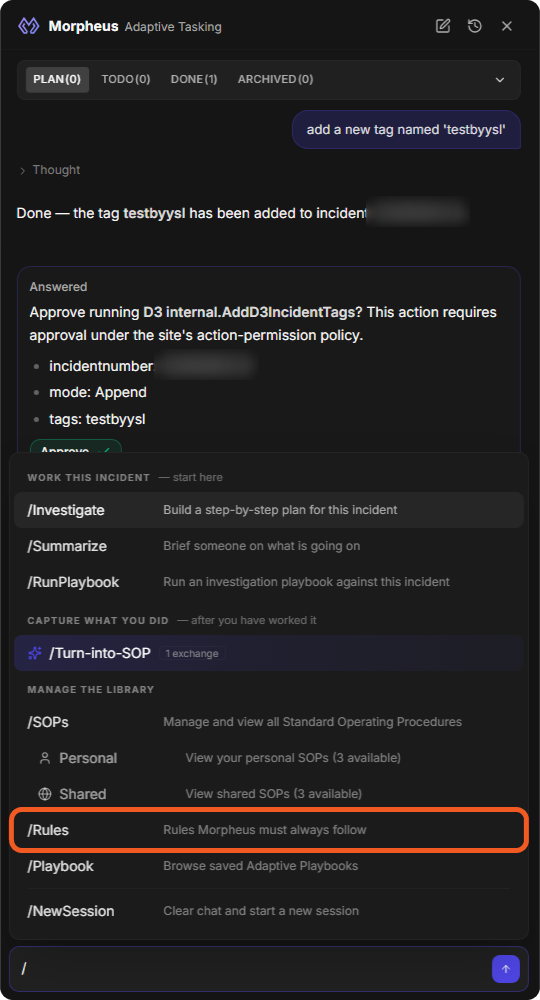
In the Morpheus Adaptive Tasking panel, type / and choose /Rules (Rules Morpheus must always follow).
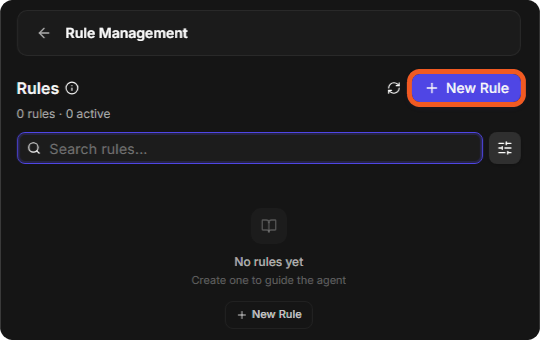
Rule Management opens in the panel. It shows the number of rules and how many are active, a search box (Search rules...), a status filter (All, Active, Inactive), and the rules grouped as PERSONAL and SHARED. Click the back arrow to return to the chat.
Rule Scopes
Each rule has one of two scopes, which decides whom it applies to.
|
Scope |
Created by |
Applies to |
|
Personal |
Any analyst |
Only that analyst's conversations and investigations |
|
Shared |
Administrators only |
Every analyst in the tenant, or only the analysts at the rule's sites |
How Morpheus Applies Rules
Active rules outrank Morpheus's default behavior. Morpheus follows them without announcing them. When a rule makes Morpheus refuse a request, the reply names the rule's title, so analysts can see which policy applies.
Lifecycle
You can create, view, edit, turn off and on, and delete rules.
Create a Rule
-
Choose /Rules, then click + New Rule.
-
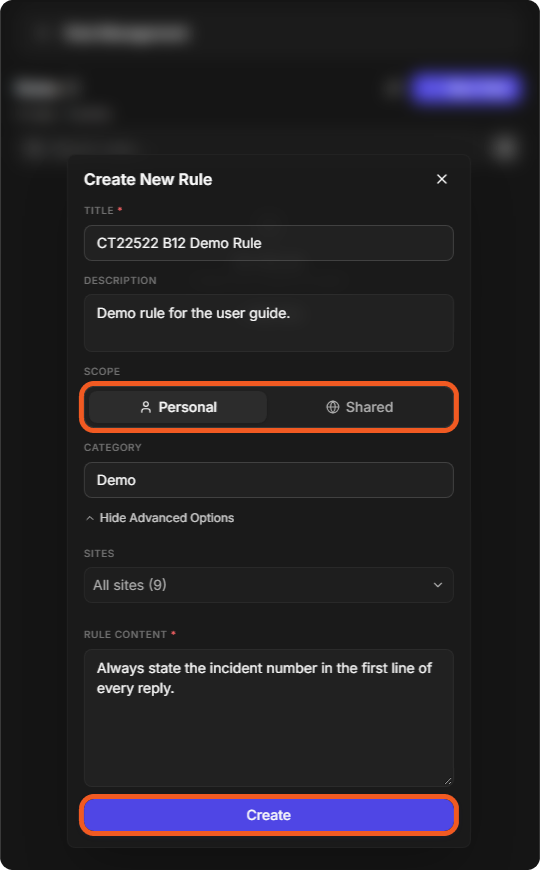
In Create New Rule, fill in:
-
Title (required)
-
Description: a brief summary of when and why to apply the rule.
-
Scope: Personal or Shared (Shared is for administrators).
-
Category: for example, Approval.
-
Sites: under View Advanced Options; the default is All sites.
-
Rule Content (required): the rule Morpheus must follow.
-
-
Click Create.
View, Edit, Turn Off and Delete Rules
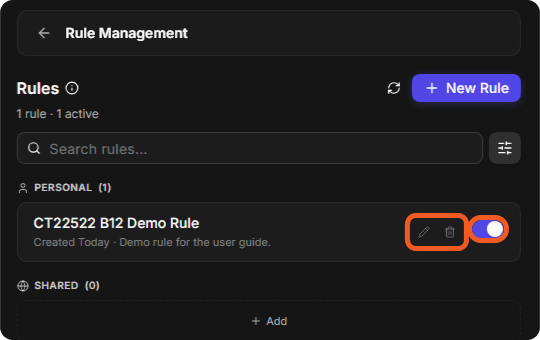
Each rule is a card in Rule Management with an edit button (pencil), a delete button (trash) and an on/off switch.
View - Click a rule to open its details: Details shows whether it is Active (available for Morpheus to use during investigations), its Description and Content; History lists its earlier versions.
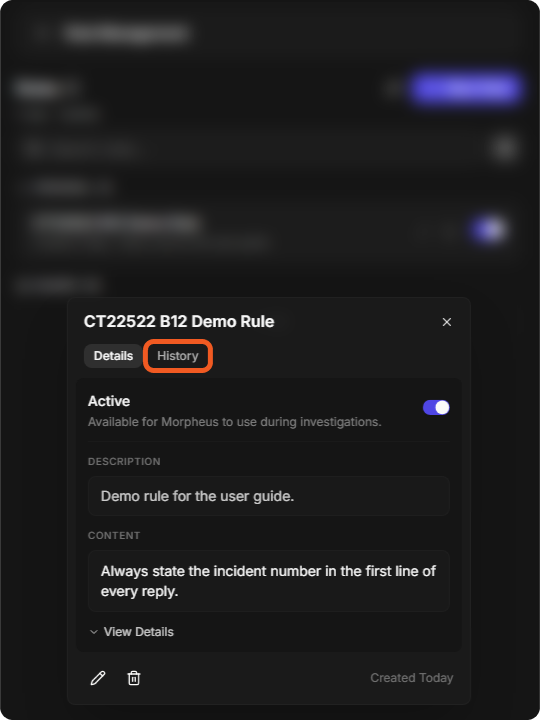
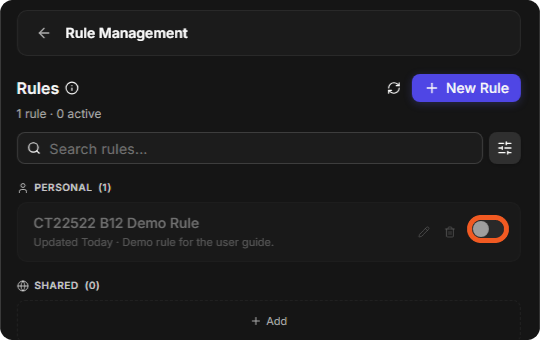
Turn off / on - Use the switch. A turned-off rule stays in the list, greyed out, and the header counts it as not active (for example, 1 rule · 0 active). Turned-off rules do not influence Morpheus. Turn the switch back on at any time.
Edit - Click the pencil to change the rule. Each change creates a new version, listed under History.
Delete - Click the trash button, then Delete in Delete this rule? This action cannot be undone.
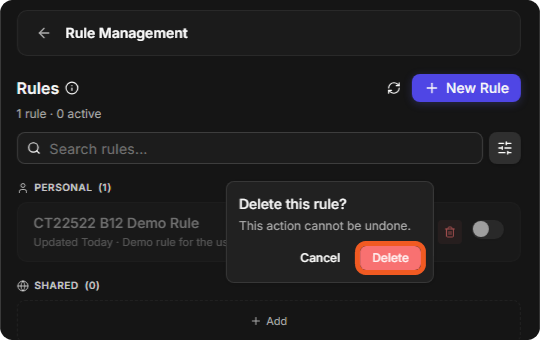
The edit and delete buttons show on your own personal rules; administrators can also edit and delete shared rules.
Rule Size
A rule's content can be up to 20,000 characters. A longer rule is rejected with a message that gives its length and the 20,000 maximum.
Isolation Guarantees
Morpheus keeps memory and rules within their scope.
Tenant Isolation
Memory and rules belonging to one tenant are never visible to any other tenant: every read and write is limited to the caller's tenant. The only knowledge shared across tenants is the D3 catalog, which contains no customer data.
Site Isolation
-
Shared rules limited to sites apply only to analysts working at one of those sites.
-
Shared rules left at All sites apply tenant-wide.
-
Memory recorded during an incident keeps that incident's site. Organization-tier memory is kept per site.
User Isolation
-
Personal rules belong to the analyst who created them.
-
User-tier memory (analyst preferences) stays private to that analyst, including when analysts work the same incident.
-
Session-tier memory is shared among all analysts working on the same incident.