
Cisco Umbrella Cloud Security
LAST UPDATED: DECEMBER 19, 2025
Overview
Cisco Umbrella Cloud Security is a cloud-based security platform that provides a first line of defense against internet-based threats. It offers secure web gateways, DNS-layer security, cloud-delivered firewall capabilities, and more, all aimed at protecting users, devices, and data across various locations, whether on or off the network. This integration enables organizations to manage destinations in the destination list, including add/remove destinations to/from specified destination list.
D3 SOAR is providing REST operations to function with Cisco Umbrella Cloud Security.
Cisco Umbrella Cloud Security is available for use in:
Known Limitations
Rate limits apply per individual API key, with the following limits.
2,000 requests per minute.
6,000 requests per hour.
Connection
Gather the following information to connect D3 SOAR to Cisco Umbrella Cloud Security.
Parameter | Description | Example |
API Key | The API Key used to authenticate the connection. | 54a3*****0a55 |
Key Secret | The secret key used to authenticate the connection. | 1341*****6e1d |
API Version | The API version. The default version is v2. | v2 |
Permission Requirements
Each endpoint in the Cisco Umbrella Cloud Security API requires a certain permission scope. The following are required scopes for the commands in this integration:
Command | Required Permissions |
Add Destinations | Policies > Destinations > Read / Write |
Create Destination List | Policies > Destination Lists > Read / Write |
Delete Destination Lists | |
List Destination Lists | Policies > Destination Lists > Read-Only |
List Destinations | Policies > Destinations > Read-Only |
Remove Destinations | Policies > Destinations > Read / Write |
Test Connection | Policies > Destination Lists > Read-Only |
As Cisco Umbrella Cloud Security is using role-based access control (RBAC), the API Key is generated based on a specific user account and the application. Therefore, the command permissions are inherited from the user account’s role. Users need to configure their user profile from the Cisco Umbrella Cloud Security console for each command in this integration.
Configuring Cisco Umbrella Cloud Security to Work with D3 SOAR
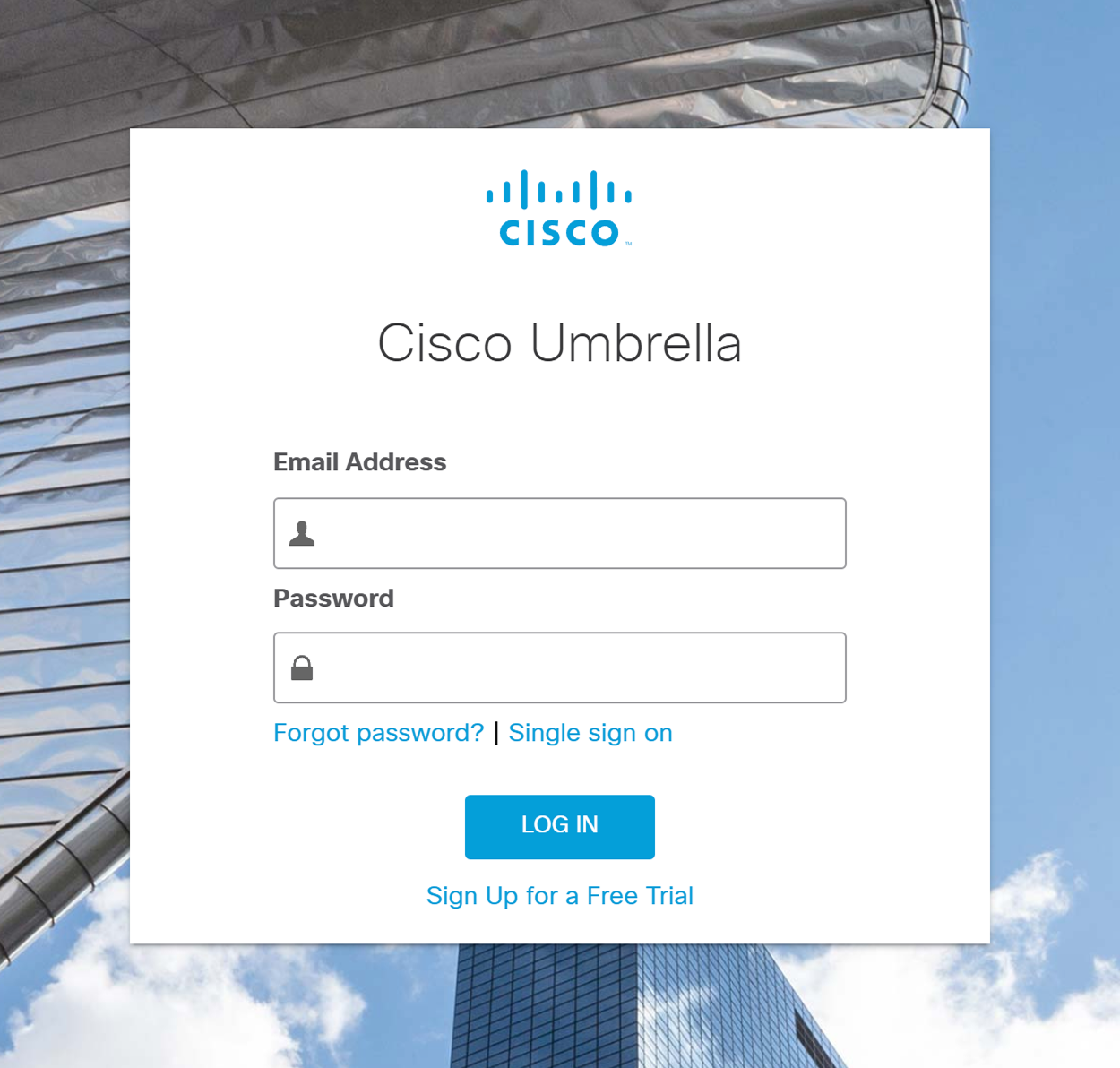
Log into Cisco Umbrella.
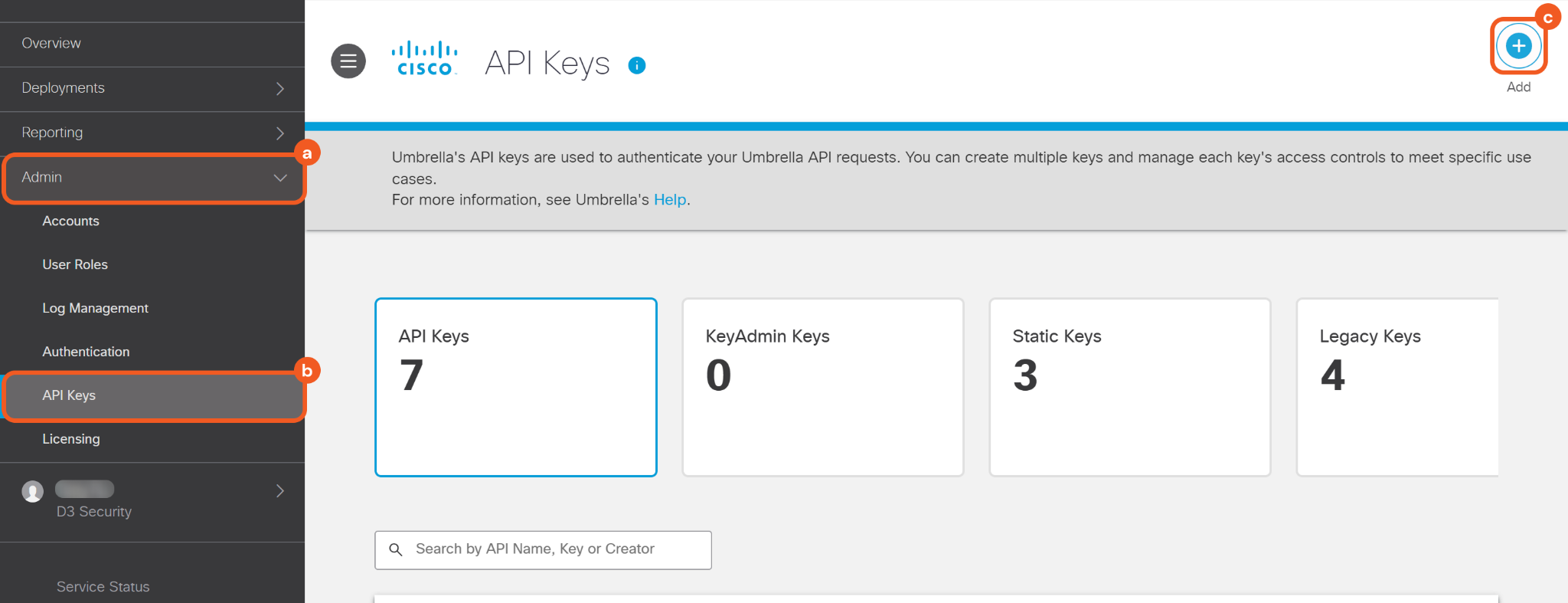
Navigate to Admin > API Keys, then click the Add button.
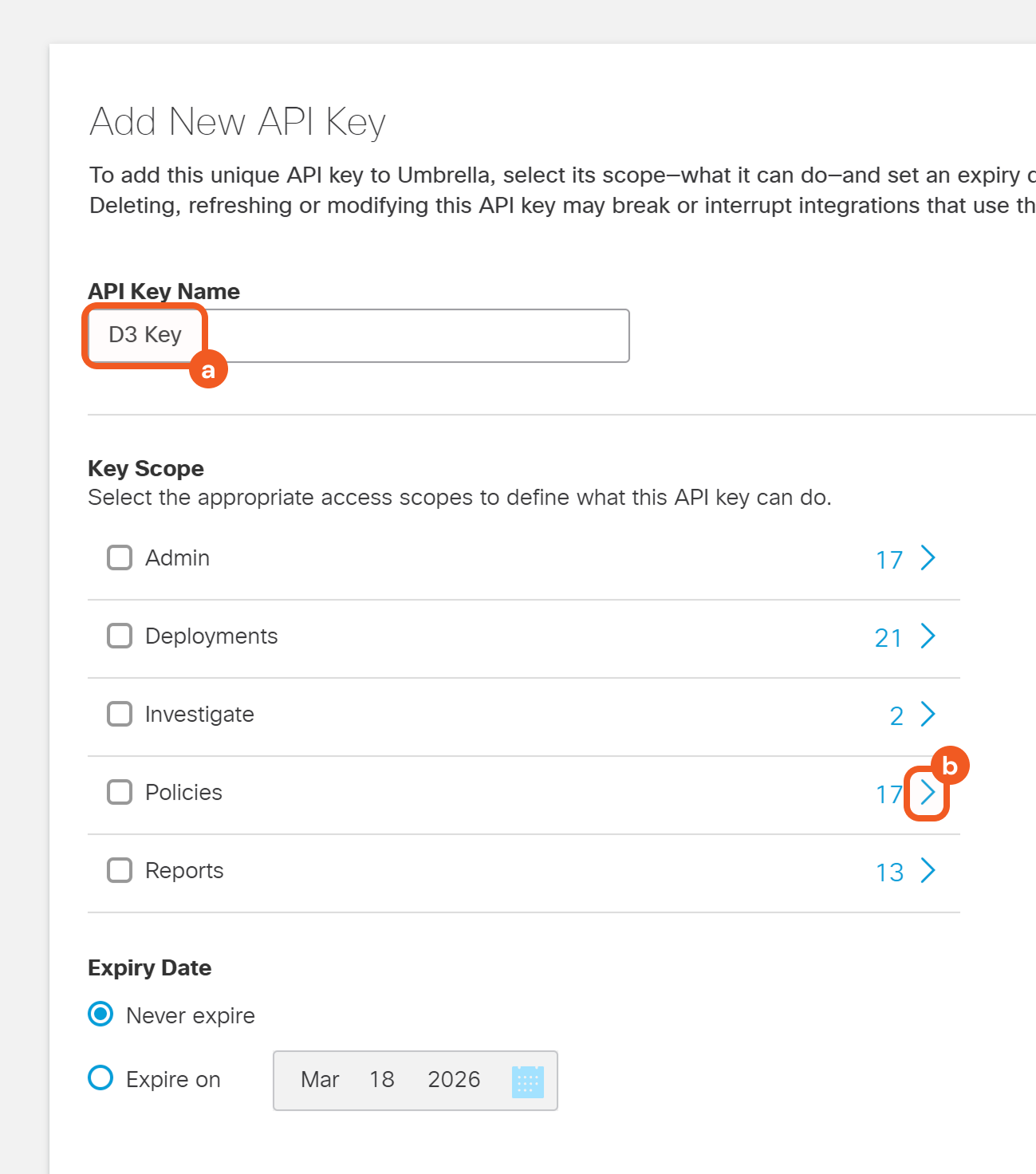
Name the API key, then click the > button next to the desired scope category (e,g., Policies).
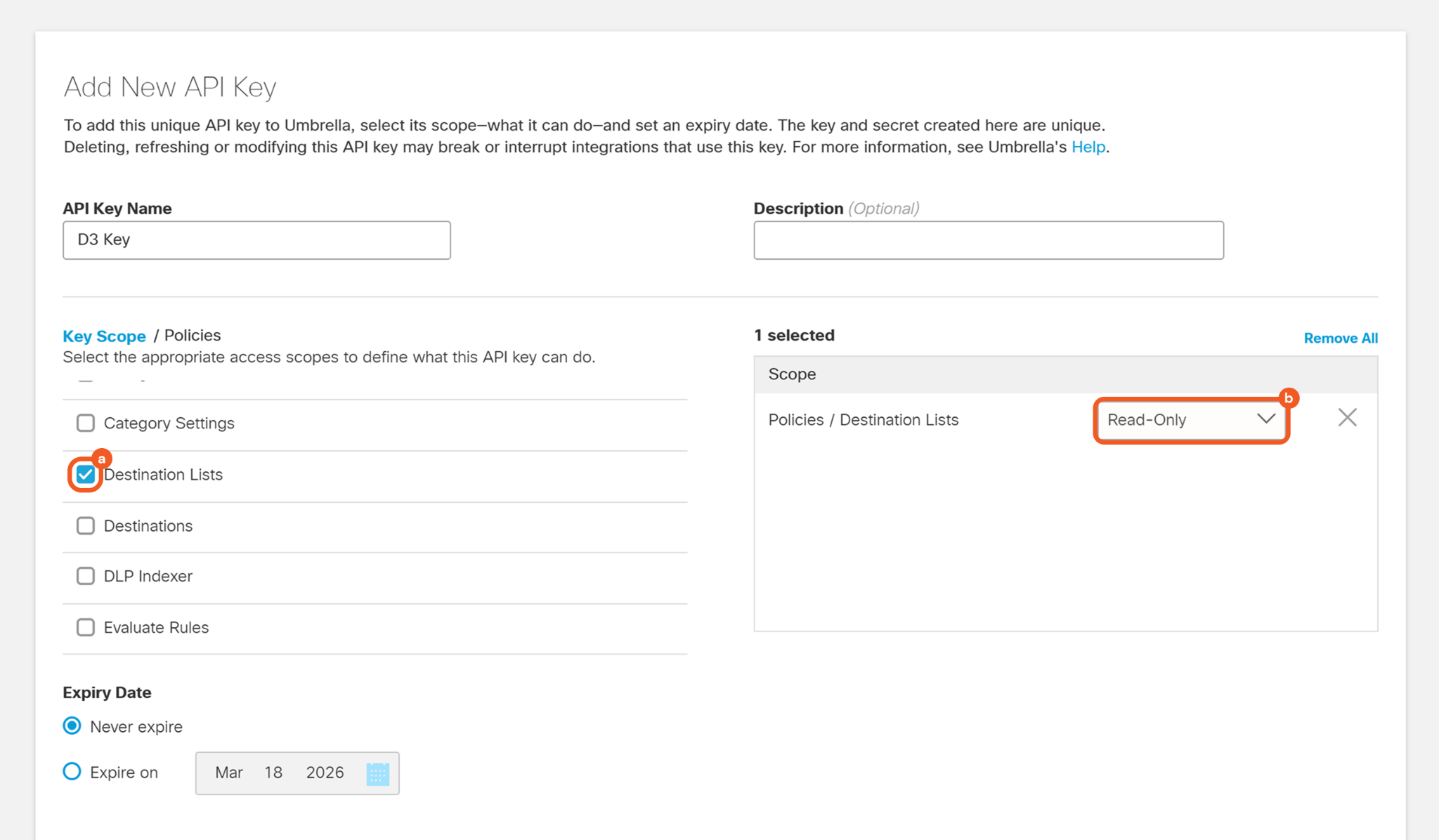
Select the desired subcategory (e.g., Destination Lists), then choose the appropriate permission level.
Click the Create Key button, then copy the API key and secret key.
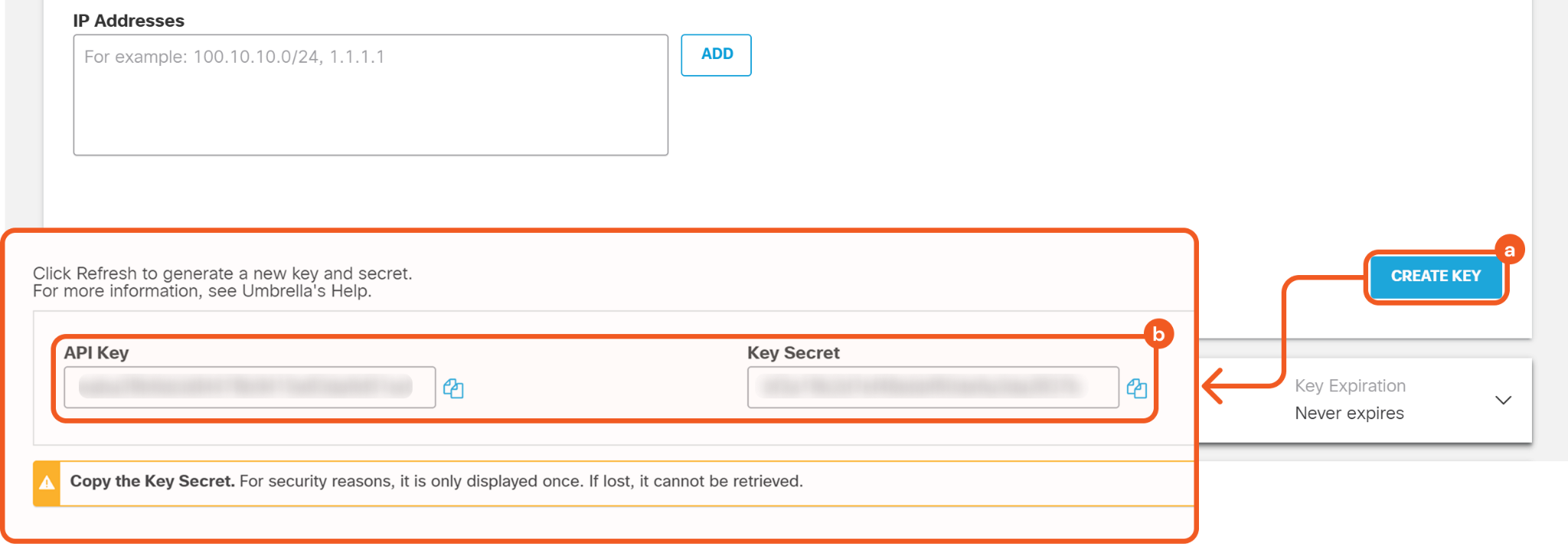
Refer to step 3.i.1 and 3.i.2 in Configuring D3 SOAR to Work with Cisco Umbrella Cloud Security.
Configuring D3 SOAR to Work with Cisco Umbrella Cloud Security
Log in to D3 SOAR.
Find the Cisco Umbrella Cloud Security integration.
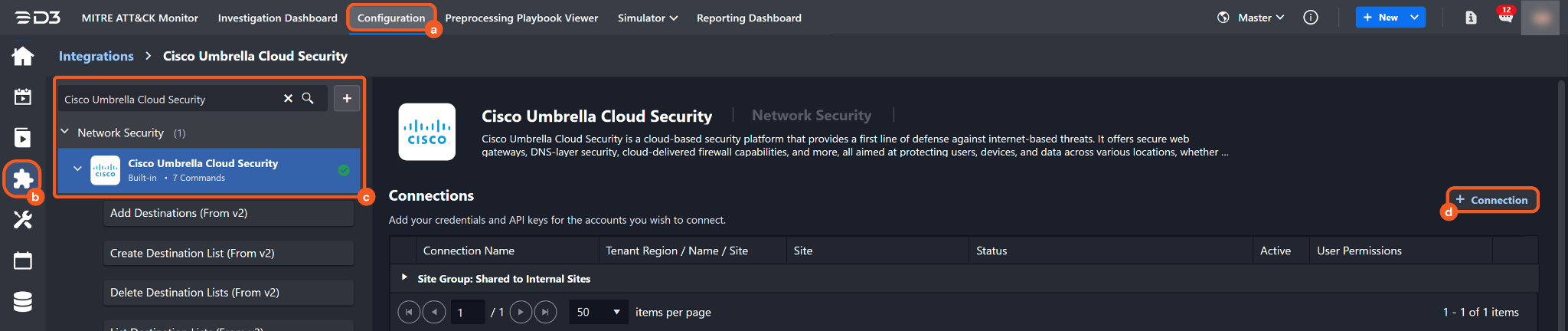
Navigate to Configuration on the top header menu.
Click on the Integration icon on the left sidebar.
Type Cisco Umbrella Cloud Security in the search box to find the integration, then click it to select it.
Click on the + Connection button on the right side of the Connections section. A new connection window will appear.
Configure the following fields to create a connection to Cisco Umbrella Cloud Security.
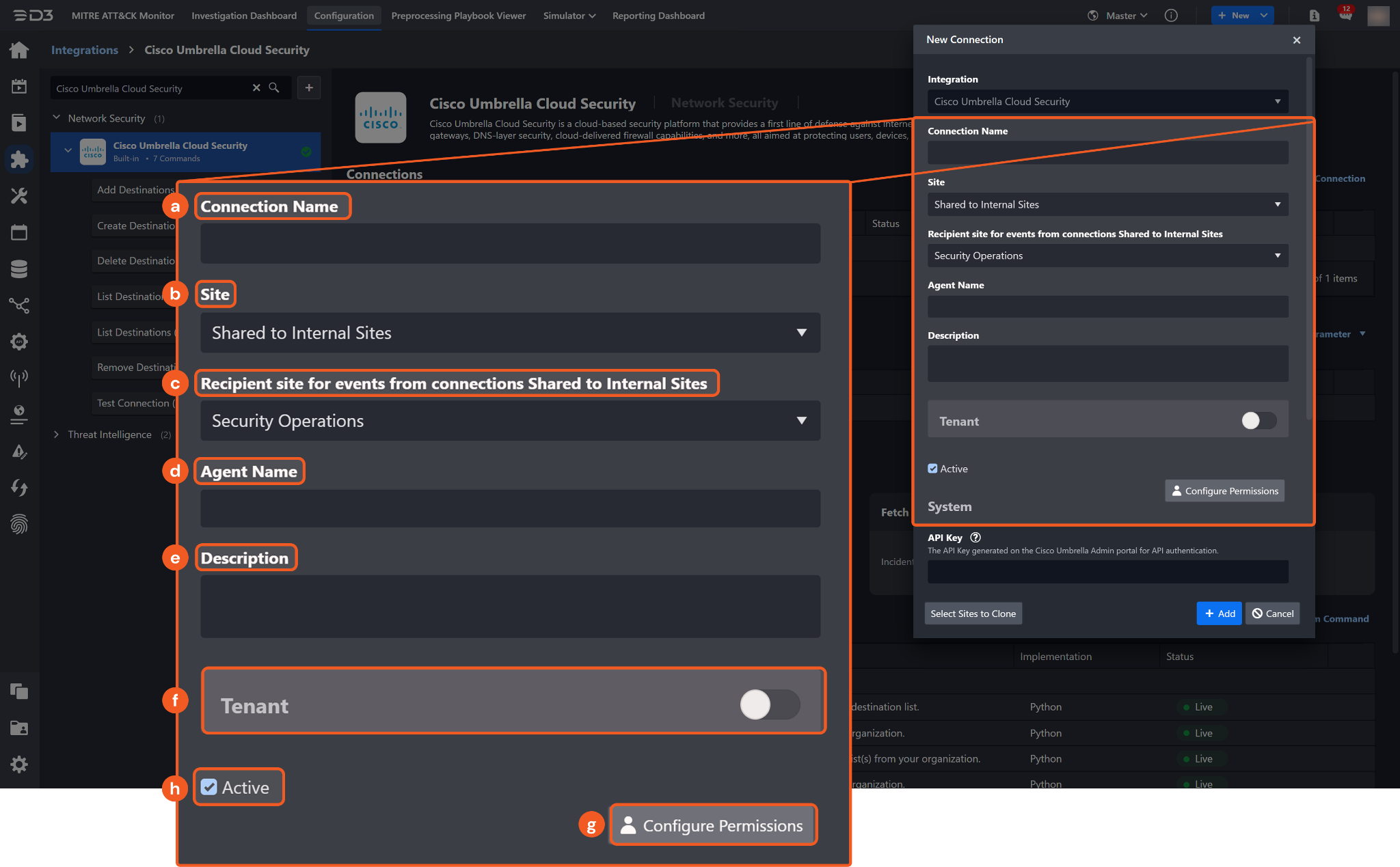
Connection Name: The desired name for the connection.
Site: The site on which to use the integration connection. Use the drop-down menu to select the site. The Share to Internal Sites option enables all internal sites to use the connection. Selecting a specific site will only enable that site to use the connection.
Recipient site for events from connections Shared to Internal Sites: This field is displayed when Share to Internal Sites is selected for the Site field, allowing selection of the internal site for deploying the integration connection.
Agent Name (Optional): The proxy agent required to build the connection. Use the dropdown menu to select the proxy agent from a list of previously configured proxy agents.
Description (Optional): The description for the connection.
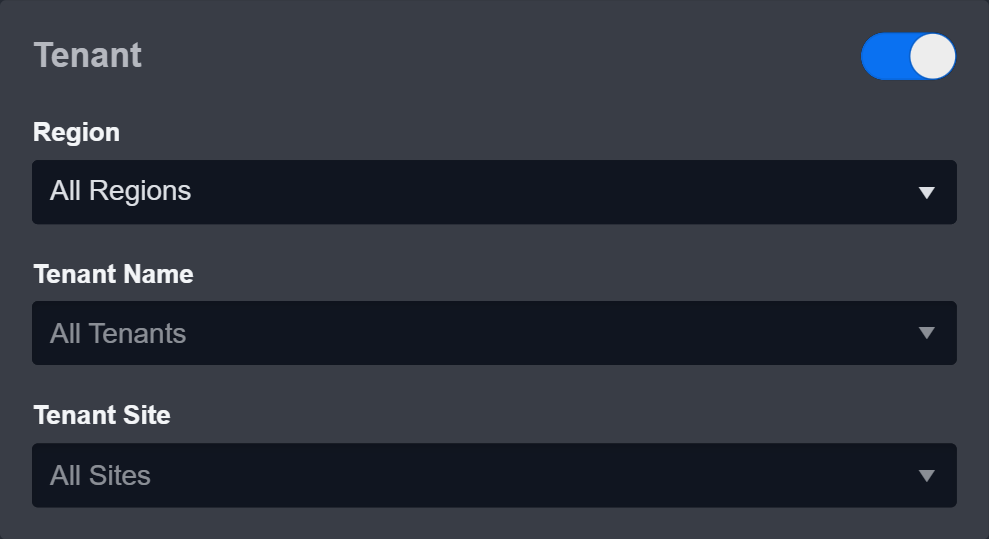
Tenant (Optional): When configuring the connection from a master tenant site, users can choose the specific tenant sites with which to share the connection. Once this setting is enabled, users can filter and select the desired tenant sites from the dropdowns to share the connection.
Configure User Permissions: Defines which users have access to the connection.
Active: The checkbox that enables the connection to be used when selected.
System: This section contains the parameters defined specifically for the integration. These parameters must be configured to create the integration connection.
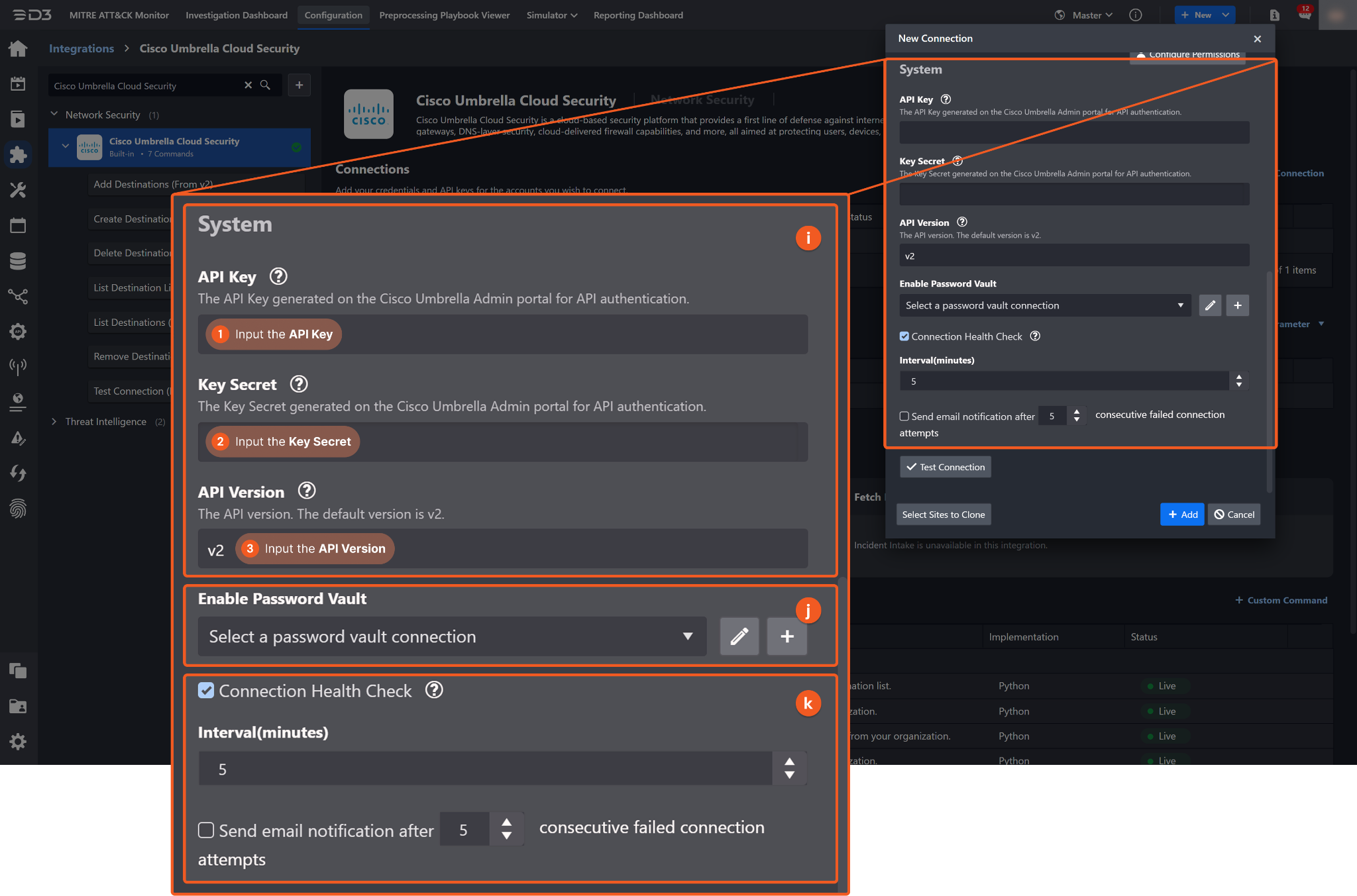
1. Input the API Key from the Cisco Umbrella Cloud Security platform. Refer to step 5 in Configuring D3 SOAR to Work with Cisco Umbrella Cloud Security.
2. Input the Key Secret from the Cisco Umbrella Cloud Security platform. Refer to step 5 in Configuring D3 SOAR to Work with Cisco Umbrella Cloud Security.
3. Input the API Version. The default value is v2.
Enable Password Vault: An optional feature that allows users to take the stored credentials from their own password vault. Refer to the password vault connection guide if needed.
Connection Health Check: Periodically checks the connection status by scheduling the Test Connection command at the specified interval (in minutes). Available only for active connections, this feature also allows configuring email notifications for failed attempts.
Test the connection.
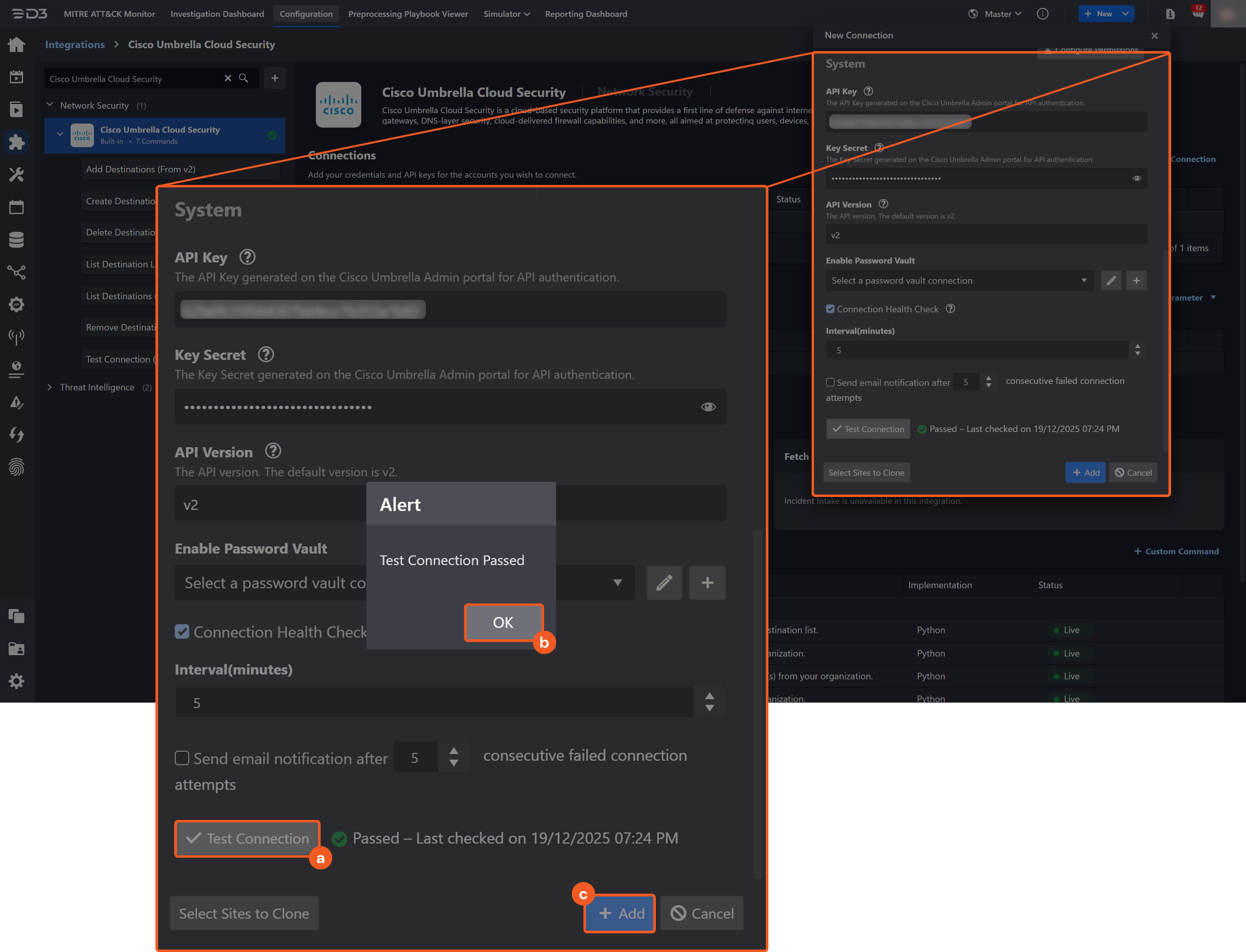
Click on the Test Connection button to verify credentials and connectivity. A success alert displays Passed with a green checkmark. If the connection fails, review the parameters and retry.
Click OK to close the alert window.
Click + Add to create and add the configured connection.
Commands
Cisco Umbrella Cloud Security includes the following executable commands for users to set up schedules or create playbook workflows. With the Test Command function, users can execute these commands independently for playbook troubleshooting.
Integration API Note
For more information about the Cisco Umbrella Cloud Security API, refer to the Cisco Umbrella Cloud Security API reference.

READER NOTE
Certain permissions are required for each command. Refer to the Permission Requirements and Configuring Cisco Umbrella Cloud Security to Work with D3 SOAR sections for details.
Add Destinations
Adds destinations to a specified destination list.
READER NOTE
Destination List ID is a required parameter to run this command.
Run the List Destination Lists command to obtain the Destination List ID. Destination List IDs can be found in the raw data at $.data[*].id.
Input
Input Parameter | Required/Optional | Description | Example |
Destination List ID | Required | The unique identifier of the destination list to which destinations will be added. Destination List ID can be obtained using the List Destination Lists command. | ***** |
Destinations | Required | The destinations to add to the destination list.
|
JSON
|
Destination Comment | Optional | The comment applied to all newly added destinations. | Comment a |
Output
To view the sample output data for all commands, refer to this article.
Error Handling
If the Return Data displays Failed, an Error tab will appear in the Test Result window.
The error tab contains the details responded from D3 SOAR or third-party API calls, including Failure Indicator, Status Code, and Message. This can help locate the root cause of a command failure.
Parts in Error | Description | Example |
Failure Indicator | Indicates the command failure that happened at a specific input and/or API call. | Add Destinations failed. |
Status Code | The response code issued by the third-party API server or the D3 SOAR system that can be used to locate the corresponding error category. For example, if the returned status code is 401, the selected connection is unauthorized to run the command. The user or system support would need to check the permission setting in the Cisco Umbrella Cloud Security portal. Refer to the HTTP Status Code Registry for details. | Status Code: 400. |
Message | The raw data or captured key error message from the integration API server about the API request failure. | Message: A block list can not have ips/cidrs. |
Error Sample Data Add Destinations failed. Status Code: 400. Message: A block list can not have ips/cidrs. |
Create Destination List
Creates a new destination list within the organization.
Input
Input Parameter | Required/Optional | Description | Example |
Destination List Name | Required | The unique name of the destination list to create. The name must be unique within the organization. | Suspicious List4 |
Bundle Type | Optional | The policy bundle type associated with the destination list. Valid options are:
By default, the value is set to DNS. | Web |
Access | Required | The access behavior applied by the destination list. Valid options are:
Allow supports IPv4, domain, and CIDR destinations. Block supports URL and domain destinations, and does not support IPv4 destinations. | Block |
Is Global | Optional | Indicates whether the destination list is global. When True, the destination list is treated as a global list. An organization allows only one global allow destination list and one global default block destination list. By default, the value is set to False. | False |
Destinations | Optional | The destinations to add to the destination list.
|
JSON
|
Destination Comment | Optional | The comment applied to all destinations added in the request. | test destination 1018 |
Output
To view the sample output data for all commands, refer to this article.
Error Handling
If the Return Data displays Failed, an Error tab will appear in the Test Result window.
The error tab contains the details responded from D3 SOAR or third-party API calls, including Failure Indicator, Status Code, and Message. This can help locate the root cause of a command failure.
Parts in Error | Description | Example |
Failure Indicator | Indicates the command failure that happened at a specific input and/or API call. | Create Destination List failed. |
Status Code | The response code issued by the third-party API server or the D3 SOAR system that can be used to locate the corresponding error category. For example, if the returned status code is 401, the selected connection is unauthorized to run the command. The user or system support would need to check the permission setting in the Cisco Umbrella Cloud Security portal. Refer to the HTTP Status Code Registry for details. | Status Code: 409. |
Message | The raw data or captured key error message from the integration API server about the API request failure. | Message: Only one global destination list per access type is allowed. |
Error Sample Data Create Destination List failed. Status Code: 409. Message: Only one global destination list per access type is allowed. |
Delete Destination Lists
Deletes specified destination lists from an organization.
READER NOTE
Destination List IDs is a required parameter to run this command.
Run the List Destination Lists command to obtain the Destination List IDs. Destination List IDs can be found in the raw data at $.data[*].id.
Input
Input Parameter | Required/Optional | Description | Example |
Destination List IDs | Required | The unique identifiers of the destination lists to delete. Destination List IDs can be obtained using the List Destination Lists command. |
JSON
|
Output
To view the sample output data for all commands, refer to this article.
Error Handling
If the Return Data displays Partially Successful or Failed, an Error tab will appear in the Test Result window.
The error tab contains the details responded from D3 SOAR or third-party API calls, including Failure Indicator, Status Code, and Message. This can help locate the root cause of a command failure.
Parts in Error | Description | Example |
Failure Indicator | Indicates the command failure that happened at a specific input and/or API call. | Delete Destination Lists failed. |
Status Code | The response code issued by the third-party API server or the D3 SOAR system that can be used to locate the corresponding error category. For example, if the returned status code is 401, the selected connection is unauthorized to run the command. The user or system support would need to check the permission setting in the Cisco Umbrella Cloud Security portal. Refer to the HTTP Status Code Registry for details. | Status Code: 404. |
Message | The raw data or captured key error message from the integration API server about the API request failure. | Message: Not Found. |
Error Sample Data Delete Destination Lists failed. Status Code: 404. Message: Not Found. |
List Destination Lists
Retrieves destination lists configured for the organization.
Input
Input Parameter | Required/Optional | Description | Example |
Destination List Name | Optional | Filters destination lists by name. Only full-text search is supported. | Global Block List |
Output
To view the sample output data for all commands, refer to this article.
Error Handling
If the Return Data displays Failed, an Error tab will appear in the Test Result window.
The error tab contains the details responded from D3 SOAR or third-party API calls, including Failure Indicator, Status Code, and Message. This can help locate the root cause of a command failure.
Parts in Error | Description | Example |
Failure Indicator | Indicates the command failure that happened at a specific input and/or API call. | List Destination Lists failed. |
Status Code | The response code issued by the third-party API server or the D3 SOAR system that can be used to locate the corresponding error category. For example, if the returned status code is 401, the selected connection is unauthorized to run the command. The user or system support would need to check the permission setting in the Cisco Umbrella Cloud Security portal. Refer to the HTTP Status Code Registry for details. | Status Code: 401. |
Message | The raw data or captured key error message from the integration API server about the API request failure. | Message: Unauthorized. |
Error Sample Data List Destination Lists failed. Status Code: 401. Message: Unauthorized. |
List Destinations
Retrieves destinations on specified destination lists.
READER NOTE
Destination List IDs is a required parameter to run this command.
Run the List Destination Lists command to obtain the Destination List IDs. Destination List IDs can be found in the raw data at $.data[*].id.
Input
Input Parameter | Required/Optional | Description | Example |
Destination List IDs | Required | The unique identifiers of the destination lists from which destinations will be retrieved. Destination List IDs can be obtained using the List Destination Lists command. |
JSON
|
Output
To view the sample output data for all commands, refer to this article.
Error Handling
If the Return Data displays Partially Successful or Failed, an Error tab will appear in the Test Result window.
The error tab contains the details responded from D3 SOAR or third-party API calls, including Failure Indicator, Status Code, and Message. This can help locate the root cause of a command failure.
Parts in Error | Description | Example |
Failure Indicator | Indicates the command failure that happened at a specific input and/or API call. | List Destinations failed. |
Status Code | The response code issued by the third-party API server or the D3 SOAR system that can be used to locate the corresponding error category. For example, if the returned status code is 401, the selected connection is unauthorized to run the command. The user or system support would need to check the permission setting in the Cisco Umbrella Cloud Security portal. Refer to the HTTP Status Code Registry for details. | Status Code: 401. |
Message | The raw data or captured key error message from the integration API server about the API request failure. | Message: Unauthorized. |
Error Sample Data List Destinations failed. Status Code: 401. Message: Unauthorized. |
Remove Destinations
Removes destinations from a specified destination list.
READER NOTE
Destination List ID is a required parameter to run this command.
Run the List Destination Lists command to obtain the Destination List ID. Destination List IDs can be found in the raw data at $.data[*].id.
Destination List IDs and Destination Names are optional parameters to run this command.
Run the List Destinations command to obtain the Destination IDs and Destination Names.
Destination IDs can be found in the raw data at $.Results[*].data[*].id.
Destination Names can be found in the raw data at $.Results[*].data[*].destination.
Input
Input Parameter | Required/Optional | Description | Example |
Destination List ID | Required | The unique identifier of the destination list from which destinations will be removed. Destination List ID can be obtained using the List Destination Lists command. | ***** |
Destination IDs | Optional | The unique identifiers of the destinations to remove from the destination list. Destination IDs can be obtained using the List Destinations command. At least one of Destination IDs or Destination Names must be provided. |
JSON
|
Destination Names | Optional | The names of the destinations to remove from the destination list. Destination Names can be obtained using the List Destinations command. At least one of Destination IDs or Destination Names must be provided. |
JSON
|
Output
To view the sample output data for all commands, refer to this article.
Error Handling
If the Return Data displays Partially Successful or Failed, an Error tab will appear in the Test Result window.
The error tab contains the details responded from D3 SOAR or third-party API calls, including Failure Indicator, Status Code, and Message. This can help locate the root cause of a command failure.
Parts in Error | Description | Example |
Failure Indicator | Indicates the command failure that happened at a specific input and/or API call. | Remove Destinations failed. |
Status Code | The response code issued by the third-party API server or the D3 SOAR system that can be used to locate the corresponding error category. For example, if the returned status code is 401, the selected connection is unauthorized to run the command. The user or system support would need to check the permission setting in the Cisco Umbrella Cloud Security portal. Refer to the HTTP Status Code Registry for details. | Status Code: 400. |
Message | The raw data or captured key error message from the integration API server about the API request failure. | Message: You must specify at least one of the parameters 'Destination IDs' or 'Destination Names'. |
Error Sample Data Remove Destinations failed. Status Code: 400. Message: You must specify at least one of the parameters 'Destination IDs' or 'Destination Names'. |
Test Connection
Allows users to perform a health check on an integration connection. Users can schedule a periodic health check by selecting Connection Health Check when editing an integration connection.
Input
N/A
Output
Output Type | Description | Return Data Type |
Return Data | Indicates one of the possible command execution states: Successful or Failed. The Failed state can be triggered by any of the following errors:
More details about an error can be viewed in the Error tab. | String |
Error Handling
If the Return Data displays Failed, an Error tab will appear in the Test Result window.
The error tab contains the details responded from D3 SOAR or third-party API calls, including Failure Indicator, Status Code, and Message. This can help locate the root cause of a command failure.
Parts in Error | Description | Example |
Failure Indicator | Indicates the command failure that happened at a specific input and/or API call. | Test Connection failed. Failed to check the connector. |
Status Code | The response code issued by the third-party API server or the D3 SOAR system that can be used to locate the corresponding error category. For example, if the returned status code is 401, the selected connection is unauthorized to run the command. The user or system support would need to check the permission setting in the Cisco Umbrella Cloud Security portal. Refer to the HTTP Status Code Registry for details. | Status Code: 401. |
Message | The raw data or captured key error message from the integration API server about the API request failure. | Message: Unauthorized. |
Error Sample Data Test Connection failed. Failed to check the connector. Status Code: 401. Message: Unauthorized. |