
Azure Key Vault
LAST UPDATED: JANUARY 15, 2026
Overview
Azure Key Vault is a Microsoft cloud service that provides secure storage and management of secrets, encryption keys, and certificates. It enables applications to safely access sensitive information such as API keys, passwords, and connection strings without hardcoding them, while supporting automated key rotation, role-based access control, and detailed audit logging. By centralizing secrets management and enforcing encryption for all communications, Azure Key Vault helps organizations reduce security risks, ensure compliance, and simplify the protection of critical data across their cloud and on-premises environments.
D3 SOAR is providing REST operations to function with Azure Key Vault.
Azure Key Vault is available for use in:
Known Limitations
Azure enforces multiple rate limits on requests to the Azure Key Vault API. Refer to Azure Key Vault service limits | Microsoft Learn for detailed information.
Connection
Gather the following information to connect D3 SOAR to Azure Key Vault.
Parameter | Description | Example |
Tenant ID | The Tenant ID to authenticate the connection. | f621*****feed |
Client ID | The Client ID to authenticate the connection. | b190*****6dbf |
Client Secret | The Client Secret to authenticate the connection. | Pg88*****3cJ2 |
Subscription ID | The Azure subscription ID. | 982d*****d7f1 |
Resource Group Name | The default resource group name used by commands that include a resource group name parameter. | D3Cyber |
API Version | The version of the API to use for the connection. Refer to Management REST API versions (Azure AI Search) for all supported API versions. | 2025-05-01 |
Permission Requirements
An access policy must be created for the application principal in each Key Vault accessed by this integration. The following permissions are required for the commands in this integration.

READER NOTE
Ensure the Azure application used in the connection is also assigned the Key Vault Contributor role.
Command | Required Access Policy Permissions |
Create Key | Key permissions: Create |
Create Key Vault | N/A |
Create Secret | Secret permissions: Set |
Delete Key Vault | N/A |
Get Certificate Details | Certificates permissions: Get, List |
Get Key Details | Key permissions: Get, List |
Get Key Vault | N/A |
Get Secret Details | Secret permissions: Get, List |
Import Certificate | Certificate permissions: Import |
List Certificates | Certificate permissions: List |
List Keys | Key permissions: List |
List Key Vaults | N/A |
List Resource Groups | |
List Secrets | Secret permission: List |
List Vault Object Versions |
|
Update Key Vault Access Policy | N/A |
Test Connection |
Configuring Azure Key Vault to Work with D3 SOAR
Registering an Application
The first step to establishing a connection in D3 is registering an application in the Azure portal. This allows users to obtain the tenant ID, client ID, client secret value, and subscription ID required for the connection.
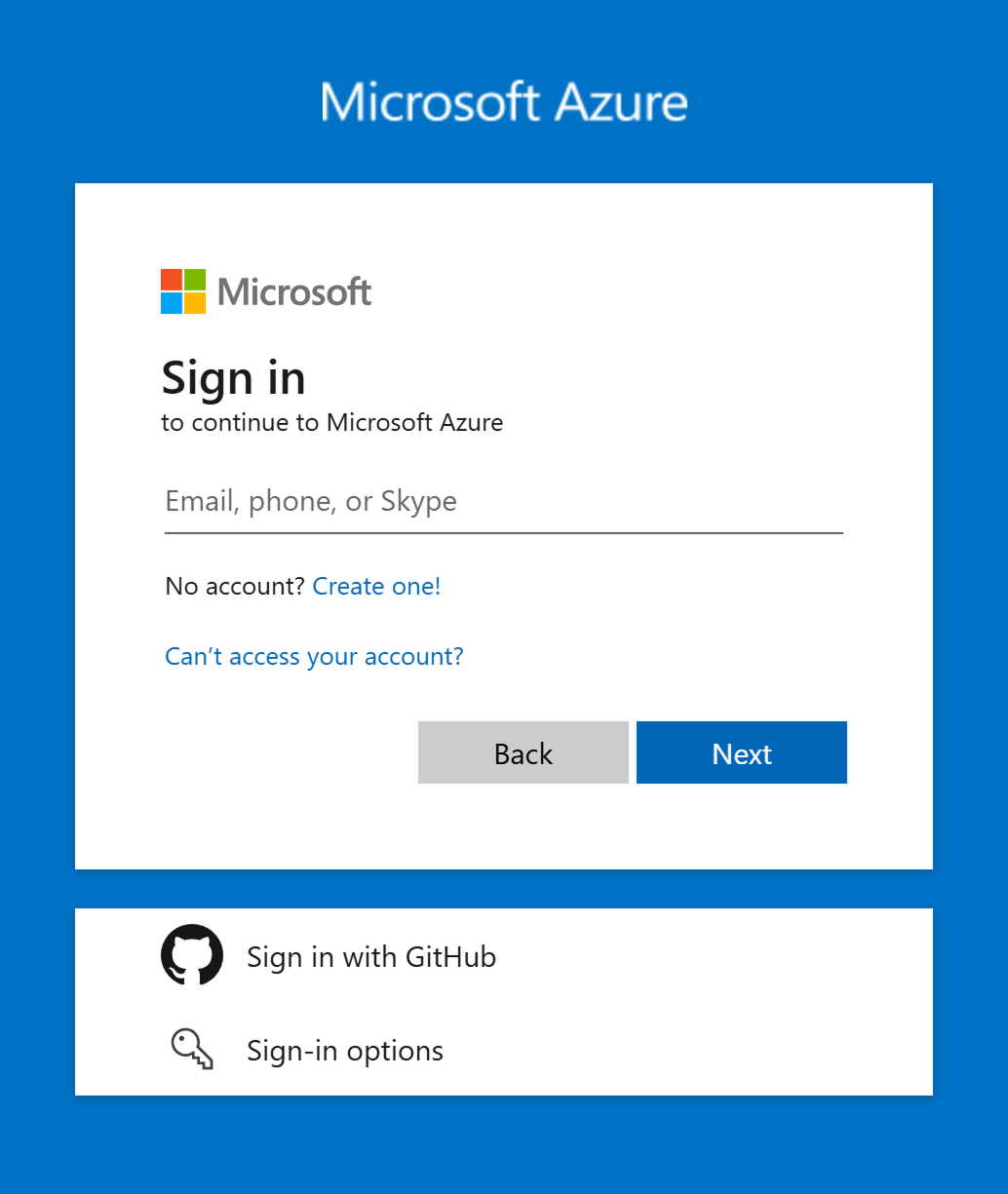
Log into Azure portal using the credentials of the user to be associated with the D3 connection.
Register a new application.
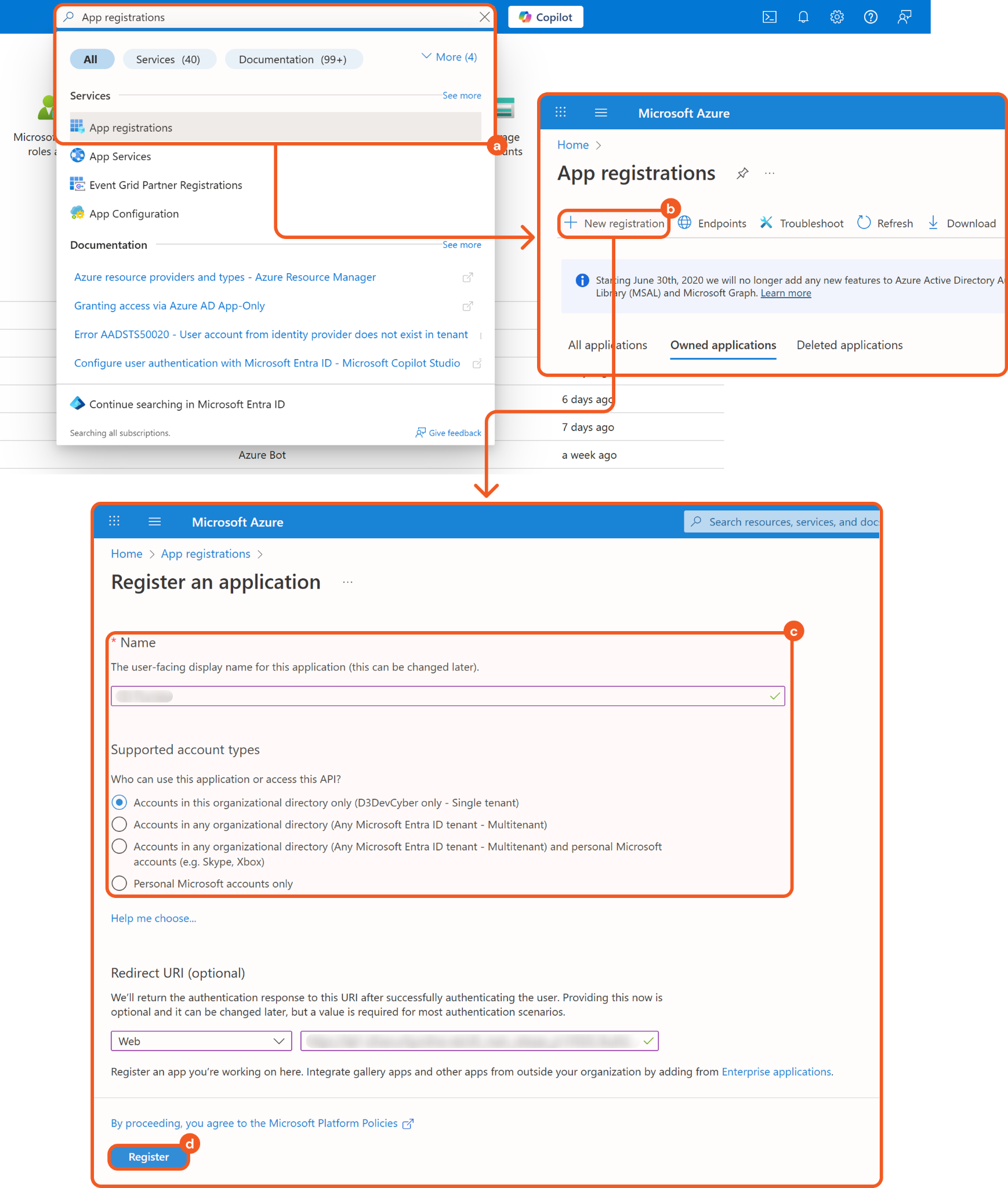
Search for and select the App registrations option.
Click the + New registration button.
Enter a unique name and select a supported account type.
Click the Register button.
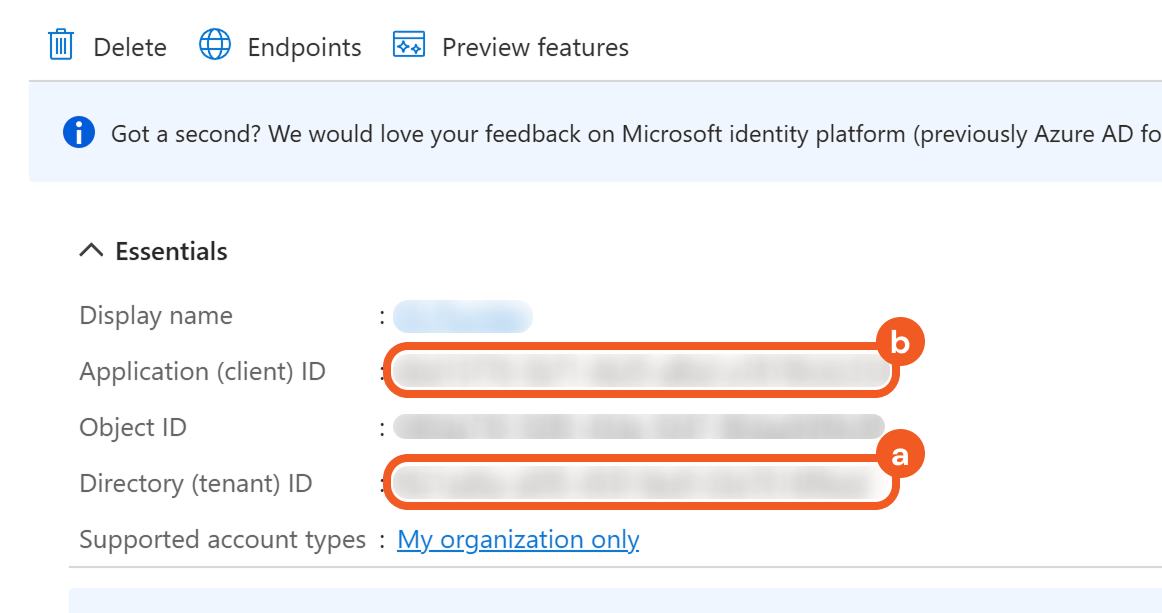
Copy the Tenant ID (a) and Client ID (b) on the Overview page.
Refer to steps 1 and 2 in Configuring D3 SOAR to Work with Azure Key Vault.
Create the client secret.
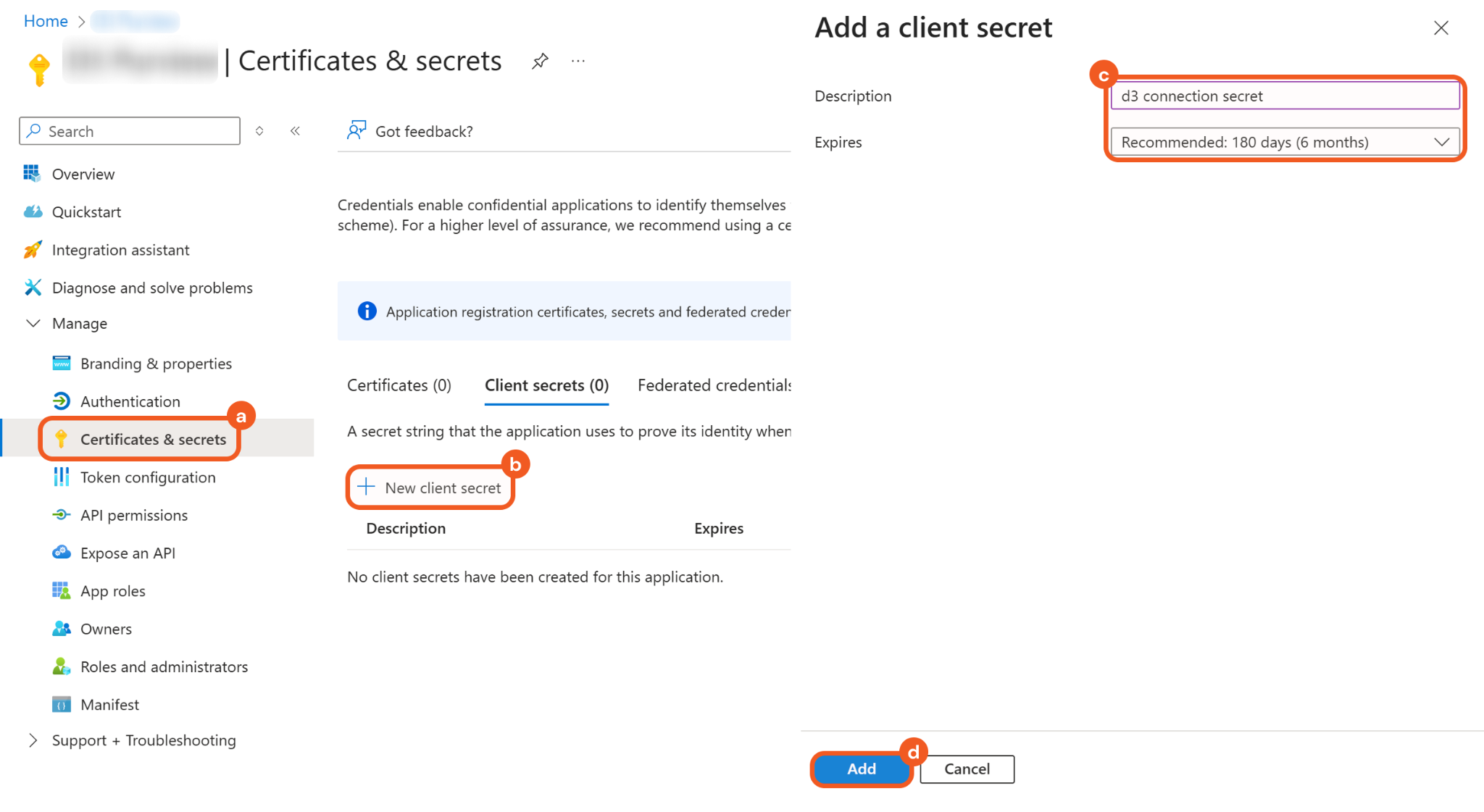
Navigate to the Certificates & secrets tab.
Click the + New client secret button.
Add a description and configure the expiry time.
Click the Add button.
Save the client secret Value in a secure location.

Refer to step 3 in Configuring D3 SOAR to Work with Azure Key Vault.
Search for and select the Subscriptions option, then copy the Subscription ID for the appropriate Azure subscription.
.png?inst-v=d6987453-129d-4677-ae2c-1e1fbdd113b6)
Refer to step 4 in Configuring D3 SOAR to Work with Azure Key Vault.
Assigning the Key Vault Contributor Role
After the application is created through App registrations, administrators must assign it the Key Vault Contributor role to use the integration. Refer to Assign Azure roles using the Azure portal for a step-by-step guide.
Assigning Each Key Vault the Required Permissions
To allow the application to manage Key Vault credentials, it must be added to each vault’s access policies. This configuration is required for all Key Vaults accessed by this integration.
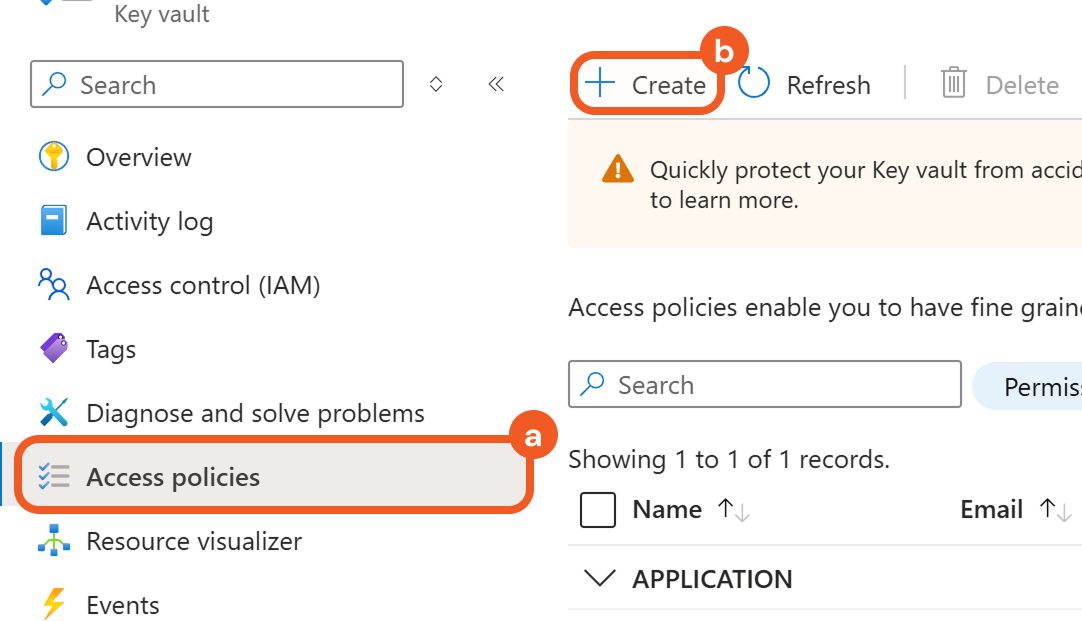
Navigate to the Access policies menu item for the target key vaults, then click the + Create button.
Select the required permissions according to the Permission Requirements table, then click the Principal tab.
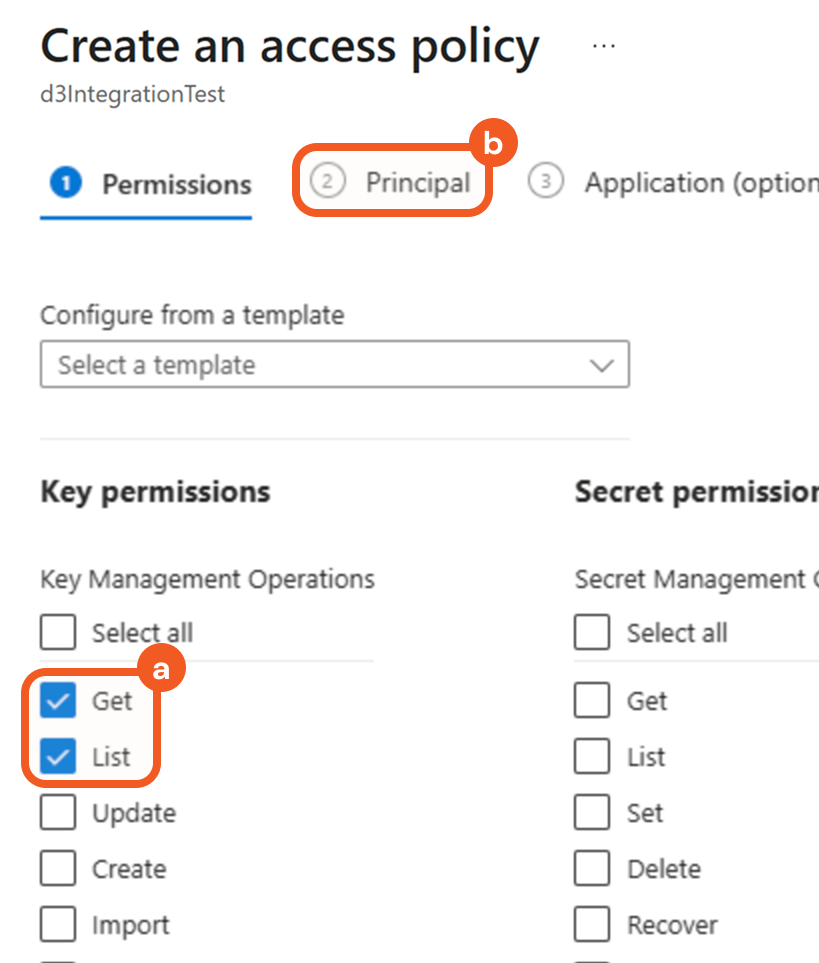
This screenshot demonstrates the required access policy configuration for the Get Key Details command.
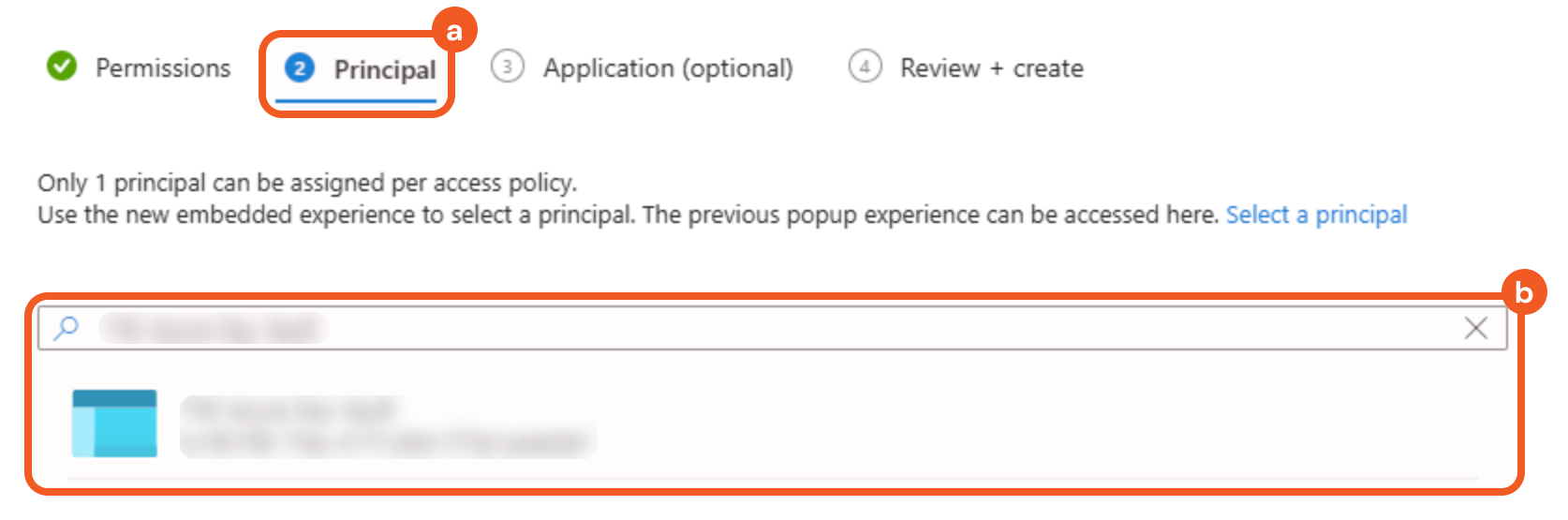
Search for and select the application created in Registering an Application to add it as a principal.
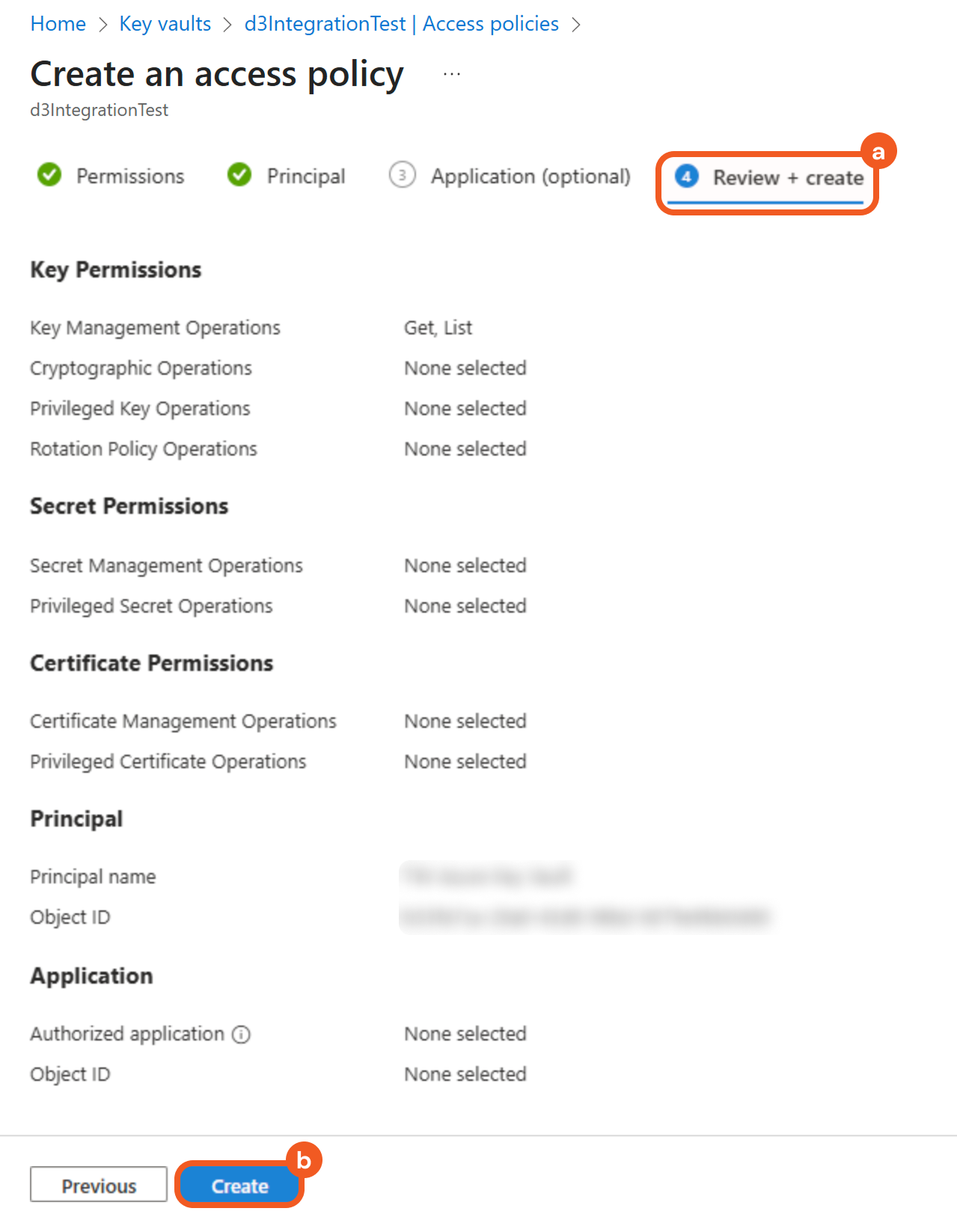
Select the Review + create tab, then click the Create button.
Configuring D3 SOAR to Work with Azure Key Vault
Log in to D3 SOAR.
Find the Azure Key Vault integration.
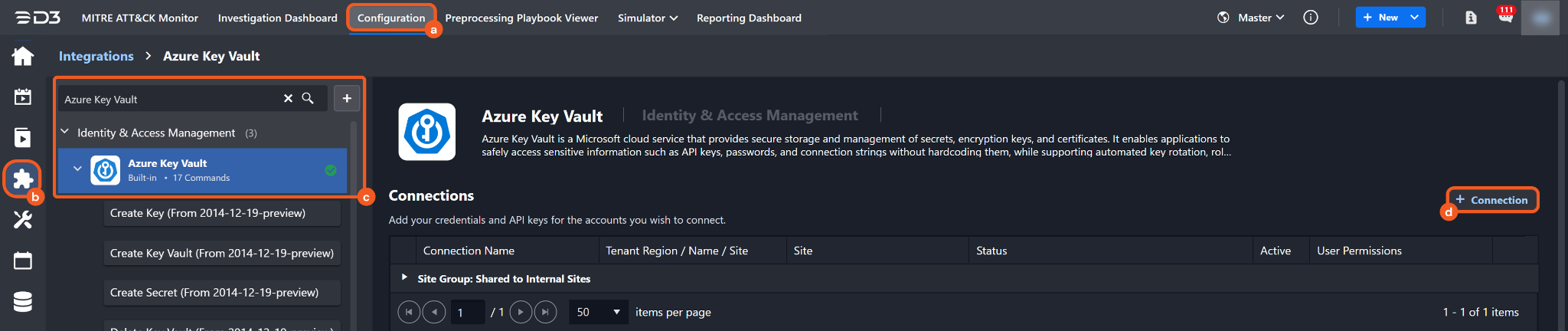
Navigate to Configuration on the top header menu.
Click on the Integration icon on the left sidebar.
Type Azure Key Vault in the search box to find the integration, then click it to select it.
Click on the + Connection button on the right side of the Connections section. A new connection window will appear.
Configure the following fields to create a connection to Azure Key Vault.
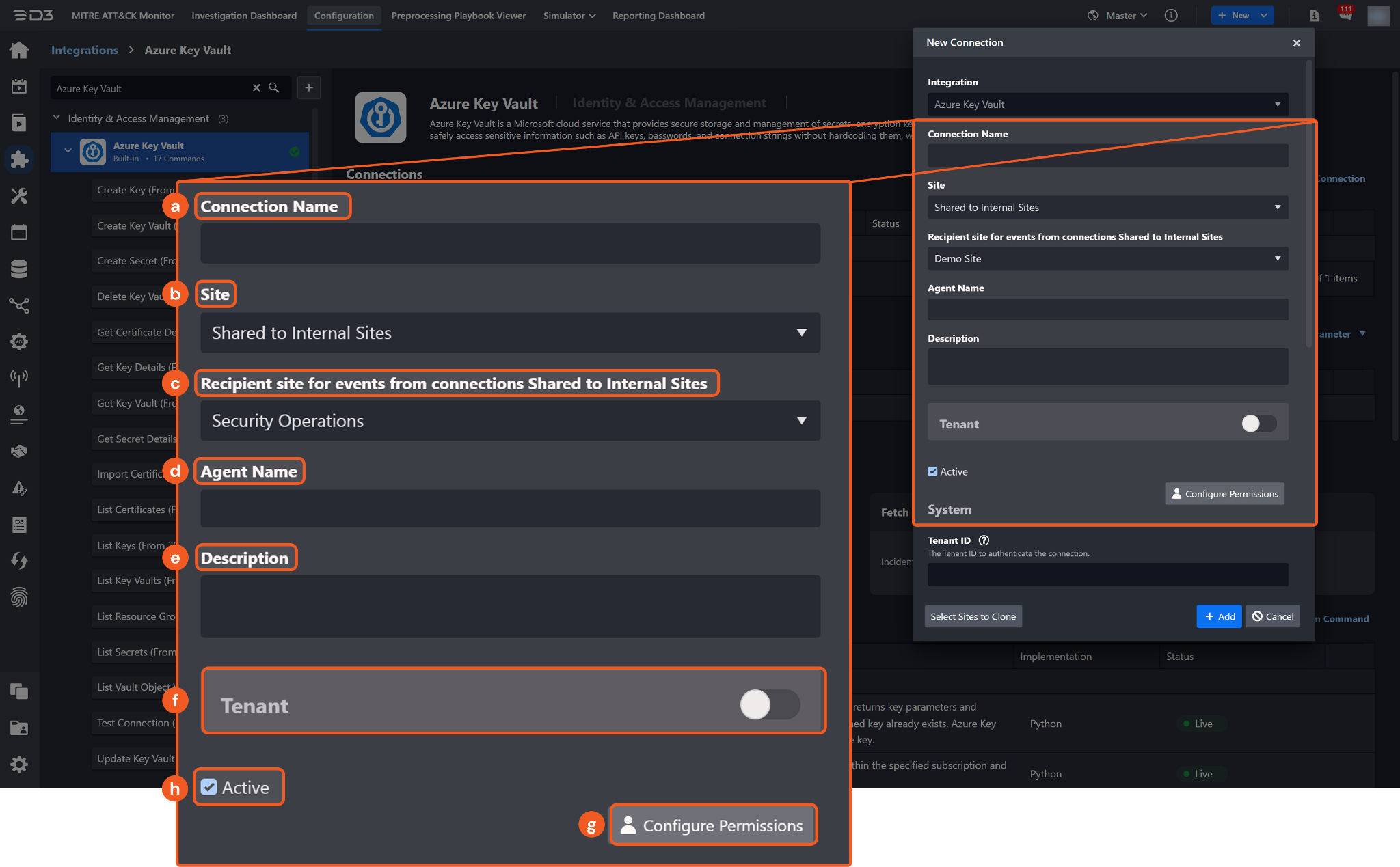
Connection Name: The desired name for the connection.
Site: The site on which to use the integration connection. Use the drop-down menu to select the site. The Share to Internal Sites option enables all internal sites to use the connection. Selecting a specific site will only enable that site to use the connection.
Recipient site for events from connections Shared to Internal Sites: This field is displayed when Share to Internal Sites is selected for the Site field, allowing selection of the internal site for deploying the integration connection.
Agent Name (Optional): The proxy agent required to build the connection. Use the dropdown menu to select the proxy agent from a list of previously configured proxy agents.
Description (Optional): The description for the connection.
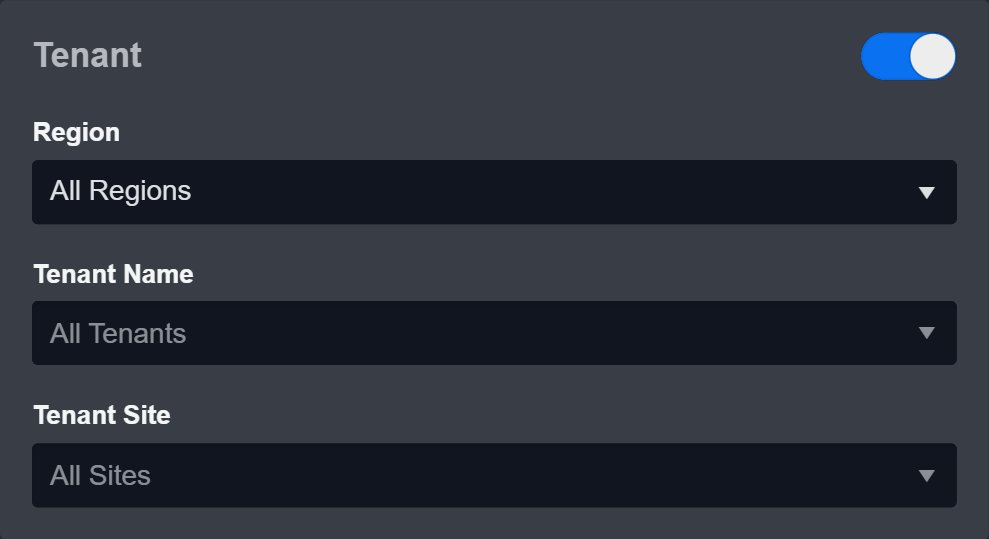
Tenant (Optional): When configuring the connection from a master tenant site, users can choose the specific tenant sites with which to share the connection. Once this setting is enabled, users can filter and select the desired tenant sites from the dropdowns to share the connection.
Configure User Permissions: Defines which users have access to the connection.
Active: The checkbox that enables the connection to be used when selected.
System: This section contains the parameters defined specifically for the integration. These parameters must be configured to create the integration connection.
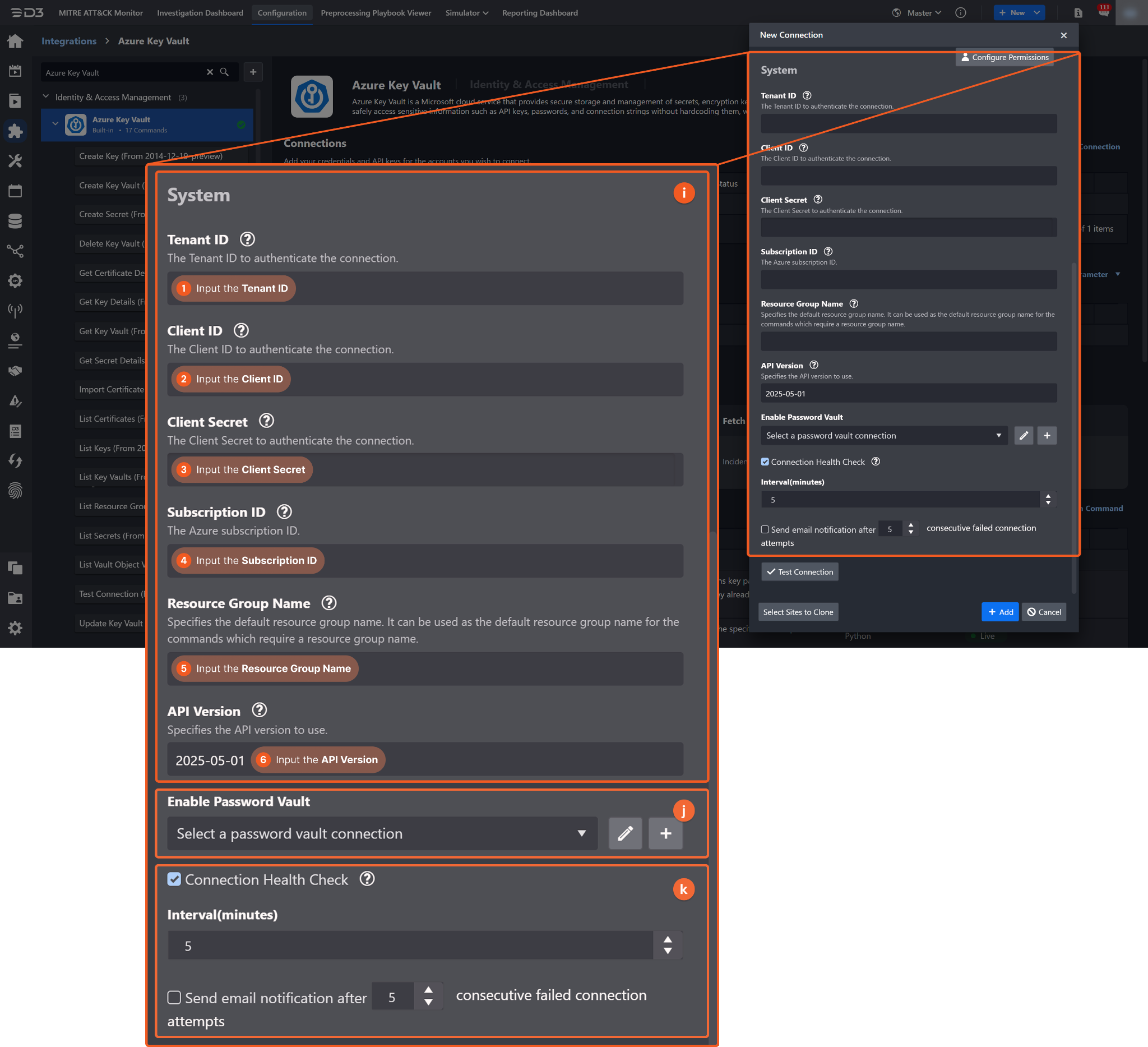
1. Input the Tenant ID. Refer to step 3 in Registering an Application.
2. Input the Client ID. Refer to step 3 in Registering an Application.
3. Input the Client Secret. Refer to step 5 in Registering an Application.
4. Input the Subscription ID. Refer to step 6 in Registering an Application.
5. Input the Resource Group Name. This value is used as the default for commands that include a resource group name parameter.
6. Input the API Version. The default value is 2025-05-01.
Enable Password Vault: An optional feature that allows users to take the stored credentials from their own password vault. Refer to the password vault connection guide if needed.
Connection Health Check: Periodically checks the connection status by scheduling the Test Connection command at the specified interval (in minutes). Available only for active connections, this feature also allows configuring email notifications for failed attempts.
Test the connection.
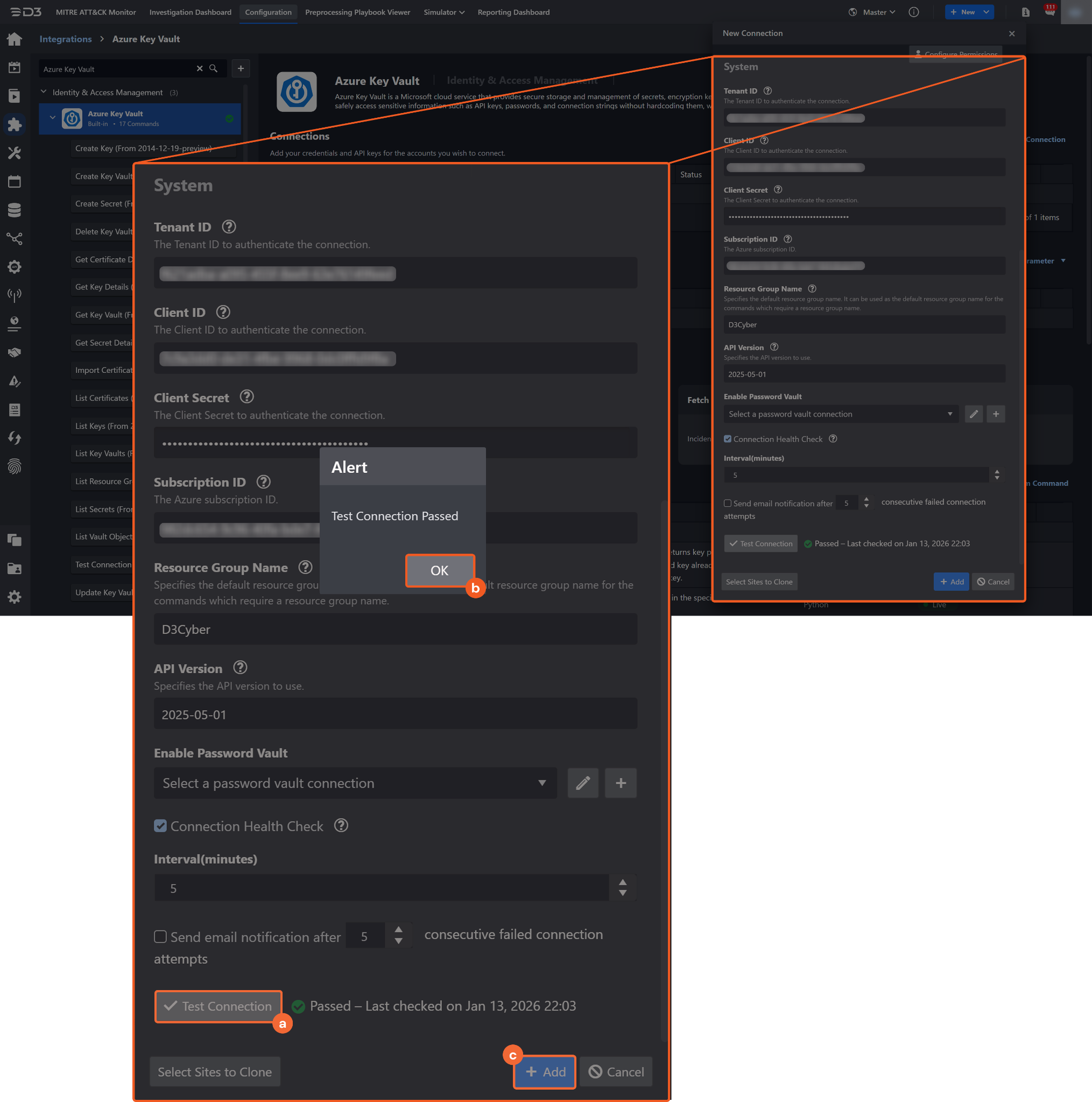
Click on the Test Connection button to verify credentials and connectivity. A success alert displays Passed with a green checkmark. If the connection fails, review the parameters and retry.
Click OK to close the alert window.
Click + Add to create and add the configured connection.
Commands
Azure Key Vault includes the following executable commands for users to set up schedules or create playbook workflows. With the Test Command function, users can execute these commands independently for playbook troubleshooting.
Integration API Note
For more information about the Azure Key Vault API, refer to the Azure Key Vault API reference.
READER NOTE
Certain permissions are required for each command. Refer to the Permission Requirements and Configuring Azure Key Vault to Work with D3 SOAR sections for details.
Create Key
Creates a new key, stores it, then returns key parameters and attributes to the client. If the named key already exists, Azure Key Vault creates a new version of the key.
READER NOTE
Key Vault Name is a required parameter to run this command.
Run the List Key Vaults command to obtain the Key Vault Name. Key Vault Names can be found in the raw data at $.value[*].name.
Resource Group Name is an optional parameter to run this command.
Run the List Resource Groups command to obtain the Resource Group Name. Resource Group Names can be found in the raw data at $.value[*].name.
Input
Input Parameter | Required/Optional | Description | Example |
Key Vault Name | Required | The name of the Key Vault in which to create the key. Key Vault Name can be obtained using the List Key Vaults command. | kv20230606a |
Resource Group Name | Optional | The name of the resource group that contains the Key Vault. Resource Group Name can be obtained using the List Resource Groups command. By default, the resource group name defined on the connection form is used. | d3deployment |
Key Name | Required | The name of the key. The name must contain only letters (uppercase or lowercase), numbers, or hyphens. The system will generate the version name for the new key. Do not include any personally identifiable or sensitive information. | D3TestEC-A |
Key Type | Required | The type of key to create. Valid options are:
EC-HSM and RSA-HSM keys cannot be created in a standard vault. | EC |
RSA Key Size | Optional | The RSA key size (in bits) for the RSA key type. Valid options are:
By default, the value is set to 2048. | 2048 |
Elliptic Curve Name | Optional | The Elliptic Curve Name for the EC key type. Valid options are:
By default, the value is set to P-256. | P-256 |
Tags | Optional | The key-value pair tags used to add application-specific metadata to the key. |
JSON
|
Output
To view the sample output data for all commands, refer to this article.
Error Handling
If the Return Data displays Failed, an Error tab will appear in the Test Result window.
The error tab contains the details responded from D3 SOAR or third-party API calls, including Failure Indicator, Status Code, and Message. This can help locate the root cause of a command failure.
Parts in Error | Description | Example |
Failure Indicator | Indicates the command failure that happened at a specific input and/or API call. | Create Key failed. |
Status Code | The response code issued by the third-party API server or the D3 SOAR system that can be used to locate the corresponding error category. For example, if the returned status code is 401, the selected connection is unauthorized to run the command. The user or system support would need to check the permission setting in the Azure Key Vault portal. Refer to the HTTP Status Code Registry for details. | Status Code: 400. |
Message | The raw data or captured key error message from the integration API server about the API request failure. | Message: The request URI contains an invalid name: testTW!!. |
Error Sample Data Create Key failed. Status Code: 400. Message: The request URI contains an invalid name: testTW!!. |
Create Key Vault
Creates a new Azure Key Vault within the specified subscription and resource group.
READER NOTE
Resource Group Name is an optional parameter to run this command.
Run the List Resource Groups command to obtain the Resource Group Name. Resource Group Names can be found in the raw data at $.value[*].name.
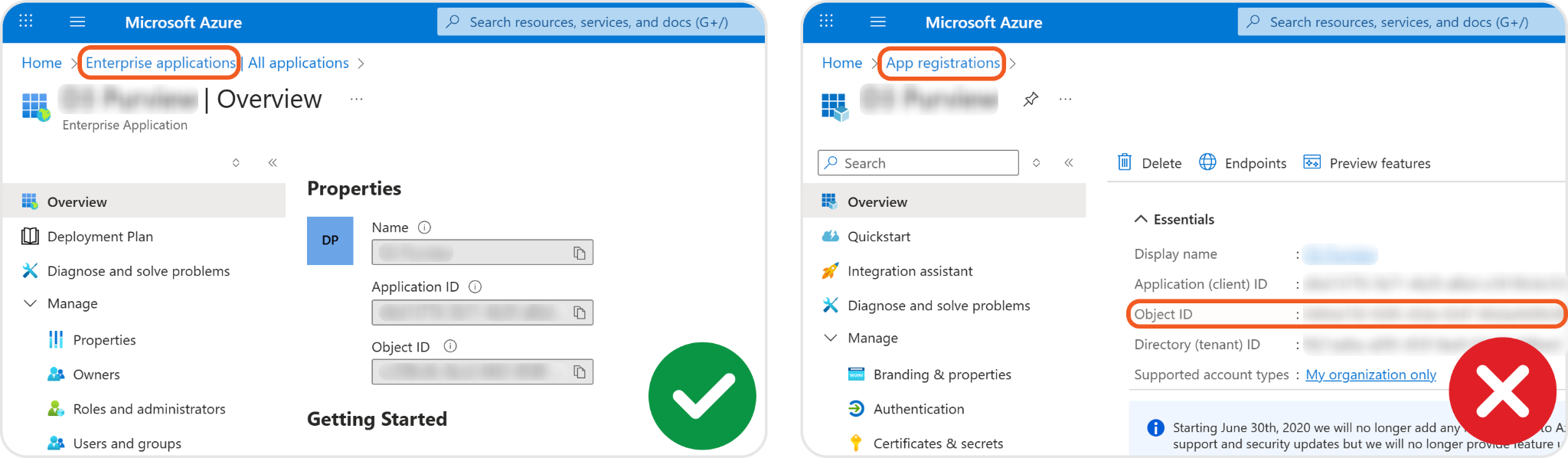
For the Object ID parameter, use the application object ID from Enterprise applications, not App registrations.
Input
Input Parameter | Required/Optional | Description | Example |
Resource Group Name | Optional | The name of the resource group in which the Key Vault is created. Resource Group Name can be obtained using the List Resource Groups command. By default, the resource group name defined on the connection form is used. | d3cyber |
Key Vault Name | Required | The name of the Key Vault. The name must contain only alphanumeric characters and dashes, and it cannot start with a number. | d3TestpVault-IT |
Location | Required | The region where the Key Vault will be created. | East US |
SKU | Required | The service tier for the Key Vault. Valid options are:
| Standard |
Create Mode | Optional | Defines how the Key Vault is created. Valid options are:
The Default option creates a new vault. The Recover option restores a soft-deleted vault with the same name. | Default |
Object ID | Optional | The unique object ID of a security principal in Microsoft Entra ID to which the access policy applies. Object ID refers to the object ID of the application used in the connection, obtained from Enterprise applications in the Azure portal. | 3900*****dec2 |
Permission Of Keys | Optional | The permissions assigned to the Key Vault that define the allowed operations on keys stored in the vault. Provide values from the following list:
|
JSON
|
Permission Of Secrets | Optional | The permissions assigned to the Key Vault that define the allowed operations on secrets stored in the vault. Provide values from the following list:
|
JSON
|
Permission Of Certificates | Optional | The permissions assigned to the Key Vault that define the allowed operations on certificates stored in the vault. Provide values from the following list:
|
JSON
|
Output
To view the sample output data for all commands, refer to this article.
Error Handling
If the Return Data displays Failed, an Error tab will appear in the Test Result window.
The error tab contains the details responded from D3 SOAR or third-party API calls, including Failure Indicator, Status Code, and Message. This can help locate the root cause of a command failure.
Parts in Error | Description | Example |
Failure Indicator | Indicates the command failure that happened at a specific input and/or API call. | Create Key Vault failed. |
Status Code | The response code issued by the third-party API server or the D3 SOAR system that can be used to locate the corresponding error category. For example, if the returned status code is 401, the selected connection is unauthorized to run the command. The user or system support would need to check the permission setting in the Azure Key Vault portal. Refer to the HTTP Status Code Registry for details. | Status Code: 409. |
Message | The raw data or captured key error message from the integration API server about the API request failure. | Message: The vault name 'TWvault' is already in use. Vault names are globally unique so it is possible that the name is already taken. If you are sure that the vault name was not taken then it is possible that a vault with the same name was recently deleted but not purged after being placed in a recoverable state. If the vault is in a recoverable state then the vault will need to be purged before reusing the name. For more information about VaultAlreadyExists, soft delete and purging a vault follow this link https://go.microsoft.com/fwlink/?linkid=2147740. |
Error Sample Data Create Key Vault failed. Status Code: 409. Message: The vault name 'TWvault' is already in use. Vault names are globally unique so it is possible that the name is already taken. If you are sure that the vault name was not taken then it is possible that a vault with the same name was recently deleted but not purged after being placed in a recoverable state. If the vault is in a recoverable state then the vault will need to be purged before reusing the name. For more information about VaultAlreadyExists, soft delete and purging a vault follow this link https://go.microsoft.com/fwlink/?linkid=2147740. |
Create Secret
Adds a new secret or a new version of an existing secret.
READER NOTE
Key Vault Name is a required parameter to run this command.
Run the List Key Vaults command to obtain the Key Vault Name. Key Vault Names can be found in the raw data at $.value[*].name.
Resource Group Name is an optional parameter to run this command.
Run the List Resource Groups command to obtain the Resource Group Name. Resource Group Names can be found in the raw data at $.value[*].name.
Input
Input Parameter | Required/Optional | Description | Example |
Key Vault Name | Required | The name of the Key Vault in which to create the secret. Key Vault Name can be obtained using the List Key Vaults command. | kv20230606a |
Resource Group Name | Optional | The name of the resource group that contains the Key Vault. Resource Group Name can be obtained using the List Resource Groups command. By default, the resource group name defined on the connection form is used. | d3deployment |
Secret Name | Required | The name of the secret. The name must contain only letters (uppercase or lowercase), numbers, or hyphens. Do not include any personally identifiable or sensitive information. | D3TestEC-A |
Secret Value | Required | The value of the secret. | 60ba*****173f |
Content Type | Optional | The content type of the secret value (e.g., password). | password |
Tags | Optional | The key-value pair tags used to add application-specific metadata to the secret. |
JSON
|
Output
To view the sample output data for all commands, refer to this article.
Error Handling
If the Return Data displays Failed, an Error tab will appear in the Test Result window.
The error tab contains the details responded from D3 SOAR or third-party API calls, including Failure Indicator, Status Code, and Message. This can help locate the root cause of a command failure.
Parts in Error | Description | Example |
Failure Indicator | Indicates the command failure that happened at a specific input and/or API call. | Create Secret failed. |
Status Code | The response code issued by the third-party API server or the D3 SOAR system that can be used to locate the corresponding error category. For example, if the returned status code is 401, the selected connection is unauthorized to run the command. The user or system support would need to check the permission setting in the Azure Key Vault portal. Refer to the HTTP Status Code Registry for details. | Status Code: 400. |
Message | The raw data or captured key error message from the integration API server about the API request failure. | Message: The request URI contains an invalid name: test!. |
Error Sample Data Create Secret failed. Status Code: 400. Message: The request URI contains an invalid name: test!. |
Delete Key Vault
Deletes a specified Key Vault.
READER NOTE
Key Vault Name is a required parameter to run this command.
Run the List Key Vaults command to obtain the Key Vault Name. Key Vault Names can be found in the raw data at $.value[*].name.
Resource Group Name is an optional parameter to run this command.
Run the List Resource Groups command to obtain the Resource Group Name. Resource Group Names can be found in the raw data at $.value[*].name.
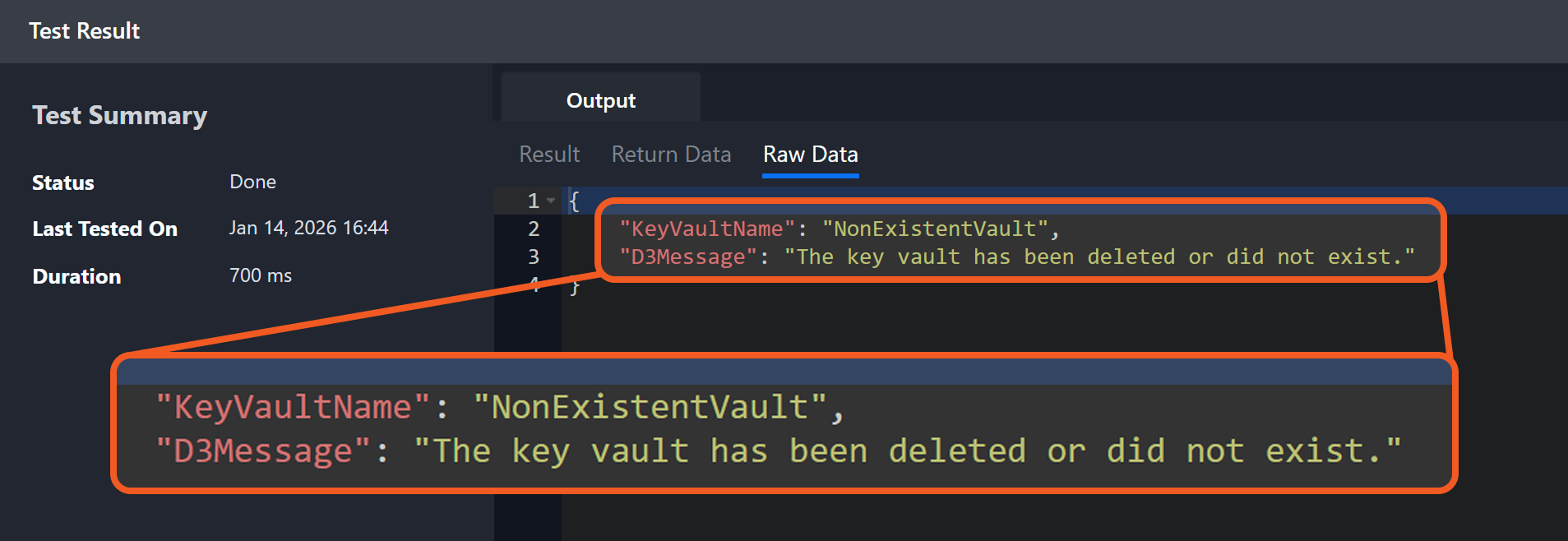
Deleting a non-existent Key Vault returns a message indicating that the Key Vault was deleted or did not exist.
Input
Input Parameter | Required/Optional | Description | Example |
Resource Group Name | Optional | The name of the resource group that contains the Key Vault. Resource Group Name can be obtained using the List Resource Groups command. By default, the resource group name defined on the connection form is used. | d3cyber |
Key Vault Name | Required | The name of the Key Vault to delete. Key Vault Name can be obtained using the List Key Vaults command. | d3testvault |
Output
To view the sample output data for all commands, refer to this article.
Error Handling
If the Return Data displays Failed, an Error tab will appear in the Test Result window.
The error tab contains the details responded from D3 SOAR or third-party API calls, including Failure Indicator, Status Code, and Message. This can help locate the root cause of a command failure.
Parts in Error | Description | Example |
Failure Indicator | Indicates the command failure that happened at a specific input and/or API call. | Delete Key Vault failed. |
Status Code | The response code issued by the third-party API server or the D3 SOAR system that can be used to locate the corresponding error category. For example, if the returned status code is 401, the selected connection is unauthorized to run the command. The user or system support would need to check the permission setting in the Azure Key Vault portal. Refer to the HTTP Status Code Registry for details. | Status Code: 404. |
Message | The raw data or captured key error message from the integration API server about the API request failure. | Message: Resource group 'test' could not be found. |
Error Sample Data Delete Key Vault failed. Status Code: 404. Message: Resource group 'test' could not be found. |
Get Certificate Details
Retrieves detailed information on the specified certificate.
READER NOTE
Key Vault Name and Certificate Name are required parameters to run this command.
Run the List Key Vaults command to obtain the Key Vault Name. Key Vault Names can be found in the raw data at $.value[*].name.
Run the List Certificates command to obtain the Certificate Name. It is the final path segment after /certificates/ in the raw data at $.value[*].id.
Example: testCert-0607a in https://kv20230606a.vault.azure.net/certificates/testCert-0607a.
Resource Group Name and Versions are optional parameters to run this command.
Run the List Resource Groups command to obtain the Resource Group Name. Resource Group Names can be found in the raw data at $.value[*].name.
Run the List Vault Object Versions command to obtain the Versions. Versions can be found in the raw data at $.value[*].id.
Run the List Key Vaults command to identify the target Key Vault, then use its Key Vault Name with the List Certificates command to retrieve the target certificate name.
Input
Input Parameter | Required/Optional | Description | Example |
Key Vault Name | Required | The name of the Key Vault containing the target certificate. Key Vault Name can be obtained using the List Key Vaults command. | d3TestpVault-IT |
Resource Group Name | Optional | The name of the resource group that contains the Key Vault. Resource Group Name can be obtained using the List Resource Groups command. By default, the resource group name defined on the connection form is used. | d3cyber |
Certificate Name | Required | The name of the certificate for which to retrieve details. Certificate Name can be obtained using the List Certificates command. | D3Test-Import-Cert-A |
Version Type | Optional | The version selection mode. Valid options are:
When All Versions or Current Version is selected, the Versions parameter is ignored. When Specific Versions is selected, version values must be provided in the Versions parameter. By default, the value is set to All Versions. | All |
Versions | Optional | The certificate versions for which to retrieve details. Versions can be obtained using the List Vault Object Versions command. This parameter is required only when Version Type is set to Specific Versions. |
JSON
|
Output
To view the sample output data for all commands, refer to this article.
Error Handling
If the Return Data displays Failed, an Error tab will appear in the Test Result window.
The error tab contains the details responded from D3 SOAR or third-party API calls, including Failure Indicator, Status Code, and Message. This can help locate the root cause of a command failure.
Parts in Error | Description | Example |
Failure Indicator | Indicates the command failure that happened at a specific input and/or API call. | Get Certificate Details failed. |
Status Code | The response code issued by the third-party API server or the D3 SOAR system that can be used to locate the corresponding error category. For example, if the returned status code is 401, the selected connection is unauthorized to run the command. The user or system support would need to check the permission setting in the Azure Key Vault portal. Refer to the HTTP Status Code Registry for details. | Status Code: 400. |
Message | The raw data or captured key error message from the integration API server about the API request failure. | Message: VersionType is 'Specific' but no Versions were provided. |
Error Sample Data Get Certificate Details failed. Status Code: 400. Message: VersionType is 'Specific' but no Versions were provided. |
Get Key Details
Retrieves detailed information on the specified key.
READER NOTE
Key Vault Name and Key Name are required parameters to run this command.
Run the List Key Vaults command to obtain the Key Vault Name. Key Vault Names can be found in the raw data at $.value[*].name.
Run the List Keys command to obtain the Key Name. It is the final path segment after /keys/ in the raw data at $.value[*].kid.
Example: key0606b in https://*****.vault.azure.net/keys/key0606b.
Resource Group Name and Versions are optional parameters to run this command.
Run the List Resource Groups command to obtain the Resource Group Name. Resource Group Names can be found in the raw data at $.value[*].name.
Run the List Vault Object Versions command to obtain the Versions. Versions can be found in the raw data at $.value[*].id.
Run the List Key Vaults command to identify the target Key Vault, then use its Key Vault Name with the List Keys command to retrieve the target key name.
Input
Input Parameter | Required/Optional | Description | Example |
Key Vault Name | Required | The name of the Key Vault containing the target key. Key Vault Name can be obtained using the List Key Vaults command. | d3TestpVault-IT |
Resource Group Name | Optional | The name of the resource group that contains the Key Vault. Resource Group Name can be obtained using the List Resource Groups command. By default, the resource group name defined on the connection form is used. | d3cyber |
Key Name | Required | The name of the key for which to retrieve details. Key Name can be obtained using the List Keys command. | D3TestEC-A |
Version Type | Optional | The version selection mode. Valid options are:
When All Versions or Current Version is selected, the Versions parameter is ignored. When Specific Versions is selected, version values must be provided in the Versions parameter. By default, the value is set to All Versions. | All |
Versions | Optional | The key versions for which to retrieve details. Versions can be obtained using the List Vault Object Versions command. This parameter is required only when Version Type is set to Specific Versions. |
JSON
|
Output
To view the sample output data for all commands, refer to this article.
Error Handling
If the Return Data displays Failed, an Error tab will appear in the Test Result window.
The error tab contains the details responded from D3 SOAR or third-party API calls, including Failure Indicator, Status Code, and Message. This can help locate the root cause of a command failure.
Parts in Error | Description | Example |
Failure Indicator | Indicates the command failure that happened at a specific input and/or API call. | Get Key Details failed. |
Status Code | The response code issued by the third-party API server or the D3 SOAR system that can be used to locate the corresponding error category. For example, if the returned status code is 401, the selected connection is unauthorized to run the command. The user or system support would need to check the permission setting in the Azure Key Vault portal. Refer to the HTTP Status Code Registry for details. | Status Code: 400. |
Message | The raw data or captured key error message from the integration API server about the API request failure. | Message: VersionType is 'Specific' but no Versions were provided. |
Error Sample Data Get Key Details failed. Status Code: 400. Message: VersionType is 'Specific' but no Versions were provided. |
Get Key Vault
Retrieves the details of a specified Key Vault.
READER NOTE
Key Vault Name is a required parameter to run this command.
Run the List Key Vaults command to obtain the Key Vault Name. Key Vault Names can be found in the raw data at $.value[*].name.
Resource Group Name is an optional parameter to run this command.
Run the List Resource Groups command to obtain the Resource Group Name. Resource Group Names can be found in the raw data at $.value[*].name.
Input
Input Parameter | Required/Optional | Description | Example |
Resource Group Name | Optional | The name of the resource group that contains the Key Vault. Resource Group Name can be obtained using the List Resource Groups command. By default, the resource group name defined on the connection form is used. | d3deployment |
Key Vault Name | Required | The name of the Key Vault to retrieve. Key Vault Name can be obtained using the List Key Vault command. | kv20230606a |
Output
To view the sample output data for all commands, refer to this article.
Error Handling
If the Return Data displays Failed, an Error tab will appear in the Test Result window.
The error tab contains the details responded from D3 SOAR or third-party API calls, including Failure Indicator, Status Code, and Message. This can help locate the root cause of a command failure.
Parts in Error | Description | Example |
Failure Indicator | Indicates the command failure that happened at a specific input and/or API call. | Get Key Vault failed. |
Status Code | The response code issued by the third-party API server or the D3 SOAR system that can be used to locate the corresponding error category. For example, if the returned status code is 401, the selected connection is unauthorized to run the command. The user or system support would need to check the permission setting in the Azure Key Vault portal. Refer to the HTTP Status Code Registry for details. | Status Code: 404. |
Message | The raw data or captured key error message from the integration API server about the API request failure. | Message: The Resource 'Microsoft.KeyVault/vaults/NonExistentVault' under resource group 'D3Cyber' was not found. For more details please go to https://aka.ms/ARMResourceNotFoundFix. |
Error Sample Data Get Key Vault failed. Status Code: 404. Message: The Resource 'Microsoft.KeyVault/vaults/NonExistentVault' under resource group 'D3Cyber' was not found. For more details please go to https://aka.ms/ARMResourceNotFoundFix. |
Get Secret Details
Retrieves detailed information on the specified secret.
READER NOTE
Key Vault Name and Secret Name are required parameters to run this command.
Run the List Key Vaults command to obtain the Key Vault Name. Key Vault Names can be found in the raw data at $.value[*].name.
Run the List Secrets command to obtain the Secret Name. It is the final path segment after /secrets/ in the raw data at $.value[*].id.
Example: testCert-0607a in https://*****.vault.azure.net/secrets/testCert-0607a.
Resource Group Name and Versions are optional parameters to run this command.
Run the List Resource Groups command to obtain the Resource Group Name. Resource Group Names can be found in the raw data at $.value[*].name.
Run the List Vault Object Versions command to obtain the Versions. Versions can be found in the raw data at $.value[*].id.
Run the List Key Vaults command to identify the target Key Vault, then use its Key Vault Name with the List Secret command to retrieve the target secret name.
Input
Input Parameter | Required/Optional | Description | Example |
Key Vault Name | Required | The name of the Key Vault containing the target secret. Key Vault Name can be obtained using the List Key Vaults command. | d3TestpVault-IT |
Resource Group Name | Optional | The name of the resource group that contains the Key Vault. Resource Group Name can be obtained using the List Resource Groups command. By default, the resource group name defined on the connection form is used. | d3cyber |
Secret Name | Required | The name of the secret for which to retrieve details. Secret Name can be obtained using the List Secrets command. | D3TestSecret-C |
Version Type | Optional | The version selection mode. Valid options are:
When All Versions or Current Version is selected, the Versions parameter is ignored. When Specific Versions is selected, version values must be provided in the Versions parameter. By default, the value is set to All Versions. | All |
Versions | Optional | The secret versions for which to retrieve details. Versions can be obtained using the List Vault Object Versions command. This parameter is required only when Version Type is set to Specific Versions. |
JSON
|
Output
To view the sample output data for all commands, refer to this article.
Error Handling
If the Return Data displays Failed, an Error tab will appear in the Test Result window.
The error tab contains the details responded from D3 SOAR or third-party API calls, including Failure Indicator, Status Code, and Message. This can help locate the root cause of a command failure.
Parts in Error | Description | Example |
Failure Indicator | Indicates the command failure that happened at a specific input and/or API call. | Get Secret Details failed. |
Status Code | The response code issued by the third-party API server or the D3 SOAR system that can be used to locate the corresponding error category. For example, if the returned status code is 401, the selected connection is unauthorized to run the command. The user or system support would need to check the permission setting in the Azure Key Vault portal. Refer to the HTTP Status Code Registry for details. | Status Code: 400. |
Message | The raw data or captured key error message from the integration API server about the API request failure. | Message: VersionType is 'Specific' but no Versions were provided. |
Error Sample Data Get Secret Details failed. Status Code: 400. Message: VersionType is 'Specific' but no Versions were provided. |
Import Certificate
Imports an existing valid certificate that contains a private key into an Azure Key Vault.
READER NOTE
Key Vault Name is a required parameter to run this command.
Run the List Key Vaults command to obtain the Key Vault Name. Key Vault Names can be found in the raw data at $.value[*].name.
Resource Group Name is an optional parameter to run this command.
Run the List Resource Groups command to obtain the Resource Group Name. Resource Group Names can be found in the raw data at $.value[*].name.
Input
Input Parameter | Required/Optional | Description | Example |
Key Vault Name | Required | The name of the Key Vault in which to create the certificate. Key Vault Name can be obtained using the List Key Vaults command. | kv20230606a |
Resource Group Name | Optional | The name of the resource group that contains the Key Vault. Resource Group Name can be obtained using the List Resource Groups command. By default, the resource group name defined on the connection form is used. | d3deployment |
Certificate Name | Required | The name of the certificate. The name must contain only letters (uppercase or lowercase), numbers, or hyphens. Do not include any personally identifiable or sensitive information. | D3Test-Import-Cert-G |
Private Key | Required | The private key of the certificate object to import. | -----BEGIN ENCRYPTED PRIVATE KEY-----*****_ |
Certificate | Required | The content of the certificate object to import. | -----BEGIN CERTIFICATE------***** |
Passphrase | Optional | The passphrase for the private key if the private key is encrypted. | test |
Tags | Optional | The key-value pair tags used to add application-specific metadata to the certificate. |
JSON
|
Output
To view the sample output data for all commands, refer to this article.
Error Handling
If the Return Data displays Failed, an Error tab will appear in the Test Result window.
The error tab contains the details responded from D3 SOAR or third-party API calls, including Failure Indicator, Status Code, and Message. This can help locate the root cause of a command failure.
Parts in Error | Description | Example |
Failure Indicator | Indicates the command failure that happened at a specific input and/or API call. | Import Certificate failed. |
Status Code | The response code issued by the third-party API server or the D3 SOAR system that can be used to locate the corresponding error category. For example, if the returned status code is 401, the selected connection is unauthorized to run the command. The user or system support would need to check the permission setting in the Azure Key Vault portal. Refer to the HTTP Status Code Registry for details. | Status Code: 400. |
Message | The raw data or captured key error message from the integration API server about the API request failure. | Message: Incorrect private key passphrase or invalid key material. |
Error Sample Data Import Certificate failed. Status Code: 400. Message: Incorrect private key passphrase or invalid key material. |
List Certificates
Returns all certificates in the specified Key Vault.
READER NOTE
Key Vault Name is a required parameter to run this command.
Run the List Key Vaults command to obtain the Key Vault Name. Key Vault Names can be found in the raw data at $.value[*].name.
Resource Group Name is an optional parameter to run this command.
Run the List Resource Groups command to obtain the Resource Group Name. Resource Group Names can be found in the raw data at $.value[*].name.
Input
Input Parameter | Required/Optional | Description | Example |
Key Vault Name | Required | The name of the Key Vault from which to list all certificates. Key Vault Name can be obtained using the List Key Vaults command. | kv20230606a |
Resource Group Name | Optional | The name of the resource group that contains the Key Vault. Resource Group Name can be obtained using the List Resource Groups command. By default, the resource group name defined on the connection form is used. | d3deployment |
Include Pending | Optional | Indicates whether to include certificates that are not completely provisioned. | False |
Output
To view the sample output data for all commands, refer to this article.
Error Handling
If the Return Data displays Failed, an Error tab will appear in the Test Result window.
The error tab contains the details responded from D3 SOAR or third-party API calls, including Failure Indicator, Status Code, and Message. This can help locate the root cause of a command failure.
Parts in Error | Description | Example |
Failure Indicator | Indicates the command failure that happened at a specific input and/or API call. | List Certificates failed. |
Status Code | The response code issued by the third-party API server or the D3 SOAR system that can be used to locate the corresponding error category. For example, if the returned status code is 401, the selected connection is unauthorized to run the command. The user or system support would need to check the permission setting in the Azure Key Vault portal. Refer to the HTTP Status Code Registry for details. | Status Code: 403. |
Message | The raw data or captured key error message from the integration API server about the API request failure. | Message: The client 'b190*****6dbf' with object id 'b53f*****0d60' does not have authorization to perform action 'Microsoft.KeyVault/vaults/read' over scope '/subscriptions/982d*****d7f1/resourceGroups/d3deployment/providers/Microsoft.KeyVault/vaults/kv20230606a' or the scope is invalid. If access was recently granted, please refresh your credentials. |
Error Sample Data List Certificates failed. Status Code: 403. Message: The client 'b190*****6dbf' with object id 'b53f*****0d60' does not have authorization to perform action 'Microsoft.KeyVault/vaults/read' over scope '/subscriptions/982d*****d7f1/resourceGroups/d3deployment/providers/Microsoft.KeyVault/vaults/kv20230606a' or the scope is invalid. If access was recently granted, please refresh your credentials. |
List Keys
Returns all keys in the specified Key Vault.
READER NOTE
Key Vault Name is a required parameter to run this command.
Run the List Key Vaults command to obtain the Key Vault Name. Key Vault Names can be found in the raw data at $.value[*].name.
Resource Group Name is an optional parameter to run this command.
Run the List Resource Groups command to obtain the Resource Group Name. Resource Group Names can be found in the raw data at $.value[*].name.
Input
Input Parameter | Required/Optional | Description | Example |
Key Vault Name | Required | The name of the Key Vault from which to list all keys. Key Vault Name can be obtained using the List Key Vaults command. | kv20230606a |
Resource Group Name | Optional | The name of the resource group that contains the Key Vault. Resource Group Name can be obtained using the List Resource Groups command. By default, the resource group name defined on the connection form is used. | d3deployment |
Output
To view the sample output data for all commands, refer to this article.
Error Handling
If the Return Data displays Failed, an Error tab will appear in the Test Result window.
The error tab contains the details responded from D3 SOAR or third-party API calls, including Failure Indicator, Status Code, and Message. This can help locate the root cause of a command failure.
Parts in Error | Description | Example |
Failure Indicator | Indicates the command failure that happened at a specific input and/or API call. | List Keys failed. |
Status Code | The response code issued by the third-party API server or the D3 SOAR system that can be used to locate the corresponding error category. For example, if the returned status code is 401, the selected connection is unauthorized to run the command. The user or system support would need to check the permission setting in the Azure Key Vault portal. Refer to the HTTP Status Code Registry for details. | Status Code: 403. |
Message | The raw data or captured key error message from the integration API server about the API request failure. | Message: The client 'b190*****6dbf' with object id 'b53f*****0d60' does not have authorization to perform action 'Microsoft.KeyVault/vaults/read' over scope '/subscriptions/982d*****d7f1/resourceGroups/d3deployment/providers/Microsoft.KeyVault/vaults/kv20230606a' or the scope is invalid. If access was recently granted, please refresh your credentials. |
Error Sample Data List Keys failed. Status Code: 403. Message: The client 'b190*****6dbf' with object id 'b53f*****0d60' does not have authorization to perform action 'Microsoft.KeyVault/vaults/read' over scope '/subscriptions/982d*****d7f1/resourceGroups/d3deployment/providers/Microsoft.KeyVault/vaults/kv20230606a' or the scope is invalid. If access was recently granted, please refresh your credentials. |
List Key Vaults
Returns all Key Vaults within the specified subscription. When a resource group is provided, only Key Vaults in that resource group are returned.
READER NOTE
Resource Group Name is an optional parameter to run this command.
Run the List Resource Groups command to obtain the Resource Group Name. Resource Group Names can be found in the raw data at $.value[*].name.
Input
Input Parameter | Required/Optional | Description | Example |
Resource Group Name | Optional | The name of the resource group from which to return Key Vaults. Resource Group Name can be obtained using the List Resource Groups command. By default, the resource group name defined on the connection form is used. | d3cyber |
Output
To view the sample output data for all commands, refer to this article.
Error Handling
If the Return Data displays Failed, an Error tab will appear in the Test Result window.
The error tab contains the details responded from D3 SOAR or third-party API calls, including Failure Indicator, Status Code, and Message. This can help locate the root cause of a command failure.
Parts in Error | Description | Example |
Failure Indicator | Indicates the command failure that happened at a specific input and/or API call. | List Key Vaults failed. |
Status Code | The response code issued by the third-party API server or the D3 SOAR system that can be used to locate the corresponding error category. For example, if the returned status code is 401, the selected connection is unauthorized to run the command. The user or system support would need to check the permission setting in the Azure Key Vault portal. Refer to the HTTP Status Code Registry for details. | Status Code: 400. |
Message | The raw data or captured key error message from the integration API server about the API request failure. | Message: Resource Group Name is required. Please provide a Resource Group name either as a command parameter or in Integration connection. |
Error Sample Data List Key Vaults failed. Status Code: 400. Message: Resource Group Name is required. Please provide a Resource Group name either as a command parameter or in Integration connection. |
List Resource Groups
Returns all resource groups in the subscription.
Input
N/A
Output
To view the sample output data for all commands, refer to this article.
Error Handling
If the Return Data displays Failed, an Error tab will appear in the Test Result window.
The error tab contains the details responded from D3 SOAR or third-party API calls, including Failure Indicator, Status Code, and Message. This can help locate the root cause of a command failure.
Parts in Error | Description | Example |
Failure Indicator | Indicates the command failure that happened at a specific input and/or API call. | List Resource Groups failed. |
Status Code | The response code issued by the third-party API server or the D3 SOAR system that can be used to locate the corresponding error category. For example, if the returned status code is 401, the selected connection is unauthorized to run the command. The user or system support would need to check the permission setting in the Azure Key Vault portal. Refer to the HTTP Status Code Registry for details. | Status Code: 403. |
Message | The raw data or captured key error message from the integration API server about the API request failure. | Message: The client 'b190*****6dbf' with object id 'b53f*****0d60' does not have authorization to perform action 'Microsoft.Resources/subscriptions/resourcegroups/read' over scope '/subscriptions/982d*****d7f1' or the scope is invalid. If access was recently granted, please refresh your credentials. |
Error Sample Data List Resource Groups failed. Status Code: 403. Message: The client 'b190*****6dbf' with object id 'b53f*****0d60' does not have authorization to perform action 'Microsoft.Resources/subscriptions/resourcegroups/read' over scope '/subscriptions/982d*****d7f1' or the scope is invalid. If access was recently granted, please refresh your credentials. |
List Secrets
Returns all secrets in the specified Key Vault.
READER NOTE
Key Vault Name is a required parameter to run this command.
Run the List Key Vaults command to obtain the Key Vault Name. Key Vault Names can be found in the raw data at $.value[*].name.
Resource Group Name is an optional parameter to run this command.
Run the List Resource Groups command to obtain the Resource Group Name. Resource Group Names can be found in the raw data at $.value[*].name.
Input
Input Parameter | Required/Optional | Description | Example |
Key Vault Name | Required | The name of the Key Vault from which to list all secrets. Key Vault Name can be obtained using the List Key Vaults command. | kv20230606a |
Resource Group Name | Optional | The name of the resource group that contains the Key Vault. Resource Group Name can be obtained using the List Resource Groups command. By default, the resource group name defined on the connection form is used. | d3deployment |
Output
To view the sample output data for all commands, refer to this article.
Error Handling
If the Return Data displays Failed, an Error tab will appear in the Test Result window.
The error tab contains the details responded from D3 SOAR or third-party API calls, including Failure Indicator, Status Code, and Message. This can help locate the root cause of a command failure.
Parts in Error | Description | Example |
Failure Indicator | Indicates the command failure that happened at a specific input and/or API call. | List Secrets failed. |
Status Code | The response code issued by the third-party API server or the D3 SOAR system that can be used to locate the corresponding error category. For example, if the returned status code is 401, the selected connection is unauthorized to run the command. The user or system support would need to check the permission setting in the Azure Key Vault portal. Refer to the HTTP Status Code Registry for details. | Status Code: 403. |
Message | The raw data or captured key error message from the integration API server about the API request failure. | Message: The client 'b190*****6dbf' with object id 'b53f*****0d60' does not have authorization to perform action 'Microsoft.KeyVault/vaults/read' over scope '/subscriptions/982d*****d7f1/resourceGroups/D3Cyber/providers/Microsoft.KeyVault/vaults/d3TestpVault-IT' or the scope is invalid. If access was recently granted, please refresh your credentials. |
Error Sample Data List Secrets failed. Status Code: 403. Message: The client 'b190*****6dbf' with object id 'b53f*****0d60' does not have authorization to perform action 'Microsoft.KeyVault/vaults/read' over scope '/subscriptions/982d*****d7f1/resourceGroups/D3Cyber/providers/Microsoft.KeyVault/vaults/d3TestpVault-IT' or the scope is invalid. If access was recently granted, please refresh your credentials. |
List Vault Object Versions
Retrieves all versions of the specified object.
READER NOTE
Key Vault Name and Object Name are required parameters to run this command.
Run the List Key Vaults command to obtain the Key Vault Name. Key Vault Names can be found in the raw data at $.value[*].name.
Run the List Keys, List Secrets, or List Certificates command to obtain the Object Name, depending on the Object Type.
If Object Type is set to Keys, then Key Names can be found in the raw data of List Keys at $.value[*].kid. It is the final path segment after /keys/.
Example: key0606b in https://*****.vault.azure.net/keys/key0606b.
If Object Type is set to Secrets, then Secret Names can be found in the raw data of List Secrets at $.value[*].id. It is the final path segment after /secrets/.
Example: testCert-0607a in https://*****.vault.azure.net/secrets/testCert-0607a.
If Object Type is set to Certificates, then Certificate Names can be found in the raw data of List Certificates at $.value[*].id. It is the final path segment after /certificates/.
Example: testCert-0607a in https://kv20230606a.vault.azure.net/certificates/testCert-0607a.
Resource Group Name is an optional parameter to run this command.
Run the List Resource Groups command to obtain the Resource Group Name. Resource Group Names can be found in the raw data at $.value[*].name.
Input
Input Parameter | Required/Optional | Description | Example |
Key Vault Name | Required | The name of the Key Vault from which to retrieve object versions. Key Vault Name can be obtained using the List Key Vaults command. | d3TestpVault-IT |
Resource Group Name | Optional | The name of the resource group that contains the Key Vault. Resource Group Name can be obtained using the List Resource Groups command. By default, the resource group name defined on the connection form is used. | d3cyber |
Object Type | Required | The Key Vault object category to query. Valid options are:
| Secrets |
Object Name | Required | The name of the object for the selected object type. Object Name can be obtained using the List Keys, List Secrets, or List Certificates command, depending on the Object Type. | D3TestSecret-C |
Output
To view the sample output data for all commands, refer to this article.
Error Handling
If the Return Data displays Failed, an Error tab will appear in the Test Result window.
The error tab contains the details responded from D3 SOAR or third-party API calls, including Failure Indicator, Status Code, and Message. This can help locate the root cause of a command failure.
Parts in Error | Description | Example |
Failure Indicator | Indicates the command failure that happened at a specific input and/or API call. | List Vault Object Versions failed. |
Status Code | The response code issued by the third-party API server or the D3 SOAR system that can be used to locate the corresponding error category. For example, if the returned status code is 401, the selected connection is unauthorized to run the command. The user or system support would need to check the permission setting in the Azure Key Vault portal. Refer to the HTTP Status Code Registry for details. | Status Code: 404. |
Message | The raw data or captured key error message from the integration API server about the API request failure. | Message: Resource group 'test' could not be found. |
Error Sample Data List Vault Object Versions failed. Status Code: 404. Message: Resource group 'test' could not be found. |
Update Key Vault Access Policy
Updates the access policies of a Key Vault.
READER NOTE
Key Vault Name is a required parameter to run this command.
Run the List Key Vaults command to obtain the Key Vault Name. Key Vault Names can be found in the raw data at $.value[*].name.
Resource Group Name is an optional parameter to run this command.
Run the List Resource Groups command to obtain the Resource Group Name. Resource Group Names can be found in the raw data at $.value[*].name.
After the update completes, verify the access policy changes directly in the Azure portal. Navigate to the target Key Vault, open Access policies, and confirm that the expected permissions are applied to the application principal.
Input
Input Parameter | Required/Optional | Description | Example |
Resource Group Name | Optional | The name of the resource group that contains the Key Vault. Resource Group Name can be obtained using the List Resource Groups command. By default, the resource group name defined on the connection form is used. | d3cyber |
Key Vault Name | Required | The name of the Key Vault whose access policies will be updated. Key Vault Name can be obtained using the List Key Vault command. | d3TestpVault-IT |
Operation Kind | Required | The operation to perform.
| Add |
Object ID | Optional | The unique object ID of a security principal in Microsoft Entra ID to which the access policy applies. Object ID refers to the object ID of the application used in the connection, obtained from Enterprise applications in the Azure portal. | b083****c919 |
Permission Of Keys | Optional | The permissions assigned to the Key Vault that define the allowed operations on keys stored in the vault. Provide values from the following list:
|
JSON
|
Permission Of Secrets | Optional | The permissions assigned to the Key Vault that define the allowed operations on secrets stored in the vault. Provide values from the following list:
|
JSON
|
Permission Of Certificates | Optional | The permissions assigned to the Key Vault that define the allowed operations on certificates stored in the vault. Provide values from the following list:
|
JSON
|
Output
To view the sample output data for all commands, refer to this article.
Error Handling
If the Return Data displays Failed, an Error tab will appear in the Test Result window.
The error tab contains the details responded from D3 SOAR or third-party API calls, including Failure Indicator, Status Code, and Message. This can help locate the root cause of a command failure.
Parts in Error | Description | Example |
Failure Indicator | Indicates the command failure that happened at a specific input and/or API call. | Update Key Vault Access Policy failed. |
Status Code | The response code issued by the third-party API server or the D3 SOAR system that can be used to locate the corresponding error category. For example, if the returned status code is 401, the selected connection is unauthorized to run the command. The user or system support would need to check the permission setting in the Azure Key Vault portal. Refer to the HTTP Status Code Registry for details. | Status Code: 403. |
Message | The raw data or captured key error message from the integration API server about the API request failure. | Message: The client 'b190*****6dbf' with object id 'b53f*****0d60' does not have authorization to perform action 'Microsoft.KeyVault/vaults/accessPolicies/write' over scope '/subscriptions/982d*****d7f1/resourceGroups/D3Cyber/providers/Microsoft.KeyVault/vaults/d3TestpVault-IT/accessPolicies/remove' or the scope is invalid. If access was recently granted, please refresh your credentials. |
Error Sample Data Update Key Vault Access Policy failed. Status Code: 403. Message: The client 'b190*****6dbf' with object id 'b53f*****0d60' does not have authorization to perform action 'Microsoft.KeyVault/vaults/accessPolicies/write' over scope '/subscriptions/982d*****d7f1/resourceGroups/D3Cyber/providers/Microsoft.KeyVault/vaults/d3TestpVault-IT/accessPolicies/remove' or the scope is invalid. If access was recently granted, please refresh your credentials. |
Test Connection
Allows users to perform a health check on an integration connection. Users can schedule a periodic health check by selecting Connection Health Check when editing an integration connection.
Input
N/A
Output
Output Type | Description | Return Data Type |
Return Data | Indicates one of the possible command execution states: Successful or Failed. The Failed state can be triggered by any of the following errors:
More details about an error can be viewed in the Error tab. | String |
Error Handling
If the Return Data displays Failed, an Error tab will appear in the Test Result window.
The error tab contains the details responded from D3 SOAR or third-party API calls, including Failure Indicator, Status Code, and Message. This can help locate the root cause of a command failure.
Parts in Error | Description | Example |
Failure Indicator | Indicates the command failure that happened at a specific input and/or API call. | Test Connection failed. Failed to check the connector. |
Status Code | The response code issued by the third-party API server or the D3 SOAR system that can be used to locate the corresponding error category. For example, if the returned status code is 401, the selected connection is unauthorized to run the command. The user or system support would need to check the permission setting in the Azure Key Vault portal. Refer to the HTTP Status Code Registry for details. | Status Code: 403. |
Message | The raw data or captured key error message from the integration API server about the API request failure. | Message: The client 'b190*****6dbf' with object id 'b53f*****0d60' does not have authorization to perform action 'Microsoft.KeyVault/vaults/read' over scope '/subscriptions/982df*****d7f1' or the scope is invalid. If access was recently granted, please refresh your credentials. |
Error Sample Data Test Connection failed. Failed to check the connector. Status Code: 403. Message: The client 'b190*****6dbf' with object id 'b53f*****0d60' does not have authorization to perform action 'Microsoft.KeyVault/vaults/read' over scope '/subscriptions/982df*****d7f1' or the scope is invalid. If access was recently granted, please refresh your credentials. |