
Run Modes
LAST UPDATED: FEBRUARY 13, 2026
Run Mode Summary
Run Mode | Trigger Condition |
|---|---|
Executes when any one immediate upstream task completes | |
Executes when any one immediate upstream task completes | |
Waits for all immediate upstream tasks to complete |
Wait for Any, Run Always DEFAULT
.png?inst-v=d6987453-129d-4677-ae2c-1e1fbdd113b6)
Functionality
The Wait for Any, Run Always (default) run mode allows a task to execute, with the possibility of multiple executions, when any direct predecessor task completes
It is particularly beneficial when a playbook task must respond to upstream paths independently or sequentially, triggering a separate execution instance each time one of them completes.
SCENARIO – Task D is configured with the Wait for Any, Run Always run mode.
Before Execution
%201.png?inst-v=d6987453-129d-4677-ae2c-1e1fbdd113b6)
Task D receives parallel input from three tasks—A, B, and C. Task A has a 30-second delay, task B has a 60-second delay, and task C proceeds without delay before all three converge at task D.
During Execution
%201.png?inst-v=d6987453-129d-4677-ae2c-1e1fbdd113b6)
Task C completes and triggers task D to execute. Although tasks A and B also finish, their delay tasks block further execution from reaching task D. Therefore, task D runs only once.
Continued Execution
%201%20(1)-20250602-180444.png?inst-v=d6987453-129d-4677-ae2c-1e1fbdd113b6)
Task D executes a second time after task A's delay completes. This reflects an additional instance of task D's execution. Task B remains paused in its 60-second delay.
Final State
%201.png?inst-v=d6987453-129d-4677-ae2c-1e1fbdd113b6)
All upstream tasks have completed, and task D has executed once for each path. This results in a total of three executions.
Resulting Instances
-20250602-192424.png?inst-v=d6987453-129d-4677-ae2c-1e1fbdd113b6)
The Playbook Task Details panel shows all execution instances of the task. Completed instances appear in the instance selector for easy review.
Wait for Any, Run Once
.png?inst-v=d6987453-129d-4677-ae2c-1e1fbdd113b6)
Functionality
The Wait for Any, Run Once run mode permits a task to execute as soon as any one of its direct predecessor tasks completes.
This is useful in workflows where an early upstream result is sufficient to proceed, such as initiating a failover, sending an alert, or short-circuiting a process based on the first available condition.
SCENARIO – Task D is configured with the Wait for Any, Run Once run mode.
Before Execution
.png?inst-v=d6987453-129d-4677-ae2c-1e1fbdd113b6)
Task D, whose run mode is set to Wait for Any, Run Once, converges from three tasks—A, B, and C. Task A leads with a 30-second delay, while task B follows with a 60-second delay. Task C has no delay. All tasks independently converge at task D.
During Execution
.png?inst-v=d6987453-129d-4677-ae2c-1e1fbdd113b6)
Tasks A, B, and C have started. Task A's delay is actively progressing toward completion. Task D has not yet executed. Task B is paused in its 60-second delay.
Continued Execution
.png?inst-v=d6987453-129d-4677-ae2c-1e1fbdd113b6)
Task A's delay has completed but does not trigger task D to execute.

KEY POINT
Task D does not run again, even if additional execution paths reach it after the first.
Final State
.png?inst-v=d6987453-129d-4677-ae2c-1e1fbdd113b6)
All upstream tasks have completed, but task D ran only once.
Wait for All
-20250530-002943.png?inst-v=d6987453-129d-4677-ae2c-1e1fbdd113b6)
Functionality
The Wait for All run mode permits a task to execute as soon as all direct predecessor tasks complete.
This is beneficial in scenarios that require complete readiness of prerequisite data and the prevention of redundant downstream task execution.

NOTICE
In business workflows where a downstream task receives input from multiple execution instances of an upstream task, use a Merge task to consolidate those inputs.
SCENARIO – Task D is configured with the Wait for All run mode.
Before Execution
%201.png?inst-v=d6987453-129d-4677-ae2c-1e1fbdd113b6)
Task D, whose run mode is set to Wait for All, receives convergence from three parallel tasks—A, B, and C—with task C preceding a 3-second delay before joining.
During Execution
%201.png?inst-v=d6987453-129d-4677-ae2c-1e1fbdd113b6)
Tasks A, B, and C have completed. The 3-second delay following task C is delaying its progression to task D. Task D remains in a waiting state.
OBSERVATION
Note that the execution status icon for task D is  instead of
 %201-20250530-184323.png?inst-v=d6987453-129d-4677-ae2c-1e1fbdd113b6) .
.
This signifies that task D has not yet executed, as the Wait for All run mode mandates completion of all upstream tasks prior to its initiation.
After Execution
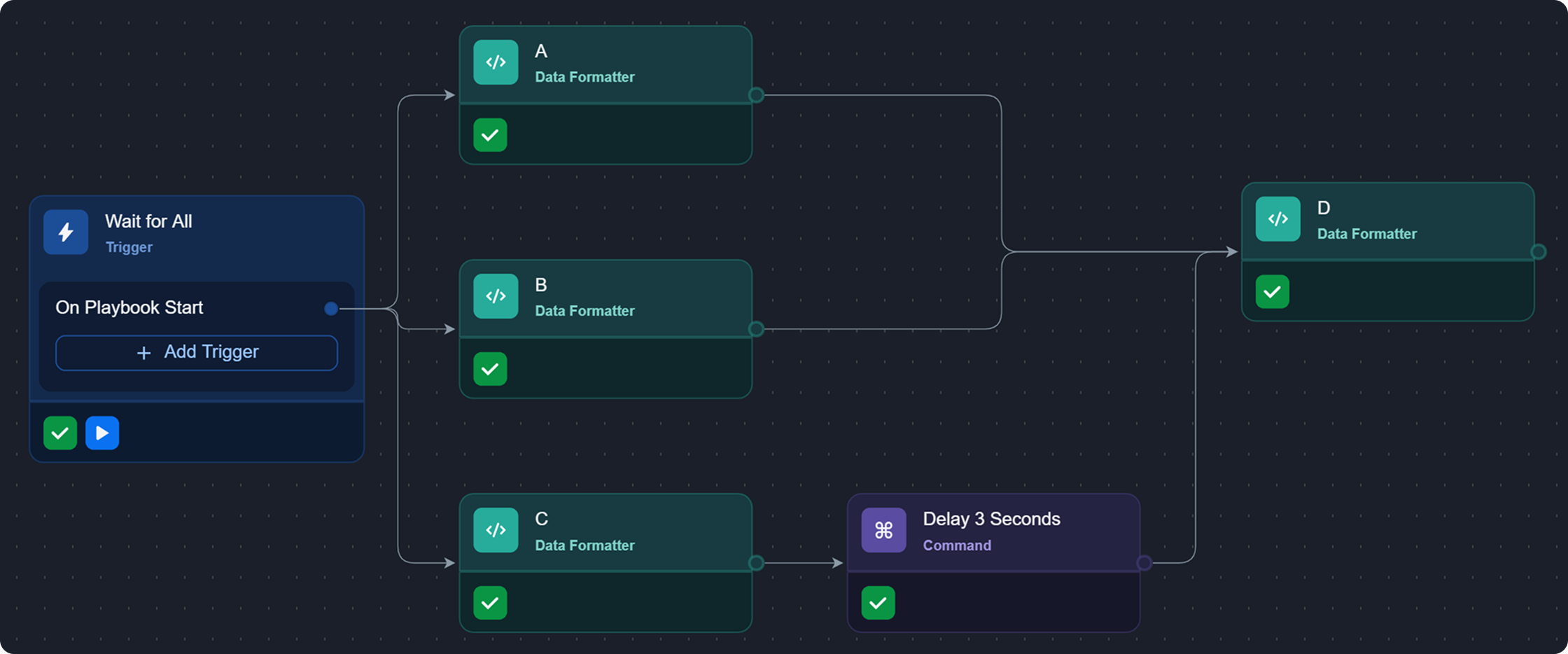
All parallel tasks have completed, allowing task D to execute and finish.